

Session Range Boxes with Asia Breakout Alert for MT4/MT5
Info
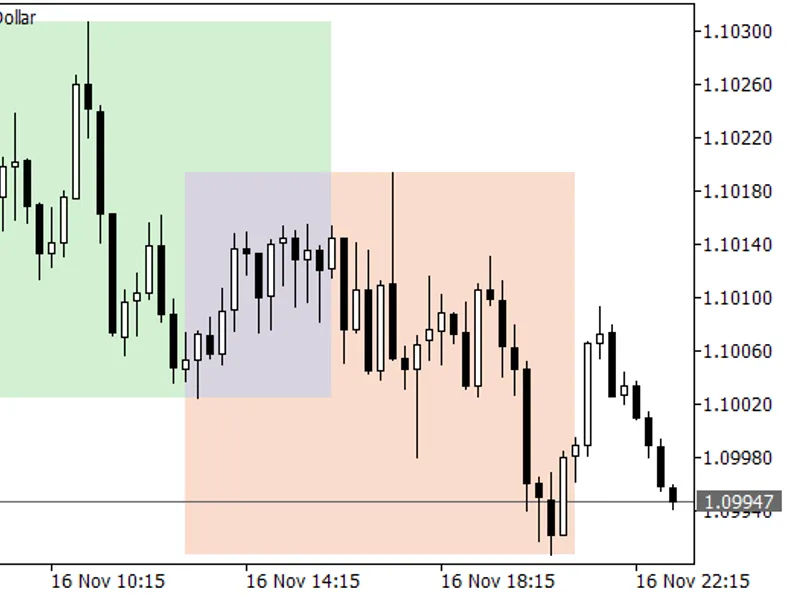
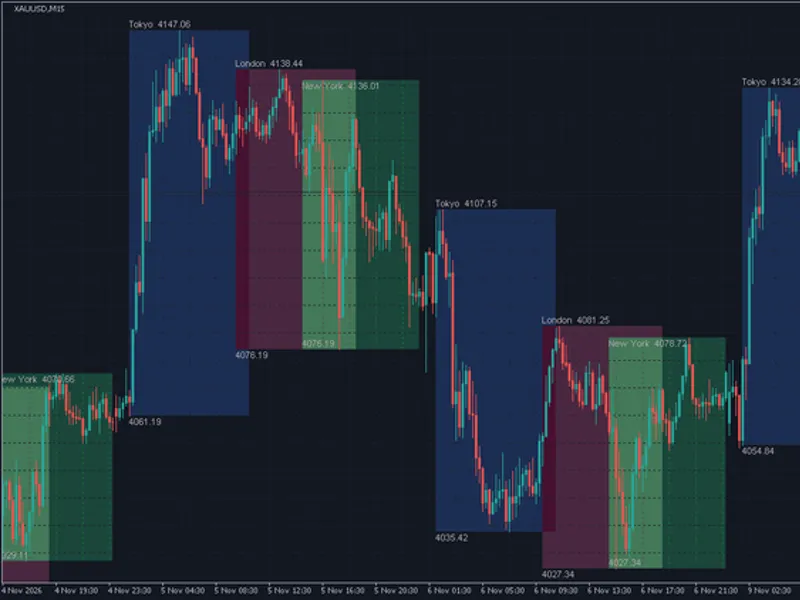
The Session Range Boxes with Asia Breakout Alert for MT4/MT5 is a Indicator for MetaTrader 5 that session range boxes displays the high and low of the three major trading sessions (asia, london, and new york) directly on your chart. These boxes visually represent each session's trading range and identify overlapping periods.
Usage
This tool is typically used for breakout trading when price moves beyond key support/resistance levels.
Platform
This Indicator works exclusively on MetaTrader 5 (both build 600+ and newer versions).
Setup
Place the downloaded file in MQL5/Indicators folder via File ? Open Data Folder in MetaTrader 5.
How to Install and Use Session Range Boxes with Asia Breakout Alert for MT4/MT5
1. Installation: Place your file in the MQL/Indicators folder via "Open Data Folder" and restart your terminal.
2. Loading: Find the indicator in the Navigator, drag it onto your chart, and configure the input parameters in the popup window.
3. Customization: Press Ctrl+I to open the indicator list, select your tool, and click "Properties" to change colors, levels, or visual styles.
4. Updating: Replace the old file in the Indicators folder with the new version and restart the platform to apply changes.
Frequently Asked Questions
Q: Why is my indicator not showing? A: Verify the file is in the MQL/Indicators folder, or try right-clicking the "Indicators" tree in the Navigator and clicking "Refresh."
Q: Do custom indicators slow down the platform? A: Too many complex indicators can impact performance; remove unused ones via the "Indicator List" (Ctrl+I).
Q: Can I use MT4 indicators on MT5? A: No, MQL4 and MQL5 are distinct languages; ensure the indicator is compiled specifically for your platform version.
What this tool does
Session Range Boxes displays the high and low of the three major trading sessions (Asia, London, and New York) directly on your chart.
Typical Use Case
This Indicator excels in automated trading and technical analysis on MetaTrader 5.
Compatible Platform & Setup
This Indicator works on MetaTrader 5. Place the file in the MQL5/Indicators folder and restart the terminal.
Description & Settings
Related: Range Filter Buy and Sell - another powerful indicator for MetaTrader 5 traders.
Session Range Boxes displays the high and low of the three major trading sessions (Asia, London, and New York) directly on your chart. These boxes visually represent each session's trading range and identify overlapping periods. Many intraday traders utilize the Asia session's range as a key reference point for breakout trading opportunities during the London and New York sessions.Also recommended: Opening Range Breakout (ORB) Box with Breakout Arrows - similar indicator with strong performance on MetaTrader 5.
Features
- Distinct colored boxes for Asia, London, and New York sessions.
- Session hours are configurable using broker server time, ensuring compatibility with all brokers.
- Supports sessions that span across midnight.
- Tooltips display session high, low, and range in points.
- Optional alerts and push notifications are triggered when the price breaks the Asia session's high or low (one alert per side, per day).
- Draws data for the last 1 to 100 days; all indicator objects are automatically removed upon deletion.
Input Parameters
- Asia / London / New York start and end hour: Define session hours (0-24) in broker server time. Default settings: Asia 0-8, London 8-16, New York 13-21.
- Number of days to draw: Specifies the number of past days to display (range 1-100, default 5).
- Show Asia / London / New York: Enable or disable the display of each session's box.
- Box colors and Fill boxes: Customize the appearance of the session boxes.
- Alert when price breaks the Asia range: Activates a pop-up alert after the Asia session has concluded.
- Also send push notification: Sends the same alert to the MetaTrader mobile application.
Recommendations for Use
This indicator is best used on H1 or lower timeframes. On higher timeframes, it will display a brief note instead of session boxes. Please verify your broker's server time zone and adjust the session hours accordingly.
Disclaimer
This is a free tool for chart analysis. It does not provide trading signals or financial advice.
You may also like: Session VWAP with Standard Deviation Bands - excellent alternative for indicator users on MetaTrader 5.
Source Code
#property copyright "RobotFX"
#property link "https://robotfx.org"
#property version     "1.01"
#property description "This code is educational. Feel free to use, modify and upgrade as you wish. Visit ROBOTFX.ORG for professional trading tools"
#property indicator_chart_window
#property indicator_buffers 0
#property indicator_plots   0
input group "Sessions (broker server time, hours 0-24)"
input int    InpAsiaStart    = 0;
input int    InpAsiaEnd      = 8;
.......
⚠ Limitations & Risk Warning
- This tool is provided for educational and testing purposes only.
- Past performance does not guarantee future results.
- Trading involves substantial risk of loss. Use on a demo account first.
- Results may vary depending on market conditions, broker, and settings.
- We recommend thorough backtesting and forward testing before using with real funds.