



Session VWAP with Standard Deviation Bands
Info
The Session VWAP with Standard Deviation Bands is a Indicator for MetaTrader 5 that session vwap with standard deviation bandsthe idea behind itvwap (volume weighted average price) is the average price of a session in which every bar counts in proportion to its traded volume. Busy bars move the average more than quiet ones, so VWAP approximates the "fair" price the market has actually transacted at since the session opened.
Usage
This tool is typically used for enhancing chart analysis and decision making.
Platform
This Indicator works exclusively on MetaTrader 5 (both build 600+ and newer versions).
Setup
Place the downloaded file in MQL5/Indicators folder via File ? Open Data Folder in MetaTrader 5.
How to Install and Use Session VWAP with Standard Deviation Bands
1. Installation: Place your file in the MQL/Indicators folder via "Open Data Folder" and restart your terminal.
2. Loading: Find the indicator in the Navigator, drag it onto your chart, and configure the input parameters in the popup window.
3. Customization: Press Ctrl+I to open the indicator list, select your tool, and click "Properties" to change colors, levels, or visual styles.
4. Updating: Replace the old file in the Indicators folder with the new version and restart the platform to apply changes.
Frequently Asked Questions
Q: Why is my indicator not showing? A: Verify the file is in the MQL/Indicators folder, or try right-clicking the "Indicators" tree in the Navigator and clicking "Refresh."
Q: Do custom indicators slow down the platform? A: Too many complex indicators can impact performance; remove unused ones via the "Indicator List" (Ctrl+I).
Q: Can I use MT4 indicators on MT5? A: No, MQL4 and MQL5 are distinct languages; ensure the indicator is compiled specifically for your platform version.
What this tool does
Session VWAP with Standard Deviation BandsThe idea behind itVWAP (Volume Weighted Average Price) is the average price of a session in which every bar counts in proportion to its traded volume.
Typical Use Case
This Indicator excels in automated trading and technical analysis on MetaTrader 5.
Compatible Platform & Setup
This Indicator works on MetaTrader 5. Place the file in the MQL5/Indicators folder and restart the terminal.
Description & Settings
Related: Session Range Boxes with Asia Breakout Alert for MT4/MT5 - another powerful indicator for MetaTrader 5 traders.
Session VWAP with Standard Deviation BandsAlso recommended: Anchored VWAP with Draggable Anchor Point (2026 Update) - similar indicator with strong performance on MetaTrader 5.
The idea behind it
VWAP (Volume Weighted Average Price) is the average price of a session in which every bar counts in proportion to its traded volume. Busy bars move the average more than quiet ones, so VWAP approximates the "fair" price the market has actually transacted at since the session opened. Institutions often use it as an execution benchmark, which is why many traders watch it as a magnet and a dynamic support/resistance level.
A single line says nothing about how far price is allowed to wander. This indicator therefore also calculates the volume-weighted standard deviation of the same price series and draws bands at a configurable number of deviations above and below VWAP. Price sitting at +2 SD is statistically stretched relative to the session so far; price returning to VWAP is a mean-reversion signal; price riding the outer band is a sign of a strong trend.
Everything is accumulated from the session open and updated incrementally with a numerically stable (Welford-type) weighted algorithm, so only the last bar is recalculated on each tick.
How to interpret it
VWAP
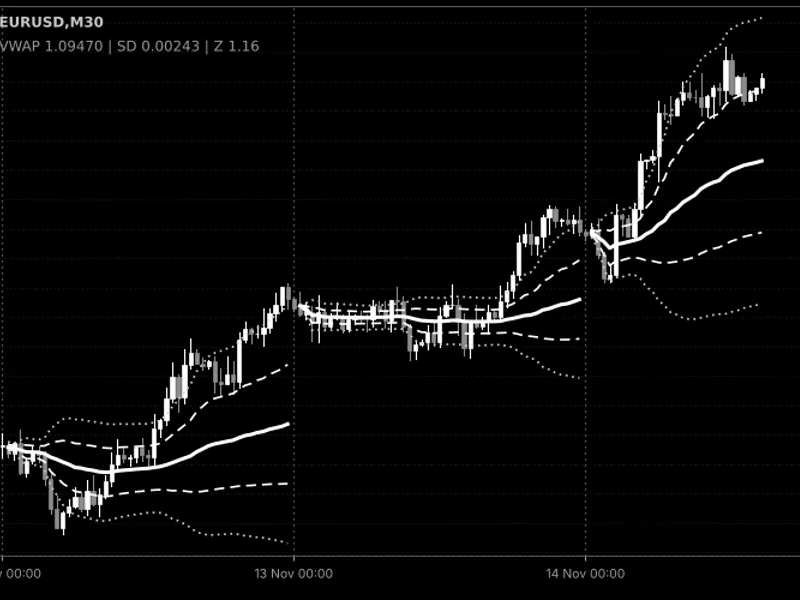
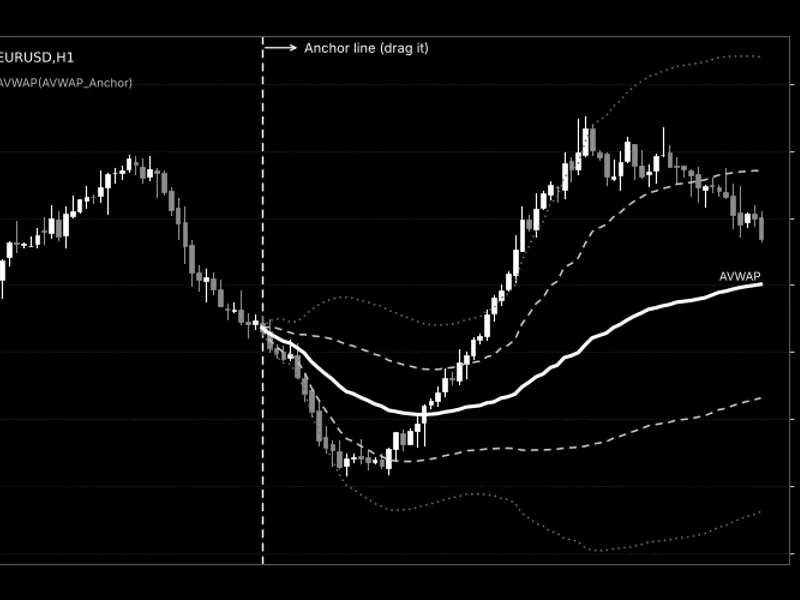
(solid, thick line) – the volume-weighted average price since the session start.
Upper / Lower band 1
(dashed lines) – VWAP ± InpMult1 standard deviations (default 1.0 SD). Price spends most of its time between these lines in a balanced session.
Upper / Lower band 2
(dotted lines) – VWAP ± InpMult2 standard deviations (default 2.0 SD). Touches of this zone are comparatively rare and mark extended moves.
Vertical dotted lines
– the start of each session, where all running sums are reset. The lines are also broken at the session open, so sessions are never joined by a false connecting segment.
Info label
(top-left corner) – current VWAP, current standard deviation and the Z-score of the last price: Z = (Price − VWAP) / SD. A Z-score of +2 means price is two deviations above VWAP.
Early in a session the bands are very narrow (the first bar has a deviation of zero) and widen as more data accumulates; this is normal behavior of a cumulative statistic.
Fig. 1. Session VWAP (solid), ±1 SD (dashed) and ±2 SD (dotted) with session separators; black & white image per Code Base image guidelines (colors are configurable in the indicator properties).
External variables (inputs)
Input
Default
Purpose
InpSession
Daily
Session reset period: Daily, Weekly (starts Monday) or Monthly.
InpStartHour
0
Hour of the session start in server time (0–23).
InpStartMinute
0
Minute of the session start (0–59).
InpPrice
PRICE_TYPICAL
Price taken from each bar: typical price (H+L+C)/3, close, median, weighted, open, high or low.
InpVolume
VOLUME_TICK
Volume used as the weight: tick volume or real volume (if the broker provides it).
InpMult1
1.0
Multiplier of the inner bands in standard deviations; must be greater than zero.
InpMult2
2.0
Multiplier of the outer bands in standard deviations; must be greater than zero.
InpHistoryBars
5000
Number of latest bars calculated on load; 0 calculates the whole history.
InpGapBetweenSessions
true
Leaves the first bar of every session empty so that lines of different sessions are not connected.
InpDrawSessionLines
true
Draws a vertical dotted line at each session start.
InpSessionLineColor
clrDimGray
Color of the session lines.
InpShowInfoLabel
true
Shows the VWAP / SD / Z-score label in the upper-left corner.
InpLabelColor
clrGray
Color of the info label.
Recommended use
Timeframes:
use a timeframe clearly smaller than the session – M1–H1 for the daily session, H1–H4 for weekly, H4–D1 for monthly. On D1 with a daily session each session is a single bar, and the indicator prints a warning to the Experts log.
Volume type:
forex and CFD symbols normally provide tick volume only, which is a reasonable proxy for activity. Real volume (InpVolume = VOLUME_REAL) is meaningful on exchange-traded instruments (futures, stocks); if the broker supplies none, bars with zero weight are skipped and the indicator shows nothing until volume appears.
Session start:
the start time is entered in server time. Adjust it to the market of interest, for example to the open of the cash session of an index. Weekly sessions begin on Monday at the chosen time.
History limit:
if the first session in the calculated range is inpHistoryBars, its VWAP is calculated only from the first loaded bar. Increase the value or set it to 0 for complete sessions on the left of the chart.
Account types:
the indicator does not trade and works identically on netting and hedging accounts.
Caveats:
the standard deviation describes the dispersion of bar prices around VWAP, not a probability of reversal. The session start is not tied to news or events, and in strong trends price can stay beyond +2 SD for a long time. Use the levels as context, together with your own entry rules and risk management.
The indicator creates chart objects (vertical lines and a label) with a unique prefix and removes only its own objects when it is deleted or reinitialized.
You may also like: Session Clock: Real-Time Trading Session Awareness - excellent alternative for indicator users on MetaTrader 5.
Source Code
#property copyright "RobotFX"
#property link "https://robotfx.org"
#property version     "1.00"
#property description "This code is educational. Feel free to use, modify and upgrade as you wish. Visit ROBOTFX.ORG for professional trading tools"
#property indicator_chart_window
#property indicator_buffers 8
#property indicator_plots   5
#property indicator_label1  "VWAP"
#property indicator_type1   DRAW_LINE
#property indicator_color1  clrDodgerBlue
.......
⚠ Limitations & Risk Warning
- This tool is provided for educational and testing purposes only.
- Past performance does not guarantee future results.
- Trading involves substantial risk of loss. Use on a demo account first.
- Results may vary depending on market conditions, broker, and settings.
- We recommend thorough backtesting and forward testing before using with real funds.