


Session Sweep Boxes MT5
Info
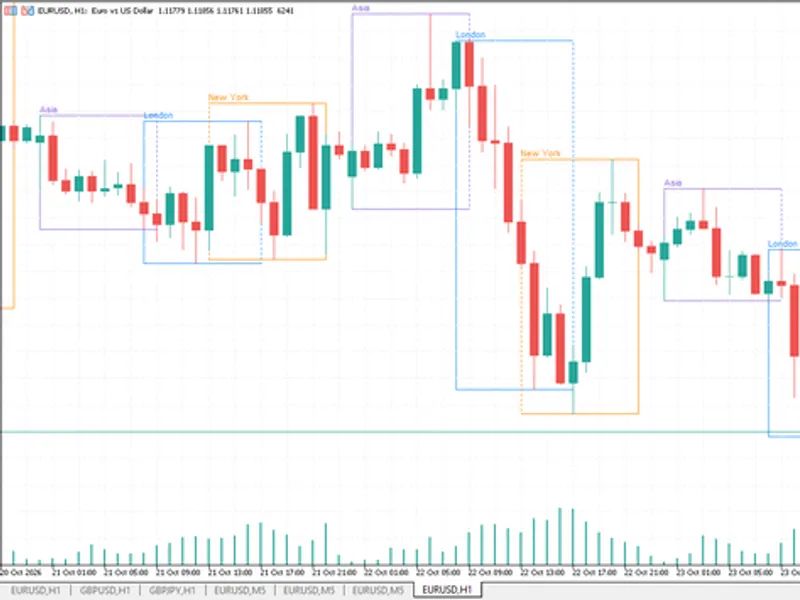
The Session Sweep Boxes MT5 is a Indicator for MetaTrader 4 that session sweep boxes draws the asian, london and new york trading sessions as range boxes on the chart and detects liquidity sweeps of those ranges. A sweep happens when price trades beyond the high or low of a completed session and then closes back inside that level.
Usage
This tool is typically used for enhancing chart analysis and decision making.
Platform
This Indicator works exclusively on MetaTrader 4 (both build 600+ and newer versions).
Setup
Place the downloaded file in MQL4/Indicators folder via File ? Open Data Folder in MetaTrader 4.
How to Install and Use Session Sweep Boxes MT5
1. Installation: Place your file in the MQL/Indicators folder via "Open Data Folder" and restart your terminal.
2. Loading: Find the indicator in the Navigator, drag it onto your chart, and configure the input parameters in the popup window.
3. Customization: Press Ctrl+I to open the indicator list, select your tool, and click "Properties" to change colors, levels, or visual styles.
4. Updating: Replace the old file in the Indicators folder with the new version and restart the platform to apply changes.
Frequently Asked Questions
Q: Why is my indicator not showing? A: Verify the file is in the MQL/Indicators folder, or try right-clicking the "Indicators" tree in the Navigator and clicking "Refresh."
Q: Do custom indicators slow down the platform? A: Too many complex indicators can impact performance; remove unused ones via the "Indicator List" (Ctrl+I).
Q: Can I use MT4 indicators on MT5? A: No, MQL4 and MQL5 are distinct languages; ensure the indicator is compiled specifically for your platform version.
What this tool does
Session Sweep Boxes draws the Asian, London and New York trading sessions as range boxes on the chart and detects liquidity sweeps of those ranges.
Typical Use Case
This Indicator excels in automated trading and technical analysis on MetaTrader 4.
Compatible Platform & Setup
This Indicator works on MetaTrader 4. Place the file in the MQL4/Indicators folder and restart the terminal.
Description & Settings
Related: UT Bot Alerts for MT4: Signal Statistics and Session Filtering - another powerful indicator for MetaTrader 4 traders.
Session Sweep Boxes draws the Asian, London and New York trading sessions as range boxes on the chart and detects liquidity sweeps of those ranges. A sweep happens when price trades beyond the high or low of a completed session and then closes back inside that level. This pattern often appears when stop orders resting above or below a session range are triggered before price reverses.Also recommended: Smart Session Breakout MT4: Asian Range Breakout with ATR Filter and Alerts - similar indicator with strong performance on MetaTrader 4.
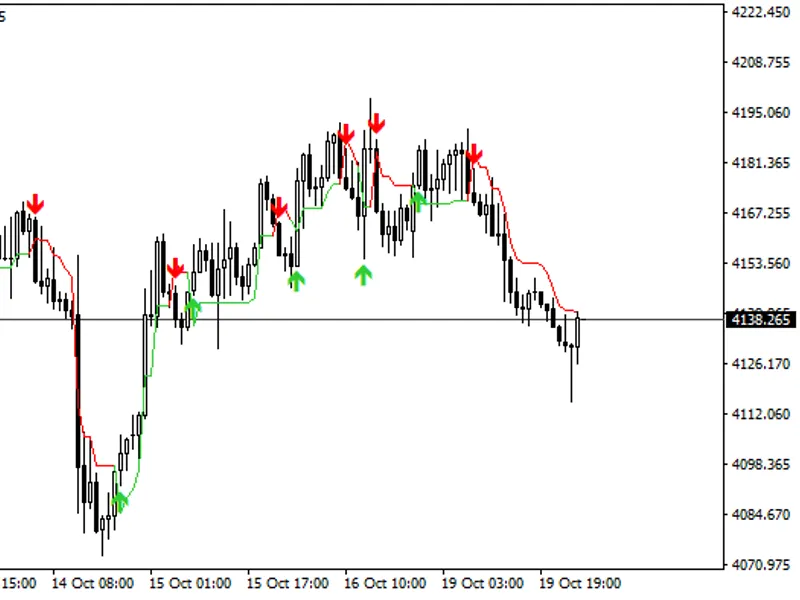
A red arrow above a bar marks a sweep of a session high, which is a bearish signal. A blue arrow below a bar marks a sweep of a session low, which is a bullish signal. Signals are confirmed only on closed bars, so they do not repaint. After a session ends, its high and low are extended as dotted lines until they are swept, broken by a close beyond them, or until the same session starts again on the next day.
Session times are entered in GMT, so the indicator works with any broker. The server GMT offset can be detected automatically or entered manually. Auto-detection needs a live connection, so in the Strategy Tester the manual offset is used. If the boxes look shifted by one hour, for example after a daylight saving time change, switch to the manual offset and enter your broker's value.
Input
Description
Server GMT offset mode
Auto-detect the broker's GMT offset, or use the manual value below.
Manual server GMT offset
Broker server offset from GMT in hours, for example 2 or 3.
Days of history to draw
How many days of past sessions are drawn on the chart.
Show / start / end / color (per session)
Enable each session, set its start and end time in GMT (HH:MM) and choose its color. Defaults: Asia 00:00-08:00, London 07:00-16:00, New York 12:00-21:00.
Fill session boxes
Draws filled boxes instead of outlines.
Show session name labels
Shows the session name above each box.
Extend completed session high/low lines
Draws dotted lines from each completed session's high and low.
Arrow distance from bar (x ATR)
Distance between the arrow and the bar, as a multiple of ATR(14). Default 0.3.
Mark only the first sweep of each level
If enabled, a level stops after its first sweep. If disabled, every sweep of the level is marked.
Cancel a level after a bar closes beyond it
A close beyond the level is treated as a breakout, and the level is no longer watched for sweeps.
Pop-up / push / sound alerts
Alerts when a sweep is confirmed on a newly closed bar.
The indicator has two buffers that Expert Advisors can read with iCustom: buffer 0 for high sweeps and buffer 1 for low sweeps. Any value other than EMPTY_VALUE means a sweep occurred on that bar. In the MT5 version the buffer value is placed slightly above or below the bar for display, so check only for a value other than EMPTY_VALUE, not for the exact price. The indicator works on H1 and lower timeframes, and M5 to M30 give the clearest picture of the session ranges.
You may also like: pivot rs session indicator - excellent alternative for indicator users on MetaTrader 4.
Source Code
#property copyright "RobotFX"
#property link "https://robotfx.org"
#property version     "1.00"
#property description "This code is educational. Feel free to use, modify and upgrade as you wish. Visit ROBOTFX.ORG for professional trading tools"
#property strict
#property indicator_chart_window
#property indicator_buffers 2
#property indicator_color1  clrRed
#property indicator_width1  2
#property indicator_color2  clrDeepSkyBlue
.......
⚠ Limitations & Risk Warning
- This tool is provided for educational and testing purposes only.
- Past performance does not guarantee future results.
- Trading involves substantial risk of loss. Use on a demo account first.
- Results may vary depending on market conditions, broker, and settings.
- We recommend thorough backtesting and forward testing before using with real funds.