

Smart Session Breakout MT4: Asian Range Breakout with ATR Filter and Alerts
Info
The Smart Session Breakout MT4: Asian Range Breakout with ATR Filter and Alerts is a Indicator for MetaTrader 4 that smart session breakout is a session-based breakout indicator for metatrader 4. It marks the Asian session range on the chart and then monitors for a confirmed breakout of that range during the London or New York trading sessions.
Usage
This tool is typically used for breakout trading when price moves beyond key support/resistance levels.
Platform
This Indicator works exclusively on MetaTrader 4 (both build 600+ and newer versions).
Setup
Place the downloaded file in MQL4/Indicators folder via File ? Open Data Folder in MetaTrader 4.
How to Install and Use Smart Session Breakout MT4: Asian Range Breakout with ATR Filter and Alerts
1. Installation: Place your file in the MQL/Indicators folder via "Open Data Folder" and restart your terminal.
2. Loading: Find the indicator in the Navigator, drag it onto your chart, and configure the input parameters in the popup window.
3. Customization: Press Ctrl+I to open the indicator list, select your tool, and click "Properties" to change colors, levels, or visual styles.
4. Updating: Replace the old file in the Indicators folder with the new version and restart the platform to apply changes.
Frequently Asked Questions
Q: Why is my indicator not showing? A: Verify the file is in the MQL/Indicators folder, or try right-clicking the "Indicators" tree in the Navigator and clicking "Refresh."
Q: Do custom indicators slow down the platform? A: Too many complex indicators can impact performance; remove unused ones via the "Indicator List" (Ctrl+I).
Q: Can I use MT4 indicators on MT5? A: No, MQL4 and MQL5 are distinct languages; ensure the indicator is compiled specifically for your platform version.
What this tool does
Smart Session Breakout is a session-based breakout indicator for MetaTrader 4.
Typical Use Case
This Indicator excels in automated trading and technical analysis on MetaTrader 4.
Compatible Platform & Setup
This Indicator works on MetaTrader 4. Place the file in the MQL4/Indicators folder and restart the terminal.
Description & Settings
Related: UT Bot Alerts for MT4: Signal Statistics and Session Filtering - another powerful indicator for MetaTrader 4 traders.
Smart Session Breakout is a session-based breakout indicator for MetaTrader 4.Also recommended: Session Sweep Boxes MT5 - similar indicator with strong performance on MetaTrader 4.
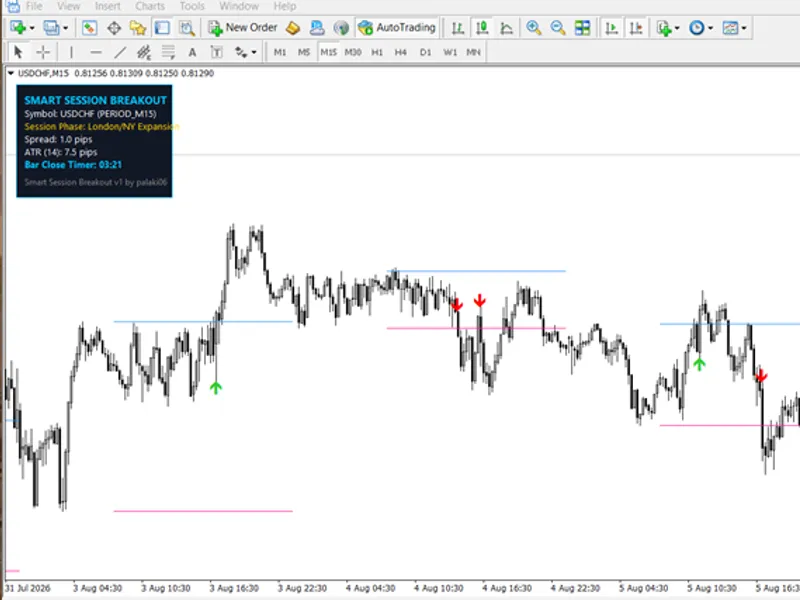
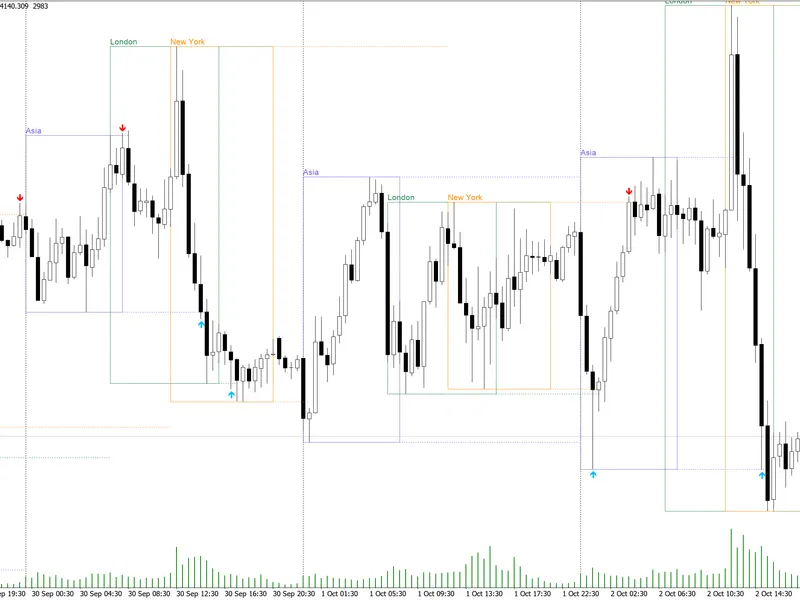
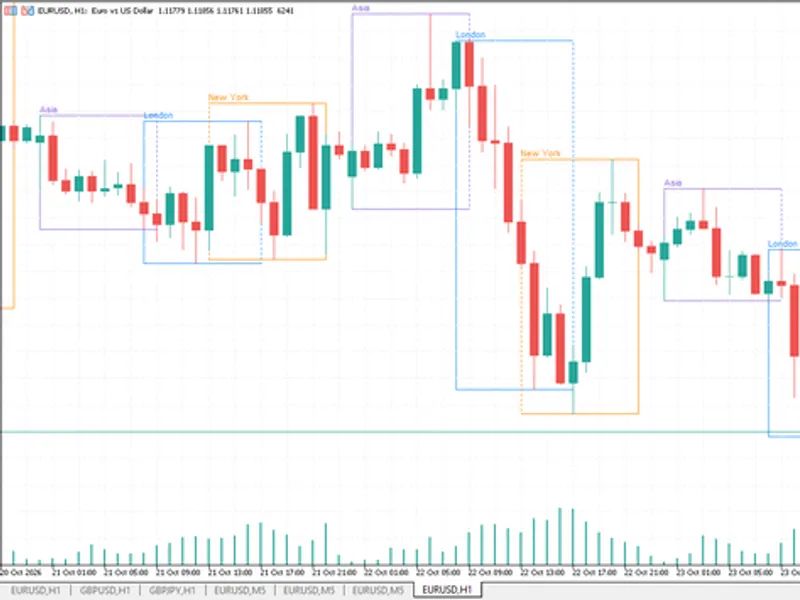
It marks the Asian session range on the chart and then monitors for a confirmed breakout of that range during the London or New York trading sessions. An on-chart dashboard provides real-time information including the current session phase, live spread, ATR in pips, and a countdown to the current bar's close.
Unlike many session breakout tools that simply confirm a signal by checking if a candle has closed beyond the range, this indicator also measures the strength of the breakout candle. The breakout candle's body must be at least a configurable multiple of ATR, distinguishing a decisive expansion candle from a marginal close just outside the level. This feature effectively filters out many weak breaks that often lead to frustration in session-based strategies.
HOW IT WORKS
1. During the Asian session (default 00:00-08:00 broker time), the indicator identifies the high and low of the period.
2. Upon the session's close, the identified range is drawn as a box with projected upper and lower levels.
3. The indicator can skip ranges that are too small or too large, using the Min/Max Range Box Height filters, thereby excluding periods of low volatility or excessive news-driven volatility.
4. During the London/New York session, a breakout signal is generated when the price closes beyond the defined range level.
5. Optional filters require the breakout candle to exhibit significant volatility expansion, using an ATR expansion filter and a minimum candle body measurement relative to ATR.
6. A buy or sell arrow is plotted on the chart, and configured alerts are triggered.
NON-REPAINTING
Signals are confirmed at the close of a bar. When the "Confirm Signal on Bar Close (Non-Repainting)" setting is enabled (true, the default), an arrow is only displayed after the breakout candle has closed. Once plotted, the arrow will not move, change, or disappear.
If this setting is disabled (false), signals may appear during the formation of a bar and could change before the bar closes. The default setting is true, which is recommended for reliable signal confirmation.
FEATURES
- Asian range box with customizable color and fill.
- Projected upper and lower breakout levels.
- Range size filters (minimum and maximum height in pips).
- ATR expansion filter.
- Minimum breakout candle body measurement as a ratio of ATR.
- Buy and sell arrows, confirmed on bar close.
- On-chart dashboard displaying symbol, timeframe, session phase, spread, ATR in pips, and bar close countdown.
- Fully configurable dashboard position and colors.
- Four alert types: pop-up, sound, email, and push notification to mobile.
- Chart history limit to maintain chart performance with older data.
INPUT PARAMETERS
Session
- Asian Session Start (Broker Time HH:MM): Defines the start time of the Asian session. Default is 00:00.
- Asian Session End (Broker Time HH:MM): Defines the end time of the Asian session. Default is 08:00.
- Max Days to Process on Chart: Sets the number of historical days to display. Default is 30.
Note: These times are based on your broker's server time. Verify your broker's Market Watch window to set these times accurately for your local Asian session.
Range filters
- Min Range Box Height (Pips): Ignores ranges smaller than this value. Default is 8.0.
- Max Range Box Height (Pips): Ignores ranges larger than this value. Default is 70.0.
Signal
- Confirm Signal on Bar Close (Non-Repainting): true = signals are confirmed at bar close and do not repaint. Default is true.
- Enable ATR Expansion Filter: Requires volatility expansion at the breakout point. Default is true.
- ATR Period: The period used for calculating the Average True Range (ATR) for filters. Default is 14.
- Min Breakout Candle Body vs ATR Ratio: The breakout candle's body must be at least this multiple of the ATR. Higher values result in fewer but stronger signals. Default is 0.8.
Visual
- Asian Box Color / Fill Asian Range Box: Customize the appearance of the Asian range box.
- Upper Line Color / Lower Line Color: Set the colors for the breakout level lines.
- Show On-Screen Dashboard Panel: Toggle the visibility of the dashboard.
- Panel Position Corner: Choose the corner for the dashboard placement.
- Dashboard Background Color / Text Color / Accent Highlight: Customize the dashboard's visual theme.
Alerts
- Enable Pop-up Alert: Activate on-screen pop-up alerts.
- Enable Sound Alert: Activate audible alerts.
- Enable Email Alert: Send alerts via email. Requires email configuration in Tools > Options > Email.
- Enable Push Alert to Mobile: Send alerts to a mobile device. Requires a MetaQuotes ID configured in Tools > Options > Notifications.
RECOMMENDED USE
- Timeframes: M5 to M30. Recommended for M15 charts.
- Symbols: Suitable for all trading symbols. Particularly effective on FX majors and crosses that exhibit a clear Asian trading range.
- Filter Adjustment: Begin with the default filter settings. Increase the "Min Breakout Candle Body vs ATR Ratio" if you require fewer, more robust signals.
NOTES
This indicator is an analytical tool, not a complete trading system. It does not execute trades and does not guarantee specific results. Thorough testing on a demo account with your broker's data is advised before using it for live trading decisions. Feedback and suggestions are welcomed.
You may also like: Smart Swing-Pivot Support and Resistance Zones for MT4 - excellent alternative for indicator users on MetaTrader 4.
Source Code
#property copyright "RobotFX"
#property link "https://robotfx.org"
#property version   "1.00"
#property strict
#property indicator_chart_window
#property indicator_buffers 4
#property indicator_color1 clrLimeGreen
#property indicator_color2 clrRed
#property indicator_color3 clrDodgerBlue
#property indicator_color4 clrDeepPink
.......
⚠ Limitations & Risk Warning
- This tool is provided for educational and testing purposes only.
- Past performance does not guarantee future results.
- Trading involves substantial risk of loss. Use on a demo account first.
- Results may vary depending on market conditions, broker, and settings.
- We recommend thorough backtesting and forward testing before using with real funds.