


Session Clock: Real-Time Trading Session Awareness
Info
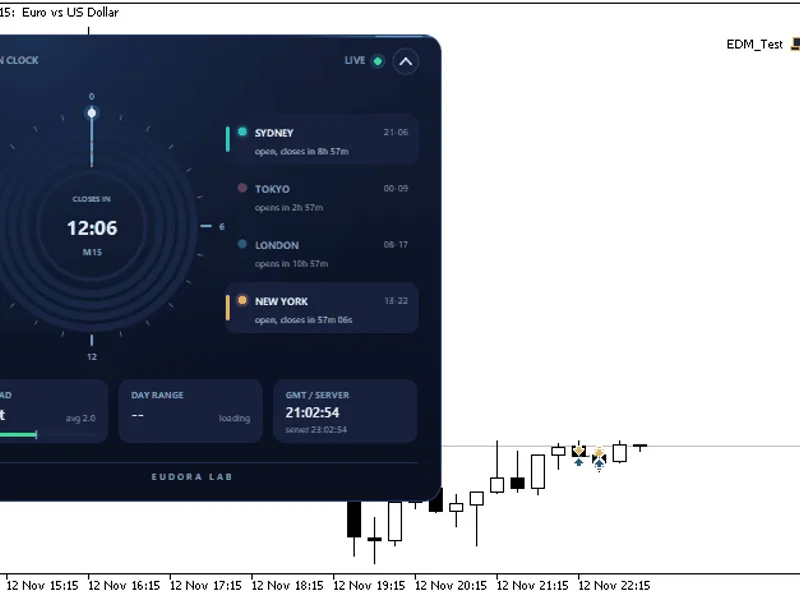
The Session Clock: Real-Time Trading Session Awareness is a Indicator for MetaTrader 5 that session clock provides immediate insights into which trading sessions are currently open, the time remaining until the next session begins, and the countdown to the close of the current chart candle. This information is presented on a 24-hour dial that dynamically updates throughout the day.
Usage
This tool is typically used for enhancing chart analysis and decision making.
Platform
This Indicator works exclusively on MetaTrader 5 (both build 600+ and newer versions).
Setup
Place the downloaded file in MQL5/Indicators folder via File ? Open Data Folder in MetaTrader 5.
How to Install and Use Session Clock: Real-Time Trading Session Awareness
1. Installation: Place your file in the MQL/Indicators folder via "Open Data Folder" and restart your terminal.
2. Loading: Find the indicator in the Navigator, drag it onto your chart, and configure the input parameters in the popup window.
3. Customization: Press Ctrl+I to open the indicator list, select your tool, and click "Properties" to change colors, levels, or visual styles.
4. Updating: Replace the old file in the Indicators folder with the new version and restart the platform to apply changes.
Frequently Asked Questions
Q: Why is my indicator not showing? A: Verify the file is in the MQL/Indicators folder, or try right-clicking the "Indicators" tree in the Navigator and clicking "Refresh."
Q: Do custom indicators slow down the platform? A: Too many complex indicators can impact performance; remove unused ones via the "Indicator List" (Ctrl+I).
Q: Can I use MT4 indicators on MT5? A: No, MQL4 and MQL5 are distinct languages; ensure the indicator is compiled specifically for your platform version.
What this tool does
Session Clock provides immediate insights into which trading sessions are currently open, the time remaining until the next session begins, and the countdown to the close of the current chart candle.
Typical Use Case
This Indicator excels in automated trading and technical analysis on MetaTrader 5.
Compatible Platform & Setup
This Indicator works on MetaTrader 5. Place the file in the MQL5/Indicators folder and restart the terminal.
Description & Settings
Related: Session Range Boxes with Asia Breakout Alert for MT4/MT5 - another powerful indicator for MetaTrader 5 traders.
Session Clock provides immediate insights into which trading sessions are currently open, the time remaining until the next session begins, and the countdown to the close of the current chart candle. This information is presented on a 24-hour dial that dynamically updates throughout the day.Also recommended: Session VWAP with Standard Deviation Bands - similar indicator with strong performance on MetaTrader 5.
The panel features a visually appealing design with antialiased shapes and smooth animations. Session arcs animate upon panel opening, the time hand moves in sync with GMT, and open sessions are highlighted. A header button allows the panel to collapse into a compact bar displaying open sessions and the candle countdown. The panel can be freely repositioned on the chart by dragging its header. The indicator is contained within a single file and utilizes only the standard Canvas library.
Panel Contents
Dial: Displays 24 hours in GMT, with midnight at the top, proceeding clockwise. Each session (Sydney, Tokyo, London, New York) is represented by an arc. Open sessions are brightly lit with a soft glow, while closed sessions appear dimmer. A hand indicates the current GMT time.
Candle Countdown: Located centrally, this shows the remaining time until the current chart timeframe candle closes. A ring visually represents the progression of the candle. When the market is closed, it displays the time until the next trading session for the selected symbol.
Legend: Each session is listed with its operating hours and status, such as "open, closes in 2h 14m" or "opens in 5h 02m".
Spread: Displays the current spread in points, compared to the average spread recorded since the indicator was initialized.
Day Range: Shows today's high-low range as a percentage of the average daily range over the past 14 trading days.
GMT / Server Time: Both GMT and the broker's server time are displayed.
Daylight Saving Time Handling
The session hours automatically adjust for daylight saving time. London and New York hours follow their respective regional daylight saving rules (European and United States rules), while Sydney follows Australian rules. These adjustments are applied on their specific dates, ensuring accurate display during periods of divergence in March, October, and November. Tokyo operates on a fixed schedule and does not observe daylight saving time. The logic has been verified against official time zone data for the period of 2026 to 2030.
Indicator Inputs
Panel Position (Distance from Edges): Specifies the initial placement of the panel from the left and top edges of the chart in pixels. The panel retains its last dragged position across different charts.
Panel Size (Percent): Scales the entire panel relative to the chart size. This setting also adapts to the screen's DPI.
Accent Color: Sets the highlight color used for active sessions and elements within the panel.
Start Collapsed: When enabled, the panel initially appears as a collapsed bar.
Session Opening Hours (GMT): Input fields to set the opening hours (in GMT) for Sydney, Tokyo, London, and New York during the northern winter. Each session is set to last nine hours (e.g., Sydney opens at 21:00 GMT).
Automatic Daylight Saving Adjustment: This option is enabled by default. Disabling it will use the entered session hours precisely as specified, without applying daylight saving time adjustments.
The Session Clock indicator is compatible with any trading symbol and timeframe. Only one instance of the indicator should be used per chart.
You may also like: Trading Session Range Boxes for MT4/MT5 - excellent alternative for indicator users on MetaTrader 5.
Source Code
#property copyright "RobotFX"
#property link "https://robotfx.org"
#property version   "1.00"
#property description "This code is educational. Feel free to use, modify and upgrade as you wish. Visit ROBOTFX.ORG for professional trading tools"
#property indicator_chart_window
#property indicator_plots 0
#include <Canvas\Canvas.mqh>
input group "Panel"
input int    InpX          = 12;
input int    InpY          = 24;
.......
⚠ Limitations & Risk Warning
- This tool is provided for educational and testing purposes only.
- Past performance does not guarantee future results.
- Trading involves substantial risk of loss. Use on a demo account first.
- Results may vary depending on market conditions, broker, and settings.
- We recommend thorough backtesting and forward testing before using with real funds.