

Trading Session Boxes: Tokyo, London, New York MT4/MT5
Info
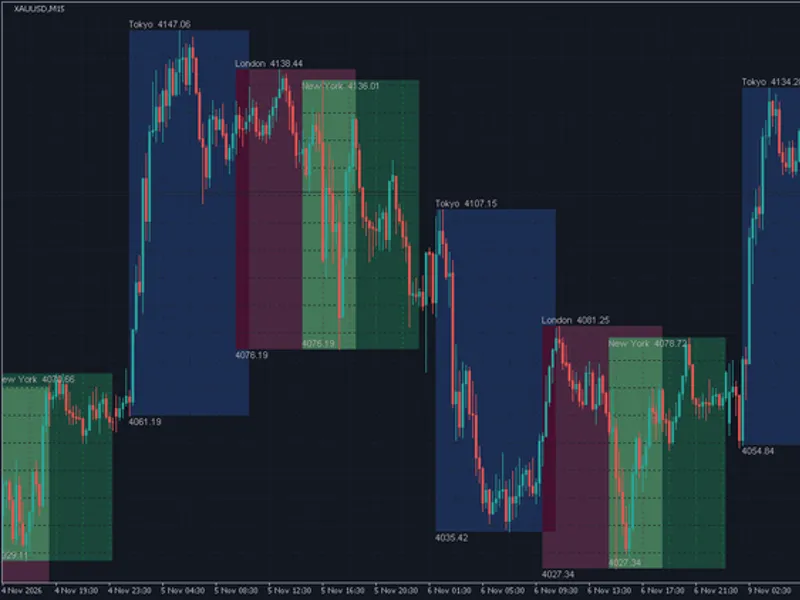
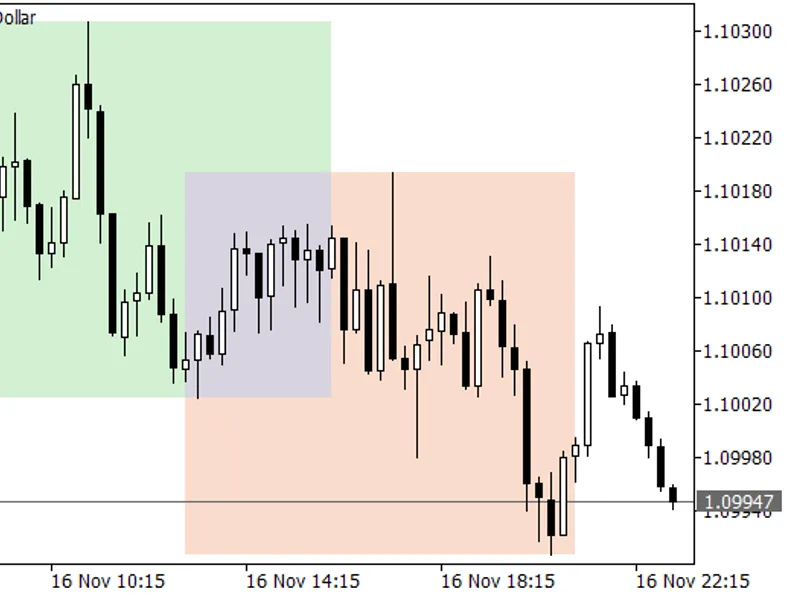
The Trading Session Boxes: Tokyo, London, New York MT4/MT5 is a Indicator for MetaTrader 4 that each session is represented as a rectangle extending from its start to end time, encompassing the highest high and lowest low traded within that period. Optional labels display the session name, with its high positioned above the box and its low below.
Usage
This tool is typically used for enhancing chart analysis and decision making.
Platform
This Indicator works exclusively on MetaTrader 4 (both build 600+ and newer versions).
Setup
Place the downloaded file in MQL4/Indicators folder via File ? Open Data Folder in MetaTrader 4.
How to Install and Use Trading Session Boxes: Tokyo, London, New York MT4/MT5
1. Installation: Place your file in the MQL/Indicators folder via "Open Data Folder" and restart your terminal.
2. Loading: Find the indicator in the Navigator, drag it onto your chart, and configure the input parameters in the popup window.
3. Customization: Press Ctrl+I to open the indicator list, select your tool, and click "Properties" to change colors, levels, or visual styles.
4. Updating: Replace the old file in the Indicators folder with the new version and restart the platform to apply changes.
Frequently Asked Questions
Q: Why is my indicator not showing? A: Verify the file is in the MQL/Indicators folder, or try right-clicking the "Indicators" tree in the Navigator and clicking "Refresh."
Q: Do custom indicators slow down the platform? A: Too many complex indicators can impact performance; remove unused ones via the "Indicator List" (Ctrl+I).
Q: Can I use MT4 indicators on MT5? A: No, MQL4 and MQL5 are distinct languages; ensure the indicator is compiled specifically for your platform version.
What this tool does
Each session is represented as a rectangle extending from its start to end time, encompassing the highest high and lowest low traded within that period.
Typical Use Case
This Indicator excels in automated trading and technical analysis on MetaTrader 4.
Compatible Platform & Setup
This Indicator works on MetaTrader 4. Place the file in the MQL4/Indicators folder and restart the terminal.
Description & Settings
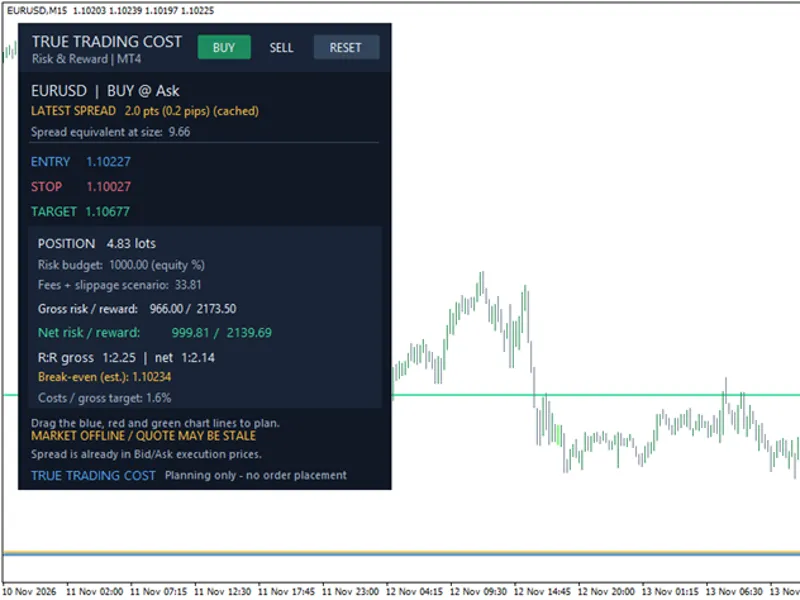
Related: True Trading Cost - Net Risk Reward Calculator for MT4 - another powerful indicator for MetaTrader 4 traders.
Each session is represented as a rectangle extending from its start to end time, encompassing the highest high and lowest low traded within that period.Also recommended: UT Bot Alerts for MT4: Signal Statistics and Session Filtering - similar indicator with strong performance on MetaTrader 4.
Optional labels display the session name, with its high positioned above the box and its low below. For the New York session, labels are placed inside its box due to potential overlaps with the London session, often sharing similar highs or lows.
The box for a session currently in progress dynamically expands as new highs or lows are recorded.
Session Display
Session hours are set using whole hours based on broker server time, not local time or GMT. The default settings are generally suitable for brokers using GMT+2 / GMT+3 server time that observe US daylight saving, a common practice.
Session
Server hours
GMT in northern winter
Tokyo
02 to 11
00 to 09
London
10 to 19
08 to 17
New York
15 to 24
13 to 22
To adjust for a different broker, consult the server time displayed in Market Watch and modify the session hours accordingly. A session can extend past midnight; to achieve this, set an end hour that is numerically lower than the start hour (e.g., 22 to 7).
Notes
- Boxes are drawn on M1 to H1 timeframes. On H4 and higher timeframes, session alignment with bars may not be accurate, and thus, no boxes will be drawn.
- Trading days without bars, such as weekends or holidays, are skipped and do not affect the 'Days to show' count.
- Boxes are rendered using only bars that have already occurred, ensuring that historical boxes remain unchanged. All indicator objects are removed when the indicator is detached from the chart.
- In MT4, a filled box is drawn behind the candles. If 'Fill boxes' is set to false, only an outline is displayed.
Inputs
Input
Default
Description
Days to show
5
Specifies the number of recent trading days for which session boxes will be drawn.
Tokyo start hour / end hour
2 / 11
Set the start and end hours for the Tokyo session in server time (0-24).
London start hour / end hour
10 / 19
Set the start and end hours for the London session in server time (0-24).
New York start hour / end hour
15 / 24
Set the start and end hours for the New York session in server time (0-24).
Tokyo, London, New York colour
dark blue, dark purple, dark green
Determines the color of the session boxes.
Fill boxes
true
Choose between filled boxes or outlines for session representation.
Show labels
true
Enables or disables the display of session names, highs, and lows on the chart.
Label colour
Dark gray
Sets the color for the session labels.
Label font size
8
Adjusts the font size of the session labels.
- The MT4 version includes a 'Note' input at the top as a reminder that the hours are displayed in server time. This indicator is compatible with MT4 and MT5 platforms, updated for 2026.
You may also like: Adaptive Market Structure Trading System - excellent alternative for indicator users on MetaTrader 4.
Source Code
#property copyright "RobotFX"
#property link "https://robotfx.org"
#property version     "1.00"
#property description "This code is educational. Feel free to use, modify and upgrade as you wish. Visit ROBOTFX.ORG for professional trading tools"
#property strict
#property indicator_chart_window
input int   Days         = 5;
input string HoursNote    = "Hours are broker server time, 0-24";
input int   TokyoStart   = 2;
input int   TokyoEnd     = 11;
.......
⚠ Limitations & Risk Warning
- This tool is provided for educational and testing purposes only.
- Past performance does not guarantee future results.
- Trading involves substantial risk of loss. Use on a demo account first.
- Results may vary depending on market conditions, broker, and settings.
- We recommend thorough backtesting and forward testing before using with real funds.