


EMA Cross EA with ATR Stops for MetaTrader 5
Info
The EMA Cross EA with ATR Stops for MetaTrader 5 is a Expert Advisor for MetaTrader 5 that ema cross demo ea (metatrader 5)a clear, well-structured demo expert advisor demonstrating a reliable ea development method. It is not intended to provide a trading edge.
Usage
This tool is typically used for automated trading on major forex pairs and gold.
Platform
This Expert Advisor works exclusively on MetaTrader 5 (both build 600+ and newer versions).
Setup
Place the downloaded file in MQL5/Experts folder via File ? Open Data Folder in MetaTrader 5.
How to Install and Use EMA Cross EA with ATR Stops for MetaTrader 5
1. Installation: Open the "File" menu, select "Open Data Folder," navigate to MQL/Experts, paste your file, and restart the terminal.
2. Activation: Drag the EA from the Navigator onto a chart, ensure "Allow live trading" is checked in the Common tab, and verify the AutoTrading button is green.
3. Optimization: Right-click your chart, choose "Expert List," click "Properties" to adjust inputs, and save your preferred setup as a set file for future use.
4. Maintenance: Regularly check the "Experts" tab in the terminal window to monitor trade logs and potential execution errors.
Frequently Asked Questions
Q: Why is my EA not opening trades? A: Check the "AutoTrading" button, ensure "Allow live trading" is enabled, and verify your broker allows automated trading on your account type.
Q: Can I run multiple EAs on one chart? A: No, each chart can only host one active EA; however, you can open multiple charts for different currency pairs to run several EAs.
Q: What does the "smiley face" icon mean? A: A smiley face in the top-right corner of the chart indicates the EA is successfully running; a frowny face means it is disabled.
What this tool does
EMA Cross Demo EA (MetaTrader 5)A clear, well-structured demo Expert Advisor demonstrating a reliable EA development method.
Typical Use Case
This Expert Advisor excels in automated trading and technical analysis on MetaTrader 5.
Compatible Platform & Setup
This Expert Advisor works on MetaTrader 5. Place the file in the MQL5/Experts folder and restart the terminal.
Description & Settings
Related: Supertrend Scalper with Breakeven Win Rate Panel - another powerful expert for MetaTrader 5 traders.
EMA Cross Demo EA (MetaTrader 5)Also recommended: Data Snooping: Robustness Testing with SPA, Reality Check, StepM, and Model Confidence Set - similar expert with strong performance on MetaTrader 5.
A clear, well-structured demo Expert Advisor demonstrating a reliable EA development method. It is not intended to provide a trading edge.
Trading Logic (evaluated once per new bar, on CLOSED bars only - no repainting):
- BUY signal: fast EMA crosses above slow EMA
- SELL signal: fast EMA crosses below slow EMA
- On an opposite signal, the open position is closed, and a new one is opened on the next tick of the new bar.
Risk Management:
- Stop-loss = entry minus/plus ATR x InpSLATRMult
- Take-profit = stop distance x InpRewardRisk
- Stop/TP levels are adjusted to the broker's minimum stop distance where necessary.
- Lot size is normalized to the symbol's volume step, minimum, and maximum allowed sizes.
- Entries are skipped if the spread is wider than InpMaxSpreadPoints.
This EA functions on both hedging and netting accounts. Position identification is performed using magic number and symbol, not by netted position type.
Configurable Inputs: fast/slow EMA period, ATR period, SL ATR multiplier, reward:risk ratio, lot size, maximum spread in points, magic number, slippage in points.
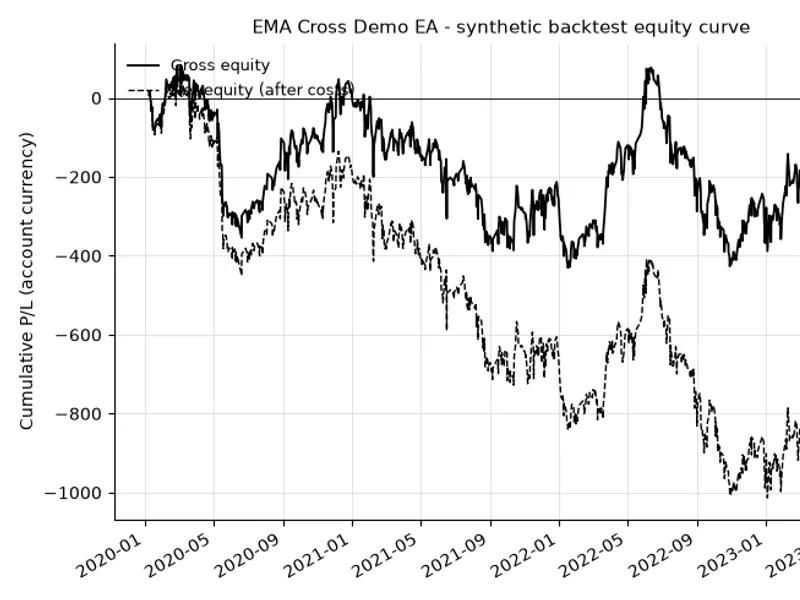
This is a functional example designed to illustrate EA structure and development techniques, including closed-bar signals, a spread filter, lot normalization, and hedging/netting-compatible position handling. It is not a trading recommendation. The attached equity chart is derived from a synthetic price series used solely to test the code; while gross P/L is positive, net P/L after commissions is negative on this synthetic run, demonstrating the backtesting approach rather than a profitable strategy.
A Python reference implementation of the equivalent signal and backtest logic (for parity testing) is available upon request.
Update (2026): Resolved an issue where the ATR-based Stop-Loss/Take-Profit could fall within the broker's minimum stop distance on fast timeframes, leading to order rejections. The distance is now floored at the stops/freeze level and checked against the correct closing-side price (Bid for a BUY, Ask for a SELL) instead of the entry price.
Update 2 (2026): The EA now verifies available margin using OrderCalcMargin() before sending an order. Orders that cannot be afforded are skipped (with a corresponding log entry), preventing broker-level "not enough money" rejections on very small test account balances.
You may also like: Regime HMM: Identifying Market Regimes with Hidden Markov Models - excellent alternative for expert users on MetaTrader 5.
Source Code
#property copyright "RobotFX"
#property version   "1.00"
#property strict
#include <Trade\Trade.mqh>
input group "Signal"
input int    InpFastEMA        = 12;
input int    InpSlowEMA        = 26;
input group "Risk"
input int    InpATRPeriod      = 14;
input double InpSLATRMult      = 2.0;
.......
⚠ Limitations & Risk Warning
- This tool is provided for educational and testing purposes only.
- Past performance does not guarantee future results.
- Trading involves substantial risk of loss. Use on a demo account first.
- Results may vary depending on market conditions, broker, and settings.
- We recommend thorough backtesting and forward testing before using with real funds.