



APB Channel EA: Heikin-Ashi Reversals with Keltner Channel Confirmation and Swing Structure Stops
Info
The APB Channel EA: Heikin-Ashi Reversals with Keltner Channel Confirmation and Swing Structure Stops is a Expert Advisor for MetaTrader 4 that apb channel ea. Heikin-Ashi Reversal with Keltner Channel Trigger (XAUUSD / XAGUSD)How it WorksThe Expert Advisor (EA) executes its full logic on each closed bar in five stages.
Usage
This tool is typically used for automated trading on major forex pairs and gold.
Platform
This Expert Advisor works exclusively on MetaTrader 4 (both build 600+ and newer versions).
Setup
Place the downloaded file in MQL4/Experts folder via File ? Open Data Folder in MetaTrader 4.
How to Install and Use APB Channel EA: Heikin-Ashi Reversals with Keltner Channel Confirmation and Swing Structure Stops
1. Installation: Open the "File" menu, select "Open Data Folder," navigate to MQL/Experts, paste your file, and restart the terminal.
2. Activation: Drag the EA from the Navigator onto a chart, ensure "Allow live trading" is checked in the Common tab, and verify the AutoTrading button is green.
3. Optimization: Right-click your chart, choose "Expert List," click "Properties" to adjust inputs, and save your preferred setup as a set file for future use.
4. Maintenance: Regularly check the "Experts" tab in the terminal window to monitor trade logs and potential execution errors.
Frequently Asked Questions
Q: Why is my EA not opening trades? A: Check the "AutoTrading" button, ensure "Allow live trading" is enabled, and verify your broker allows automated trading on your account type.
Q: Can I run multiple EAs on one chart? A: No, each chart can only host one active EA; however, you can open multiple charts for different currency pairs to run several EAs.
Q: What does the "smiley face" icon mean? A: A smiley face in the top-right corner of the chart indicates the EA is successfully running; a frowny face means it is disabled.
What this tool does
APB Channel EA.
Typical Use Case
This Expert Advisor excels in automated trading and technical analysis on MetaTrader 4.
Compatible Platform & Setup
This Expert Advisor works on MetaTrader 4. Place the file in the MQL4/Experts folder and restart the terminal.
Description & Settings
Related: tc trade channel: a channel-based trading strategy - another powerful expert for MetaTrader 4 traders.
APB Channel EA. Heikin-Ashi Reversal with Keltner Channel Trigger (XAUUSD / XAGUSD)Also recommended: moving average and commodity channel index (ma2 cc i) - similar expert with strong performance on MetaTrader 4.
How it Works
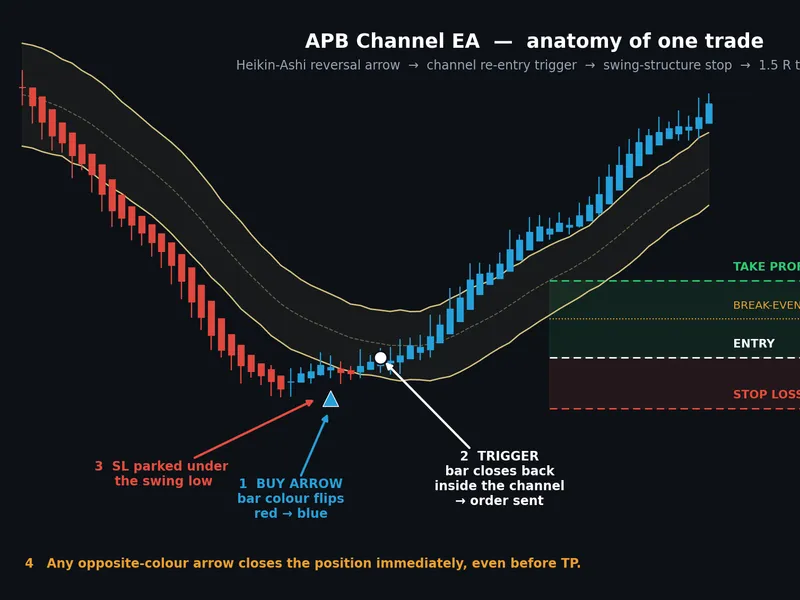
The Expert Advisor (EA) executes its full logic on each closed bar in five stages.
1. Signal - The Colour Flip
Heikin-Ashi bars are recalculated for each new bar. When a bar's colour changes compared to the previous bar (bearish to bullish, or bullish to bearish), the EA registers a directional arrow and prepares a pending signal. Heikin-Ashi averaging smooths out noise that causes raw candles to flip frequently in choppy markets, resulting in fewer false reversal signals.
2. Trigger - Channel Re-entry
An arrow alone does not initiate a trade. The EA then waits for the price to close back inside or through a Keltner-style channel (EMA ± ATR × multiplier) in the direction of the arrow.
Buy:
A bar must close at or above the lower band.
Sell:
A bar must close at or below the upper band.
This is the primary filter of the system. It prevents the EA from buying into a sharp decline the moment a single bar changes colour, instead waiting for price to confirm a return into the value area. If the trigger does not occur within MaxBarsToTrigger bars, the pending signal expires and is discarded (set to 0 to wait indefinitely).
3. Filters
Before any order is placed, three independent filters must all be satisfied:
Time Window
- Trades only occur between TradeStartHour and TradeEndHour (server time; correctly handles time windows that cross midnight). An optional Friday cut-off hour is included to avoid the thin trading at the weekend close.
Liquidity
- The tick volume of the signal bar must be at least MinVolumeRatio multiplied by the recent average volume. This keeps the EA out of inactive sessions with wide spreads.
Large Candle / Volatility
- If the Average True Range (ATR) exceeds MaxATRPips, entries are skipped. This blocks entries during significant news events when stops are unreliable and spreads widen.
4. Order Placement
Lot size is calculated based on the distance between the entry price and the stop loss. This ensures the monetary risk remains constant regardless of the stop loss distance. The take profit is set at RR_Ratio multiplied by the risk distance (default is 1.5). The EA validates the stop distance against the broker's StopLevel before sending the order, providing a clear log message instead of a silent error 130.
5. Trade Management
Stop Loss
is placed beyond the lowest low (for buys) or highest high (for sells) of the last SwingLookbackBars closed bars, plus a configurable buffer. This serves as a true structural invalidation point rather than an arbitrary fixed distance.
Break-Even
moves the stop loss to the entry price plus a small lock-in buffer once the price has covered BreakEvenTriggerPct of the distance to the take profit.
Exit
occurs at the 1.5R take profit, at the stop loss, or immediately upon detecting an opposite-direction arrow signal, whichever happens first. The opposite-signal exit does not wait for that new signal's own channel trigger; it closes as soon as the reversal is detected.
Only one position is held at a time per symbol and magic number.
Inputs
Signal and Channel
Input
Default
Meaning
HeikinAshiBars
60
Lookback period for Heikin-Ashi recalculation on each new bar.
Channel_MA_Period
20
Period for the Exponential Moving Average (EMA) used for the channel midline.
Channel_ATR_Period
20
Period for the Average True Range (ATR) used for channel width calculation.
Channel_Multiplier
1.5
Multiplier for ATR to determine band distance (Band distance = ATR × this value).
MaxBarsToTrigger
15
Maximum number of bars to wait for the trigger condition; 0 means wait indefinitely.
Risk and Targets
Input
Default
Meaning
RiskMode
RISK_PERCENT
Defines risk as a percentage of balance or a fixed cash amount.
RiskValue
1.0
The percentage or currency amount to risk, based on RiskMode.
RR_Ratio
1.5
Take profit target as a multiple of the risk amount.
UseInitialStopLoss
true
Enables sending a hard stop loss to the broker.
SLMethod
SL_SWING_STRUCTURE
Method for setting stop loss: Swing-based or ATR-based.
SwingLookbackBars
10
Number of bars to scan for swing low/high points when using SL_SWING_STRUCTURE.
SL_BufferPips
20
Additional buffer in pips beyond the swing point for the stop loss.
FixedLots
0.01
Fallback lot size if the risk calculation fails.
Break-even
Input
Default
Meaning
UseBreakEven
true
Enables break-even stop loss management.
BreakEvenTriggerPct
50
Percentage of the take profit distance that must be covered before the stop loss moves to break-even.
BreakEvenLockPips
2
Number of pips to lock in beyond the entry price when break-even is activated.
Filters and General Settings
Input
Default
Meaning
UseTimeFilter / TradeStartHour / TradeEndHour
true / 7 / 21
Enables time filtering and sets the trading session window in server time.
AvoidFridayLateSession / FridayCutoffHour
true / 20
Enables avoiding late Friday trading and sets the cut-off hour.
UseLiquidityFilter / MinVolumeRatio
true / 0.5
Enables liquidity filtering and sets the minimum tick volume ratio compared to the average.
UseLargeCandleFilter / MaxATRPips
true / 100
Enables filtering of large candles/volatility and sets the maximum ATR in pips.
CloseOnOppositeSignal
true
Enables closing the trade upon receiving an opposite signal.
PointsPerPip
10
Defines the number of points per pip. Use 10 for 3/5-digit quotes (e.g., 3450.500) and 1 for 2/4-digit quotes (e.g., 3450.50).
DebugLog
true
Enables detailed diagnostic logging to the Journal.
Setup Notes
Ensure PointsPerPip is set correctly for your broker before any other configuration. This setting impacts all pip-based inputs like stop buffer, break-even lock, and ATR filter. Incorrect settings can lead to stop losses that are ten times too wide or too narrow.
TradeStartHour and TradeEndHour are based on broker server time. Verify your broker's server time offset before setting the trading session window.
With DebugLog enabled, the Journal will provide detailed explanations for each bar's trading decisions: signal detection, trigger evaluation, which filter prevented an entry, and the outcome of every OrderSend attempt. Disable this for extended optimization runs.
Tuning Suggestions
SwingLookbackBars should generally align with your typical swing size on the trading timeframe. For shallower pullbacks, use 5–7 bars; for wider structures, use 12–15 bars. A lookback period that is too long can result in distant stop losses and smaller position sizes.
Channel_Multiplier determines the depth of retracement required before an entry is considered. Higher values lead to fewer but more selective entries.
If you are observing very few trades, consider adjusting MaxBarsToTrigger first, as signals might be expiring before price re-enters the channel.
Notes and Limitations
This EA is provided as a functional, readable starting point, not a finished commercial product. It does not come with optimized parameters; the default values are sensible starting points, not results of rigorous testing.
Thoroughly test the EA in the Strategy Tester using your broker's data, and then conduct forward testing on a demo account before risking real capital. Performance can vary significantly between brokers due to differences in spreads, swaps, quote precision, and server times. Reversal systems of this nature tend to underperform during strong, sustained trends, as colour flips can generate repeated counter-trend entries. The channel trigger mitigates this but does not eliminate it.
Feedback and suggestions for improvement are welcomed.
You may also like: donchain counter-channel system - excellent alternative for expert users on MetaTrader 4.
Source Code
#property strict
#property copyright "RobotFX"
#property version   "2.00"
#property description "This code is educational. Feel free to use, modify and upgrade as you wish. Visit ROBOTFX.ORG for professional trading tools"
input int    HeikinAshiBars      = 60;
input int    Channel_MA_Period   = 20;
input int    Channel_ATR_Period  = 20;
input double Channel_Multiplier  = 1.5;
input int    MaxBarsToTrigger    = 15;
enum ENUM_RISK_MODE { RISK_PERCENT, RISK_FIXED_MONEY };
.......
⚠ Limitations & Risk Warning
- This tool is provided for educational and testing purposes only.
- Past performance does not guarantee future results.
- Trading involves substantial risk of loss. Use on a demo account first.
- Results may vary depending on market conditions, broker, and settings.
- We recommend thorough backtesting and forward testing before using with real funds.