




Support and Resistance Channels Ranked by Strength
Info
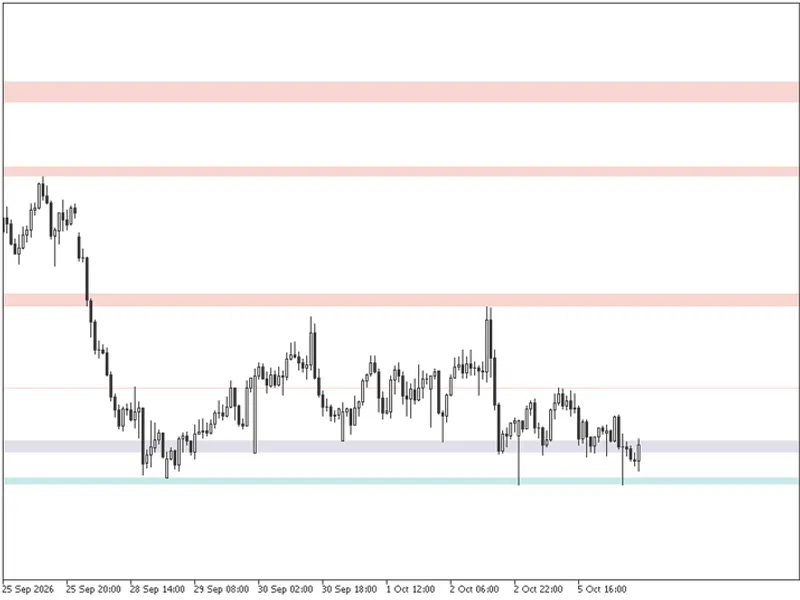
The Support and Resistance Channels Ranked by Strength is a Indicator for MetaTrader 5 that a line drawn at an old high is a guess. A price band where several tops and bottoms cluster, and where price kept coming back bar after bar, carries real weight, and this indicator measures that weight.
Usage
This tool is typically used for enhancing chart analysis and decision making.
Platform
This Indicator works exclusively on MetaTrader 5 (both build 600+ and newer versions).
Setup
Place the downloaded file in MQL5/Indicators folder via File ? Open Data Folder in MetaTrader 5.
How to Install and Use Support and Resistance Channels Ranked by Strength
1. Installation: Place your file in the MQL/Indicators folder via "Open Data Folder" and restart your terminal.
2. Loading: Find the indicator in the Navigator, drag it onto your chart, and configure the input parameters in the popup window.
3. Customization: Press Ctrl+I to open the indicator list, select your tool, and click "Properties" to change colors, levels, or visual styles.
4. Updating: Replace the old file in the Indicators folder with the new version and restart the platform to apply changes.
Frequently Asked Questions
Q: Why is my indicator not showing? A: Verify the file is in the MQL/Indicators folder, or try right-clicking the "Indicators" tree in the Navigator and clicking "Refresh."
Q: Do custom indicators slow down the platform? A: Too many complex indicators can impact performance; remove unused ones via the "Indicator List" (Ctrl+I).
Q: Can I use MT4 indicators on MT5? A: No, MQL4 and MQL5 are distinct languages; ensure the indicator is compiled specifically for your platform version.
What this tool does
A line drawn at an old high is a guess.
Typical Use Case
This Indicator excels in automated trading and technical analysis on MetaTrader 5.
Compatible Platform & Setup
This Indicator works on MetaTrader 5. Place the file in the MQL5/Indicators folder and restart the terminal.
Description & Settings
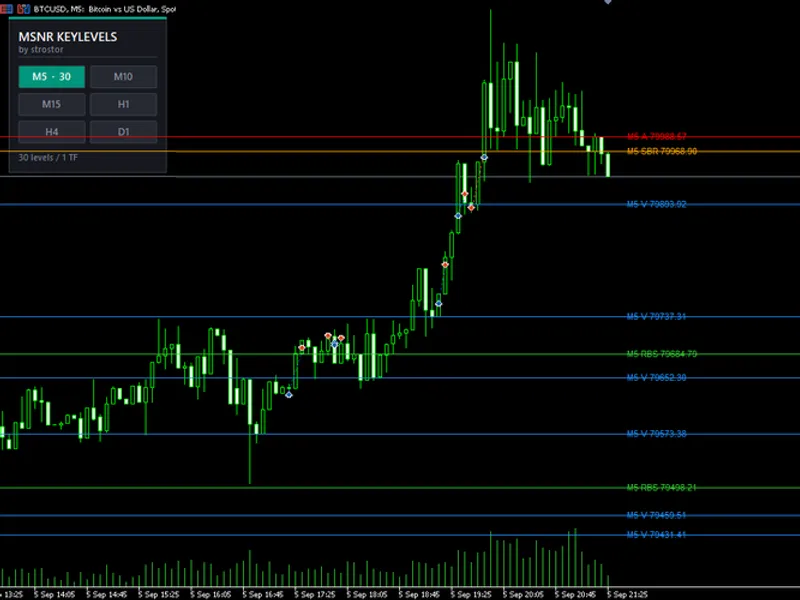
Related: MSNR Key Levels MultiTF: Advanced Support & Resistance Analysis - another powerful indicator for MetaTrader 5 traders.
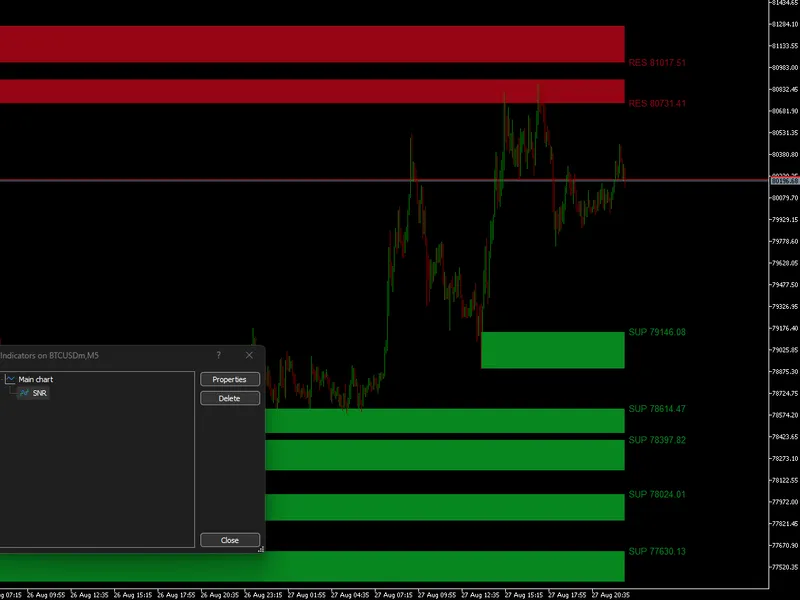
A line drawn at an old high is a guess. A price band where several tops and bottoms cluster, and where price kept coming back bar after bar, carries real weight, and this indicator measures that weight. It collects the latest pivots, groups the ones that sit close together into channels, gives each channel a score and draws the strongest ones as shaded bands across the whole chart.Also recommended: Support and Resistance Zig Zag Indicator - similar indicator with strong performance on MetaTrader 5.
The bands are colored by where price is right now. A channel entirely above the current price is resistance and turns vermilion; a channel entirely below it is support and turns teal; the channel price is trading inside turns violet gray. The color follows the live price, so a band changes role on the chart the moment price crosses it.
How a channel earns its score
With the default settings, pivots are tops and bottoms with ten bars on each side, taken on the wicks or on the candle body. A pivot stays in use for 290 bars after it is confirmed. Each one is the seed of a candidate channel, which then takes in, from the newest pivot to the oldest, every other pivot that keeps it within the width limit.
That limit is 5% of the high-low range of the last 300 bars, so the width adapts on its own: narrow on a quiet M15 chart, wider on a volatile H4. A channel scores 20 points for each pivot inside it and one more point for every bar across the lookback whose high or low landed inside it. Both kinds of evidence count: the turns that built the level and the bars that tested it.
The selection is greedy. The best score wins a place, every other candidate with an edge inside the winner is discarded, and the process repeats until up to ten channels are kept. The six strongest are drawn by default.
Levels that hold still
Channels are rebuilt only when a new pivot is confirmed. Between pivots they stay exactly where they are, so the bands do not shift with every tick. Closed bars feed a confirmed state, and the bar in progress is applied to a copy of it, so a tick on the open bar never rewrites the confirmed history. On load the indicator works through the last 5,000 closed bars, and the bands are drawn on the background, behind the candles, at a quarter of their color's strength over the chart background, which keeps them readable on light and dark themes alike. A channel built from a single pivot has no height and shows as a thin outline.
Breaks, pivot marks and averages
Break arrows:
- An up arrow under the bar when the close moves above the top of a channel on the chart, and a down arrow over the bar when it drops below the bottom. A close that lands inside another channel shown is not a break, so price moving from one band straight into the next is left unmarked.
Pivot marks:
- H above every top and L below every bottom, in the resistance and support colors. They show which turns are feeding each channel.
Two moving averages
- Of the close, each one off, simple or exponential, with its own period. Their colors are set in the Colors tab.
Alerts
A channel break can raise a pop-up alert, or a pop-up plus a push notification to the MetaTrader mobile app. The alert fires once per bar, when the bar closes, with the symbol, the timeframe and whether resistance or support was broken. It works whether the break arrows are on the chart or not.
Inputs
Pivots:
- Pivot period, the bars on each side of a top or bottom (default 10, range 4 to 30).
- Pivot price: high and low, or candle body.
Channels:
- Widest channel as a percentage of the 300-bar range (default 5, range 1 to 8).
- Pivots a channel needs (default 1).
- Channels shown (default 6, up to 10).
- Bars a pivot stays in use (default 290, range 100 to 400).
- The pivots setting is a strength floor of 20 points per pivot: at 2, only channels scoring 40 or more are drawn.
Colors:
- Resistance, support, and price inside the channel. The arrows and pivot marks use the same colors.
Marks:
- Pivot marks and break arrows, both off by default.
Averages:
- Average 1 with its period (default 50) and average 2 with its period (default 200), each off by default, simple or exponential.
Alerts:
- Channel break alert: off, pop-up, or pop-up and push.
Works on any symbol and timeframe, draws with chart objects and indicator buffers only, and removing it clears everything it drew.
Educational content, not financial advice. Trading involves risk of loss. Copyright 2026.
You may also like: Scalping Dashboard: Real-Time Trading Decision Support - excellent alternative for indicator users on MetaTrader 5.
Source Code
#property copyright "RobotFX"
#property link "https://robotfx.org"
#property version   "1.02"
#property description "This code is educational. Feel free to use, modify and upgrade as you wish. Visit ROBOTFX.ORG for professional trading tools"
#property indicator_chart_window
#property indicator_buffers 4
#property indicator_plots   4
#property indicator_label1  "Average 1"
#property indicator_type1   DRAW_LINE
#property indicator_color1  C'52,101,164'
.......
⚠ Limitations & Risk Warning
- This tool is provided for educational and testing purposes only.
- Past performance does not guarantee future results.
- Trading involves substantial risk of loss. Use on a demo account first.
- Results may vary depending on market conditions, broker, and settings.
- We recommend thorough backtesting and forward testing before using with real funds.