





Opening Gap Tracker: Daily, Weekend Gaps with Fill Tracking and Alerts
Info
The Opening Gap Tracker: Daily, Weekend Gaps with Fill Tracking and Alerts is a Indicator for MetaTrader 5 that gaptracker finds opening gaps on any symbol and timeframe. A gap is defined as a bar whose open is at least a chosen number of points away from the previous bar's close.
Usage
This tool is typically used for enhancing chart analysis and decision making.
Platform
This Indicator works exclusively on MetaTrader 5 (both build 600+ and newer versions).
Setup
Place the downloaded file in MQL5/Indicators folder via File ? Open Data Folder in MetaTrader 5.
How to Install and Use Opening Gap Tracker: Daily, Weekend Gaps with Fill Tracking and Alerts
1. Installation: Place your file in the MQL/Indicators folder via "Open Data Folder" and restart your terminal.
2. Loading: Find the indicator in the Navigator, drag it onto your chart, and configure the input parameters in the popup window.
3. Customization: Press Ctrl+I to open the indicator list, select your tool, and click "Properties" to change colors, levels, or visual styles.
4. Updating: Replace the old file in the Indicators folder with the new version and restart the platform to apply changes.
Frequently Asked Questions
Q: Why is my indicator not showing? A: Verify the file is in the MQL/Indicators folder, or try right-clicking the "Indicators" tree in the Navigator and clicking "Refresh."
Q: Do custom indicators slow down the platform? A: Too many complex indicators can impact performance; remove unused ones via the "Indicator List" (Ctrl+I).
Q: Can I use MT4 indicators on MT5? A: No, MQL4 and MQL5 are distinct languages; ensure the indicator is compiled specifically for your platform version.
What this tool does
GapTracker finds opening gaps on any symbol and timeframe.
Typical Use Case
This Indicator excels in automated trading and technical analysis on MetaTrader 5.
Compatible Platform & Setup
This Indicator works on MetaTrader 5. Place the file in the MQL5/Indicators folder and restart the terminal.
Description & Settings
Related: ICT Model Tracker: Sweep, MSS, and FVG Analysis with Performance Statistics - another powerful indicator for MetaTrader 5 traders.
GapTracker finds opening gaps on any symbol and timeframe. A gap is defined as a bar whose open is at least a chosen number of points away from the previous bar's close.Also recommended: Prop Firm Daily Loss Tracker: Monitor Your Risk Limits - similar indicator with strong performance on MetaTrader 5.
Gaps are classified as:
- Daily Gap: The first bar of a new trading day.
- Weekend/Holiday Gap: The first bar after a pause longer than a specified threshold (default 36 hours).
- Bar-to-Bar Gap: An optional gap detected between consecutive bars within the same day.
For each identified gap, the indicator monitors subsequent bars to determine when the gap is filled. A gap is considered filled when the price reaches the previous close level. For a gap up, this is when a later low touches the previous close. For a gap down, it's when a later high touches it. The gap bar itself is included in this observation, meaning a gap filled within its first bar is reported as filled after 0 bars. You can set a limit on the number of bars to wait for a fill.
On-Chart Visualization:
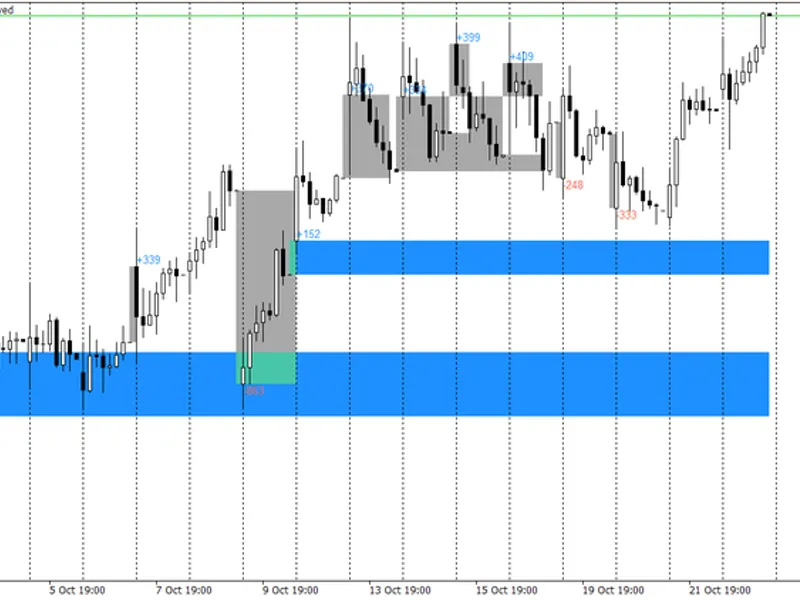
Each gap is represented by a filled rectangle spanning from the previous close to the gap's open. This rectangle extends to the bar that filled the gap or continues to the current bar if the gap remains open.
The size of the gap in points is displayed next to the gap bar. The color is blue for a gap up and red for a gap down, with customizable input options.
Once a gap is filled, its corresponding box turns grey.
Hovering over a gap box or its label reveals detailed information, including type, direction, size, previous close, open price, fill time, and the number of bars taken to fill.
To prevent chart clutter, only the most recent gaps (default 200) are drawn, ensuring a clean display even with extensive history.
Example:
The screenshot illustrates AAPL on an H1 timeframe. Grey boxes represent filled daily gaps, while blue boxes indicate open gaps extending to the last bar.
Alerts:
When a new gap forms in real time, the indicator can trigger various alerts:
- Pop-up alerts on the chart.
- Push notifications sent to your mobile terminal.
- Audible sound alerts.
Alert messages include the symbol, timeframe, gap type, direction, size in points, previous close, and open price. Gaps identified historically when the indicator is first applied are not announced.
CSV Log:
The indicator can generate a CSV log file that is updated whenever a gap appears or is filled. The file contains one line per gap with the following information:
time, symbol, period, type, direction, prev_close, open, gap_points, filled, fill_time, bars_to_fill
This file is saved in the MQL5/Files directory (or the common Files folder) and is named GapTracker_
The CSV log is designed for data analysis in spreadsheets, enabling research on gap behavior, such as the fill rate of weekend gaps within the first day or the typical size of gaps that remain open.
Expert Advisor Integration:
Two indicator buffers are available for Expert Advisor (EA) integration. These buffers are plotted as DRAW_NONE but can be accessed using the CopyBuffer function:
- Buffer 0: Contains the signed gap size in points on the bar where the gap occurred; otherwise, it is 0.
- Buffer 1: Indicates the gap type on the gap bar: 1 for daily, 2 for weekend/holiday, and 3 for bar-to-bar gaps.
The indicator is structured to avoid input groups, ensuring all parameters are passed correctly to iCustom.
Example EA usage:
int handle = iCustom(_Symbol, _Period, "GapTracker", 0, 50, 36, 5000); // scope, minimum points, weekend hours, bars to scan
double gap[1], type[1];
CopyBuffer(handle, 0, 1, 1, gap); // gap size in points of the last closed bar, 0 = no gap
CopyBuffer(handle, 1, 1, 1, type); // 1 daily, 2 weekend, 3 bar
Inputs:
- Gap Detection Scope: Choose between detecting daily gaps (separating weekend/holiday gaps), weekend gaps only, or all bar-to-bar gaps.
- Minimum Gap Size (Points): Specifies the minimum point difference to be considered a gap. A point is the smallest price step for the symbol (e.g., 50 points = 5 pips on a 5-digit pair).
- Weekend/Holiday Gap Threshold (Hours): Sets the minimum pause duration (default 36 hours) to classify a gap as a weekend or holiday gap.
- Bars to Scan Back: Set to 0 to scan the entire historical data.
- Track Gap Fill: Enable or disable tracking when a gap is filled.
- Stop Waiting After Bars: Define the maximum number of bars to wait for a gap to fill (0 means indefinite waiting).
- Draw Gaps on Chart: Toggle the visual display of gaps on the chart.
- Most Recent Gaps to Keep Drawn: Limit the number of recent gaps displayed.
- Label Gaps with Size: Show the gap size next to each gap.
- Colors: Customize the colors for gap up, gap down, and filled gaps.
- Alert Options: Enable/disable pop-up alerts, push notifications, and sound alerts.
- Sound File: Specify the sound file for alerts.
- Write CSV Log: Enable or disable the CSV log.
- File Name: Define the name for the CSV log file.
- Write to Common Files Folder: Save the CSV log to the common MQL5 Files directory.
Notes:
Gap detection occurs at the first tick of the gap bar and remains fixed thereafter. Only the fill status of an open gap is updated with new bar data.
Day changes are determined by bar times, reflecting server time. For symbols without a distinct daily session break, the 'daily gap' represents the difference between the day's open and the previous day's close.
The indicator creates graphical objects with the prefix "GapTracker_" and automatically removes them when detached from the chart.
This indicator was compiled with MetaTrader 5 build 6182, with no errors or warnings.
You may also like: bollinger bands 3 sigma - excellent alternative for indicator users on MetaTrader 5.
Source Code
#property copyright "RobotFX"
#property link "https://robotfx.org"
#property version   "1.00"
#property description "This code is educational. Feel free to use, modify and upgrade as you wish. Visit ROBOTFX.ORG for professional trading tools"
#property indicator_chart_window
#property indicator_buffers 2
#property indicator_plots   2
#property indicator_type1   DRAW_NONE
#property indicator_label1  "Gap (points)"
#property indicator_type2   DRAW_NONE
.......
⚠ Limitations & Risk Warning
- This tool is provided for educational and testing purposes only.
- Past performance does not guarantee future results.
- Trading involves substantial risk of loss. Use on a demo account first.
- Results may vary depending on market conditions, broker, and settings.
- We recommend thorough backtesting and forward testing before using with real funds.