


ICT Model Tracker: Sweep, MSS, and FVG Analysis with Performance Statistics
Info
The ICT Model Tracker: Sweep, MSS, and FVG Analysis with Performance Statistics is a Indicator for MetaTrader 5 that ict model tracker is an indicator designed to identify and quantify ict (inner circle trader) model setups on any chart. It precisely locates classic ICT sequences: a liquidity sweep within a killzone, followed by a market structure shift (MSS) with displacement, or an inverted Fair Value Gap (FVG), and finally, the retrace entry with defined stop loss and take profit levels.
Usage
This tool is typically used for enhancing chart analysis and decision making.
Platform
This Indicator works exclusively on MetaTrader 5 (both build 600+ and newer versions).
Setup
Place the downloaded file in MQL5/Indicators folder via File ? Open Data Folder in MetaTrader 5.
How to Install and Use ICT Model Tracker: Sweep, MSS, and FVG Analysis with Performance Statistics
1. Installation: Place your file in the MQL/Indicators folder via "Open Data Folder" and restart your terminal.
2. Loading: Find the indicator in the Navigator, drag it onto your chart, and configure the input parameters in the popup window.
3. Customization: Press Ctrl+I to open the indicator list, select your tool, and click "Properties" to change colors, levels, or visual styles.
4. Updating: Replace the old file in the Indicators folder with the new version and restart the platform to apply changes.
Frequently Asked Questions
Q: Why is my indicator not showing? A: Verify the file is in the MQL/Indicators folder, or try right-clicking the "Indicators" tree in the Navigator and clicking "Refresh."
Q: Do custom indicators slow down the platform? A: Too many complex indicators can impact performance; remove unused ones via the "Indicator List" (Ctrl+I).
Q: Can I use MT4 indicators on MT5? A: No, MQL4 and MQL5 are distinct languages; ensure the indicator is compiled specifically for your platform version.
What this tool does
ICT Model Tracker is an indicator designed to identify and quantify ICT (Inner Circle Trader) model setups on any chart.
Typical Use Case
This Indicator excels in automated trading and technical analysis on MetaTrader 5.
Compatible Platform & Setup
This Indicator works on MetaTrader 5. Place the file in the MQL5/Indicators folder and restart the terminal.
Description & Settings
Related: Opening Gap Tracker: Daily, Weekend Gaps with Fill Tracking and Alerts - another powerful indicator for MetaTrader 5 traders.
ICT Model Tracker is an indicator designed to identify and quantify ICT (Inner Circle Trader) model setups on any chart. It precisely locates classic ICT sequences: a liquidity sweep within a killzone, followed by a market structure shift (MSS) with displacement, or an inverted Fair Value Gap (FVG), and finally, the retrace entry with defined stop loss and take profit levels. The indicator tracks each setup to its conclusion and presents its performance in a dedicated statistics panel. All analyses are based on closed bars only, ensuring no repainting. The indicator is provided as a single file without external dependencies.Also recommended: Prop Firm Daily Loss Tracker: Monitor Your Risk Limits - similar indicator with strong performance on MetaTrader 5.
Understanding the Performance Data
The results displayed, even if not profitable, are presented intentionally. The primary function of the indicator is to measure the effectiveness of the ICT model. A reliable measurement tool must accurately report both positive and negative outcomes. This page showcases the complete performance record, not just winning scenarios.
The presented statistics reflect the performance of the ICT model itself, not any flaws in the indicator's code. An independent implementation of the model's logic, tested over a four-month period, validated these findings. Performance may vary across different symbols, timeframes, or indicator settings. Users can utilize the panel to test their preferred configurations before deploying real capital. It is important to note that no information on this page constitutes a recommendation to trade.
On-Chart Visualizations
The indicator displays the following on the chart:
- Killzone boxes (London, NY AM, NY PM) automatically adjusted for New York time and daylight saving.
- Liquidity levels, including previous day's high and low, Asian range, London range, and optional swing highs and lows.
- For each detected setup:
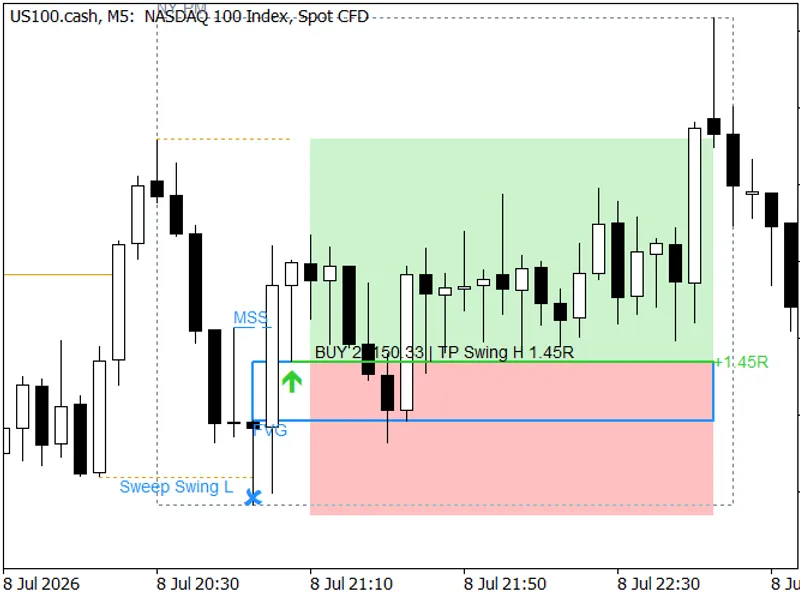
- The initiating liquidity sweep (marked with ✕ and the level swept).
- The Market Structure Shift (MSS) line.
- The Fair Value Gap (FVG), or for an inverted FVG (iFVG), the original gap up to the candle that inverts it.
- The entry point, indicated by a green buy or red sell arrow and entry line.
- Shaded zones representing the target and risk areas.
- The final outcome of the trade (+R for profit, −1R for loss, EXP for expired, MISS for missed).
- A comprehensive statistics panel detailing setups, trades, win rate, average risk-reward ratio (R), profit factor, longest losing streak, and drawdown in R, segmented by killzone, direction, and model type.
Example Visuals:
- A complete setup from sweep to result, showing the sweep, MSS line, FVG, entry, and shaded risk/reward zones on US100.cash M5.
- A losing trade example, visually identical to a winning one, illustrating a sell setup that hit its stop loss. Every setup is tracked to its outcome.
Getting Started
To use the indicator:
1. Attach it to an intraday chart. While it functions on any timeframe, killzone logic is most relevant on M1 to M15.
2. Verify your broker's server time. The default setting (New York + 7) is suitable for most GMT+2/+3 brokers. The 'Server time' display helps confirm your settings.
3. Review the statistics panel. It reports the model's performance over the 'Days processed' (default 120). Increase 'Days drawn' to visualize older setups.
Setup Definition Criteria
The indicator implements a precise interpretation of the ICT model, with all thresholds configurable:
Sweep:
Occurs within a killzone when a candle trades through a currently active liquidity level.
Confirmation within 12 bars:
Model A: A close occurs beyond the last 3-candle swing high/low (MSS) preceding the sweep extreme, accompanied by a displacement candle (body size at least 1 ATR) that leaves an FVG. Model B: A displacement candle closes through an opposing FVG that formed prior to or during the sweep (iFVG).
Entry, Stop Loss, and Take Profit:
- Entry: Limit order placed at the near edge of the FVG zone or its midpoint.
- Stop Loss (SL): Placed beyond the sweep extreme plus 0.1 ATR.
- Take Profit (TP): Set at the nearest opposite liquidity level, provided it is at least 1R away, otherwise set at 2R.
Trade Lifecycle:
- Order fills must occur within 12 bars; otherwise, the order expires.
- Orders are cancelled if the target is reached before the fill.
- Open trades are closed at 16:00 New York time.
- Long and short setups are tracked independently, allowing for simultaneous active trades. The indicator measures setups, it does not manage account positions.
All thresholds are ATR-based, ensuring the default settings are applicable to indices, gold, and forex.
Model B Illustration:
Model B visualizes the original FVG (dotted line) until the candle that inverts it. From that point, the same price range is treated as an iFVG.
Statistics Computation Methods
The performance statistics are calculated using a bar-based simulation that incorporates spread:
- The median spread of the loaded bars is used, or a user-defined value.
- Ambiguous bars are treated conservatively: a bar that touches both the stop loss and take profit is counted as a loss. An order fill bar is never counted as a win.
The statistics panel reflects the model's historical performance and does not provide future predictions.
Verified Performance Characteristics
No Repainting:
Indicator buffers logged bar by bar in the Strategy Tester are identical to historical calculations, and results remain consistent regardless of the data window's starting point.
Independent Replay Verification:
A separate implementation of the indicator's logic accurately reproduced all 1,927 events and statistics from a four-month backtest of US100 M5, with seven configurations matching exactly.
Visual Review:
Ten setups, covering both models, both directions, and all possible outcomes, were meticulously checked candle by candle against the independent replay data.
Time Zone Accuracy:
The conversion from server time to New York time aligns with the IANA time zone database across three server modes and accounts for both daylight saving periods.
Cross-Market Compatibility:
The indicator operates without errors on EURUSD, USDJPY, XAUUSD, and US100 across M1, M5, M15, H4, and D1 timeframes.
Processing Speed:
The full calculation for 120 days of data takes approximately 30 milliseconds on M5 (23,339 bars) and around 160 milliseconds on M1 (116,701 bars) within the Strategy Tester.
Configurable Inputs
Input Groups:
Main Inputs:
- Model: Select Model A (MSS + FVG), Model B (iFVG), or both. Configure MSS swing strength, displacement body size, and FVG size in ATR.
- Entry, SL, and TP: Choose between proximal or 50% FVG entry. Define bars to fill, SL buffer, target based on liquidity or fixed R, and time-based exit.
- Liquidity Levels: Include previous day's high/low, Asian range, London range, and swing points.
- Killzones: Define three trading windows based on New York time.
- Server Time: Set to New York + 7 (common for GMT+2/+3 brokers), GMT+X with European DST, or a fixed GMT+X.
- HTF Bias: Option to disable, use HTF market structure (H1 to D1), or use New York midnight open for bias.
- Statistics: Set days to process, simulation spread, and enable CSV export.
- Alerts: Configure alerts for sweep, setup, fill, and result events via popup, sound, push, or email.
- Drawing: Adjust days to draw, include layers (even for sweeps without setups), panel corner, colors, and zone shading.
For Expert Advisor (EA) Developers
The indicator provides output buffers accessible for EA integration. Buffers 0 to 9 contain specific values for each event, logged on the bar the event is confirmed and remaining unchanged thereafter. Access buffer shift 1 on each new bar for the latest information.
Buffer Mapping:
- Buffer 0: Signal value (+1 for long, -1 for short).
- Buffers 1, 2, 3: Entry price, Stop Loss price, and Take Profit price for the signal.
- Buffers 4 / 5: Order fill status for long / short (1 if filled, 0 if cancelled).
- Buffers 6 / 7: Result of the trade in R units for long / short.
- Buffers 8 / 9: The swept liquidity level that initiated a short / long setup.
When using iCustom, each input group of this indicator is treated as a single string parameter. Pass the group name in its corresponding position.
Server Time Configuration Assistance
The default server time setting (New York + 7) is appropriate for brokers using the US daylight-saving schedule on GMT+2/+3 servers. To confirm your broker's time, observe the US100 or US500 cash market open (09:30 New York time). This should typically occur at 16:30 server time year-round. If this time shifts to 15:30 for a period in March and November, it indicates the use of the European daylight-saving schedule, and the 'European DST' option should be selected.
Indicator Limitations
- Single Symbol Operation: The indicator operates on one symbol per chart; multi-symbol dashboards are not supported.
- Bar-Based Simulation: The simulation uses closed bars only. It does not account for tick data, assumes a constant spread, and does not include commissions.
- Dynamic Spread Impact: When using automatic spread settings, the median spread is influenced by the amount of historical data loaded. Using a fixed spread value allows for consistent comparisons across different data window lengths.
You may also like: Market Structure Entry Model Explained - excellent alternative for indicator users on MetaTrader 5.
Source Code
#property copyright "RobotFX"
#property link "https://robotfx.org"
#property version     "1.05"
#property description "This code is educational. Feel free to use, modify and upgrade as you wish. Visit ROBOTFX.ORG for professional trading tools"
#property indicator_chart_window
#property indicator_buffers 12
#property indicator_plots   12
enum ENUM_ICT_MODEL
  {
   MODEL_A    = 0,
.......
⚠ Limitations & Risk Warning
- This tool is provided for educational and testing purposes only.
- Past performance does not guarantee future results.
- Trading involves substantial risk of loss. Use on a demo account first.
- Results may vary depending on market conditions, broker, and settings.
- We recommend thorough backtesting and forward testing before using with real funds.