






Chandelier Exit for MT4: A Precise Port with Enhanced Signal Statistics
Info
The Chandelier Exit for MT4: A Precise Port with Enhanced Signal Statistics is a Indicator for MetaTrader 4 that a line-by-line port of "chandelier exit", licensed under gpl-3. 0.
Usage
This tool is typically used for enhancing chart analysis and decision making.
Platform
This Indicator works exclusively on MetaTrader 4 (both build 600+ and newer versions).
Setup
Place the downloaded file in MQL4/Indicators folder via File ? Open Data Folder in MetaTrader 4.
How to Install and Use Chandelier Exit for MT4: A Precise Port with Enhanced Signal Statistics
1. Installation: Place your file in the MQL/Indicators folder via "Open Data Folder" and restart your terminal.
2. Loading: Find the indicator in the Navigator, drag it onto your chart, and configure the input parameters in the popup window.
3. Customization: Press Ctrl+I to open the indicator list, select your tool, and click "Properties" to change colors, levels, or visual styles.
4. Updating: Replace the old file in the Indicators folder with the new version and restart the platform to apply changes.
Frequently Asked Questions
Q: Why is my indicator not showing? A: Verify the file is in the MQL/Indicators folder, or try right-clicking the "Indicators" tree in the Navigator and clicking "Refresh."
Q: Do custom indicators slow down the platform? A: Too many complex indicators can impact performance; remove unused ones via the "Indicator List" (Ctrl+I).
Q: Can I use MT4 indicators on MT5? A: No, MQL4 and MQL5 are distinct languages; ensure the indicator is compiled specifically for your platform version.
What this tool does
A line-by-line port of "Chandelier Exit", licensed under GPL-3.
Typical Use Case
This Indicator excels in automated trading and technical analysis on MetaTrader 4.
Compatible Platform & Setup
This Indicator works on MetaTrader 4. Place the file in the MQL4/Indicators folder and restart the terminal.
Description & Settings
Related: Chandelier Exit Indicator - another powerful indicator for MetaTrader 4 traders.
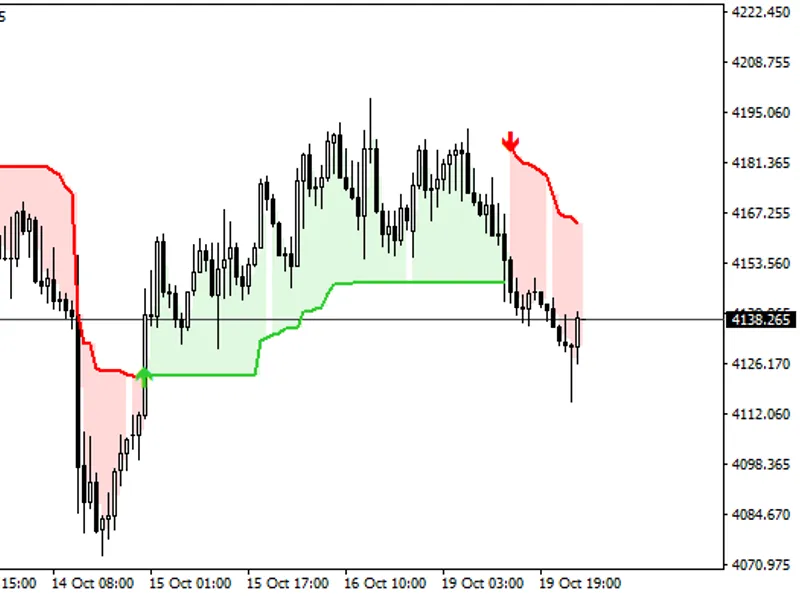
A line-by-line port of "Chandelier Exit", licensed under GPL-3.0. The original script is available on tradingview.com/script/AqXxNS7j/. This port adheres to the same licensing terms.Also recommended: Automatic Chart Swapping Indicator - similar indicator with strong performance on MetaTrader 4.
The core logic is identical to the original:
ATR Calculation:
ATR = multiplier × ta.atr(length) (using Wilder's RMA, initialized with SMA).
Long Stop Calculation:
Long stop = highest(close or high, length) − ATR. This stop only moves upwards if the previous close was above the previous stop.
Short Stop Calculation:
Short stop = lowest(close or low, length) + ATR. This stop moves symmetrically: it only moves downwards if the previous close was below the previous stop.
Direction Determination:
The indicator turns long when the closing price breaks above the previous short stop.
The indicator turns short when the closing price breaks below the previous long stop.
Otherwise, the indicator maintains its previous state.
Buy/Sell Signals:
Signals are generated when the direction flips. A dot marks the beginning of each new stop line.
State Highlighting:
The area between the OHLC/4 and the active stop is highlighted. This is drawn as background rectangles, ensuring it remains behind candles and other indicators.
Input Parameters (Defaults):
ATR Period: 22
Multiplier: 3.0
Use Close Price for Extremums: Enabled
MT4 Specific Enhancements:
Signal Statistics Panel:
This panel provides insights into past performance. It registers buys at the bar following a Buy signal, sells after a Sell signal, and closes/reverses at opposing signals. It displays:
- Trades executed, win rate, net points/pips/USD (after spread and commission)
- Profit factor, longest losing streak, maximum drawdown
- Current open trade details and cost per trade
Daily Session Filter:
Filter trades based on your local time zone, with optional session shading and an option to close positions at the end of a session. This feature is disabled by default (the panel aggregates data for the entire day). To enable it, set Use_Session = true and define your session hours.
Trade Marks:
Visual markers for trades, complete with tooltips for additional information.
Alerts:
Notifications for new signals.
EA Integration (iCustom):
Buffers are available for Expert Advisors:
- Buffer 4: Buy signals
- Buffer 5: Sell signals
- Buffer 6: Long stop level
- Buffer 7: Short stop level
The statistics panel illustrates historical signal performance. It is not a backtesting tool and does not guarantee future results. © 2026.
You may also like: SD X-TZ Pivots 3 - excellent alternative for indicator users on MetaTrader 4.
Source Code
яю
#property copyright "RobotFX"
#property version   "1.10"
#property description "This code is educational. Feel free to use, modify and upgrade as you wish. Visit ROBOTFX.ORG for professional trading tools"
#property strict
#property indicator_chart_window
#property indicator_buffers 6
#define PFX "TVCE_"
input int    ATR_Period       = 22;
input double ATR_Multiplier   = 3.0;
.......
⚠ Limitations & Risk Warning
- This tool is provided for educational and testing purposes only.
- Past performance does not guarantee future results.
- Trading involves substantial risk of loss. Use on a demo account first.
- Results may vary depending on market conditions, broker, and settings.
- We recommend thorough backtesting and forward testing before using with real funds.