





Semi-HFT Grid Bot: Two-Sided Martingale Grid with Basket Take Profit
Info
The Semi-HFT Grid Bot: Two-Sided Martingale Grid with Basket Take Profit is a Expert Advisor for MetaTrader 4 that important noticethis is a two-sided martingale grid system. It does not have a per-trade stop loss by default.
Usage
This tool is typically used for automated trading on major forex pairs and gold.
Platform
This Expert Advisor works exclusively on MetaTrader 4 (both build 600+ and newer versions).
Setup
Place the downloaded file in MQL4/Experts folder via File ? Open Data Folder in MetaTrader 4.
How to Install and Use Semi-HFT Grid Bot: Two-Sided Martingale Grid with Basket Take Profit
1. Installation: Open the "File" menu, select "Open Data Folder," navigate to MQL/Experts, paste your file, and restart the terminal.
2. Activation: Drag the EA from the Navigator onto a chart, ensure "Allow live trading" is checked in the Common tab, and verify the AutoTrading button is green.
3. Optimization: Right-click your chart, choose "Expert List," click "Properties" to adjust inputs, and save your preferred setup as a set file for future use.
4. Maintenance: Regularly check the "Experts" tab in the terminal window to monitor trade logs and potential execution errors.
Frequently Asked Questions
Q: Why is my EA not opening trades? A: Check the "AutoTrading" button, ensure "Allow live trading" is enabled, and verify your broker allows automated trading on your account type.
Q: Can I run multiple EAs on one chart? A: No, each chart can only host one active EA; however, you can open multiple charts for different currency pairs to run several EAs.
Q: What does the "smiley face" icon mean? A: A smiley face in the top-right corner of the chart indicates the EA is successfully running; a frowny face means it is disabled.
What this tool does
Important NoticeThis is a two-sided martingale grid system.
Typical Use Case
This Expert Advisor excels in automated trading and technical analysis on MetaTrader 4.
Compatible Platform & Setup
This Expert Advisor works on MetaTrader 4. Place the file in the MQL4/Experts folder and restart the terminal.
Description & Settings
Related: moving average grid ea - another powerful expert for MetaTrader 4 traders.
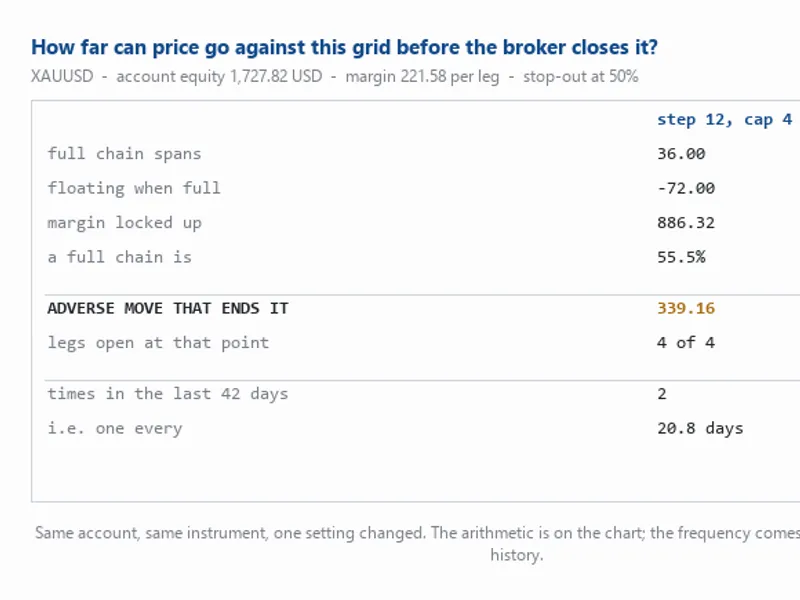
Important NoticeThis is a two-sided martingale grid system. It does not have a per-trade stop loss by default. Lot sizes double as the grid extends against an open side, and drawdown and exposure can increase rapidly during sustained one-directional price movements. A BasketSL_USD (emergency floating-loss cutoff) is available but disabled by default. This Expert Advisor (EA) is provided as a functional and transparent implementation of a specific grid trading mechanism for educational and testing purposes. It is not intended as a low-risk or 'set and forget' system. Always test on a demo account, understand the potential maximum drawdown associated with your chosen lot and step settings before considering live trading, and never risk capital that you cannot afford to lose on any martingale strategy.
Also recommended: 204060 Program AI Grid System - similar expert with strong performance on MetaTrader 4.
Timeframe
Any timeframe is suitable, as the EA operates on a tick-driven basis, not bar-driven.
Symbols
Suitable for XAUUSD and index CFDs such as NAS100/US100/USTEC. The EA includes separate input configurations for each symbol type, automatically detected from the symbol name.
Latency Recommendation
Recommended latency is less than 80ms.
Trading Phases
Phase 1 — Seed
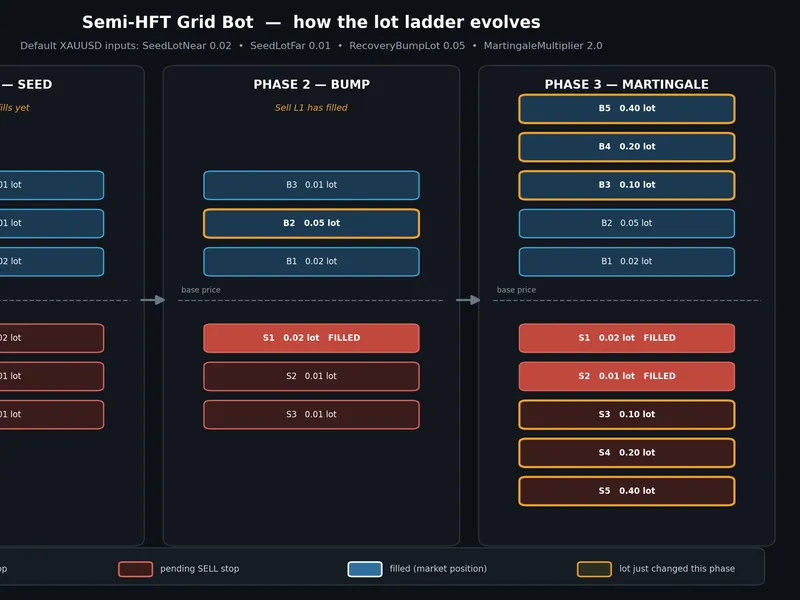
When no orders are open, the EA places three pending stop orders on each side of the current price. The nearest level uses SeedLotNear, and two farther levels use SeedLotFar. This establishes a small, symmetrical starting ladder without a directional bias.
Phase 2 — Bump
As soon as the nearest pending order (Level 1) on either side is filled, the pending order lot size on the opposite side's Level 2 is increased to RecoveryBumpLot. This adjustment aims to provide a larger lot size to catch a pullback if the price has moved decisively in one direction.
Phase 3 — Martingale
Once either side of the grid achieves two filled orders, all remaining pending orders on both sides (Levels 2 through 5) switch to a doubling sequence. This sequence is based on RecoveryBumpLot and MartingaleMultiplier (default lot size = RecoveryBumpLot × multiplier^(level−2)). By default, this results in lot sizes of 1x, 2x, 4x, and 8x. Two additional levels (Levels 4 and 5) are added to both sides. Orders that have already been filled are not modified.
Basket Management
On every tick, the EA calculates the total floating profit, swap, and commission across all open positions managed by the EA (identified by symbol and magic number). If this total reaches BasketTP_USD, all positions are closed, and all pending orders are canceled. The grid then re-initializes from Phase 1 on the next tick. If BasketSL_USD is set to a value greater than zero, a similar full closure occurs on the loss side as an emergency stop.
Self-Healing and Market Fallback Fills
The grid is reconciled on every tick, not just at the start of new bars. The ReconcileGrid() function checks the status of each level and places, resizes, or replaces pending orders as needed to match the current phase's target lot sizes. If the price has already moved past a level's entry price due to a rapid market move (which can cause a pending order to be rejected), the EA will fill the order at the current market price instead of leaving the level empty. This is because the condition for the level (price having moved through this point) has effectively been met.
Multi-Symbol Handling
Symbols like XAUUSD and index CFDs (e.g., NAS100) often have significant differences in point size and the minimum distance required by brokers for placing pending orders (MODE_STOPLEVEL / MODE_FREEZELEVEL). A grid step size suitable for gold might result in no orders being placed on an index. To address this, the EA maintains separate input configurations for metals and indices. These are automatically selected based on the chart symbol name (or can be manually set via SymbolProfile). The EA also automatically widens the configured grid step if it is narrower than the symbol's broker-defined minimum distance. Any failed OrderSend, OrderModify, or OrderDelete operation is logged with its GetLastError() code, making silent failures visible in the Experts log instead of the EA simply failing to act.
Inputs
Symbol Profile
Input
Default
Meaning
SymbolProfile
PROFILE_AUTO
Automatically detect XAUUSD versus NAS100/US100 from the symbol name, or force a specific profile.
XAUUSD / Metals
Input
Default
Meaning
Metals_SeedLotNear
0.02
Lot size for Level 1 on each side.
Metals_SeedLotFar
0.01
Lot size for Levels 2–3 on each side.
Metals_RecoveryBumpLot
0.05
Lot size used from Phase 2 onwards.
Metals_GridStepPoints
50
Spacing between grid levels, measured in points.
Metals_MaxSpreadPoints
40
Do not arm a new seed grid if the current spread exceeds this value.
NAS100 / US100
Input
Default
Meaning
Index_SeedLotNear / Index_SeedLotFar / Index_RecoveryBumpLot
0.20 / 0.10 / 0.50
Same roles as above, scaled for index instruments.
Index_GridStepPoints
50
Verify against your broker's specific point size for indices.
Index_MaxSpreadPoints
150
Indices generally exhibit wider spreads in points.
Shared Settings
Input
Default
Meaning
MagicNumber
990011
Unique identifier for EA-managed orders.
MartingaleMultiplier
2.0
The factor by which lot sizes increase once Phase 3 is active.
BasketTP_USD
2.00
Close all positions when the total floating profit reaches this amount.
BasketSL_USD
0
Emergency floating loss cutoff; set to 0 to disable.
Slippage
5
Maximum allowed slippage in points.
LogOrderErrors
true
Enable detailed logging of GetLastError() codes for failed order operations.
Setup Notes
Before running, confirm that Metals_GridStepPoints and Index_GridStepPoints are set appropriately relative to your broker's actual point size and MODE_STOPLEVEL for the symbol. The EA will automatically widen an undersized step, but it is beneficial to understand the effective spacing you will be using. BasketTP_USD and BasketSL_USD are denominated in account currency, not pips or percentages. A small BasketTP_USD value combined with larger lot sizes during the martingale phase can lead to rapid closure of the entire basket once it becomes active. If the EA restarts (e.g., due to terminal restart or VPS reboot) while a grid is active, OnInit() will detect existing orders associated with its magic number and recover the grid's base price from the B1/S1 level, preventing the initiation of a new, potentially overlapping grid.
Notes and Limitations
This EA implements a specific, documented grid trading mechanic reverse-engineered from observed behavior. It is not a fully optimized or tuned trading system and carries the inherent structural risks of any martingale approach. A strong, sustained trend against one side of the grid will lead to escalating exposure on that side through Phase 3. There is no predefined limit to how far the grid can extend beyond Level 5; BasketSL_USD serves as the only hard stop-loss, and it is disabled by default. Thorough backtesting across diverse market conditions (trending and ranging) and subsequent forward testing on a demo account are crucial before making any conclusions about its performance. It is recommended to size the seed, bump, and martingale lots conservatively in relation to your account equity.
Originality Statement
This Expert Advisor is an original implementation. It was developed by reverse-engineering a documented grid trading bot observed in a screen recording and through annotated screenshots. This EA has been extended with multi-symbol support, self-healing reconciliation, and error logging capabilities that were not present in the original observed system. It does not rely on any external indicators or DLL dependencies.
You may also like: News Grid Expert Advisor for MT4/MT5 - excellent alternative for expert users on MetaTrader 4.
Source Code
#property copyright "RobotFX"
#property strict
enum ENUM_PROFILE { PROFILE_AUTO, PROFILE_XAUUSD, PROFILE_NAS100 };
input ENUM_PROFILE SymbolProfile   = PROFILE_AUTO;
input string   ____Metals____      = "===== XAUUSD / metals =====";
input double   Metals_SeedLotNear     = 0.02;
input double   Metals_SeedLotFar      = 0.01;
input double   Metals_RecoveryBumpLot = 0.05;
input int      Metals_GridStepPoints  = 50;
input int      Metals_MaxSpreadPoints = 40;
.......
⚠ Limitations & Risk Warning
- This tool is provided for educational and testing purposes only.
- Past performance does not guarantee future results.
- Trading involves substantial risk of loss. Use on a demo account first.
- Results may vary depending on market conditions, broker, and settings.
- We recommend thorough backtesting and forward testing before using with real funds.