





Grid Capital Calculator
Info
The Grid Capital Calculator is a Expert Advisor for MetaTrader 5 that grid capital calculatorthe crucial question for anyone running a grid, martingale, or averaging system is whether their account size is sufficient. The common method of using the loss at the last grid level as a benchmark is misleading.
Usage
This tool is typically used for automated trading on major forex pairs and gold.
Platform
This Expert Advisor works exclusively on MetaTrader 5 (both build 600+ and newer versions).
Setup
Place the downloaded file in MQL5/Experts folder via File ? Open Data Folder in MetaTrader 5.
How to Install and Use Grid Capital Calculator
1. Installation: Open the "File" menu, select "Open Data Folder," navigate to MQL/Experts, paste your file, and restart the terminal.
2. Activation: Drag the EA from the Navigator onto a chart, ensure "Allow live trading" is checked in the Common tab, and verify the AutoTrading button is green.
3. Optimization: Right-click your chart, choose "Expert List," click "Properties" to adjust inputs, and save your preferred setup as a set file for future use.
4. Maintenance: Regularly check the "Experts" tab in the terminal window to monitor trade logs and potential execution errors.
Frequently Asked Questions
Q: Why is my EA not opening trades? A: Check the "AutoTrading" button, ensure "Allow live trading" is enabled, and verify your broker allows automated trading on your account type.
Q: Can I run multiple EAs on one chart? A: No, each chart can only host one active EA; however, you can open multiple charts for different currency pairs to run several EAs.
Q: What does the "smiley face" icon mean? A: A smiley face in the top-right corner of the chart indicates the EA is successfully running; a frowny face means it is disabled.
What this tool does
Grid Capital CalculatorThe crucial question for anyone running a grid, martingale, or averaging system is whether their account size is sufficient.
Typical Use Case
This Expert Advisor excels in automated trading and technical analysis on MetaTrader 5.
Compatible Platform & Setup
This Expert Advisor works on MetaTrader 5. Place the file in the MQL5/Experts folder and restart the terminal.
Description & Settings
Related: Grid Pro Panel: Open-Source Grid Trading EA with On-Chart Control - another powerful expert for MetaTrader 5 traders.
Grid Capital CalculatorAlso recommended: bg c grid ea - similar expert with strong performance on MetaTrader 5.
The crucial question for anyone running a grid, martingale, or averaging system is whether their account size is sufficient.
The common method of using the loss at the last grid level as a benchmark is misleading. Account termination typically occurs when the margin level hits the broker's stop-out level while the trade chain is still open and appears salvageable.
This Expert Advisor calculates the actual required capital. It then analyzes the symbol's M1 historical data to determine the frequency of past price movements of that magnitude.
This tool operates in a strictly read-only mode, without opening, closing, or modifying any positions.
Common Misconceptions Addressed:
A chain of N legs does not float at step N. The cumulative loss is step × N(N−1)/2. For 10 legs, this equates to 45 steps of loss, not 10.
Open positions also lock up margin while they are floating. The stop-out calculation uses equity versus margin used, meaning both the loss and the available margin decrease simultaneously.
Stop-out is a percentage, not zero. Accounts can be closed when only half of the equity is lost, typically at a 50% margin level.
Reported Metrics:
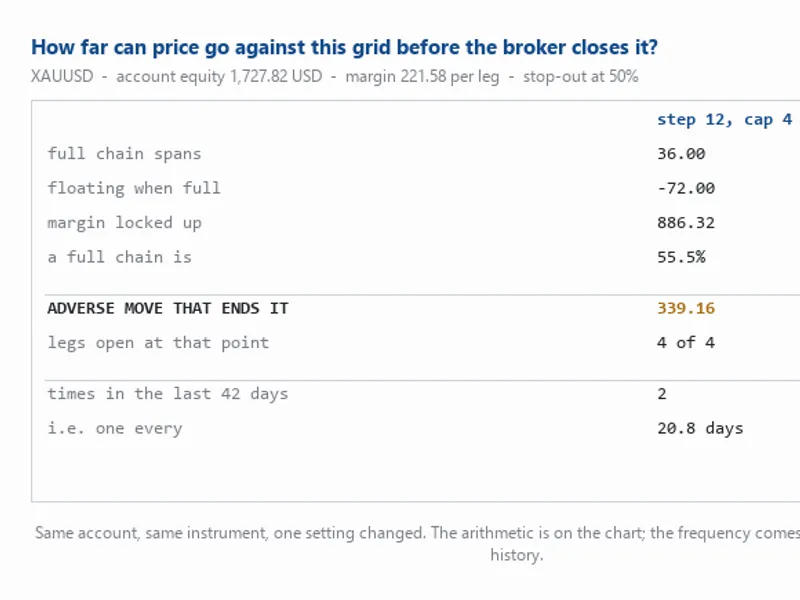
full chain spans: Price distance from the newest to the oldest leg.
floating when full: The total floating loss (step × N(N−1)/2) in account currency.
margin locked up: Margin required, as determined by OrderCalcMargin, reflecting broker-specific rules.
a full chain is: Floating loss plus margin, expressed as a percentage of equity.
adverse move that ends it: The maximum price movement against the trader before a stop-out.
legs open at that point: The number of active legs when the stop-out level is reached.
times in the last N days: The frequency of a move of the 'adverse move that ends it' magnitude, based on M1 bars.
Significance of Key Metrics:
The metrics 'adverse move that ends it' and 'times in the last N days' transform abstract calculations into actionable insights. For example, knowing a specific adverse move occurred frequently (e.g., 71 times in 100 days, averaging one occurrence every 1.4 days) provides a clear decision-making basis. The frequency count resets after each event, ensuring comparability.
'legs open at that point' addresses the debate about leg caps. If the account is stopped out before the chain reaches its maximum leg count, the cap becomes irrelevant. Adjusting it would have no impact.
Key Calculation Details:
Money per price unit is derived from the symbol's tick value and tick size, accounting for different contract definitions across asset types.
Hedged positions typically do not double margin requirements. The EA checks SYMBOL_MARGIN_HEDGED and assumes the higher margin requirement if the rule cannot be determined, prioritizing safety.
The EA accurately models chain filling as price moves. It solves for a self-consistent state where the number of legs matches the price movement, avoiding the error of assuming full margin at an early stage.
Inputs:
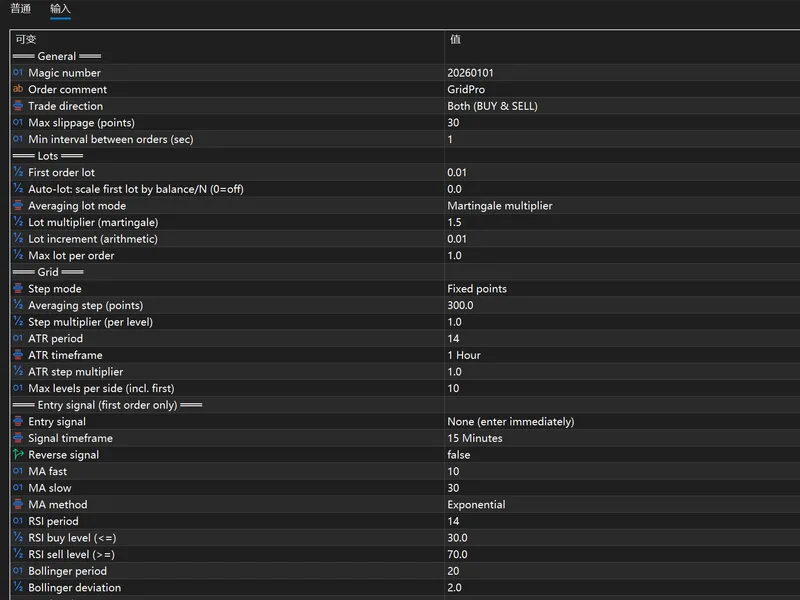
InpGridStep: Distance between grid levels in price.
InpLots: Lot size for each leg.
InpMaxLegs: Maximum number of legs allowed in the chain.
InpBothSides: Boolean indicating if both long and short chains are active.
InpEquity: Assumed equity for testing. Setting to 0 uses the live account equity.
InpStopOutLevel: Broker's stop-out percentage. Setting to 0 queries the broker.
InpHistoryDays: Number of days of M1 history to analyze for frequency. Setting to 0 skips this check.
Testing with InpEquity allows users to determine the necessary capital for a given configuration without needing to fund an account with that amount.
Limitations:
This tool is not a backtester and does not assess strategy profitability. It exclusively addresses capital requirements and the probability of adverse price movements.
It does not model trade recovery scenarios. Its focus is on the initial price excursion that determines survival.
You may also like: xander grid ea for xauusd (mt5) - excellent alternative for expert users on MetaTrader 5.
Source Code
#property copyright "RobotFX"
#property version   "1.00"
#property description "This code is educational. Feel free to use, modify and upgrade as you wish. Visit ROBOTFX.ORG for professional trading tools"
#property strict
input group "=== The grid you want to check ==="
input double InpGridStep      = 12.0;
input double InpLots          = 0.01;
input int    InpMaxLegs       = 4;
input bool   InpBothSides     = true;
input group "=== Account assumptions ==="
.......
⚠ Limitations & Risk Warning
- This tool is provided for educational and testing purposes only.
- Past performance does not guarantee future results.
- Trading involves substantial risk of loss. Use on a demo account first.
- Results may vary depending on market conditions, broker, and settings.
- We recommend thorough backtesting and forward testing before using with real funds.