

Session Edge Tester: Evaluating Time-Based Trading Strategies Against Market Costs
Info
The Session Edge Tester: Evaluating Time-Based Trading Strategies Against Market Costs is a Script for MetaTrader 5 that session edge tester analyzes time-of-day trading rules using your broker's historical data. FunctionalityThe tool simulates buying or selling on specific weekdays at a defined entry hour and exits after a set duration.
Usage
This tool is typically used for enhancing chart analysis and decision making.
Platform
This Script works exclusively on MetaTrader 5 (both build 600+ and newer versions).
Setup
Place the downloaded file in MQL5/Scripts folder via File ? Open Data Folder in MetaTrader 5.
How to Install and Use Session Edge Tester: Evaluating Time-Based Trading Strategies Against Market Costs
1. Installation: Move your script file into the MQL/Scripts directory and restart the platform.
2. Execution: Drag the script onto a chart; it will perform a one-time action, such as closing all open orders or clearing chart objects.
3. Editing: Use MetaEditor (F4) to modify code, click "Compile," and verify no errors appear in the terminal before running.
4. Removing: Scripts stop automatically, but you can remove them manually by right-clicking the chart and choosing "Remove Script."
Frequently Asked Questions
Q: How are scripts different from EAs? A: Scripts execute a single action and then stop; EAs monitor the market and trade continuously.
Q: Can I assign a hotkey to a script? A: Yes, right-click the script in the Navigator, select "Set Hotkey," and define your preferred keyboard shortcut.
Q: Why did my script stop? A: Scripts are designed to stop immediately after finishing their programmed command; this is normal behavior.
What this tool does
Session Edge Tester analyzes time-of-day trading rules using your broker's historical data.
Typical Use Case
This Script excels in automated trading and technical analysis on MetaTrader 5.
Compatible Platform & Setup
This Script works on MetaTrader 5. Place the file in the MQL5/Scripts folder and restart the terminal.
Description & Settings
Related: Kalman Filter: Exact Diffuse Initialization for Local Level and Time-Varying Hedge Ratio Models - another powerful script for MetaTrader 5 traders.
Session Edge Tester analyzes time-of-day trading rules using your broker's historical data.Also recommended: Edge or Luck: A Bootstrap Test for Your Average Trade - similar script with strong performance on MetaTrader 5.
Functionality
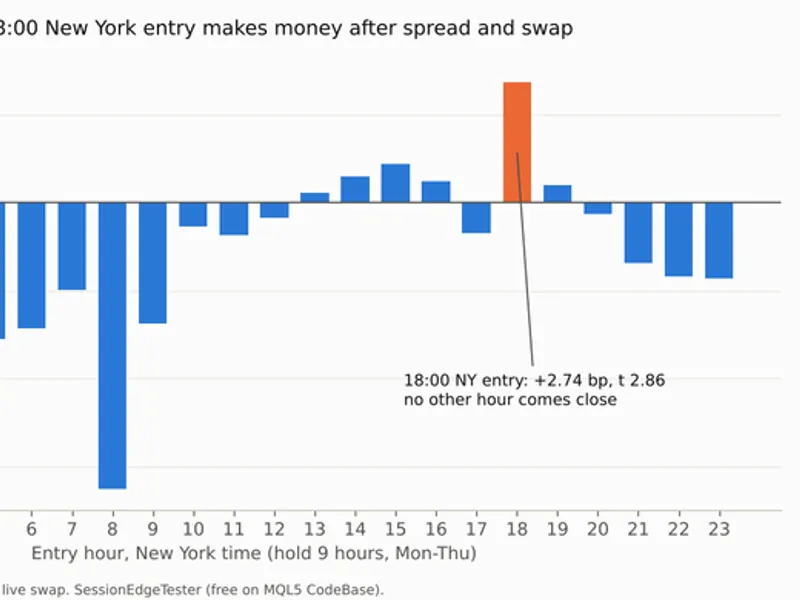
The tool simulates buying or selling on specific weekdays at a defined entry hour and exits after a set duration.
Each simulated trade accounts for costs including the greater of 1.5x the live spread or the spread at entry, plus any commission, and swap fees for each server midnight crossed (with triple swaps on rollover days).
Entry times can be specified in server, New York, or London time. The system correctly handles daylight saving, maintaining the rule's adherence to the same clock hour throughout the year across different broker time conventions (GMT and New York-close at GMT+2/+3).
An optional percentage-based stop-loss is included, which is checked against the High/Low of H1 bars.
Report Details
The report includes all simulated trades, segmented into the first 60% and the last 40% of the historical data to provide an out-of-sample evaluation. A PASS / WATCH / FAIL verdict is assigned based on performance.
Results are presented before swap costs, broken down by weekday and by year.
A baseline analysis is performed by simulating the same holding period started at every other hour. If most alternative hours perform similarly, it suggests the observed
You may also like: Edge Drift Detector: Identify and Quantify Strategy Performance Degradation - excellent alternative for script users on MetaTrader 5.
Source Code
#property copyright "RobotFX"
#property link "https://robotfx.org"
#property version   "1.00"
#property description "This code is educational. Feel free to use, modify and upgrade as you wish. Visit ROBOTFX.ORG for professional trading tools"
#property script_show_inputs
enum ENUM_CLOCK  { CLOCK_SERVER=0, CLOCK_NEWYORK=1, CLOCK_LONDON=2 };
enum ENUM_SERVER { SRV_FIXED_NOW=0, SRV_NY_PLUS7=1, SRV_GMT=2 };
input string      Sym          = "";
input bool        GoLong       = true;
input ENUM_CLOCK  Clock        = CLOCK_NEWYORK;
.......
⚠ Limitations & Risk Warning
- This tool is provided for educational and testing purposes only.
- Past performance does not guarantee future results.
- Trading involves substantial risk of loss. Use on a demo account first.
- Results may vary depending on market conditions, broker, and settings.
- We recommend thorough backtesting and forward testing before using with real funds.