






Kalman Filter: Exact Diffuse Initialization for Local Level and Time-Varying Hedge Ratio Models
Info
The Kalman Filter: Exact Diffuse Initialization for Local Level and Time-Varying Hedge Ratio Models is a Script for MetaTrader 5 that kalman. mqh provides a Kalman filter and smoother for linear Gaussian state space models with one observation per bar.
Usage
This tool is typically used for hedging and risk management in volatile market conditions.
Platform
This Script works exclusively on MetaTrader 5 (both build 600+ and newer versions).
Setup
Place the downloaded file in MQL5/Scripts folder via File ? Open Data Folder in MetaTrader 5.
How to Install and Use Kalman Filter: Exact Diffuse Initialization for Local Level and Time-Varying Hedge Ratio Models
1. Installation: Move your script file into the MQL/Scripts directory and restart the platform.
2. Execution: Drag the script onto a chart; it will perform a one-time action, such as closing all open orders or clearing chart objects.
3. Editing: Use MetaEditor (F4) to modify code, click "Compile," and verify no errors appear in the terminal before running.
4. Removing: Scripts stop automatically, but you can remove them manually by right-clicking the chart and choosing "Remove Script."
Frequently Asked Questions
Q: How are scripts different from EAs? A: Scripts execute a single action and then stop; EAs monitor the market and trade continuously.
Q: Can I assign a hotkey to a script? A: Yes, right-click the script in the Navigator, select "Set Hotkey," and define your preferred keyboard shortcut.
Q: Why did my script stop? A: Scripts are designed to stop immediately after finishing their programmed command; this is normal behavior.
What this tool does
Kalman.
Typical Use Case
This Script excels in automated trading and technical analysis on MetaTrader 5.
Compatible Platform & Setup
This Script works on MetaTrader 5. Place the file in the MQL5/Scripts folder and restart the terminal.
Description & Settings
Related: MT5 to MT4 Set File Converter - another powerful script for MetaTrader 5 traders.
Kalman.mqh provides a Kalman filter and smoother for linear Gaussian state space models with one observation per bar. It utilizes the exact diffuse initialization method from Durbin and Koopman, eliminating the need to guess initial states or large starting variances. It supports missing values and estimates variances via maximum likelihood for three pre-defined models: - A local level model (a drifting level observed with noise). - A local linear trend model. - A regression model with drifting coefficients, suitable for applications like time-varying hedge ratios. This implementation does not require external DLLs.Also recommended: Close Orders by Symbol and Type - similar script with strong performance on MetaTrader 5.
Usage
#include
For custom models of the form y(t) = Z(t) a(t) + e(t), a(t+1) = T a(t) + w(t), you can use SetModel(Z, T, Q, H) followed by Filter(y) and Smooth(). The SetDynamicRegression() function allows fitting a regression with specified variances instead of estimating them.
Output Details
The tool provides: - Filtered states (based on data up to each bar, useful for real-time analysis). - Smoothed states (based on all available data). - Standard deviations for both filtered and smoothed states. - One-step ahead forecast errors and their variances. - Forecasts of the observation variable 'y' with associated variances.
The log-likelihood (using exact diffuse initialization), AIC, and BIC values are also reported, along with the number of diffuse bars identified.
Variance Estimation:
Variances are estimated using maximum likelihood on their logarithms. The estimation process involves a grid search over 20 initial points, followed by BFGS optimization from the three best starting points, and a final Nelder-Mead polish. This approach helps in finding the global maximum, especially for regression models where the likelihood function might have multiple peaks.
Numerical Stability Considerations:
The diffuse period is managed by tracking the rank reduction of diffuse directions. A test on the diffuse variance size fails when two prices are nearly identical, ensuring robustness.
For regression models, regressors are centered internally. This exact coordinate transformation of the state ensures accurate results when converted back. Without this, models involving raw log prices (e.g., gold) alongside an intercept can lead to ill-conditioned state covariances, significantly impacting the accuracy of smoothed hedge ratio standard deviations. This implementation maintains high precision (within 6e-6) even in such challenging cases.
The optimization routine employs a separate likelihood calculation on plain arrays, enabling efficient fitting. For instance, fitting 2,000 bars typically takes between 10 to 400 milliseconds.
Example Usage:
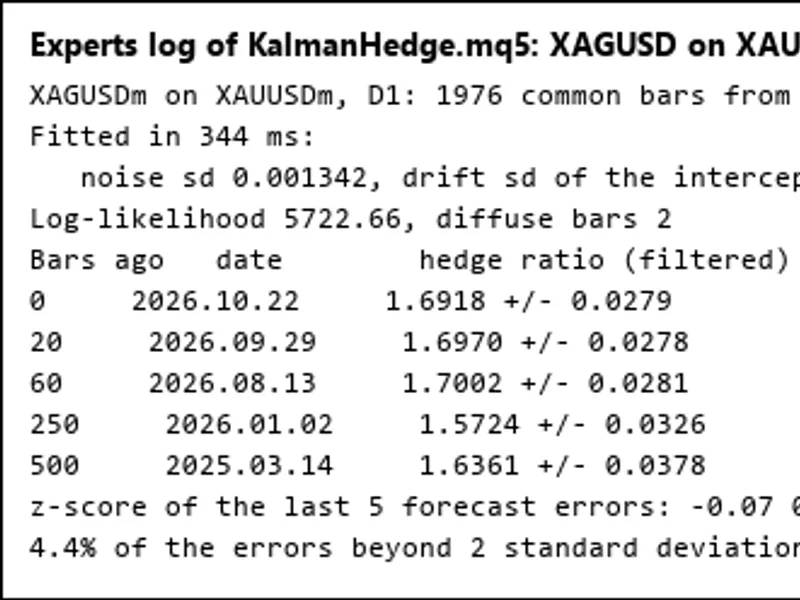
The KalmanHedge.mq5 script demonstrates fitting a regression model (e.g., one symbol on another's log prices). It outputs fitted variances, the hedge ratio's current value and historical estimates (with standard deviations), and smoothed values. It also reports z-scores of forecast errors, which can serve as trading signals for Kalman pair trading strategies. The script can optionally export the bar-by-bar hedge ratio to a CSV file.
Verification:
The tool has been rigorously tested on six datasets (simulated local level, local level with 10% missing values, simulated local linear trend, log price of gold, simulated regression, and silver on gold H4). Results were compared against the state space models in statsmodels version 0.15 (using exact diffuse initialization) and a 40-digit precision computation of the same recursions.
- Number of diffuse bars matched.
- Log-likelihoods and smoothed states are within 2e-11 of 40-digit values.
- Smoothed standard deviations are within 2e-9 (except for silver on gold, where it's within 6e-6).
- statsmodels showed deviations up to 7e-9 in log-likelihood and 2e-2 in standard deviations on the same data.
- Maximum likelihood variance estimates and likelihood values align closely with statsmodels (within 3e-7) across all tested series.
File Locations:
- Kalman.mqh should be placed in the MQL5\Include\Kalman directory.
- KalmanHedge.mq5 should be placed in the MQL5\Scripts\Kalman directory.
You may also like: Key Points Indicator - excellent alternative for script users on MetaTrader 5.
Source Code
#property copyright "RobotFX"
#property version     "1.00"
#property script_show_inputs
#include <Kalman\Kalman.mqh>
input string          InpY      = "XAGUSD";
input string          InpX      = "XAUUSD";
input ENUM_TIMEFRAMES InpPeriod = PERIOD_D1;
input int             InpBars   = 2000;
input bool            InpLog    = true;
input string          InpCsv    = "";
.......
⚠ Limitations & Risk Warning
- This tool is provided for educational and testing purposes only.
- Past performance does not guarantee future results.
- Trading involves substantial risk of loss. Use on a demo account first.
- Results may vary depending on market conditions, broker, and settings.
- We recommend thorough backtesting and forward testing before using with real funds.