

Session Time: Broker Server Time Conversion with Daylight Saving
Info
The Session Time: Broker Server Time Conversion with Daylight Saving is a Expert Advisor for MetaTrader 5 that session hours are defined in the exchange's local time, but the chart displays the broker's server time. The difference between these times varies depending on the broker and changes twice a year.
Usage
This tool is typically used for automated trading on major forex pairs and gold.
Platform
This Expert Advisor works exclusively on MetaTrader 5 (both build 600+ and newer versions).
Setup
Place the downloaded file in MQL5/Experts folder via File ? Open Data Folder in MetaTrader 5.
How to Install and Use Session Time: Broker Server Time Conversion with Daylight Saving
1. Installation: Open the "File" menu, select "Open Data Folder," navigate to MQL/Experts, paste your file, and restart the terminal.
2. Activation: Drag the EA from the Navigator onto a chart, ensure "Allow live trading" is checked in the Common tab, and verify the AutoTrading button is green.
3. Optimization: Right-click your chart, choose "Expert List," click "Properties" to adjust inputs, and save your preferred setup as a set file for future use.
4. Maintenance: Regularly check the "Experts" tab in the terminal window to monitor trade logs and potential execution errors.
Frequently Asked Questions
Q: Why is my EA not opening trades? A: Check the "AutoTrading" button, ensure "Allow live trading" is enabled, and verify your broker allows automated trading on your account type.
Q: Can I run multiple EAs on one chart? A: No, each chart can only host one active EA; however, you can open multiple charts for different currency pairs to run several EAs.
Q: What does the "smiley face" icon mean? A: A smiley face in the top-right corner of the chart indicates the EA is successfully running; a frowny face means it is disabled.
What this tool does
Session hours are defined in the exchange's local time, but the chart displays the broker's server time.
Typical Use Case
This Expert Advisor excels in automated trading and technical analysis on MetaTrader 5.
Compatible Platform & Setup
This Expert Advisor works on MetaTrader 5. Place the file in the MQL5/Experts folder and restart the terminal.
Description & Settings
Related: Giano Session Range Breakout EA - another powerful expert for MetaTrader 5 traders.
Session hours are defined in the exchange's local time, but the chart displays the broker's server time. The difference between these times varies depending on the broker and changes twice a year. Notably, the US and Europe do not adjust their clocks on the same dates.Also recommended: Spread Session Recorder - similar expert with strong performance on MetaTrader 5.
For instance, in 2026, the US adjusted its clocks on March 8, while Europe made its adjustments on March 29. In the autumn, Europe reverted its clocks on October 25, and the US followed on November 1.
Consider a GMT+2 server that follows US daylight saving rules. For most of the year, the London open occurs at 10:00 server time. However, during the transition weeks, this shifts to 11:00 server time. Code that relies on fixed server hours will be inaccurate by one hour for approximately four weeks annually.
SessionTime.mqh is an include file designed to address this. It models the server time by accounting for a winter offset and an additional hour during the server's daylight-saving period, supporting US, EU, or no daylight saving rules. This model facilitates the conversion of any time zone to server time and vice versa.
To use this functionality, include SessionTime.mqh in your indicator or Expert Advisor that requires session times, range windows, or time filters based on local market time.
Main Functions
- ST_ZoneToServer(broker, zone, zoneTime): Converts session time from London, New York, Tokyo, Sydney, or GMT to server time.
- ST_ServerToUtc(broker, serverTime): Converts server time to UTC.
- ST_UtcToServer(broker, utc): Converts UTC to server time.
- ST_ZoneToUtc(zone, zoneTime): Converts zone time to UTC, performing a two-pass conversion to correctly handle hours around clock changes.
- ST_UsDst(utc): Checks if US daylight saving is in effect at a given UTC moment.
- ST_EuDst(utc): Checks if EU daylight saving is in effect at a given UTC moment.
- ST_AuDst(utc): Checks if Australian daylight saving is in effect at a given UTC moment.
- ST_DetectWinterOffset(rule, winter): For live charts only. Reads TimeTradeServer() and TimeGMT() after terminal connection to determine and remove the summer hour offset. In the Strategy Tester, TimeGMT() reflects the simulated server time, so an input parameter should be used there.
- ST_ParseHM("08:30"): Parses a "HH:MM" string into minutes past midnight.
Example Usage
#include <SessionTime.mqh>
ST_Broker b;
b.winter = 2; // GMT+2 in winter
b.dst = ST_DST_US; // Follows US daylight saving
datetime londonOpen = ST_ZoneToServer(b, ST_ZONE_LONDON, D'2026.03.16 08:00'); // Results in 11:00 server time
Included Files
- SessionTimeCheck.mq5 (script): This script executes 15 pre-calculated test cases, including sessions for London, New York, Tokyo, and Sydney, and accounts for brokers using US and EU daylight saving rules. It specifically checks Friday 17:00 New York time against 00:00 server time. The script allows input for the broker's winter offset, daylight-saving rule, and the year. All 15 cases have been verified on MetaTrader 5.
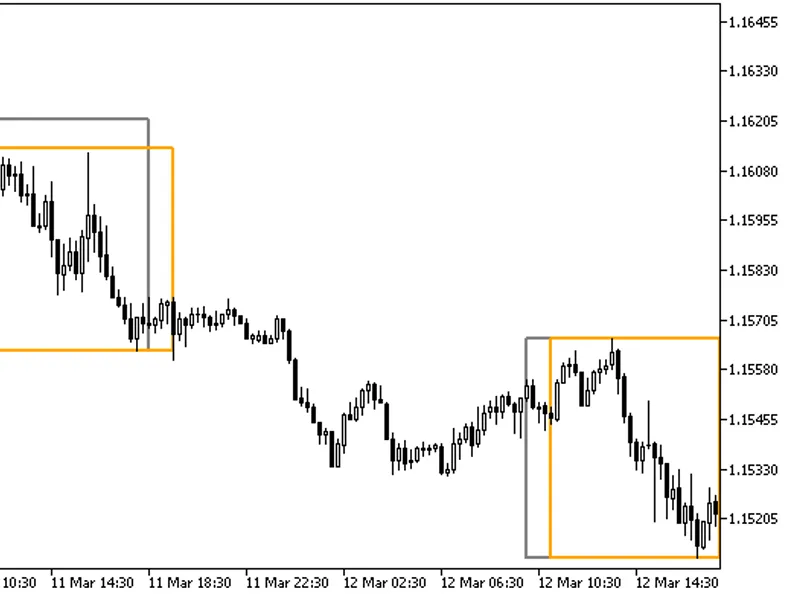
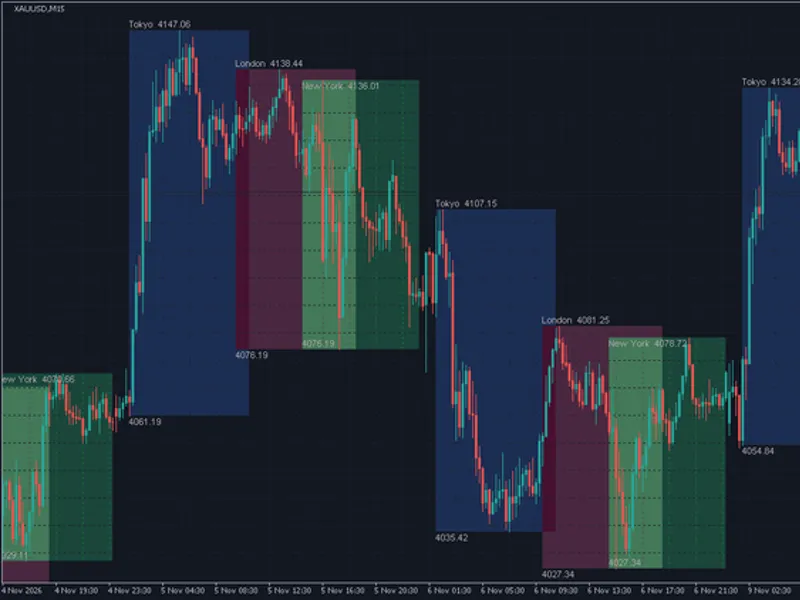
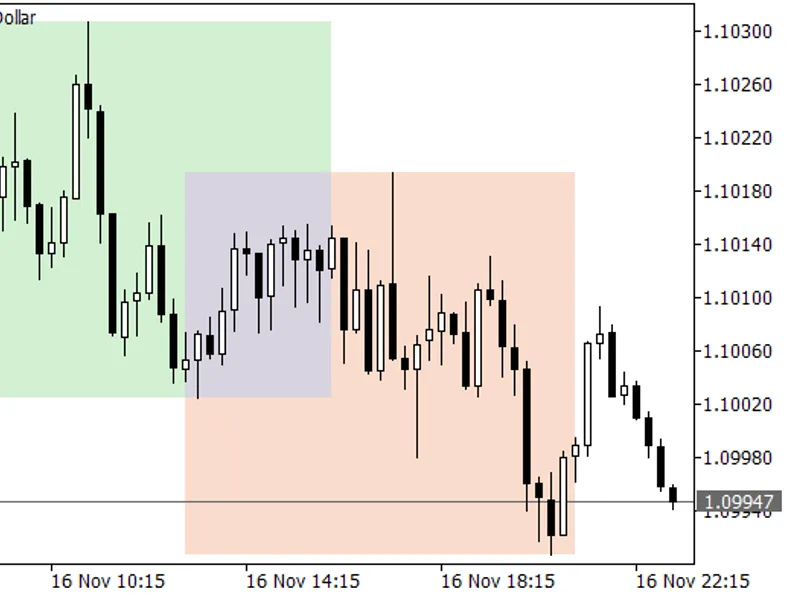
The accompanying screenshot illustrates EURUSD on an M15 chart from March 11-12, 2026. It displays boxes drawn using ST_ZoneToServer(). The orange box represents the London session (08:00-16:30 London time) converted daily, while the grey box uses fixed server hours of 10:00-18:30. In typical weeks, these boxes align perfectly.
Limitations: The US daylight saving rules are based on those in effect since 2007, and EU rules are as they are currently implemented. This tool does not model half-hour broker offsets or broker-specific holiday hours.
You may also like: EMA Cross Scalper for XAUUSD (M15) with WIB Session Filter - excellent alternative for expert users on MetaTrader 5.
Source Code
#property copyright "RobotFX"
#property link "https://robotfx.org"
#property script_show_inputs
#include <SessionTime.mqh>
input int         InpWinter = 2;
input ENUM_ST_DST InpDst    = ST_DST_US;
input int         InpYear   = 2026;
int g_fail = 0;
void Check(const string what, const datetime got, const datetime expected)
  {
.......
⚠ Limitations & Risk Warning
- This tool is provided for educational and testing purposes only.
- Past performance does not guarantee future results.
- Trading involves substantial risk of loss. Use on a demo account first.
- Results may vary depending on market conditions, broker, and settings.
- We recommend thorough backtesting and forward testing before using with real funds.