
Edge Drift Detector: Identify and Quantify Strategy Performance Degradation
Info
The Edge Drift Detector: Identify and Quantify Strategy Performance Degradation is a Script for MetaTrader 5 that a live expert advisor can remain profitable long after its trading edge has diminished. The Edge Drift Detector addresses this by statistically testing whether live closing deals originate from the same distribution as the backtest.
Usage
This tool is typically used for enhancing chart analysis and decision making.
Platform
This Script works exclusively on MetaTrader 5 (both build 600+ and newer versions).
Setup
Place the downloaded file in MQL5/Scripts folder via File ? Open Data Folder in MetaTrader 5.
How to Install and Use Edge Drift Detector: Identify and Quantify Strategy Performance Degradation
1. Installation: Move your script file into the MQL/Scripts directory and restart the platform.
2. Execution: Drag the script onto a chart; it will perform a one-time action, such as closing all open orders or clearing chart objects.
3. Editing: Use MetaEditor (F4) to modify code, click "Compile," and verify no errors appear in the terminal before running.
4. Removing: Scripts stop automatically, but you can remove them manually by right-clicking the chart and choosing "Remove Script."
Frequently Asked Questions
Q: How are scripts different from EAs? A: Scripts execute a single action and then stop; EAs monitor the market and trade continuously.
Q: Can I assign a hotkey to a script? A: Yes, right-click the script in the Navigator, select "Set Hotkey," and define your preferred keyboard shortcut.
Q: Why did my script stop? A: Scripts are designed to stop immediately after finishing their programmed command; this is normal behavior.
What this tool does
A live Expert Advisor can remain profitable long after its trading edge has diminished.
Typical Use Case
This Script excels in automated trading and technical analysis on MetaTrader 5.
Compatible Platform & Setup
This Script works on MetaTrader 5. Place the file in the MQL5/Scripts folder and restart the terminal.
Description & Settings
Related: Kalman Filter: Exact Diffuse Initialization for Local Level and Time-Varying Hedge Ratio Models - another powerful script for MetaTrader 5 traders.
A live Expert Advisor can remain profitable long after its trading edge has diminished. The Edge Drift Detector addresses this by statistically testing whether live closing deals originate from the same distribution as the backtest. It determines if the average result per deal has declined towards zero.Also recommended: Edge or Luck: A Bootstrap Test for Your Average Trade - similar script with strong performance on MetaTrader 5.
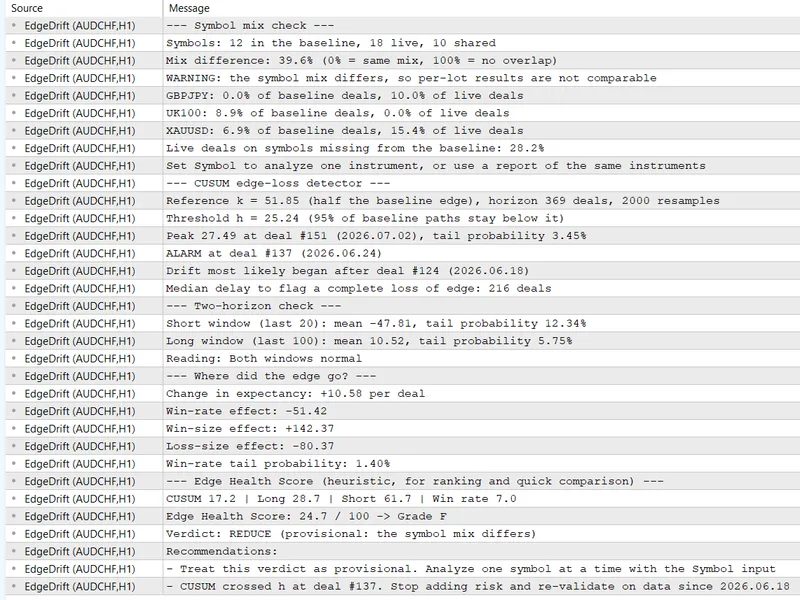
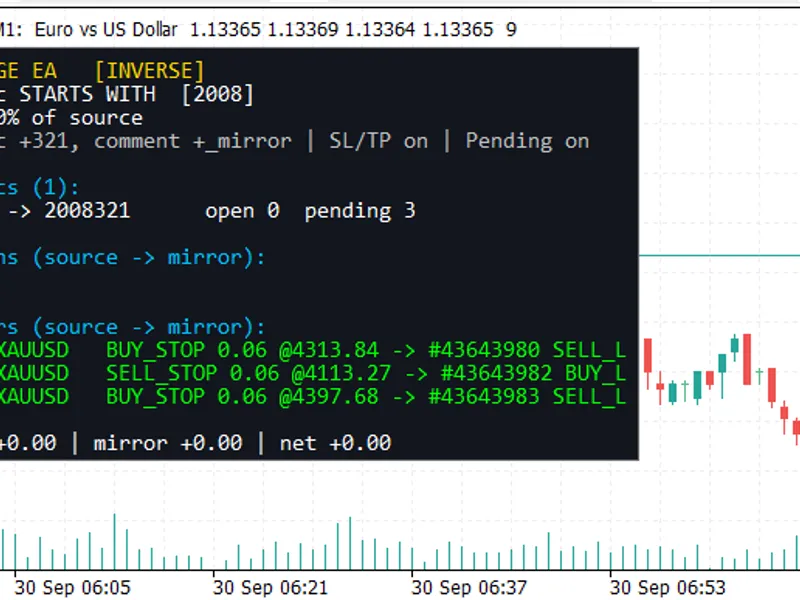
The script analyzes two data sources (typically CSV files or account history) and generates a comprehensive report in the Experts tab.
Key analysis components include:
- CUSUM Edge-Loss Detector: An alarm threshold calibrated using bootstrap analysis of backtest deals, with a user-defined false-alarm rate over a specified monitoring horizon.
- Drift Start: Identifies the specific deal and date after which performance drift likely began.
- Two-Horizon Check: Provides bootstrap tail probabilities for the most recent 20 and 100 deals.
- Expectancy Decomposition: Breaks down the change in trading expectancy into contributions from win-rate, average win size, and average loss size.
- Symbol Mix Check: Issues a warning if the live trading account utilizes a different mix of instruments compared to the baseline data, as per-lot results for different symbols are not directly comparable.
- Detection Delay: Estimates the median number of deals required to confirm a complete loss of edge for the strategy.
- Edge Health Score: Assigns a grade from A+ to F, accompanied by a verdict (CONTINUE, WATCH, REDUCE, or SUSPEND) and actionable recommendations.
Input and Usage:
No code modifications to your Expert Advisor are necessary. First, backtest your Expert Advisor. Then, right-click the backtest results, select 'Report,' and save it as an HTML file in the common 'Files' folder. Subsequently, run the EdgeDrift.mq5 script on your live account, ensuring it uses the correct magic number for your Expert Advisor. The script automatically locates the newest 'ReportTester*.html' file and reads live deal data from the account history. On the initial run, before any report is generated, the script will provide instructions and analyze built-in demonstration data. Two alternative data source configurations are supported: using a CSV baseline file and live account history, or using baseline data from the same account prior to a specified date. The optional DriftExport.mq5 helper script can export live trading deals to a CSV file if your account is running on a different terminal.
Files:
Both scripts (EdgeDrift.mq5 and DriftExport.mq5) should be placed in the MQL5\Scripts\EdgeDrift directory. The provided MQL5.zip archive includes this folder structure.
Parameters:
- InpBaseSource: Defines the source for baseline data (Tester report, CSV file, or account history).
- InpLiveSource: Defines the source for live trading data (account history or CSV file).
- InpMagic, InpSymbol, InpLiveFrom: Filters for selecting specific deals.
- InpMaxMixGap: Sets the maximum permissible difference in symbol mix to avoid a warning.
- InpHorizon: Specifies the planned monitoring horizon in terms of number of deals.
- InpAlpha: Sets the acceptable false-alarm probability over the monitoring horizon.
- InpShortWindow and InpLongWindow: Define the lookback periods for the two-horizon check.
- InpBootstrap and InpSeed: Control the resampling process for reproducibility.
- InpPerLot: Normalizes all results to a one-lot trade size.
- Additional inputs control score weighting, healthy tail probability levels, and grading boundaries.
You may also like: Edge Meter: Does Your Entry Signal Profit After Costs? - excellent alternative for script users on MetaTrader 5.
Source Code
#property copyright "RobotFX"
#property link "https://robotfx.org"
#property version   "1.21"
#property description "This code is educational. Feel free to use, modify and upgrade as you wish. Visit ROBOTFX.ORG for professional trading tools"
#property script_show_inputs
#define DEMO_BASE_FILE "DemoBase.csv"
#define DEMO_LIVE_FILE "DemoLive.csv"
enum ENUM_BASE_SOURCE
  {
   BASE_TESTER_REPORT,
.......
⚠ Limitations & Risk Warning
- This tool is provided for educational and testing purposes only.
- Past performance does not guarantee future results.
- Trading involves substantial risk of loss. Use on a demo account first.
- Results may vary depending on market conditions, broker, and settings.
- We recommend thorough backtesting and forward testing before using with real funds.