






Mirror Hedge EA: Reverse Trading Strategies in Real-Time
Info
The Mirror Hedge EA: Reverse Trading Strategies in Real-Time is a Expert Advisor for MetaTrader 5 that overview:many expert advisors (eas) consistently incur losses. This tool allows you to discover in real-time if reversing their trades leads to profitability, using live or demo accounts.
Usage
This tool is typically used for hedging and risk management in volatile market conditions.
Platform
This Expert Advisor works exclusively on MetaTrader 5 (both build 600+ and newer versions).
Setup
Place the downloaded file in MQL5/Experts folder via File ? Open Data Folder in MetaTrader 5.
How to Install and Use Mirror Hedge EA: Reverse Trading Strategies in Real-Time
1. Installation: Open the "File" menu, select "Open Data Folder," navigate to MQL/Experts, paste your file, and restart the terminal.
2. Activation: Drag the EA from the Navigator onto a chart, ensure "Allow live trading" is checked in the Common tab, and verify the AutoTrading button is green.
3. Optimization: Right-click your chart, choose "Expert List," click "Properties" to adjust inputs, and save your preferred setup as a set file for future use.
4. Maintenance: Regularly check the "Experts" tab in the terminal window to monitor trade logs and potential execution errors.
Frequently Asked Questions
Q: Why is my EA not opening trades? A: Check the "AutoTrading" button, ensure "Allow live trading" is enabled, and verify your broker allows automated trading on your account type.
Q: Can I run multiple EAs on one chart? A: No, each chart can only host one active EA; however, you can open multiple charts for different currency pairs to run several EAs.
Q: What does the "smiley face" icon mean? A: A smiley face in the top-right corner of the chart indicates the EA is successfully running; a frowny face means it is disabled.
What this tool does
Overview:Many Expert Advisors (EAs) consistently incur losses.
Typical Use Case
This Expert Advisor excels in automated trading and technical analysis on MetaTrader 5.
Compatible Platform & Setup
This Expert Advisor works on MetaTrader 5. Place the file in the MQL5/Experts folder and restart the terminal.
Description & Settings
Related: Triangle Hedge: Synthesizing Hedged Positions in MetaTrader 5 - another powerful expert for MetaTrader 5 traders.
Overview:Also recommended: Simple Hedge Panel for MT4/MT5 - similar expert with strong performance on MetaTrader 5.
Many Expert Advisors (EAs) consistently incur losses. This tool allows you to discover in real-time if reversing their trades leads to profitability, using live or demo accounts.MirrorHedgeEA monitors an account for trades initiated by another EA or manual trading. It replicates these trades based on specified magic-number rules. The EA manages market positions, pending orders, Stop Loss/Take Profit modifications, partial closes, and closures. Each mirrored trade is uniquely identified with its own magic number and comment, making it easy to distinguish mirrored results from original trades in the History tab.
Trade mirroring operates within a single account at a single broker. It does not involve cross-account or cross-server communication.
The EA can be attached to any chart; for instance, it can mirror positions for XAUUSD even when placed on the EURUSD chart.
Features
Flexible Source Selection:
Specify one or more comma-separated magic patterns. These can be matched using 'starts with' (default), 'contains', or 'exact' rules.
Lot Size Modes:
Options include 'same as source' (default), 'fixed lot', or a 'percentage of the source lot'. Volumes are automatically adjusted to the symbol's minimum step and clamped within its minimum and maximum limits.
Inverse Mode (Enabled by Default):
- Buy orders are reversed to Sell orders, and Sell orders to Buy orders.
- The source Take Profit becomes the mirror's Stop Loss, and the source Stop Loss becomes the mirror's Take Profit, both at the same price levels.
- Pending orders retain their price levels but are transformed: Buy Limit becomes Sell Stop, Buy Stop becomes Sell Limit, and so on.
Full Lifecycle Synchronization:
The EA synchronizes opens, pending order placement, price/Stop Loss/Take Profit/expiration modifications, partial closes (in 'Same' and '%' modes), closures, and pending order deletions.
Traceable Mirrors:
- The mirror magic number is generated by appending a suffix to the source magic number (e.g., 808 becomes 808321).
- The mirror comment is created by appending a suffix to the source comment (e.g., _mirror).
Restart-Safe:
- Connections between source trades and mirrored trades persist through EA restarts.
- A mirror trade closed by its own Stop Loss or Take Profit will not be reopened.
Information Panel:
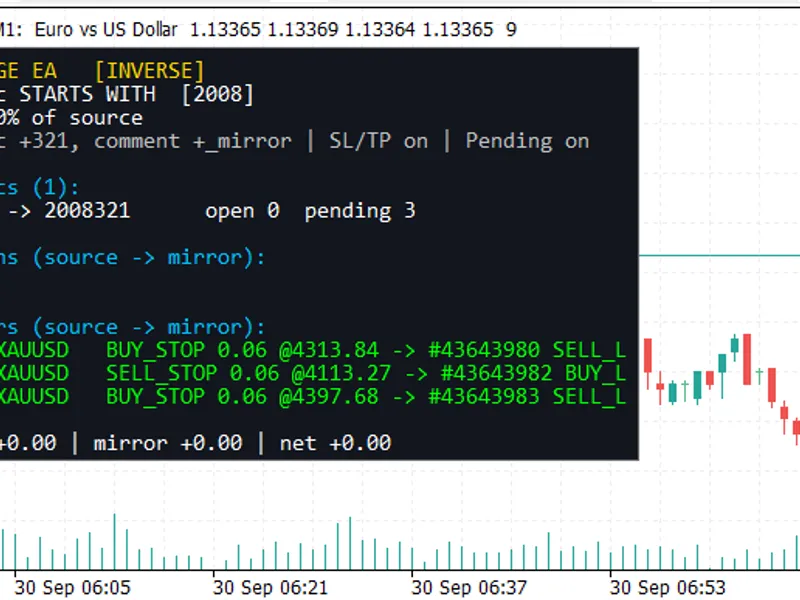
Displays the active mirroring rule, lot size mode, source magic numbers being copied along with their corresponding mirror magic numbers, each source position or pending order alongside its mirror, and the net Profit/Loss for sources, mirrors, and the combined total.
Input Parameters
Parameter
Default
Description
Source magic pattern(s)
1001
Comma-separated magic patterns of trades to copy.
Magic match rule
Starts with
Rule for matching magic patterns: Starts with, Contains, or Exact match.
Mirror magic suffix
321
Suffix added to source magic to create the mirror magic.
Mirror comment suffix
_mirror
Suffix added to source comment to create the mirror comment (maximum 31 characters).
Inverse direction
true
Reverses trade direction (Buy/Sell) and swaps SL/TP roles.
Lot size mode
Same as source
Determines lot size: Same as source, Fixed lot, or Percentage of source lot.
Fixed lot / Lot percent
0.01 / 100
Values used for Fixed lot or Percentage of source lot size modes.
Mirror pending orders
true
Enables copying of pending orders.
Mirror SL/TP
true
Enables copying of Stop Loss and Take Profit levels and their subsequent modifications.
Sync partial closes
true
Synchronizes partial closes (only for 'Same' and '%' lot size modes).
Mirror existing trades
true
Copies trades that were already open when the EA was started.
Max slippage / Sync interval
20 pts / 100 ms
Settings for order execution slippage and synchronization polling frequency.
Panel settings
–
Options for the information panel: Show/hide, position, width, font size, and maximum rows.
Setup
The account type must be a hedging account. This EA will not run on netting accounts.
Attach the EA to any chart and ensure 'Algo Trading' is enabled.
Set the 'Source magic pattern' to the magic number of the EA or manual trades you wish to mirror.
Verify on the information panel: the source magic should be listed under 'Copying magics', and each trade should display its corresponding mirror.
Utility for Testing Reversed Strategies
A common hypothesis is: "This strategy loses in backtests, so its opposite must be profitable." Inverting a backtest manually often results in an inaccurate Profit/Loss calculation that simply flips the sign of the original P/L. This approach is generally flawed.
Costs are Doubled:
If the source Profit/Loss is calculated as gross edge minus costs, the mirrored P/L becomes negative gross edge minus costs, not simply the negative of the original P/L. A strategy primarily affected by spread and commission will not become profitable when inverted, as the mirrored trades incur the same costs. Manual inversion overestimates the potential result by approximately double the trading costs.
Spread Asymmetry:
Buy orders are opened at the ask price and closed at the bid price. Sell orders operate in the reverse manner. The mirror's stop orders may trigger on a different price side compared to the source's, particularly when spread widens, potentially causing one to trigger and the other not.
Execution Delay:
Since the mirror trade is executed after the source trade, slippage in fast-moving markets can affect it differently.
Stop Loss/Take Profit Asymmetry:
A system with a tight Take Profit and wide Stop Loss typically exhibits a high win rate. Its inverse results in a low win rate with potentially large winning trades, and the specific path of price movement to each level becomes significant.
Swap Rates:
Long and short swap rates often differ, leading to different holding costs for the mirrored trades.
Tester Assumptions:
Simulated ticks and fixed spreads in testing environments do not account for broker-specific behaviors such as stop levels, freeze levels, requotes, and partial fills.
By running this EA on a demo or small live account alongside the original strategy, both will interact with the same live market data and execution conditions. Consequently, the mirrored results will accurately reflect all these real-world effects. You can filter the mirrored trades by their magic number in the History tab to evaluate the inverted strategy independently. The information panel provides an at-a-glance view of the combined source, mirror, and net Profit/Loss.
As the mirror functions as a hedge, the source and mirrored positions will offset each other on the account. Net equity changes are primarily influenced by trading costs. This design positions the EA as a measurement tool rather than a profit-generating strategy. If the mirrored trades demonstrate a genuine edge after accounting for costs over a sufficient period, you might consider running the inverted strategy as a standalone system in a separate account.
Limitations
Hedging Accounts Only:
This EA requires a hedging account type and will not function on netting accounts.
Stop-Limit Orders:
Exact inverses for stop-limit orders do not exist, so they are skipped when Inverse Mode is active.
Fixed Lot Mode with Partial Closes:
In fixed lot mode, partial closes are not mirrored.
Magic Number Length:
Magic numbers exceeding 15 digits cannot accommodate the suffix and will be skipped.
Link Persistence:
Source-to-mirror links are stored in terminal global variables. These links can be broken if the variables are deleted or if they remain inactive for approximately 4 weeks.
Disclaimer:
This EA is a testing tool and does not guarantee profits. It is recommended to test on a demo account before deploying on a live account.
You may also like: Cross Contest Hedged Moving Average Intersection EA - excellent alternative for expert users on MetaTrader 5.
Source Code
#property copyright "RobotFX"
#property link "https://robotfx.org"
#property version   "1.00"
#property description "This code is educational. Feel free to use, modify and upgrade as you wish. Visit ROBOTFX.ORG for professional trading tools"
#include <Trade\Trade.mqh>
enum ENUM_MATCH_MODE
{
   MATCH_STARTS_WITH = 0,
   MATCH_CONTAINS    = 1,
   MATCH_EXACT       = 2
.......
⚠ Limitations & Risk Warning
- This tool is provided for educational and testing purposes only.
- Past performance does not guarantee future results.
- Trading involves substantial risk of loss. Use on a demo account first.
- Results may vary depending on market conditions, broker, and settings.
- We recommend thorough backtesting and forward testing before using with real funds.