






Regime Router: Trend/Range Classifier with Per-Regime Win Rate Ledger
Info
The Regime Router: Trend/Range Classifier with Per-Regime Win Rate Ledger is a Expert Advisor for MetaTrader 5 that regimerouter — trend/range classifier with a per-regime win rate ledgerthe problema trend-following rule loses money in a range. A mean-reversion rule gets destroyed in a trend.
Usage
This tool is typically used for trend following strategies across multiple currency pairs.
Platform
This Expert Advisor works exclusively on MetaTrader 5 (both build 600+ and newer versions).
Setup
Place the downloaded file in MQL5/Experts folder via File ? Open Data Folder in MetaTrader 5.
How to Install and Use Regime Router: Trend/Range Classifier with Per-Regime Win Rate Ledger
1. Installation: Open the "File" menu, select "Open Data Folder," navigate to MQL/Experts, paste your file, and restart the terminal.
2. Activation: Drag the EA from the Navigator onto a chart, ensure "Allow live trading" is checked in the Common tab, and verify the AutoTrading button is green.
3. Optimization: Right-click your chart, choose "Expert List," click "Properties" to adjust inputs, and save your preferred setup as a set file for future use.
4. Maintenance: Regularly check the "Experts" tab in the terminal window to monitor trade logs and potential execution errors.
Frequently Asked Questions
Q: Why is my EA not opening trades? A: Check the "AutoTrading" button, ensure "Allow live trading" is enabled, and verify your broker allows automated trading on your account type.
Q: Can I run multiple EAs on one chart? A: No, each chart can only host one active EA; however, you can open multiple charts for different currency pairs to run several EAs.
Q: What does the "smiley face" icon mean? A: A smiley face in the top-right corner of the chart indicates the EA is successfully running; a frowny face means it is disabled.
What this tool does
RegimeRouter — trend/range classifier with a per-regime win rate ledgerThe problemA trend-following rule loses money in a range.
Typical Use Case
This Expert Advisor excels in trend following on MetaTrader 5.
Compatible Platform & Setup
This Expert Advisor works on MetaTrader 5. Place the file in the MQL5/Experts folder and restart the terminal.
Description & Settings
Related: Regime HMM: Identifying Market Regimes with Hidden Markov Models - another powerful expert for MetaTrader 5 traders.
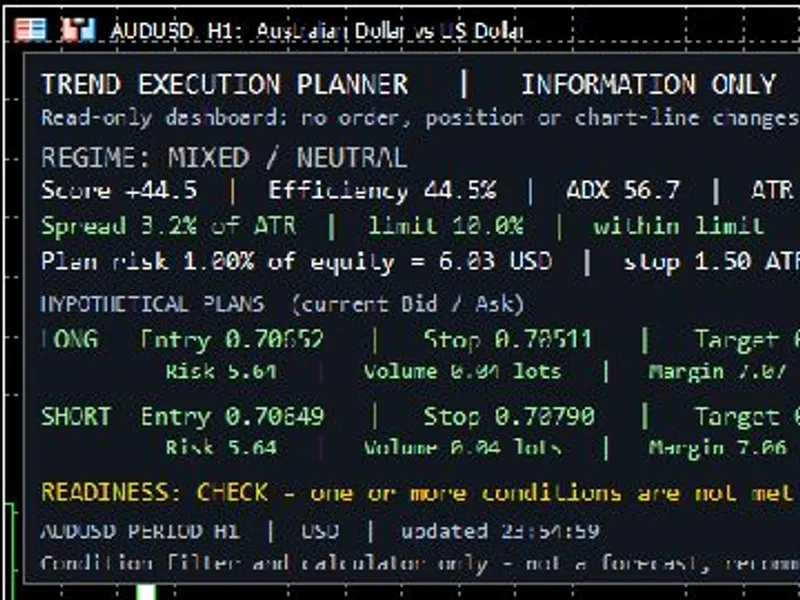
RegimeRouter — trend/range classifier with a per-regime win rate ledgerAlso recommended: Trend Execution Planner: Market Regime and Risk Analysis Panel - similar expert with strong performance on MetaTrader 5.
The problem
A trend-following rule loses money in a range. A mean-reversion rule gets destroyed in a trend. Most Expert Advisors (EAs) pick one strategy and hope the market cooperates. The usual fix is a single ADX filter. ADX measures directional strength but says nothing about whether returns are actually persistent or mean-reverting.
How it classifies
On every closed bar, it measures three independent properties of the recent price series:
ADX
- Classic directional strength.
Hurst exponent
- Rescaled range (R/S) analysis of log returns. Above 0.5, the series is persistent. Below 0.5, it is anti-persistent. At 0.5, it is a random walk.
Lag-1 autocorrelation
- Whether a move tends to be followed by another move in the same direction, or by a snap back.
Each indicator casts a vote: plus one for trend, minus one for range, zero for undecided. The votes are summed. If the sum clears the InpMinVotes threshold in either direction, the regime is TREND or RANGE. Otherwise, it is NEUTRAL, and the EA does not trade. If any one of the three indicators cannot be computed, it does not vote, and the bar is NEUTRAL. Requiring agreement is key; one indicator alone is a coin flip with extra steps.
How it routes
Regime
Module
TREND
Break of the N-bar high or low, taken only in the direction the fast and slow EMAs are already pointing.
RANGE
Fade a stretched z-score of price against its own moving average. Buy the low tail, sell the high tail.
NEUTRAL
No trades.
The ledger
Every position is opened with a magic number of InpMagicBase plus the regime ID, so the regime that produced a trade is stamped on the trade itself. On startup, the EA walks the deal history, groups deals by position ID, and rebuilds the record. It survives restarts and being moved to another terminal.
For each module, it reports the raw win rate, the Wilson 95% lower bound, the breakeven win rate implied by that module's own average win and average loss, the profit factor, and a verdict.
Example:
TREND 96 tr 38 W raw 39.6% wilson95 30.4% breakeven 34.2% PF 1.26 net +734.84 [UNPROVEN]
The middle two numbers are critical. A 2R trend follower is profitable above roughly 34%. A 1R fade needs better than 50%. A raw win rate from six trades is not evidence of anything. The verdict is simply whether the lower bound clears breakeven, which is the only reliable measure of whether a module is working, especially in small samples.
The A/B switch
InpForceRegime disables the router and forces every trade through one module. Run the same symbol and timeframe three times: first in AUTO, then ALWAYS_TREND, then ALWAYS_RANGE. This provides a direct measurement of whether the classifier is adding value. The three runs are logged, allowing comparison of the forced module's performance on bars the router would have refused.
Perform this test before trusting the EA. The routing logic is a hypothesis, not a proven result.
Backtest
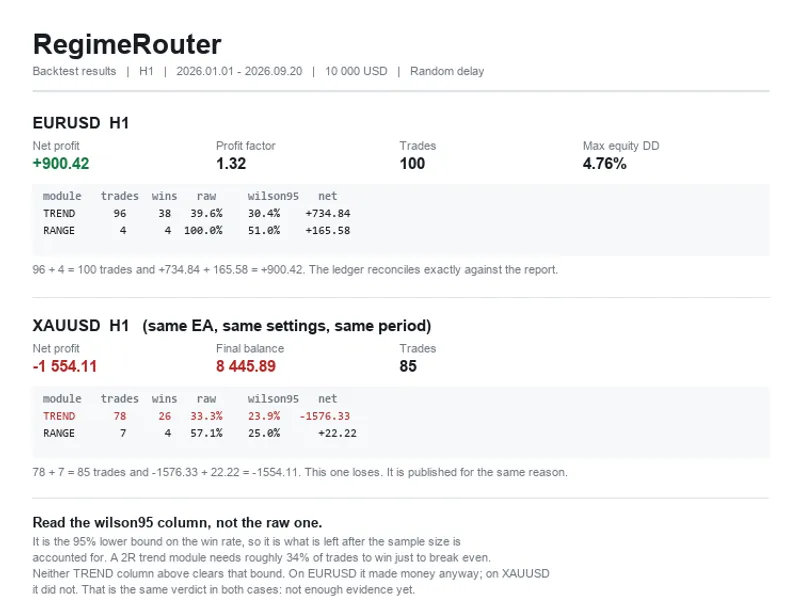
H1 · 2026.01.01 to 2026.09.20 · 10 000 USD · Random delay enabled · all inputs at default. Two symbols, both shown.
EURUSD H1
Metric
Value
Total net profit
+900.42
Gross profit / gross loss
3 712.84 / 2 812.42
Profit factor
1.32
Expected payoff
9.00
Recovery factor
1.71
Total trades
100
Maximal balance drawdown
505.32 (4.56%)
Maximal equity drawdown
527.80 (4.76%)
Module
Trades
Wins
Raw
Wilson 95% low
Net
TREND
96
38
39.6%
30.4%
+734.84
RANGE
4
4
100.0%
51.0%
+165.58
Note: 96 + 4 = 100 trades and +734.84 + 165.58 = +900.42. The ledger reconciles exactly with the tester report.
XAUUSD H1 — same EA, same settings, same period
Metric
Value
Total net profit
−1 554.11
Final balance
8 445.89
Total trades
85
Module
Trades
Wins
Raw
Wilson 95% low
Net
TREND
78
26
33.3%
23.9%
−1 576.33
RANGE
7
4
57.1%
25.0%
+22.22
Note: 78 + 7 = 85 trades and −1 576.33 + 22.22 = −1 554.11. This run loses money. It is published alongside the profitable run to demonstrate the EA's behavior across different market conditions, not just in favorable ones.
What that result does and does not show
Read this part before using the EA.
The TREND module is not proven on either symbol.
- On EURUSD, the average win was 93.35 and the average loss was 48.49. This means it needed approximately 34.2% of trades to win just to break even. The actual win rate was 39.6%. However, the Wilson 95% lower bound on this win rate is 30.4%, which is below breakeven. At this sample size, the result is consistent with no statistical edge.
- On XAUUSD, the same module reported a 33.3% raw win rate and 23.9% at the lower bound, resulting in a net loss. The verdict is the same in both cases: insufficient evidence yet.
It would take approximately 320 trades at the EURUSD win rate for the lower bound to clear breakeven. One symbol on H1 produced 100 trades in about nine months, indicating this is a portfolio problem rather than a problem solvable by simply extending the backtest period.
The RANGE module is essentially untested.
- Four trades on EURUSD and seven on XAUUSD. The 100% win rate on EURUSD is statistically meaningless, highlighting the importance of the Wilson column.
There is no out-of-sample test.
- This analysis covers one period, one timeframe, and two symbols.
Modelling was 'Every tick', not 'real ticks'.
- Exits are based on the broker's SL and TP, meaning intrabar price movement is crucial. Re-run the test using 'real ticks' before drawing firm conclusions.
The EA is published because the measurement and classification apparatus is valuable, not because a validated edge is being sold. Use the A/B switch test. If the router does not outperform its constituent modules on your specific symbol and timeframe, that outcome is also informative.
Execution notes
Signals are evaluated on bar close, making this EA suitable for M15 timeframe and higher.
Positions open with no initial stops. Stops are attached after the real fill price is confirmed. A stop calculated from a pre-trade snapshot might be invalid by the time the order executes.
If attaching stops fails, the position is immediately closed to prevent it from being left unprotected.
Stop distances are constrained by the symbol's specific stop level and freeze level.
Exits are determined by the broker's Stop Loss (SL) and Take Profit (TP) levels. There is no manual timed force-close mechanism.
An optional ATR trailing stop can be applied to trend trades. It is applied at most once per bar and never on the entry bar.
The EA manages only one position at a time. On a netting account, a subsequent order for the same symbol merges with the existing position rather than creating a new trade, which would corrupt the ledger data.
Features include risk-based lot sizing, a daily loss limit, a daily trade cap, a spread filter, a minimum take-profit-to-spread ratio, and an optional session filter.
Main inputs
Input
Default
What it does
InpForceRegime
Auto
Forces one module to be used, enabling A/B testing of the classifier.
InpMinVotes
2
The minimum number of votes (out of three) required to commit to a regime (TREND or RANGE).
InpADXTrendLevel
/
InpADXRangeLevel
25 / 20
ADX thresholds for voting on trend or range.
InpHurstBars
256
Number of past log returns used for the Hurst exponent estimate.
InpHurstAdaptive
off
When enabled, the Hurst exponent is judged against its own historical distribution rather than fixed levels.
InpAutoCorrThreshold
0.05
The minimum absolute value of autocorrelation required to cast a vote.
InpBreakoutBars
20
Trend module parameter: number of bars to break a high/low.
InpRangeZEntry
2.0
Range module parameter: the z-score level at which to fade the price movement.
InpRiskPercent
0.5
The percentage of account balance risked per trade.
InpMagicBase
772000
Base magic number. The regime ID is added to this number for each trade.
Note on the Hurst threshold
There is an input called InpHurstAdaptive, which is off by default.
The textbook threshold for the Hurst exponent distinguishing trend from range is 0.5. In practice, this threshold is often misplaced. The Rescaled Range (R/S) estimator is biased upward on a finite sample; therefore, a 256-bar estimate of an ordinary series typically lands well above 0.5. For example, on EURUSD H1, the readings averaged 0.568 and dropped below 0.45 only twice in 419 observations. Using a fixed 0.45 / 0.55 band means this indicator would almost always vote for TREND.
Turning InpHurstAdaptive on changes the scale analysis from an absolute one to a relative one: it asks if the current series persistence is higher or lower than this symbol has recently exhibited. The last N readings are stored, and the vote is cast based on percentiles of this history rather than against the fixed 0.5 level.
This adaptive mode has a consequence: by construction, it will vote RANGE on a fixed percentage of bars, regardless of the market's actual behavior. Thus, it acts as a switch rather than a dynamic adjustment. It is off by default because the backtests presented above were conducted with this setting disabled, and shipping with a default setting for which no results are available is undesirable.
No trading strategy is guaranteed to be profitable. This EA provides a structure for testing hypotheses with built-in measurement capabilities. It does not guarantee an edge.
You may also like: ks fair value gap ea with regime detection and dual sl/tp modes - excellent alternative for expert users on MetaTrader 5.
Source Code
#property copyright "RobotFX"
#property link "https://robotfx.org"
#property version   "1.00"
#property strict
#property description "This code is educational. Feel free to use, modify and upgrade as you wish. Visit ROBOTFX.ORG for professional trading tools"
#include <Trade/Trade.mqh>
CTrade trade;
#define REGIME_NEUTRAL 0
#define REGIME_TREND   1
#define REGIME_RANGE   2
.......
⚠ Limitations & Risk Warning
- This tool is provided for educational and testing purposes only.
- Past performance does not guarantee future results.
- Trading involves substantial risk of loss. Use on a demo account first.
- Results may vary depending on market conditions, broker, and settings.
- We recommend thorough backtesting and forward testing before using with real funds.