
Edge Meter: Does Your Entry Signal Profit After Costs?
Info
The Edge Meter: Does Your Entry Signal Profit After Costs? is a Script for MetaTrader 5 that edgemeter analyzes entry signals to determine profitability after transaction costs. It does not execute trades.
Usage
This tool is typically used for enhancing chart analysis and decision making.
Platform
This Script works exclusively on MetaTrader 5 (both build 600+ and newer versions).
Setup
Place the downloaded file in MQL5/Scripts folder via File ? Open Data Folder in MetaTrader 5.
How to Install and Use Edge Meter: Does Your Entry Signal Profit After Costs?
1. Installation: Move your script file into the MQL/Scripts directory and restart the platform.
2. Execution: Drag the script onto a chart; it will perform a one-time action, such as closing all open orders or clearing chart objects.
3. Editing: Use MetaEditor (F4) to modify code, click "Compile," and verify no errors appear in the terminal before running.
4. Removing: Scripts stop automatically, but you can remove them manually by right-clicking the chart and choosing "Remove Script."
Frequently Asked Questions
Q: How are scripts different from EAs? A: Scripts execute a single action and then stop; EAs monitor the market and trade continuously.
Q: Can I assign a hotkey to a script? A: Yes, right-click the script in the Navigator, select "Set Hotkey," and define your preferred keyboard shortcut.
Q: Why did my script stop? A: Scripts are designed to stop immediately after finishing their programmed command; this is normal behavior.
What this tool does
EdgeMeter analyzes entry signals to determine profitability after transaction costs.
Typical Use Case
This Script excels in automated trading and technical analysis on MetaTrader 5.
Compatible Platform & Setup
This Script works on MetaTrader 5. Place the file in the MQL5/Scripts folder and restart the terminal.
Description & Settings
Related: Kalman Filter: Exact Diffuse Initialization for Local Level and Time-Varying Hedge Ratio Models - another powerful script for MetaTrader 5 traders.
EdgeMeter analyzes entry signals to determine profitability after transaction costs.Also recommended: Edge or Luck: A Bootstrap Test for Your Average Trade - similar script with strong performance on MetaTrader 5.
It does not execute trades. Instead, it reviews historical data, evaluates your signal on each completed bar, and provides a conclusive report.
WHY IT WAS DEVELOPED
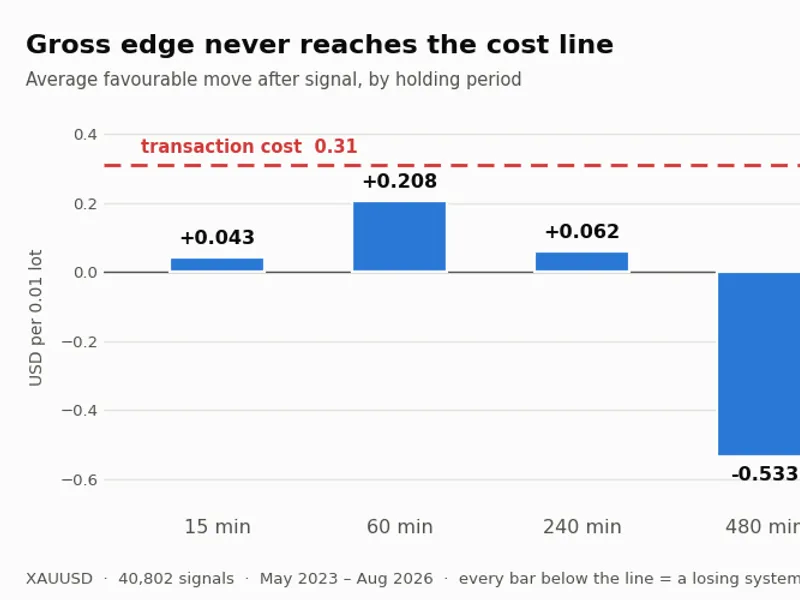
A detailed grid Expert Advisor developed for XAUUSD on the M1 timeframe, incorporating stop loss, floating loss cap, reversal exit, and maximum basket age, consistently incurred losses.
Upon isolating and analyzing the entry signal itself, the findings were stark:
Average movement following a signal (15 minutes): +0.04
Spread cost per round turn: 0.26
No exit strategy could compensate for this fundamental deficit. The losses were incurred at the point of entry, rendering all subsequent effort on exits futile. This script was created to prevent such scenarios.
REPORT CONTENTS
For each specified holding period, the report includes:
- Gross Edge: The average favorable price movement subsequent to the signal.
- Net Result: Simulated profit or loss per trade after accounting for costs.
- T-statistic: Calculated on non-overlapping trades.
- Profitable Months Share: The proportion of months with positive outcomes.
- Maximum Drawdown: The largest peak-to-trough decline in equity.
Additionally, the script performs the same analysis on a random control: trades are initiated with the same frequency but with random direction (coin-flip). A truly random entry should, on average, lose precisely the transaction cost. This comparison serves two purposes: validating the simulator's accuracy and establishing a baseline for market noise. If your signal's performance does not significantly outperform this baseline, it likely contains no actionable information.
THE OVERLAP ISSUE
This is a common pitfall that affected the original development and affects most traders.
Consecutive signals often share a significant portion of their evaluation window. For instance, a 60-bar horizon sampled on every bar results in windows that overlap by 59 bars. Treating these overlapping windows as independent inflates the t-statistic, often by a factor related to the square root of the horizon.
In the initial analysis, the signal appeared to show a t-statistic of 3.32 when treating overlapping trades as independent, suggesting significance. However, when analyzed using genuinely independent samples, the t-statistic dropped to 1.20, which is statistically indistinguishable from random noise. EdgeMeter simulates trades one at a time, ensuring that reported trades are non-overlapping and the t-statistic is reliable.
ACCEPTANCE CRITERIA
The script enforces three mandatory criteria:
[1] Net profit per trade must be greater than 0 after accounting for costs.
[2] The absolute value of the t-statistic must be greater than 2.
[3] At least 3 out of every 4 months must show a positive net result.
It is crucial to define these criteria *before* reviewing the results. Setting criteria after observing the data can lead to the justification of underperforming systems.
TESTING YOUR OWN SIGNALS
To test your own trading signals, open the script file and modify the two functions within the designated USER SECTION. No other modifications are necessary.
bool UserInit() - Initialize your indicator handles and load their buffers using LoadBuffer() / LoadBufferB().
int UserSignal(int i) - Evaluate the closed bar at index 'i'. Return +1 for a buy signal, -1 for a sell signal, and 0 to stand aside.
All array indexing starts at 0 for the oldest bar. This reversed indexing simplifies calculations for forward returns (index + horizon), reducing the likelihood of sign errors.
Entry is simulated on the open of the next bar (i+1). It is critical to avoid referencing bar i+1 or any subsequent bars within UserSignal, as this constitutes look-ahead bias and can artificially inflate the perceived performance of a signal.
The default UserSignal function implements a two-timeframe moving average crossover, provided as a working example. This should be replaced with your own signal logic.
SETTING TRANSACTION COSTS
The input parameters InpSpread, InpCommission, and InpSlippage are defined in price units, not points. These are the most critical inputs for accurate analysis and should reflect your actual trading costs.
Utilize recorded execution logs from live or demo trading for the most accurate average costs. If logs are unavailable, use the typical spread observed on the chart and add a reasonable slippage allowance, rather than assuming zero slippage. Be aware that demo servers often report near-zero slippage, which is characteristic of the simulation environment, not actual market conditions.
SYSTEM REQUIREMENTS
Ensure sufficient historical data is loaded before running the script. Open a chart for the desired symbol and timeframe and scroll back to the earliest available data. The script will alert you if insufficient history is detected. A minimum of 30 signals is recommended for results to be considered evidence-based rather than anecdotal.
This script is provided free of charge for use and modification.
You may also like: Edge Drift Detector: Identify and Quantify Strategy Performance Degradation - excellent alternative for script users on MetaTrader 5.
Source Code
#property copyright "RobotFX"
#property version   "1.04"
#property script_show_inputs
#property description "This code is educational. Feel free to use, modify and upgrade as you wish. Visit ROBOTFX.ORG for professional trading tools"
input group "===== COST -- the number that decides everything ====="
input double InpSpread     = 0.26;
input double InpCommission = 0.00;
input double InpSlippage   = 0.05;
input group "===== DATA ====="
input ENUM_TIMEFRAMES InpTF  = PERIOD_H1;
.......
⚠ Limitations & Risk Warning
- This tool is provided for educational and testing purposes only.
- Past performance does not guarantee future results.
- Trading involves substantial risk of loss. Use on a demo account first.
- Results may vary depending on market conditions, broker, and settings.
- We recommend thorough backtesting and forward testing before using with real funds.