
Solfeo: Market as a Musical Score (Candlesticks to MIDI)
Info
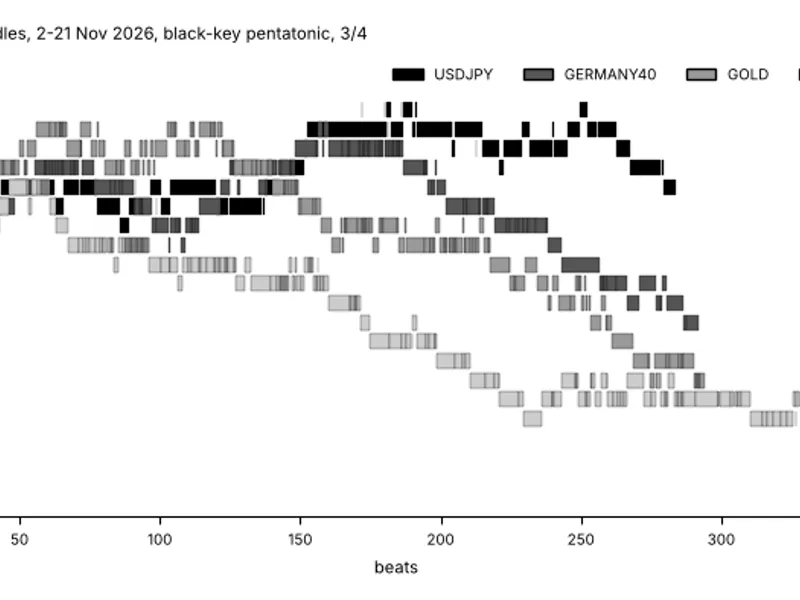
The Solfeo: Market as a Musical Score (Candlesticks to MIDI) is a Script for MetaTrader 5 that solfeo interprets market data by transforming it into a musical score, creating a standard midi file (format 1). Each symbol is assigned its own track, allowing playback in any Digital Audio Workstation (DAW) or score editor.
Usage
This tool is typically used for enhancing chart analysis and decision making.
Platform
This Script works exclusively on MetaTrader 5 (both build 600+ and newer versions).
Setup
Place the downloaded file in MQL5/Scripts folder via File ? Open Data Folder in MetaTrader 5.
How to Install and Use Solfeo: Market as a Musical Score (Candlesticks to MIDI)
1. Installation: Move your script file into the MQL/Scripts directory and restart the platform.
2. Execution: Drag the script onto a chart; it will perform a one-time action, such as closing all open orders or clearing chart objects.
3. Editing: Use MetaEditor (F4) to modify code, click "Compile," and verify no errors appear in the terminal before running.
4. Removing: Scripts stop automatically, but you can remove them manually by right-clicking the chart and choosing "Remove Script."
Frequently Asked Questions
Q: How are scripts different from EAs? A: Scripts execute a single action and then stop; EAs monitor the market and trade continuously.
Q: Can I assign a hotkey to a script? A: Yes, right-click the script in the Navigator, select "Set Hotkey," and define your preferred keyboard shortcut.
Q: Why did my script stop? A: Scripts are designed to stop immediately after finishing their programmed command; this is normal behavior.
What this tool does
Solfeo interprets market data by transforming it into a musical score, creating a standard MIDI file (format 1).
Typical Use Case
This Script excels in automated trading and technical analysis on MetaTrader 5.
Compatible Platform & Setup
This Script works on MetaTrader 5. Place the file in the MQL5/Scripts folder and restart the terminal.
Description & Settings
Related: Market Hours Label: Real-time Symbol Status and Countdown - another powerful script for MetaTrader 5 traders.
Solfeo interprets market data by transforming it into a musical score, creating a standard MIDI file (format 1). Each symbol is assigned its own track, allowing playback in any Digital Audio Workstation (DAW) or score editor.Also recommended: Session Edge Tester: Evaluating Time-Based Trading Strategies Against Market Costs - similar script with strong performance on MetaTrader 5.
Score Composition Details
Meter: Determined by the autocorrelation of absolute returns across 2, 3, and 4 bars, the time signature is set to 2/4, 3/4, or 4/4. The analysis also provides the one-day autocorrelation, reflecting the market's daily rhythm.
Pitch: The cumulative price movement from the initial closing price is measured in daily Average True Range (ATR) units. By default, 1 ATR equals one tone. This movement is quantized to a selected scale: major, natural minor, chromatic, or the default black-key pentatonic.
Accidentals: Notes falling outside the selected scale retain their chromatic pitch. Sharps are assigned to up candles, and flats to down candles.
Duration: The length of a note corresponds to the candle body's size relative to the bar's ATR for the chosen timeframe. Durations range from a 64th note to a whole note. Notes are dotted if the wicks extend more than half the length of the candle body.
Rests and Ties: A doji candle is represented as a rest. A tie occurs when a note shares the same pitch and direction as the preceding note.
Fermata: A gap in the data, such as a weekend or holiday, results in the preceding note's duration being doubled.
Velocity: Note velocity is determined by comparing tick volume to its average.
User Inputs
The following inputs can be configured: symbols (comma-separated), General MIDI programs for each symbol, timeframe, start and end dates, scale, base note, tones per ATR, doji threshold, fermata gap duration, tempo, and output file name. Any symbols not found will be skipped.
Output Files (Stored in MQL5\Files\Solfeo\)
-
-
-
Temporal Arrangement
Each track maintains its own timeline, with one event per candle. This means instruments can drift apart in time, with markets exhibiting higher volatility producing longer notes and quieter markets producing faster notes.
Technical Notes
This tool utilizes standard MQL5 functions, including FileWriteArray for binary file creation and CryptEncode(CRYPT_BASE64) for base64 text conversion. No external DLLs are required.
Functionality Disclaimer
Solfeo is designed for data sonification and trend visualization; it does not engage in trading or provide forecasts. It offers a unique auditory perspective on market volatility and trends.
Recommendations
Explore a high-volatility week on an H1 timeframe using the default pentatonic scale, and then repeat the analysis with the minor scale for comparative insights.
You may also like: Market Information Script for MetaTrader 5 - excellent alternative for script users on MetaTrader 5.
Source Code
#property copyright "RobotFX"
#property version   "1.00"
#property script_show_inputs
#property description "This code is educational. Feel free to use, modify and upgrade as you wish. Visit ROBOTFX.ORG for professional trading tools"
enum ENUM_SOLFEO_SCALE { SC_MAJOR=0,
                         SC_MINOR=1,
                         SC_PENTA=2,
                         SC_CHROM=3 };
input string            Simbolos     = "USDJPY,GERMANY40,GOLD,BTCUSD";
input string            Instrumentos = "33,0,40,81";
.......
⚠ Limitations & Risk Warning
- This tool is provided for educational and testing purposes only.
- Past performance does not guarantee future results.
- Trading involves substantial risk of loss. Use on a demo account first.
- Results may vary depending on market conditions, broker, and settings.
- We recommend thorough backtesting and forward testing before using with real funds.