

Market Hours Label: Real-time Symbol Status and Countdown
Info
The Market Hours Label: Real-time Symbol Status and Countdown is a Script for MetaTrader 5 that this script displays the current trading status of a chart symbol directly on your metatrader 5 chart, indicating whether the market is currently open or closed, and showing the time remaining until the next opening or closing event. Every broker defines unique trading hours for symbols like gold, indices, and cryptocurrencies, including daily breaks at varying times.
Usage
This tool is typically used for enhancing chart analysis and decision making.
Platform
This Script works exclusively on MetaTrader 5 (both build 600+ and newer versions).
Setup
Place the downloaded file in MQL5/Scripts folder via File ? Open Data Folder in MetaTrader 5.
How to Install and Use Market Hours Label: Real-time Symbol Status and Countdown
1. Installation: Move your script file into the MQL/Scripts directory and restart the platform.
2. Execution: Drag the script onto a chart; it will perform a one-time action, such as closing all open orders or clearing chart objects.
3. Editing: Use MetaEditor (F4) to modify code, click "Compile," and verify no errors appear in the terminal before running.
4. Removing: Scripts stop automatically, but you can remove them manually by right-clicking the chart and choosing "Remove Script."
Frequently Asked Questions
Q: How are scripts different from EAs? A: Scripts execute a single action and then stop; EAs monitor the market and trade continuously.
Q: Can I assign a hotkey to a script? A: Yes, right-click the script in the Navigator, select "Set Hotkey," and define your preferred keyboard shortcut.
Q: Why did my script stop? A: Scripts are designed to stop immediately after finishing their programmed command; this is normal behavior.
What this tool does
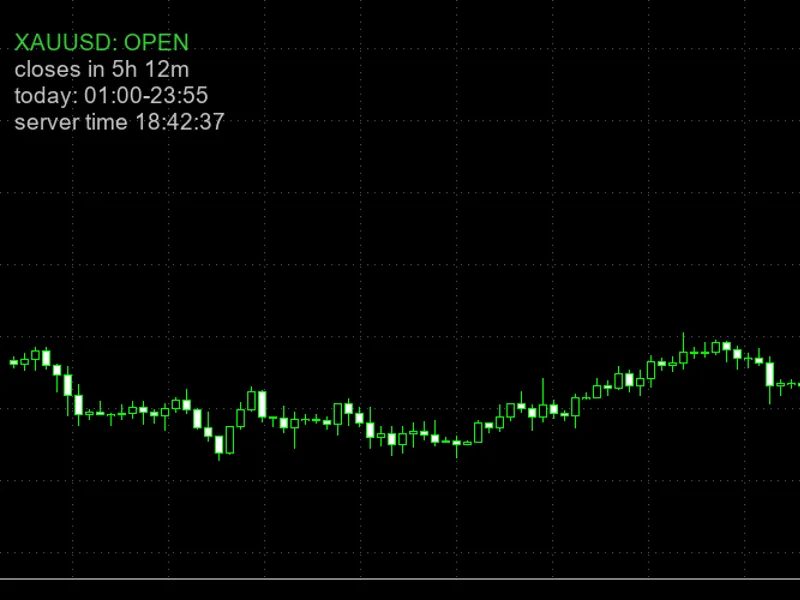
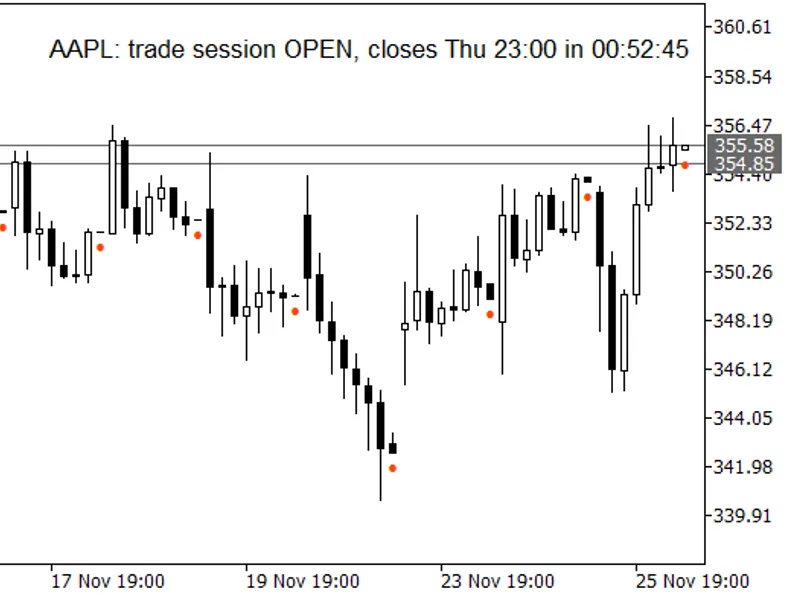
This script displays the current trading status of a chart symbol directly on your MetaTrader 5 chart, indicating whether the market is currently open or closed, and showing the time remaining until the next opening or closing event.
Typical Use Case
This Script excels in automated trading and technical analysis on MetaTrader 5.
Compatible Platform & Setup
This Script works on MetaTrader 5. Place the file in the MQL5/Scripts folder and restart the terminal.
Description & Settings
Related: Solfeo: Market as a Musical Score (Candlesticks to MIDI) - another powerful script for MetaTrader 5 traders.
This script displays the current trading status of a chart symbol directly on your MetaTrader 5 chart, indicating whether the market is currently open or closed, and showing the time remaining until the next opening or closing event.Also recommended: Session Edge Tester: Evaluating Time-Based Trading Strategies Against Market Costs - similar script with strong performance on MetaTrader 5.
Every broker defines unique trading hours for symbols like gold, indices, and cryptocurrencies, including daily breaks at varying times. This tool eliminates the need to repeatedly open the symbol specification window by providing this information at a glance.
What the Label Shows:
- The current trading status: OPEN or CLOSED for the chart's symbol.
- The time remaining until the next close, or until the next open if the market is currently closed.
- Today's trading sessions, displayed in server time.
- The current server time.
Script Inputs:
- Corner: Specifies the chart corner for the label.
- X and Y Offset: Adjusts the horizontal and vertical position of the label.
- Font Size and Colors: Customizes the appearance of the label.
- Show/Hide Sessions: Option to display or hide today's trading sessions.
- Alert Minutes Before Close: Set a number of minutes before a session closes to receive an alert (0 to disable). Push notifications can also be enabled.
Important Notes:
- The script relies on the broker's provided session table. Holidays are not included in this table, so the label might indicate 'OPEN' on a holiday even if the market is actually closed.
- If a session ends at 24:00 and the next begins at 00:00, it is treated as a single continuous session, ensuring an accurate time-to-close calculation.
- All displayed times are in server time.
- This is a display-only script; it does not open or close any trades.
Installation and Usage:
1. Copy the MarketHoursLabel.mq5 file into your MQL5\Scripts folder.
2. Compile the script within MetaTrader 5.
3. Drag and drop the compiled script onto the chart of the symbol you wish to monitor.
Last updated: 2026
You may also like: Market Information Script for MetaTrader 5 - excellent alternative for script users on MetaTrader 5.
Source Code
#property copyright "RobotFX"
#property version   "1.00"
#property description "This code is educational. Feel free to use, modify and upgrade as you wish. Visit ROBOTFX.ORG for professional trading tools"
#property script_show_inputs
input ENUM_BASE_CORNER InpCorner       = CORNER_LEFT_UPPER;
input int              InpX            = 12;
input int              InpY            = 24;
input int              InpFontSize     = 10;
input color            InpColorOpen    = clrLimeGreen;
input color            InpColorClosed  = clrTomato;
.......
⚠ Limitations & Risk Warning
- This tool is provided for educational and testing purposes only.
- Past performance does not guarantee future results.
- Trading involves substantial risk of loss. Use on a demo account first.
- Results may vary depending on market conditions, broker, and settings.
- We recommend thorough backtesting and forward testing before using with real funds.