
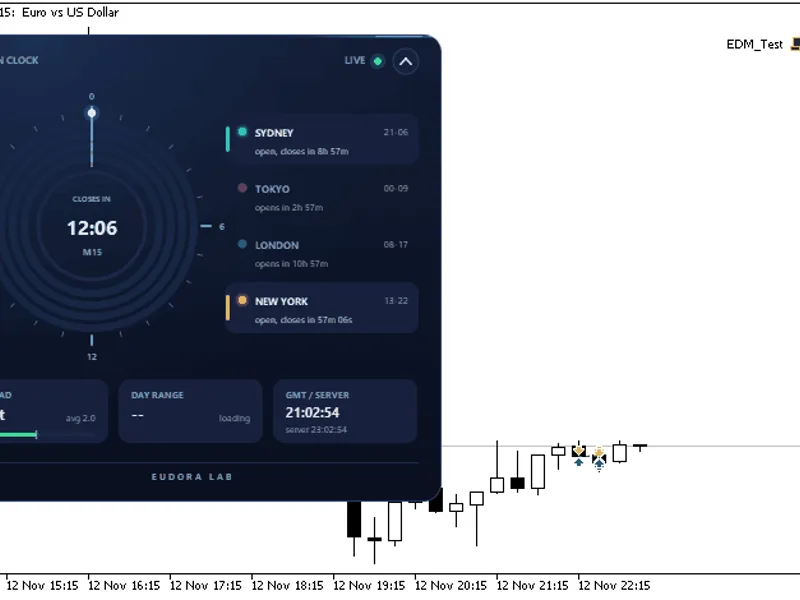
Session Ranges and ADR Panel for Intraday Trading
Info
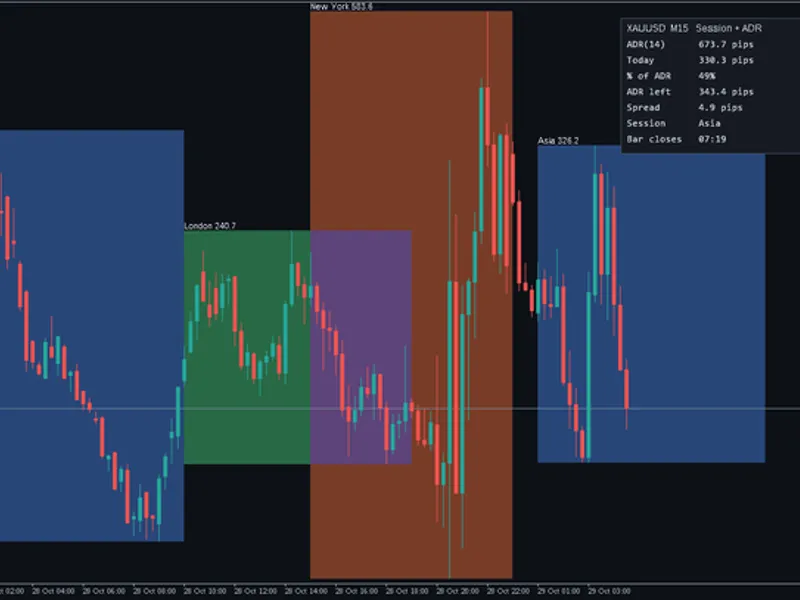
The Session Ranges and ADR Panel for Intraday Trading is a Indicator for MetaTrader 5 that session ranges + adr panel answers the three questions most intraday traders ask before taking a trade:what were the highs and lows of the asian, london, and new york sessions. How far has price moved today compared to a normal day.
Usage
This tool is typically used for enhancing chart analysis and decision making.
Platform
This Indicator works exclusively on MetaTrader 5 (both build 600+ and newer versions).
Setup
Place the downloaded file in MQL5/Indicators folder via File ? Open Data Folder in MetaTrader 5.
How to Install and Use Session Ranges and ADR Panel for Intraday Trading
1. Installation: Place your file in the MQL/Indicators folder via "Open Data Folder" and restart your terminal.
2. Loading: Find the indicator in the Navigator, drag it onto your chart, and configure the input parameters in the popup window.
3. Customization: Press Ctrl+I to open the indicator list, select your tool, and click "Properties" to change colors, levels, or visual styles.
4. Updating: Replace the old file in the Indicators folder with the new version and restart the platform to apply changes.
Frequently Asked Questions
Q: Why is my indicator not showing? A: Verify the file is in the MQL/Indicators folder, or try right-clicking the "Indicators" tree in the Navigator and clicking "Refresh."
Q: Do custom indicators slow down the platform? A: Too many complex indicators can impact performance; remove unused ones via the "Indicator List" (Ctrl+I).
Q: Can I use MT4 indicators on MT5? A: No, MQL4 and MQL5 are distinct languages; ensure the indicator is compiled specifically for your platform version.
What this tool does
Session Ranges + ADR Panel answers the three questions most intraday traders ask before taking a trade:What were the highs and lows of the Asian, London, and New York sessions.
Typical Use Case
This Indicator excels in automated trading and technical analysis on MetaTrader 5.
Compatible Platform & Setup
This Indicator works on MetaTrader 5. Place the file in the MQL5/Indicators folder and restart the terminal.
Description & Settings
Related: Session Range Boxes with Asia Breakout Alert for MT4/MT5 - another powerful indicator for MetaTrader 5 traders.
Session Ranges + ADR Panel answers the three questions most intraday traders ask before taking a trade:Also recommended: Session VWAP with Standard Deviation Bands - similar indicator with strong performance on MetaTrader 5.
What were the highs and lows of the Asian, London, and New York sessions?
How far has price moved today compared to a normal day?
How much time is left on the current candle, and what is the current spread cost?
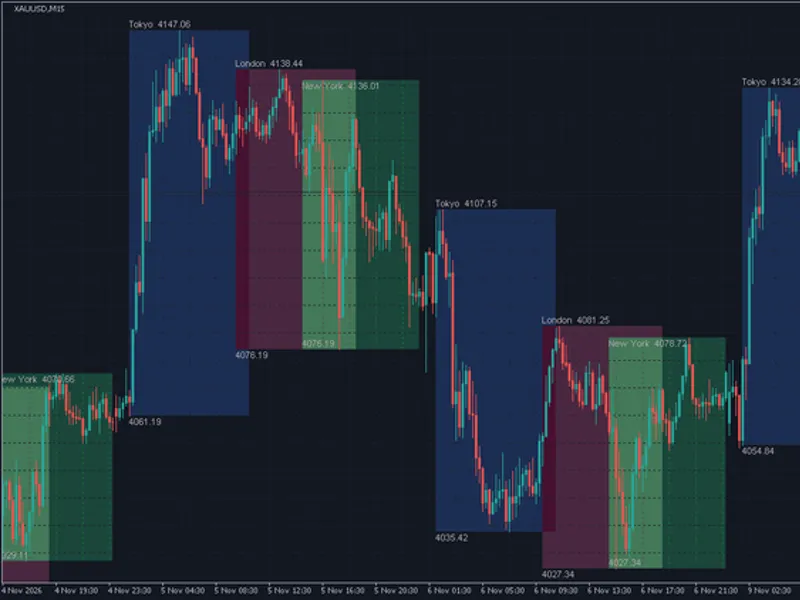
It displays a box for each trading session and a small information panel in the chart corner. This tool is compatible with any symbol, including forex pairs, gold (XAUUSD), oil (UKOIL/USOIL), and indices.
Features
Session Boxes
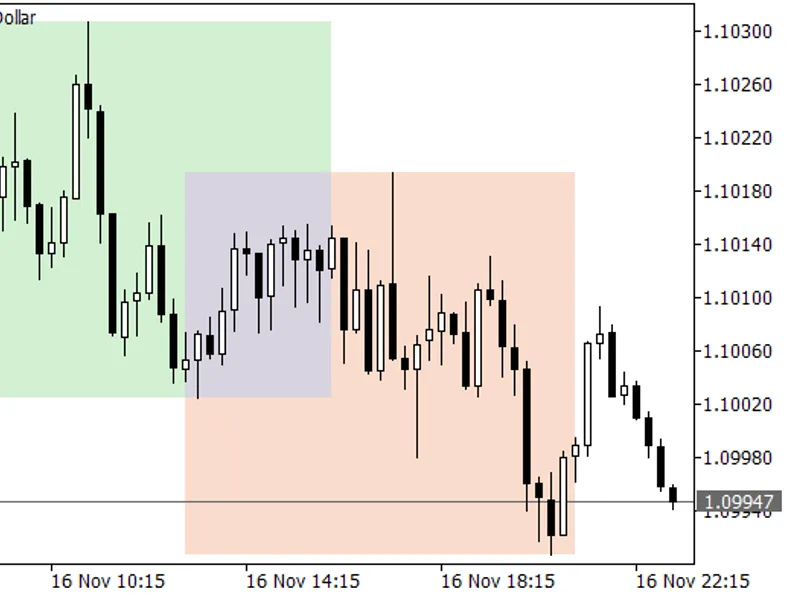
For Asia, London, and New York sessions, each displaying its high, low, and range with a label such as "London 32.3".
Clear Overlaps
The London/New York overlap is visually represented with a blended color.
Accurate Highs and Lows
Session highs and lows are derived from a lower timeframe (M5 by default), ensuring precise boxes on M1 to H1 charts. On higher timeframes, the boxes are hidden by default, but this limit can be adjusted.
Sessions Crossing Midnight
Sessions can extend across midnight, for example, from 22:00 to 07:00.
ADR Panel:
Average Daily Range
Calculates the Average Daily Range over the last N completed days.
Today's Progress
Shows today's trading range and today's range as a percentage of the Average Daily Range. The percentage turns orange at 70% and red at 100% of the ADR.
Remaining Range
Indicates the remaining Average Daily Range for the current day.
Live Spread
Displays the current live spread.
Active Session
Identifies which trading session is currently open.
Candle Countdown
Provides a countdown to the current candle's close, updating every second, even without new ticks.
Units
Supports displaying ranges in pips, points, or price. Pip size is detected automatically (10 points for 3- and 5-digit quotes, and for 2-digit gold or silver quotes). A custom pip size can also be configured.
No Repainting
Once a session box is completed, it remains fixed. Only the currently open session updates as price reaches new highs or lows.
CPU Efficient
History boxes are generated once when the indicator loads and again at the start of each new day. During normal market activity, only the open session and the panel are updated.
Clean Chart Display
All graphical objects are automatically removed when the indicator is detached from the chart. Objects cannot be accidentally selected or moved.
Hover Information
Hovering over any session box reveals its exact high, low, and range values.
Inputs
Sessions
Display Session
(Default: true): Enables or disables the display of Asian, London, and New York sessions.
Session Label
(Default: Asia / London / New York): Custom text displayed on the session box and in the panel.
Session Time (HH:MM)
(Default: 01:00-10:00, 10:00-19:00, 15:00-24:00): Defines the start and end times for each session, based on broker server time (the time displayed on the chart axis). The default settings are suitable for GMT+2/+3 brokers.
Session Box Color
(Default: blue / green / brown): Sets the color for each session box.
Session Box Appearance
History Bars to Draw
(Default: 10): Specifies the number of past trading days for which session boxes will be drawn (range: 1-60).
Filled Boxes
(Default: true): Set to false to display boxes with outlines only.
Show Session Label
(Default: true): Displays the session name and range label above each box.
Timeframe for Session High/Low
(Default: M5): The lower timeframe used to determine accurate session highs and lows.
Hide Boxes Above Timeframe
(Default: H1): Configures the chart timeframe above which session boxes will be hidden.
ADR Panel Settings
Show Information Panel
(Default: true): Enables or disables the display of the ADR information panel.
ADR Period
(Default: 14): Sets the number of completed daily candles used for the Average Daily Range calculation.
Range Units
(Default: Pips): Specifies the units for displaying ranges: Pips, Points, or Price.
Custom Pip Size
(Default: 0 = auto): Allows setting a custom pip size (e.g., 0.1 for gold or 0.01 for oil) if preferred.
Panel Position
(Default: top-right, 10, 20): Sets the panel's corner and offsets (X and Y).
Panel Font Size
(Default: 9): Adjusts the font size of the panel text.
Panel Colors
(Default: dark theme): Configures the background, border, and text colors of the panel.
Warning and Hot Colors
(Default: orange / red): Sets the colors for the " % of ADR" indicator at 70% (warning) and 100% (hot).
How to Use
Breakouts
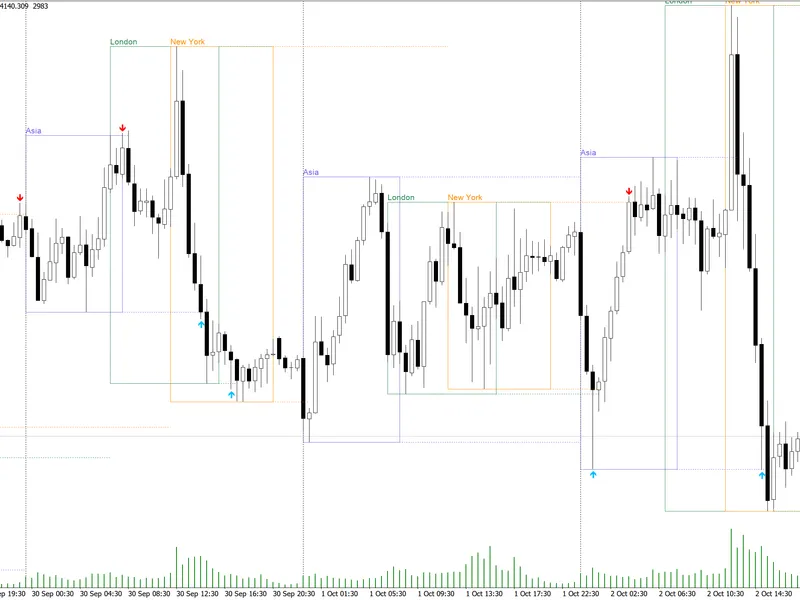
Monitor for London session breakouts from the Asian range. The Asia box provides key levels for these breakouts.
Targets and Stops Management
If the current day's range has reached 90% or more of its Average Daily Range, potential breakouts may have limited room for further movement. Adjust your targets accordingly or consider waiting for a more opportune moment.
Spread and Timing Considerations
For instruments like gold or oil, check the spread before entering trades. Utilize the candle close countdown to time entries precisely.
Notes
Session times are based on your broker's server time. If your broker operates in a different time zone, adjust the start and end times accordingly. For example, with a GMT+0 broker, London session times are typically around 08:00-17:00.
On Mondays and following holidays, session boxes will only display bars that are actually present for that day.
This tool is provided as a free educational resource. It does not execute trades or provide trading signals.
You may also like: Session Clock: Real-Time Trading Session Awareness - excellent alternative for indicator users on MetaTrader 5.
Source Code
#property copyright "RobotFX"
#property link "https://robotfx.org"
#property version     "1.00"
#property description "This code is educational. Feel free to use, modify and upgrade as you wish. Visit ROBOTFX.ORG for professional trading tools"
#property indicator_chart_window
#property indicator_buffers 0
#property indicator_plots   0
enum ENUM_RANGE_UNITS
  {
   UNITS_PIPS   = 0,
.......
⚠ Limitations & Risk Warning
- This tool is provided for educational and testing purposes only.
- Past performance does not guarantee future results.
- Trading involves substantial risk of loss. Use on a demo account first.
- Results may vary depending on market conditions, broker, and settings.
- We recommend thorough backtesting and forward testing before using with real funds.