



Asian Range Sweep Indicator with Built-In Win Rate Scorecard
Info
The Asian Range Sweep Indicator with Built-In Win Rate Scorecard is a Indicator for MetaTrader 5 that asian sweep scorecard: asian range sweep signals that grade themselvesmarks the asian session range, signals when london or new york sweeps one side of it and reverses, and keeps a scorecard of how every past signal ended in r, spread included. Non-repainting, with buffers ready for an Expert Advisor.
Usage
This tool is typically used for enhancing chart analysis and decision making.
Platform
This Indicator works exclusively on MetaTrader 5 (both build 600+ and newer versions).
Setup
Place the downloaded file in MQL5/Indicators folder via File ? Open Data Folder in MetaTrader 5.
How to Install and Use Asian Range Sweep Indicator with Built-In Win Rate Scorecard
1. Installation: Place your file in the MQL/Indicators folder via "Open Data Folder" and restart your terminal.
2. Loading: Find the indicator in the Navigator, drag it onto your chart, and configure the input parameters in the popup window.
3. Customization: Press Ctrl+I to open the indicator list, select your tool, and click "Properties" to change colors, levels, or visual styles.
4. Updating: Replace the old file in the Indicators folder with the new version and restart the platform to apply changes.
Frequently Asked Questions
Q: Why is my indicator not showing? A: Verify the file is in the MQL/Indicators folder, or try right-clicking the "Indicators" tree in the Navigator and clicking "Refresh."
Q: Do custom indicators slow down the platform? A: Too many complex indicators can impact performance; remove unused ones via the "Indicator List" (Ctrl+I).
Q: Can I use MT4 indicators on MT5? A: No, MQL4 and MQL5 are distinct languages; ensure the indicator is compiled specifically for your platform version.
What this tool does
Asian Sweep Scorecard: Asian Range Sweep Signals That Grade ThemselvesMarks the Asian session range, signals when London or New York sweeps one side of it and reverses, and keeps a scorecard of how every past signal ended in R, spread included.
Typical Use Case
This Indicator excels in automated trading and technical analysis on MetaTrader 5.
Compatible Platform & Setup
This Indicator works on MetaTrader 5. Place the file in the MQL5/Indicators folder and restart the terminal.
Description & Settings
Related: ADX Auto Range: Automated Trend Strength and Consolidation Detection - another powerful indicator for MetaTrader 5 traders.
Asian Sweep Scorecard: Asian Range Sweep Signals That Grade ThemselvesAlso recommended: Session Range Breakout: Asia, London, and New York High/Low Levels - similar indicator with strong performance on MetaTrader 5.
Marks the Asian session range, signals when London or New York sweeps one side of it and reverses, and keeps a scorecard of how every past signal ended in R, spread included. Non-repainting, with buffers ready for an Expert Advisor.
Indicator Functionality
The Asian range sweep is a widely discussed intraday trading setup, particularly popular for gold trading. It identifies when price consolidates in a tight range overnight, with stops accumulating above and below it, followed by a swift reversal initiated by the London or New York session. While existing indicators may highlight the range and signal sweeps, this indicator provides the crucial missing piece of information: profitability assessment of past signals.
This indicator draws the Asian range and signals, and then meticulously tracks each signal bar by bar until a stop loss, target, or the end of the trading day is reached. The result is then displayed directly on the chart. Users can adjust an input parameter to modify the scorecard, enabling them to evaluate the setup's effectiveness on their specific symbol and broker hours before committing capital.
Signal Formation
The Asian range is defined by the high and low prices between the `InpAsiaStartHour` and `InpAsiaEndHour` (server time, defaulting to 01:00 to 09:00). Days with an Asian range narrower than 1.5 ATR or wider than 12 ATR are excluded.
Within the `InpTradeStartHour` and `InpTradeEndHour` (09:00 to 18:00), a sweep is identified when a closed bar's wick extends beyond one side of the range by at least 0.1 ATR and subsequently closes back within the range. A bar closing outside the range is considered a breakout, and that side is deemed finished for the day.
Confirmation of a sweep signal occurs within the next 4 bars, where a bar must close beyond the opposite extreme of the sweep bar. This closing bar marks the signal, and an arrow is plotted on it.
The scorecard assumes an entry at the open of the subsequent bar, with a stop loss set 0.2 ATR beyond the sweep wick and a target profit of 2R. Any trades remaining open at 22:00 server time are closed at that bar's open price.
All signals are based on closed bars, ensuring that a signal, once plotted, does not repaint or disappear. This has been verified using the strategy tester against a small Expert Advisor that recorded every signal upon appearance, with results matching the indicator's buffers exactly across four symbols from January to September 2026 (confirming 30, 44, 36, and 32 signals).
Scorecard Calculation Details
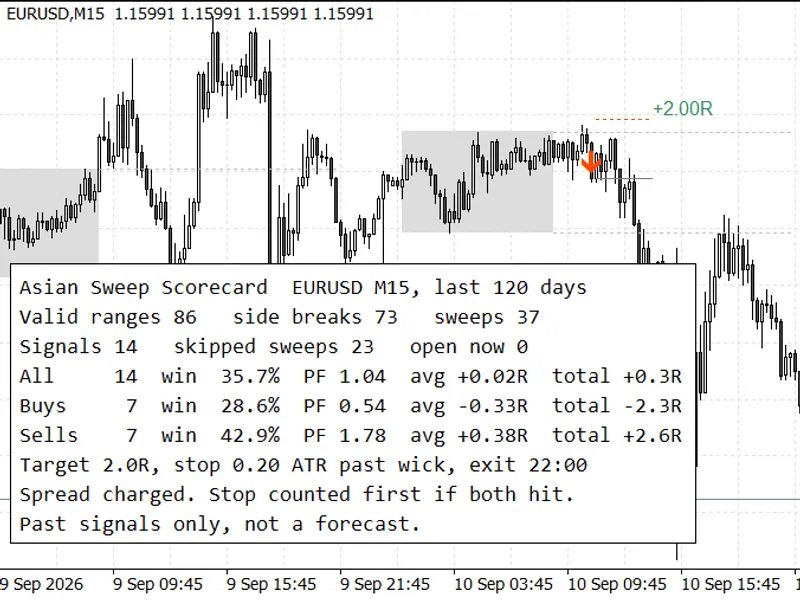
Each signal's outcome is measured in R (Risk), where 1R equals the distance from the entry price to the stop loss. The spread of the entry bar is deducted as a trading cost. If both the stop loss and target profit fall within the same bar, the stop loss is counted as the outcome. The scorecard panel displays the total number of signals, win rate, profit factor, average R, and total R, categorized separately for buy and sell signals, as well as combined. It also reports the count of days with valid ranges, the number of range sides that were simply broken out of, and the number of sweeps that were disregarded due to lack of confirmation or stop levels exceeding defined limits.
Performance on Sample Symbols
The following performance data uses default inputs on the M15 timeframe, covering approximately 400 days up to September 18, 2026, using MetaQuotes-Demo data:
Symbol
Signals Scored
Win Rate
Profit Factor
Total R
EURUSD
53
41.5%
1.30
+9.0R
GBPUSD
63
36.5%
1.01
+0.3R
USDJPY
53
32.1%
0.84
-5.6R
XAUUSD
50
36.0%
0.81
-6.2R
Contrary to expectations, gold performed the poorest among the four symbols. The negative performance on gold was primarily driven by buy signals. Over 120 days ending September 10, 2026, the gold scorecard showed 11 buy signals with only one winner (-8.0R), while the 6 sell signals yielded +1.7R. In these instances, price would sweep the Asian low, the indicator would signal a buy, but the sell-off would continue. Applying an H1 trend filter reduced gold signals to 10, but the overall performance remained negative (-1.1R). EURUSD demonstrated the best performance with the same default settings. This underscores the importance of using the scorecard to test individual symbols before relying on generalized performance assumptions.
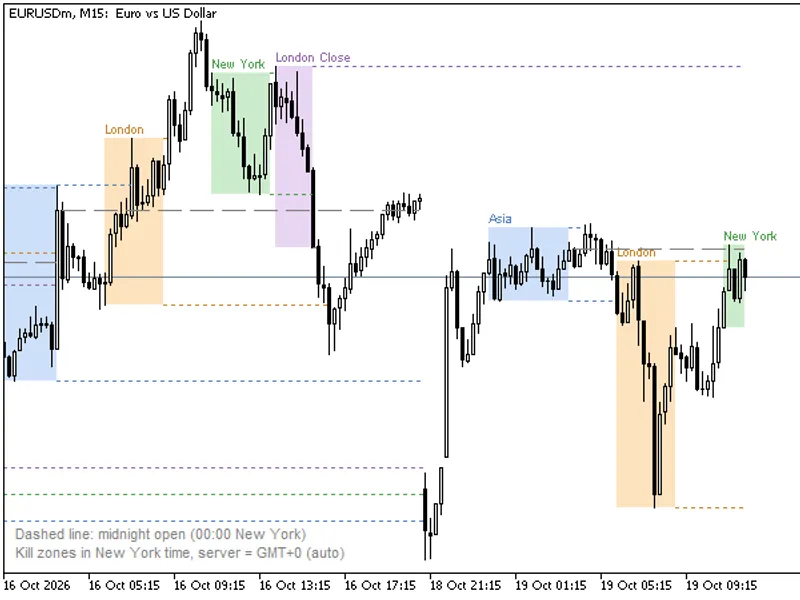
Figure 1 illustrates an EURUSD M15 chart, showing the Asian range (grey box), a sweep of its high, the subsequent sell signal, its outcome, and the corresponding 120-day scorecard.
Indicator Inputs
Input Parameter
Default Value
Description
InpAsiaStartHour
1
Start hour of the Asian range (server time)
InpAsiaEndHour
9
End hour of the Asian range (server time, exclusive)
InpTradeStartHour
9
Earliest hour for a sweep signal to be valid
InpTradeEndHour
18
Latest hour for new sweep signals to form
InpDayCloseHour
22
Hour at which open signals are closed
InpATRPeriod
14
Period for Average True Range (ATR) calculations
InpMinSweepATR
0.10
Minimum wick extension beyond range in ATR for a sweep
InpConfirmBars
4
Maximum bars allowed for confirmation of a sweep
InpMinRangeATR
1.5
Minimum ATR value for the Asian range to be considered valid
InpMaxRangeATR
12.0
Maximum ATR value for the Asian range to be considered valid
InpMaxSignalsDay
1
Maximum number of signals allowed per day
InpUseTrend
false
Enable trend filter using EMA
InpTrendTF
H1
Timeframe for the trend calculation
InpTrendEMA
50
Period for the trend EMA
InpSLBufferATR
0.20
Stop loss distance beyond sweep wick in ATR
InpMinSLATR
0.50
Minimum acceptable stop loss distance in ATR
InpMaxSLATR
4.00
Maximum acceptable stop loss distance in ATR
InpRewardRatio
2.0
Target profit ratio (Risk/Reward)
InpDaysBack
120
Number of past days to include in the scorecard
InpDrawDays
20
Number of recent days to draw range boxes and trade lines
InpShowPanel
true
Display the scorecard panel on the chart
InpPanelCorner
left upper
Position of the scorecard panel
InpBoxColor
Gainsboro
Color of the Asian range box
InpAlertPopup
true
Enable popup alerts for new signals
InpAlertPush
false
Enable push notifications for new signals
Note: The specified hours are based on server time. For brokers with different time zone offsets, adjust the `InpAsiaStartHour` and `InpAsiaEndHour` accordingly. For example, MetaQuotes-Demo uses GMT+3 during summer, so the default 01:00 to 09:00 corresponds to approximately 22:00 to 06:00 GMT.
Expert Advisor Integration
The indicator provides ten buffers for integration with Expert Advisors (EAs). Signals are recorded on the bar that confirms them, allowing an EA to read signal data at shift 1 after that bar has closed.
Buffer Index
Content Description
0
Buy signal entry price, EMPTY_VALUE otherwise
1
Sell signal entry price, EMPTY_VALUE otherwise
2, 3
Locked Asian session high and low
4, 5
Stop loss and target price for the signal on the confirmation bar
6 to 9
Scorecard data on the last closed bar: count of closed signals, number of wins, total R profit, and sum of losing R
Buffers 6 through 9 enable an EA to review historical performance before executing trades. For instance, an EA could be programmed to only take signals when the total R profit over the scored window is positive.
Example MQL5 Code Snippet
int handle;
datetime lastBar = 0;
int OnInit()
{
handle = iCustom(_Symbol, PERIOD_M15, "AsianSweepScorecard");
return(handle == INVALID_HANDLE ? INIT_FAILED : INIT_SUCCEEDED);
}
void OnTick()
{
// Signals are based on closed bars, so check once per new bar
datetime bar = iTime(_Symbol, PERIOD_M15, 0);
if(bar == lastBar)
return;
lastBar = bar;
double buySignal[1], sellSignal[1], stopLoss[1], takeProfit[1];
if(CopyBuffer(handle, 0, 1, 1, buySignal) < 1 || CopyBuffer(handle, 1, 1, 1, sellSignal) < 1 ||
CopyBuffer(handle, 4, 1, 1, stopLoss) < 1 || CopyBuffer(handle, 5, 1, 1, takeProfit) < 1)
return;
if(buySignal[0] != EMPTY_VALUE)
Print("Buy signal, stop ", stopLoss[0], ", target ", takeProfit[0]);
if(sellSignal[0] != EMPTY_VALUE)
Print("Sell signal, stop ", stopLoss[0], ", target ", takeProfit[0]);
}
Important Note on `iCustom` Inputs:
The indicator is intentionally designed without input groups in the MQL5 code. Each `input group` line in MQL5 counts as a parameter for `iCustom()`. Omitting input groups ensures that all input parameters passed to `iCustom()` align correctly with the indicator's expected order. Failure to do so may result in incorrect parameter assignments and prevent the indicator from initializing properly.
Limitations
The scorecard operates on bar data and does not account for price action within a bar. Consequently, when both stop loss and target profit levels fall within the same bar, the stop loss is prioritized. The calculation includes the spread of the entry bar but excludes commissions and slippage. Market events like news spikes can cause stops to be triggered at prices significantly different from the set level, and this is not reflected in the scorecard. The performance data represents historical outcomes and does not guarantee future results.
You may also like: ICT Kill Zones Indicator: Asian, London, New York in New York Time (2026) - excellent alternative for indicator users on MetaTrader 5.
Source Code
#property copyright "RobotFX"
#property version     "1.00"
#property description "This code is educational. Feel free to use, modify and upgrade as you wish. Visit ROBOTFX.ORG for professional trading tools"
#property indicator_chart_window
#property indicator_buffers 10
#property indicator_plots   4
#property indicator_label1  "Buy signal"
#property indicator_type1   DRAW_ARROW
#property indicator_color1  clrDodgerBlue
#property indicator_width1  2
.......
⚠ Limitations & Risk Warning
- This tool is provided for educational and testing purposes only.
- Past performance does not guarantee future results.
- Trading involves substantial risk of loss. Use on a demo account first.
- Results may vary depending on market conditions, broker, and settings.
- We recommend thorough backtesting and forward testing before using with real funds.