








ICT Kill Zones Indicator: Asian, London, New York in New York Time (2026)
Info
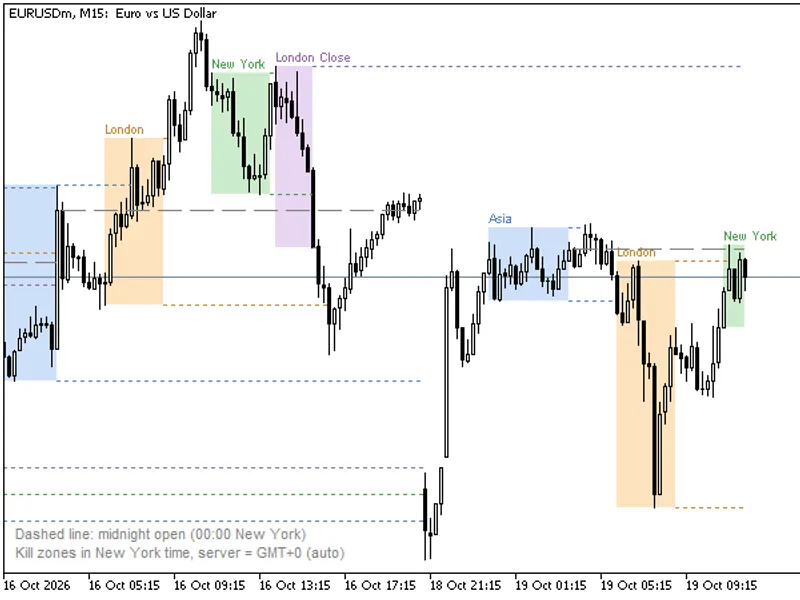
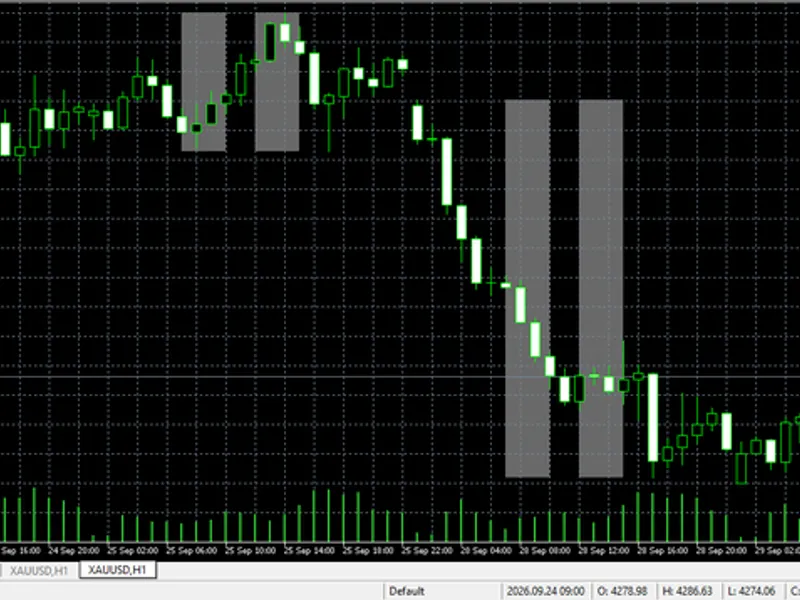
The ICT Kill Zones Indicator: Asian, London, New York in New York Time (2026) is a Indicator for MetaTrader 5 that ict kill zones indicatorkill zones represent specific trading hours where ict (inner circle trader) methodologies anticipate significant market movements. These times are defined relative to New York local time:- Asian kill zone: 20:00 - 00:00- London kill zone: 02:00 - 05:00- New York kill zone: 07:00 - 10:00- London Close kill zone: 10:00 - 12:00All times are adjustable in HH:MM-HH:MM format, based on New York time.
Usage
This tool is typically used for enhancing chart analysis and decision making.
Platform
This Indicator works exclusively on MetaTrader 5 (both build 600+ and newer versions).
Setup
Place the downloaded file in MQL5/Indicators folder via File ? Open Data Folder in MetaTrader 5.
How to Install and Use ICT Kill Zones Indicator: Asian, London, New York in New York Time (2026)
1. Installation: Place your file in the MQL/Indicators folder via "Open Data Folder" and restart your terminal.
2. Loading: Find the indicator in the Navigator, drag it onto your chart, and configure the input parameters in the popup window.
3. Customization: Press Ctrl+I to open the indicator list, select your tool, and click "Properties" to change colors, levels, or visual styles.
4. Updating: Replace the old file in the Indicators folder with the new version and restart the platform to apply changes.
Frequently Asked Questions
Q: Why is my indicator not showing? A: Verify the file is in the MQL/Indicators folder, or try right-clicking the "Indicators" tree in the Navigator and clicking "Refresh."
Q: Do custom indicators slow down the platform? A: Too many complex indicators can impact performance; remove unused ones via the "Indicator List" (Ctrl+I).
Q: Can I use MT4 indicators on MT5? A: No, MQL4 and MQL5 are distinct languages; ensure the indicator is compiled specifically for your platform version.
What this tool does
ICT Kill Zones IndicatorKill zones represent specific trading hours where ICT (Inner Circle Trader) methodologies anticipate significant market movements.
Typical Use Case
This Indicator excels in automated trading and technical analysis on MetaTrader 5.
Compatible Platform & Setup
This Indicator works on MetaTrader 5. Place the file in the MQL5/Indicators folder and restart the terminal.
Description & Settings
Related: Accurate Broker Time Zones and Session Lines for MT4/MT5 - another powerful indicator for MetaTrader 5 traders.
ICT Kill Zones IndicatorAlso recommended: Trend Buy/Sell Zones with Automated Lot Sizing and Risk Panel for MT5 - similar indicator with strong performance on MetaTrader 5.
Kill zones represent specific trading hours where ICT (Inner Circle Trader) methodologies anticipate significant market movements. These times are defined relative to New York local time:
- Asian kill zone: 20:00 - 00:00
- London kill zone: 02:00 - 05:00
- New York kill zone: 07:00 - 10:00
- London Close kill zone: 10:00 - 12:00
All times are adjustable in HH:MM-HH:MM format, based on New York time.
Addressing MetaTrader's Time Zone Challenges:
MetaTrader charts display broker server time, which can differ from New York time. Furthermore, brokers and financial centers observe daylight saving time shifts on varying dates. This indicator automatically converts all times to New York time, ensuring that kill zone boxes remain accurate throughout the year, regardless of seasonal clock changes.
Broker Server Clock Input Options:
- Auto (Default): Automatically detects the server's GMT offset from the terminal. Servers with GMT+2 / GMT+3 are typically aligned with the standard forex server clock (New York + 7 hours). Other server offsets are treated as fixed.
- New York + 7 h: Sets the server midnight consistently to 17:00 New York time, year-round.
- GMT+2 / GMT+3 with European summer time dates: Adjusts for European daylight saving time shifts.
- Fixed GMT offset: Allows manual setting of a fixed GMT offset (e.g., 0 or +3).
Daylight Saving Time Adjustments:
- US summer time: Observed from the second Sunday of March to the first Sunday of November.
Indicator Visualization:
- Kill Zone Boxes: Displays a distinct box for each kill zone, spanning from its high to its low, labeled with its name.
- High/Low Extension: The high and low of each completed kill zone are extended horizontally until price breaches them, highlighting potential liquidity targets that may be revisited later (e.g., Asian range highs/lows being targeted during London sessions).
- Midnight Open Line: A dashed line marks the New York opening price at 00:00.
- Recent Trading Days: Displays the last 5 trading days (configurable). Kill zones are short-lived, so they are primarily visualized on M1 to H1 charts. Higher time frames will display a concise summary note.
- Price Information: Hovering over a box or line reveals its exact price levels.
Alerting Capabilities:
- Kill Zone Start Alerts: Notifies when a kill zone session begins.
- Liquidity Sweeps Alerts: Alerts when price takes out the high or low of a completed kill zone.
- Notification Methods: Supports popup alerts, push notifications, and email alerts.
Expert Advisor Buffers (Non-Drawn):
These buffers provide the high and low values of the last COMPLETED kill zone for each type, ensuring no repainting:
- Buffers 0 / 1: Asian kill zone high / low
- Buffers 2 / 3: London kill zone high / low
- Buffers 4 / 5: New York kill zone high / low
- Buffers 6 / 7: London Close kill zone high / low
- EMPTY_VALUE is used when no data is available or on charts above H1.
Example Usage: A London breakout Expert Advisor could utilize buffers 0 and 1 (Asian range) from the last closed candle to inform its trading decisions.
Important Considerations:
- Strategy Tester Time: The Strategy Tester does not emulate real-time GMT clock adjustments accurately. In the tester, the 'Auto' setting defaults to 'New York + 7 h'. Users should select their broker's specific clock setting if it differs.
- Trading Day Start: The typical forex trading day commences at 17:00 New York time. Consequently, the Asian kill zone is considered part of the subsequent calendar day.
- Symbol Compatibility: The indicator functions effectively on any trading symbol.
- Indicator Functionality: The indicator is designed solely for visualization and calculation purposes; it does not execute trades.
This tool was last updated in 2026.
You may also like: Session Range Boxes with Killzones, Breakout Alerts, and Statistics - excellent alternative for indicator users on MetaTrader 5.
Source Code
#property copyright "RobotFX"
#property link "https://robotfx.org"
#property version     "1.00"
#property description "This code is educational. Feel free to use, modify and upgrade as you wish. Visit ROBOTFX.ORG for professional trading tools"
#property indicator_chart_window
#property indicator_buffers 8
#property indicator_plots   8
#property indicator_type1   DRAW_NONE
#property indicator_label1  "Asian high"
#property indicator_type2   DRAW_NONE
.......
⚠ Limitations & Risk Warning
- This tool is provided for educational and testing purposes only.
- Past performance does not guarantee future results.
- Trading involves substantial risk of loss. Use on a demo account first.
- Results may vary depending on market conditions, broker, and settings.
- We recommend thorough backtesting and forward testing before using with real funds.