


Trend Buy/Sell Zones with Automated Lot Sizing and Risk Panel for MT5
Info
The Trend Buy/Sell Zones with Automated Lot Sizing and Risk Panel for MT5 is a Indicator for MetaTrader 5 that algofx is a trend-following indicator for metatrader 5. It identifies potential areas where price may retrace within an established trend, highlighting zones where buyers or sellers might re-enter the market.
Usage
This tool is typically used for trend following strategies across multiple currency pairs.
Platform
This Indicator works exclusively on MetaTrader 5 (both build 600+ and newer versions).
Setup
Place the downloaded file in MQL5/Indicators folder via File ? Open Data Folder in MetaTrader 5.
How to Install and Use Trend Buy/Sell Zones with Automated Lot Sizing and Risk Panel for MT5
1. Installation: Place your file in the MQL/Indicators folder via "Open Data Folder" and restart your terminal.
2. Loading: Find the indicator in the Navigator, drag it onto your chart, and configure the input parameters in the popup window.
3. Customization: Press Ctrl+I to open the indicator list, select your tool, and click "Properties" to change colors, levels, or visual styles.
4. Updating: Replace the old file in the Indicators folder with the new version and restart the platform to apply changes.
Frequently Asked Questions
Q: Why is my indicator not showing? A: Verify the file is in the MQL/Indicators folder, or try right-clicking the "Indicators" tree in the Navigator and clicking "Refresh."
Q: Do custom indicators slow down the platform? A: Too many complex indicators can impact performance; remove unused ones via the "Indicator List" (Ctrl+I).
Q: Can I use MT4 indicators on MT5? A: No, MQL4 and MQL5 are distinct languages; ensure the indicator is compiled specifically for your platform version.
What this tool does
AlgoFX is a trend-following indicator for MetaTrader 5.
Typical Use Case
This Indicator excels in trend following on MetaTrader 5.
Compatible Platform & Setup
This Indicator works on MetaTrader 5. Place the file in the MQL5/Indicators folder and restart the terminal.
Description & Settings
Related: ADX Auto Range: Automated Trend Strength and Consolidation Detection - another powerful indicator for MetaTrader 5 traders.
AlgoFX is a trend-following indicator for MetaTrader 5.Also recommended: Line Master: Advanced Trend Lines with Change Signals - similar indicator with strong performance on MetaTrader 5.
It identifies potential areas where price may retrace within an established trend, highlighting zones where buyers or sellers might re-enter the market.While developed with Gold (XAUUSD) in mind, it is adaptable to any trading instrument and timeframe.
AlgoFX serves as an analytical tool, indicating potential zones rather than providing direct entry, stop loss, or take profit signals.
HOW IT WORKS
Trend Identification
- The trend is determined by the 50-period Exponential Moving Average (EMA) and the 200-period EMA.
- An uptrend is confirmed when the EMA 50 is above the EMA 200 and the EMA 200 is rising.
- A downtrend is confirmed when the EMA 50 is below the EMA 200 and the EMA 200 is falling.
- If neither condition is met, the indicator signals "No clear trend" on the panel.
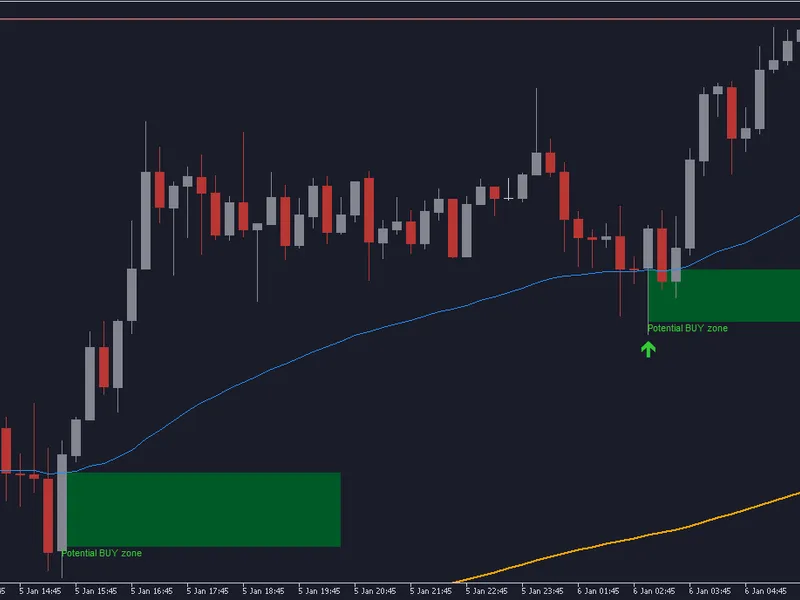
Potential BUY Zone (Uptrend Only)
- This zone is identified when the price retraces to an area just below the EMA 50, with the depth defined by the Average True Range (ATR).
- A bullish candle that closes above the zone confirms its validity.
- The zone is visually marked with a green box and an arrow, labeled "Potential BUY zone".
Potential SELL Zone (Downtrend Only)
- This is the inverse of the BUY zone.
- Price rallies into an area just above the EMA 50, and a bearish candle closes within the zone.
- The zone is marked with a red box and an arrow, labeled "Potential SELL zone".
Additional Filters
- Optional RSI Filter: Prevents BUY zones when the RSI is overbought and SELL zones when the RSI is oversold.
- Cooldown Period: Ensures a minimum number of bars between zones on the same side to prevent visual clutter.
No Repainting
- Zones are calculated exclusively on closed candles.
- Once a zone appears, it remains fixed and does not change or disappear, ensuring historical accuracy.
RISK PANEL
The on-chart panel provides the following information:
- Current trend status.
- Account balance or equity (user selectable).
- Risk per trade, displayed as a percentage and in account currency.
- Suggested lot size, automatically calculated based on user-defined risk percentage, ATR-based stop distance, and the symbol's tick value.
- Today's profit or loss across the entire account.
- A warning alert when the daily loss limit is approached or reached.
The lot size calculation is designed to never exceed the defined risk. It also adheres to the broker's specifications for minimum lot size, maximum lot size, and lot step increments.
If the calculated risk is too small to accommodate the minimum lot size, the panel will indicate this instead of suggesting a larger, unsuitable trade.
SETTINGS
Trend & Zones
- Fast EMA Period (Default: 50)
- Slow EMA Period (Default: 200)
- Number of bars used to confirm the EMA 200 slope.
- ATR Period and Zone Depth (measured in ATR units).
- RSI Filter activation, RSI Period, and Overbought/Oversold levels.
- Cooldown bars between sequential zones.
- Zone box length and the number of historical bars to scan.
Risk Management
- Risk per trade (as a percentage of account balance).
- Option to use balance or equity for calculations.
- Stop Distance for lot size calculation (in ATR units).
- Maximum allowed lot size.
- Daily loss limit (as a percentage of account balance).
Display & Alerts
- Option to enable or disable a dark chart design (original chart colors are restored upon indicator removal).
- Controls to show or hide zone boxes, text labels, and the main panel.
- Configuration for panel corner, position, and font size.
- Settings for pop-up alerts and push notifications for new zone occurrences.
- Customizable zone colors.
HOW TO USE
1. Attach the AlgoFX indicator to any desired chart. Timeframes like M15 and H1 are often suitable for Gold.
2. Configure your risk percentage and daily loss limit within the indicator's input settings.
3. Execute trades exclusively in the direction indicated by the prevailing trend shown on the panel.
4. Interpret the identified zones as areas of potential interest and always confirm trading decisions with your own comprehensive analysis.
5. Adhere to the suggested lot size for trades and maintain awareness of the daily loss warning.
IMPORTANT CONSIDERATIONS
This indicator is designed as an analytical and risk management tool, not as a standalone trading signal service.
Trading involves inherent risks, and historical performance of any indicator does not guarantee future outcomes.
It is strongly recommended to thoroughly test the indicator on a demo account before using it with live funds.
Feedback and suggestions are appreciated in the comments section.
Last updated 2026.
You may also like: MTF Trend Context - Professional Market Analysis Tool - excellent alternative for indicator users on MetaTrader 5.
Source Code
#property copyright "RobotFX"
#property version     "1.00"
#property description "This code is educational. Feel free to use, modify and upgrade as you wish. Visit ROBOTFX.ORG for professional trading tools"
#property indicator_chart_window
#property indicator_buffers 4
#property indicator_plots   4
#property indicator_label1  "Fast EMA"
#property indicator_type1   DRAW_LINE
#property indicator_color1  clrDodgerBlue
#property indicator_width1  1
.......
⚠ Limitations & Risk Warning
- This tool is provided for educational and testing purposes only.
- Past performance does not guarantee future results.
- Trading involves substantial risk of loss. Use on a demo account first.
- Results may vary depending on market conditions, broker, and settings.
- We recommend thorough backtesting and forward testing before using with real funds.