



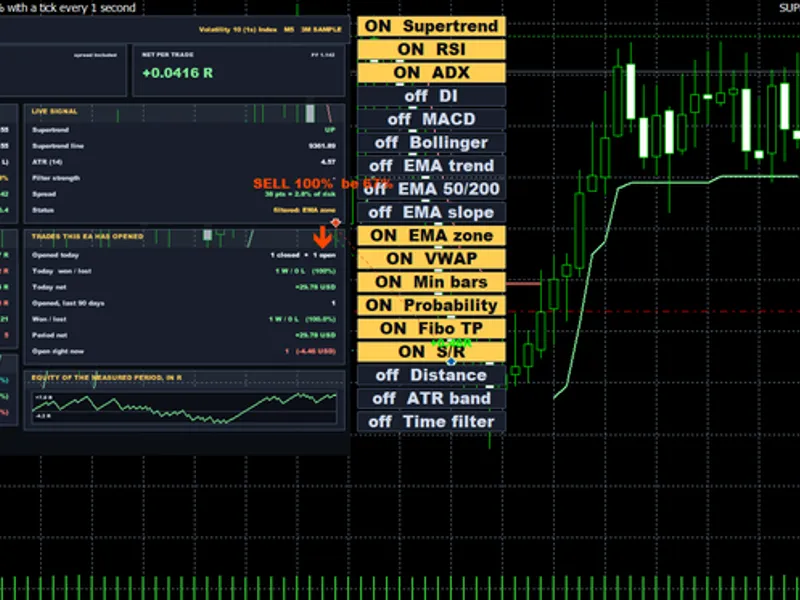





Stormbreaker ADX - Supertrend and DMI Trend EA for MT5
Info
The Stormbreaker ADX - Supertrend and DMI Trend EA for MT5 is a Expert Advisor for MetaTrader 5 that stormbreaker adx is a metatrader 5 expert advisor that integrates supertrend direction with adx strength and the +di/−di directional relationship. It assesses signals on completed candles, manages position sizing based on a fixed equity-risk budget, and implements an ATR-based protective stop.
Usage
This tool is typically used for trend following strategies across multiple currency pairs.
Platform
This Expert Advisor works exclusively on MetaTrader 5 (both build 600+ and newer versions).
Setup
Place the downloaded file in MQL5/Experts folder via File ? Open Data Folder in MetaTrader 5.
How to Install and Use Stormbreaker ADX - Supertrend and DMI Trend EA for MT5
1. Installation: Open the "File" menu, select "Open Data Folder," navigate to MQL/Experts, paste your file, and restart the terminal.
2. Activation: Drag the EA from the Navigator onto a chart, ensure "Allow live trading" is checked in the Common tab, and verify the AutoTrading button is green.
3. Optimization: Right-click your chart, choose "Expert List," click "Properties" to adjust inputs, and save your preferred setup as a set file for future use.
4. Maintenance: Regularly check the "Experts" tab in the terminal window to monitor trade logs and potential execution errors.
Frequently Asked Questions
Q: Why is my EA not opening trades? A: Check the "AutoTrading" button, ensure "Allow live trading" is enabled, and verify your broker allows automated trading on your account type.
Q: Can I run multiple EAs on one chart? A: No, each chart can only host one active EA; however, you can open multiple charts for different currency pairs to run several EAs.
Q: What does the "smiley face" icon mean? A: A smiley face in the top-right corner of the chart indicates the EA is successfully running; a frowny face means it is disabled.
What this tool does
Stormbreaker ADX is a MetaTrader 5 Expert Advisor that integrates Supertrend direction with ADX strength and the +DI/−DI directional relationship.
Typical Use Case
This Expert Advisor excels in trend following on MetaTrader 5.
Compatible Platform & Setup
This Expert Advisor works on MetaTrader 5. Place the file in the MQL5/Experts folder and restart the terminal.
Description & Settings
Related: Supertrend Scalper with Breakeven Win Rate Panel - another powerful expert for MetaTrader 5 traders.
Stormbreaker ADX is a MetaTrader 5 Expert Advisor that integrates Supertrend direction with ADX strength and the +DI/−DI directional relationship. It assesses signals on completed candles, manages position sizing based on a fixed equity-risk budget, and implements an ATR-based protective stop.Also recommended: Night Flat Trade Strategy - similar expert with strong performance on MetaTrader 5.
The downloadable source code is provided for educational purposes, testing, and modification. This Expert Advisor does not guarantee profits; thorough testing with your broker's data and contract specifications is essential before considering live deployment.
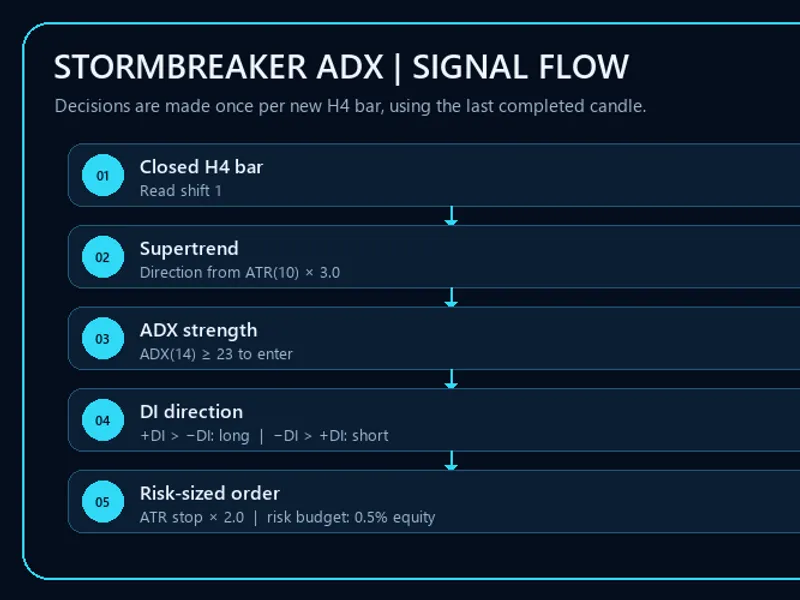
Figure 1. Entry filters are evaluated sequentially at the commencement of a new signal-timeframe candle.
1. Strategy Overview
The default signal timeframe is H4. For each new H4 bar, the EA analyzes the preceding completed bar (shift 1), computes a custom Supertrend using ATR, and reads ADX, +DI, −DI, and ATR values. A trade is initiated only when the Supertrend direction and directional movement indicators align, and the ADX meets the specified entry threshold.
Component
Default
Purpose
Signal timeframe
H4
Signal evaluation timeframe; entries are checked once per new bar.
Supertrend
ATR 10, factor 3.0
Defines the current trend direction.
ADX / DMI
ADX 14; entry threshold 23
Filters for trend strength and confirms direction using +DI and −DI.
Exit strength threshold
ADX below 18
Closes a managed position when trend strength weakens below the exit level.
Initial stop
2 × ATR(10)
Places the stop from the completed signal bar's close, then aligns it to broker price rules.
Risk budget
0.5% of current equity
Calculates volume from the estimated loss between the current entry quote and stop.
Take profit
None
There is no fixed take-profit target; exits are signal/strength based or by stop loss.
2. Entry and Exit Rules
Action
Conditions
Open a buy
Buy entries enabled; Supertrend is bullish; ADX ≥ 23; +DI > −DI.
Open a sell
Sell entries enabled; Supertrend is bearish; ADX ≥ 23; −DI > +DI.
Close an existing position
ADX < 18, or Supertrend direction reverses against the position. An opposite qualifying signal also closes/reverses the managed position.
The EA does not add to a same-direction position if an existing position with the same symbol and magic number is found. A stop-loss remains active independently of the signal exit.
3. Risk-Based Volume Calculation
Prior to sending an order, Stormbreaker estimates the potential loss for a one-lot trade from the current Ask/Bid entry quote to the proposed stop level using OrderCalcProfit. It then divides the 0.5% equity risk budget by this estimated one-lot loss. The resulting volume is rounded down to the broker's permitted volume increment and capped by the maximum volume setting. Margin availability is also verified. If the minimum allowable lot size would exceed the risk budget or if margin is insufficient, the EA will skip the trade.
double risk_cash = AccountInfoDouble(ACCOUNT_EQUITY) * 0.5 / 100.0; double one_lot_loss = MathAbs(one_lot_profit); double volume = MathFloor((risk_cash / one_lot_loss) / volume_step) * volume_step; volume = MathMin(volume, MaxVolume);
Excerpt simplified for explanatory purposes. The complete source code includes checks for invalid prices, tick/volume alignment, broker stop distance rules, and margin requirements. Due to the stop being derived from the previous candle's close while sizing utilizes the current entry quote, potential slippage, price gaps, and execution costs can result in the realized loss deviating from the 0.5% target. This represents a risk target, not a guaranteed maximum loss.
Figure 2. Stop levels are determined by ATR; the EA does not feature a fixed profit target.
4. Inputs and Defaults
Input
Default
Meaning
SignalTimeframe
PERIOD_H4
Timeframe used for generating signals.
SupertrendFactor
3.0
ATR multiplier employed by the Supertrend indicator.
SupertrendATRPeriod
10
ATR period utilized for Supertrend calculation and initial stop placement.
ADXPeriod
14
Period for ADX/DMI calculations.
EntryADX
23.0
Minimum ADX value required for initiating a new trade entry.
ExitADX
18.0
ADX level below which an open position will be closed.
StopATRMultiple
2.0
ATR multiple used to determine the initial stop-loss distance.
MaxVolume
100.0
Upper limit for trade volume in lots; actual symbol-specific limits remain applicable.
DeviationPoints
20
Maximum allowable price deviation in points for trade requests.
EnableBuy / EnableSell
true / true
Enables or disables trading in the buy or sell direction, respectively.
MagicNumber
51003
Unique identifier used to manage the EA's positions.
The 0.5% risk percentage is currently a fixed constant within the source code and is not exposed as a user input.
5. MQL5 Signal Code Example
The subsequent excerpt illustrates the closed-bar entry conditions implemented by the EA:
bool long_signal = EnableBuy && direction < 0
&& adx >= EntryADX && plus_di > minus_di;
bool short_signal = EnableSell && direction > 0
&& adx >= EntryADX && minus_di > plus_di;
if(long_signal)
STOpenPosition(true, bar.close - StopATRMultiple * atr,
0.0, MagicNumber, "ST ADX long", MaxVolume,
DeviationPoints);
else if(short_signal)
STOpenPosition(false, bar.close + StopATRMultiple * atr,
0.0, MagicNumber, "ST ADX short", MaxVolume,
DeviationPoints);
else if(position != 0 && (adx < ExitADX
|| (position > 0 && direction > 0)
|| (position < 0 && direction < 0)))
STClosePosition(MagicNumber);
Within the full EA implementation, these conditions are evaluated only after detecting a new signal-timeframe bar and successfully retrieving the prior closed bar and indicator data.
6. Broker Backtest Snapshot
The following figures are derived from the provided MetaTrader 5 Strategy Tester reports for XAGUSD on H4. As initial deposits vary, both net return and net profit are presented. Tick-history quality is also variable, with particularly limited data for Fusion Markets.
Broker
Period end
Initial deposit
Net profit
Net return
Max equity DD
Profit factor
Sharpe
Trades
Real ticks
IC Markets
2026-09-23
USD 1,000,000
USD 154,482.51
15.45%
19.40%
1.12
0.50
520
32%
BlackBull Markets
2026-09-24
USD 1,000,000
USD 225,766.54
22.58%
5.00%
1.45
1.00
196
41%
Fusion Markets
2026-09-23
USD 100,000
USD 26,680.57
26.68%
8.97%
1.26
2.22
374
4%
Figure 3. Broker-specific historical performance data from the supplied reports. Fusion Markets' report utilized only 4% real ticks.
Testing Limitations:
The presented results are from historical Strategy Tester runs and do not represent audited live trading performance. The reported periods conclude on slightly different dates, and initial deposits and broker specifications vary. Modeling quality ranges from 4% to 41% real ticks. These figures are not directly comparable and do not serve as a predictor of future outcomes. It is recommended to conduct your own tests with your intended broker, symbol specifications, spread, commissions, swaps, and tick data.
7. Compatibility and Practical Use
Platform: MetaTrader 5; Source Language: MQL5.
Attach the EA to the chart of the desired trading symbol. The signal timeframe is configured via the SignalTimeframe input parameter.
No external custom indicator files are required. The EA utilizes the standard Trade rade.mqh library and built-in ATR/ADX indicator data.
Employ a unique Magic Number for each EA instance. On netting accounts, where positions are aggregated, refrain from running other strategies or executing manual trades on the same symbol.
Verify broker-specific minimum volume, tick size, stop distance, and margin requirements in the Strategy Tester and on a demo account prior to live trading.
8. NorthSlope: The Next Step
Stormbreaker ADX represented a significant milestone in the development of my systematic trend-following Expert Advisors. NorthSlope is the definitive evolution of this work. It is a more focused Supertrend-based system designed for AAPL on H1, incorporating rising-slope confirmation, an on-chart Supertrend display, detailed diagnostic logging, and configurable equity-based risk sizing. NorthSlope is long-only and specifically tailored for its stated AAPL setup; it is not a direct substitute for Stormbreaker's XAGUSD H4 configuration.
Risk Disclosure:
Automated trading systems carry substantial risk. A stop-loss order cannot guarantee execution at the specified price during market gaps or periods of high volatility. Backtest results, demo trading, and historical performance do not ensure future profitability. You are solely responsible for evaluating the Expert Advisor and its settings before deployment.
You may also like: Exp Color Bulls Trading System - excellent alternative for expert users on MetaTrader 5.
Source Code
#property strict
#property version "1.10"
#property description "This code is educational. Feel free to use, modify and upgrade as you wish. Visit ROBOTFX.ORG for professional trading tools"
#include <Trade\Trade.mqh>
CTrade STTrade;
const double ST_FIXED_RISK_PERCENT = 0.5;
int STATRHandle=INVALID_HANDLE;
int STADXHandle=INVALID_HANDLE;
bool STNewBar(const ENUM_TIMEFRAMES timeframe, datetime &last_bar)
{
.......
⚠ Limitations & Risk Warning
- This tool is provided for educational and testing purposes only.
- Past performance does not guarantee future results.
- Trading involves substantial risk of loss. Use on a demo account first.
- Results may vary depending on market conditions, broker, and settings.
- We recommend thorough backtesting and forward testing before using with real funds.