


MTF Trend Context - Professional Market Analysis Tool
Info
The MTF Trend Context - Professional Market Analysis Tool is a Indicator for MetaTrader 5 that see multi-timeframe trend alignment at a glance. MTF Trend Context is a compact MetaTrader 5 market-context indicator.
Usage
This tool is typically used for trend following strategies across multiple currency pairs.
Platform
This Indicator works exclusively on MetaTrader 5 (both build 600+ and newer versions).
Setup
Place the downloaded file in MQL5/Indicators folder via File ? Open Data Folder in MetaTrader 5.
How to Install and Use MTF Trend Context - Professional Market Analysis Tool
1. Installation: Place your file in the MQL/Indicators folder via "Open Data Folder" and restart your terminal.
2. Loading: Find the indicator in the Navigator, drag it onto your chart, and configure the input parameters in the popup window.
3. Customization: Press Ctrl+I to open the indicator list, select your tool, and click "Properties" to change colors, levels, or visual styles.
4. Updating: Replace the old file in the Indicators folder with the new version and restart the platform to apply changes.
Frequently Asked Questions
Q: Why is my indicator not showing? A: Verify the file is in the MQL/Indicators folder, or try right-clicking the "Indicators" tree in the Navigator and clicking "Refresh."
Q: Do custom indicators slow down the platform? A: Too many complex indicators can impact performance; remove unused ones via the "Indicator List" (Ctrl+I).
Q: Can I use MT4 indicators on MT5? A: No, MQL4 and MQL5 are distinct languages; ensure the indicator is compiled specifically for your platform version.
What this tool does
See multi-timeframe trend alignment at a glance.
Typical Use Case
This Indicator excels in trend following on MetaTrader 5.
Compatible Platform & Setup
This Indicator works on MetaTrader 5. Place the file in the MQL5/Indicators folder and restart the terminal.
Description & Settings
Related: ADX Auto Range: Automated Trend Strength and Consolidation Detection - another powerful indicator for MetaTrader 5 traders.
See multi-timeframe trend alignment at a glance.Also recommended: Line Master: Advanced Trend Lines with Change Signals - similar indicator with strong performance on MetaTrader 5.
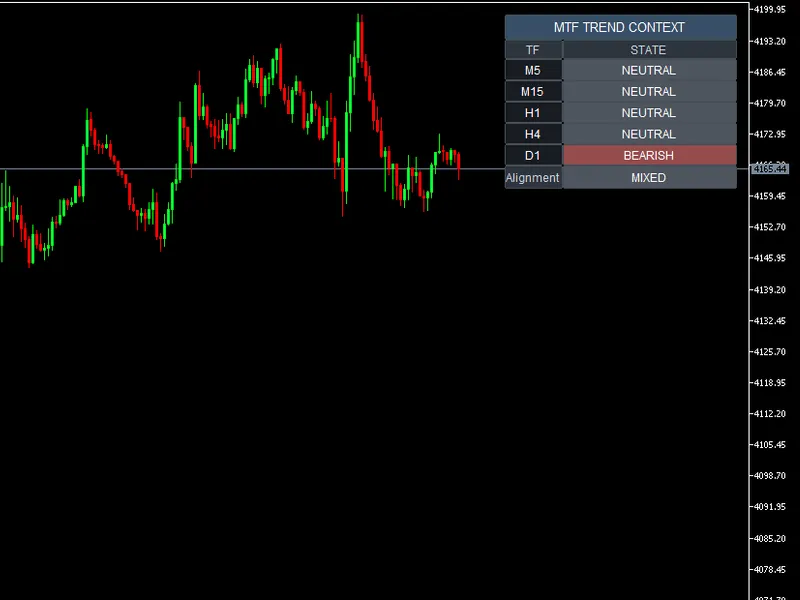
MTF Trend Context is a compact MetaTrader 5 market-context indicator. It displays the directional state of five selected timeframes in a single panel and summarizes whether those timeframes are broadly aligned or mixed.
How it works
Each timeframe adheres to a consistent rule:
Bullish:
Close > Fast EMA > Slow EMA
Bearish:
Close < Fast EMA < Slow EMA
Neutral:
All other valid configurations
N/A:
Required history or indicator data is not ready
The default EMA lengths are 20 and 50. Both are adjustable, and the Slow EMA length must be greater than the Fast EMA length.
Confirmed closed-bar behavior
Each row uses the most recently closed bar of its respective timeframe. The indicator reads price and both EMA values from shift 1, not from the current forming bar.
This behavior is consistent regardless of whether a selected timeframe is lower than, equal to, or higher than the chart timeframe.
Before displaying a state, the indicator verifies history synchronization, available bars, and EMA calculation readiness. If the required data is unavailable, it shows N/A instead of estimating a state.
Presets
Scalping:
M1 / M5 / M15 / H1 / H4
Intraday (default):
M5 / M15 / H1 / H4 / D1
Swing:
H1 / H4 / D1 / W1 / MN1
Custom:
Five user-selected MetaTrader timeframes
Changing the chart timeframe does not automatically alter the selected preset.
Alignment Summary
5/5 Bullish → ALL BULLISH
4/5 Bullish → MOSTLY BULLISH
5/5 Bearish → ALL BEARISH
4/5 Bearish → MOSTLY BEARISH
All other combinations → MIXED
If any row displays N/A, the indicator will not categorize the remaining rows into a strong alignment label. It will report MIXED along with the count of valid timeframes.
Parameters
Trend
Fast EMA Length — default 20
Slow EMA Length — default 50
Timeframes
Preset — Intraday by default
Custom TF1–TF5 — used only when Custom is selected
Display
Panel Corner — Top Right by default
Text Size — Medium by default
Show Alignment — true by default
Intended Use
Utilize the panel as a rapid market-context check prior to in-depth analysis: are the timeframes you are focusing on generally moving in the same direction, or are they conflicting?
This indicator provides market context; it is not a standalone trading signal.
Limitations
This indicator does not execute trades.
It does not generate BUY/SELL signals, entry or exit points, stop losses, take profits, alerts, predictions, or backtest results.
The EMA-based trend classification is intentionally simplified and may lag behind price action.
It does not measure trend quality, volatility, volume, momentum, trading sessions, market structure, or future returns.
A terminal or broker may require time to synchronize historical data for certain timeframes. Those specific rows will display N/A until the necessary data becomes available.
You may also like: Trend Buy/Sell Zones with Automated Lot Sizing and Risk Panel for MT5 - excellent alternative for indicator users on MetaTrader 5.
Source Code
#property copyright "RobotFX"
#property version   "1.00"
#property description "This code is educational. Feel free to use, modify and upgrade as you wish. Visit ROBOTFX.ORG for professional trading tools"
#property indicator_chart_window
#property indicator_buffers 1
#property indicator_plots   1
#property indicator_type1   DRAW_NONE
#property indicator_label1  "MTF Trend Context"
enum ENUM_MTF_PRESET
  {
.......
⚠ Limitations & Risk Warning
- This tool is provided for educational and testing purposes only.
- Past performance does not guarantee future results.
- Trading involves substantial risk of loss. Use on a demo account first.
- Results may vary depending on market conditions, broker, and settings.
- We recommend thorough backtesting and forward testing before using with real funds.