





ATR Monitor — Daily, Weekly, and Monthly Range Comparison
Info
The ATR Monitor — Daily, Weekly, and Monthly Range Comparison is a Indicator for MetaTrader 4 that atr monitor compares the current daily, weekly, and monthly price ranges with the average true range (atr). It provides insights into the size of each period's range relative to its ATR and the position of the current price concerning the period's opening price.
Usage
This tool is typically used for enhancing chart analysis and decision making.
Platform
This Indicator works exclusively on MetaTrader 4 (both build 600+ and newer versions).
Setup
Place the downloaded file in MQL4/Indicators folder via File ? Open Data Folder in MetaTrader 4.
How to Install and Use ATR Monitor — Daily, Weekly, and Monthly Range Comparison
1. Installation: Place your file in the MQL/Indicators folder via "Open Data Folder" and restart your terminal.
2. Loading: Find the indicator in the Navigator, drag it onto your chart, and configure the input parameters in the popup window.
3. Customization: Press Ctrl+I to open the indicator list, select your tool, and click "Properties" to change colors, levels, or visual styles.
4. Updating: Replace the old file in the Indicators folder with the new version and restart the platform to apply changes.
Frequently Asked Questions
Q: Why is my indicator not showing? A: Verify the file is in the MQL/Indicators folder, or try right-clicking the "Indicators" tree in the Navigator and clicking "Refresh."
Q: Do custom indicators slow down the platform? A: Too many complex indicators can impact performance; remove unused ones via the "Indicator List" (Ctrl+I).
Q: Can I use MT4 indicators on MT5? A: No, MQL4 and MQL5 are distinct languages; ensure the indicator is compiled specifically for your platform version.
What this tool does
ATR Monitor compares the current daily, weekly, and monthly price ranges with the Average True Range (ATR).
Typical Use Case
This Indicator excels in automated trading and technical analysis on MetaTrader 4.
Compatible Platform & Setup
This Indicator works on MetaTrader 4. Place the file in the MQL4/Indicators folder and restart the terminal.
Description & Settings
Related: multi-timeframe indicator: daily, 4-hour, and 1-hour bars - another powerful indicator for MetaTrader 4 traders.
ATR Monitor compares the current daily, weekly, and monthly price ranges with the Average True Range (ATR). It provides insights into the size of each period's range relative to its ATR and the position of the current price concerning the period's opening price.Also recommended: time out indicator: monitor quote delivery delays - similar indicator with strong performance on MetaTrader 4.
Panel Display
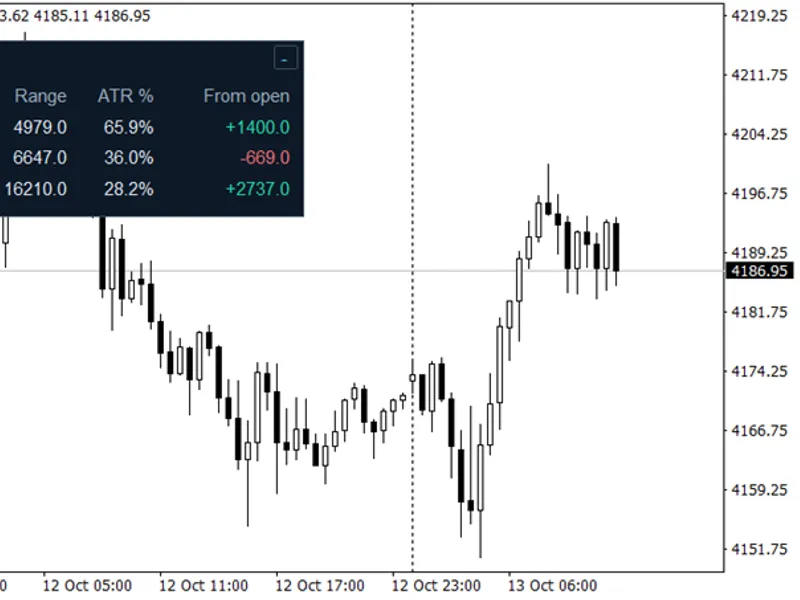
The panel consists of three rows, representing Day, Week, and Month. These timeframes are accessible on the current chart, regardless of its timeframe.
Table Explanation
Column
Meaning
Period
Daily, weekly, or monthly candle.
ATR
Built-in ATR for the specified timeframe, measured in pips.
Range
Difference between the current period's high and low, in pips.
ATR %
Percentage obtained by dividing the current range by ATR and multiplying by 100.
From open
Difference between the current price and the period's opening price, expressed in pips.
For instance, a daily range of 66 pips against a daily ATR of 60 pips results in an ATR % of 110%. Similarly, a weekly range of 144 pips against an ATR of 240 pips yields 60%, and a monthly range of 160 pips against an ATR of 400 pips gives 40%.
The ATR % calculation considers the full high–low range. 'From open' provides a separate direction measurement, with positive values in green and negative values in red. A value rounded to zero is neutral.
Values at or above MaxATRPercent are highlighted in amber. The default threshold is 100%. Adjusting this setting only affects highlighting; the displayed percentage remains uncapped.
Inputs
Input
Default
Purpose
ATRPeriod
14
ATR lookback applied independently to daily, weekly, and monthly data.
MaxATRPercent
100.0
Percentage threshold for amber highlighting.
PanelX
7
Horizontal position from the chart's upper-left corner, in pixels.
PanelY
30
Vertical position from the chart's upper-left corner, in pixels.
PanelXSize
400
Expanded panel width before scaling.
PanelYSize
146
Expanded panel height before scaling.
PanelScale
1.0
Panel and font scale, ranging from 0.5 to 3.0. Position offsets remain unchanged.
Colors
Dark theme
Background, border, text, direction, and threshold colors.
Click minus to minimize the panel and plus to restore it. Hover over the title or column headings for explanations of values and units.
Calculation and Updates
Prices and ATR are based on the current forming candle (shift 0) on each timeframe. The indicator loads values when attached and updates on incoming ticks. ATR values change as the current candle progresses and are not fixed references from the previous completed candle.
Period boundaries adhere to the broker's candles. Range measures high minus low, while ATR uses true range, including gaps relative to the previous close. A range above 100% ATR does not necessarily indicate an impending price reversal.
Pip conversion uses ten points per pip for three- and five-digit quotes and one point otherwise. Values display one decimal place. Other instruments may follow different pip conventions.
Unavailable data is shown as '--' and retried on later ticks. A zero ATR displays N/A for ATR %. Without incoming ticks, there is no automatic retry after history loading completes. Restoring the panel refreshes available values. Values are not updated while the panel is minimized.
Installation
Place AtrMonitor.mq4 in the terminal data folder under MQL4/Indicators, compile it in MetaEditor, refresh Navigator, and attach the indicator to a chart. No external libraries or DLLs are necessary.
You may also like: prop firm risk monitor and auto-lot calculator for metatrader 4 - excellent alternative for indicator users on MetaTrader 4.
Source Code
#property strict
#property version "1.00"
#property copyright "RobotFX"
#property description "This code is educational. Feel free to use, modify and upgrade as you wish. Visit ROBOTFX.ORG for professional trading tools"
#property indicator_chart_window
#property indicator_buffers 0
input int    ATRPeriod       = 14;
input double MaxATRPercent   = 100.0;
input int    PanelX          = 7;
input int    PanelY          = 30;
.......
⚠ Limitations & Risk Warning
- This tool is provided for educational and testing purposes only.
- Past performance does not guarantee future results.
- Trading involves substantial risk of loss. Use on a demo account first.
- Results may vary depending on market conditions, broker, and settings.
- We recommend thorough backtesting and forward testing before using with real funds.