



Session Range Desk MT5: Educational Range Breakout EA
Info
The Session Range Desk MT5: Educational Range Breakout EA is a Expert Advisor for MetaTrader 5 that session range desk mt5 - version 4. 01Session Range Desk is an educational, source-available session-range breakout Expert Advisor for MetaTrader 5 hedging accounts.
Usage
This tool is typically used for breakout trading when price moves beyond key support/resistance levels.
Platform
This Expert Advisor works exclusively on MetaTrader 5 (both build 600+ and newer versions).
Setup
Place the downloaded file in MQL5/Experts folder via File ? Open Data Folder in MetaTrader 5.
How to Install and Use Session Range Desk MT5: Educational Range Breakout EA
1. Installation: Open the "File" menu, select "Open Data Folder," navigate to MQL/Experts, paste your file, and restart the terminal.
2. Activation: Drag the EA from the Navigator onto a chart, ensure "Allow live trading" is checked in the Common tab, and verify the AutoTrading button is green.
3. Optimization: Right-click your chart, choose "Expert List," click "Properties" to adjust inputs, and save your preferred setup as a set file for future use.
4. Maintenance: Regularly check the "Experts" tab in the terminal window to monitor trade logs and potential execution errors.
Frequently Asked Questions
Q: Why is my EA not opening trades? A: Check the "AutoTrading" button, ensure "Allow live trading" is enabled, and verify your broker allows automated trading on your account type.
Q: Can I run multiple EAs on one chart? A: No, each chart can only host one active EA; however, you can open multiple charts for different currency pairs to run several EAs.
Q: What does the "smiley face" icon mean? A: A smiley face in the top-right corner of the chart indicates the EA is successfully running; a frowny face means it is disabled.
What this tool does
Session Range Desk MT5 - version 4.
Typical Use Case
This Expert Advisor excels in automated trading and technical analysis on MetaTrader 5.
Compatible Platform & Setup
This Expert Advisor works on MetaTrader 5. Place the file in the MQL5/Experts folder and restart the terminal.
Description & Settings
Related: Fx Craft Example EA: Range Breakout with Pending Orders - another powerful expert for MetaTrader 5 traders.
Session Range Desk MT5 - version 4.01Also recommended: Opening Range Breakout with NR4 / NR7 Contraction Filters (2026 Update) - similar expert with strong performance on MetaTrader 5.
Session Range Desk is an educational, source-available session-range breakout Expert Advisor for MetaTrader 5 hedging accounts. It combines a range filter, stop-distance position sizing, and a chart panel. Copies on different symbols can display a shared desk view through terminal global variables. It uses no grid, martingale, or averaging scheme.
Trading Sequence
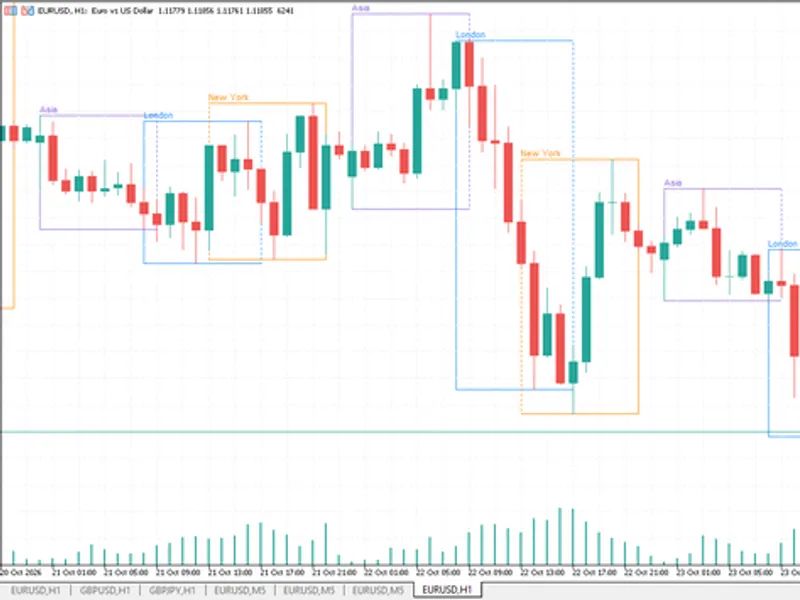
At the first eligible tick at or after the configured server start time, the EA takes the highest high and lowest low of the previous LookbackCandles completed bars on the chart timeframe. This is a trailing-bar range, not a continuously accumulated opening session. If its width is outside the configured ATR band, that day's signal is skipped. Otherwise, price touching the boundary or a completed bar closing beyond it can trigger a market order. The opposite range edge is supplied as the stop. The intended limit is one successful entry per symbol per server day during uninterrupted operation.
Optional management includes an R-multiple target, break-even, and partial close. R refers to the initial entry-to-stop distance. At the configured end time, the EA attempts to close its matching position on an incoming tick. Execution remains subject to the broker and available prices.
Inputs
StartHour / StartMinute: server time after which the completed-bar range is established. EndHour / EndMinute: same-day forced-close attempt time. Use a start earlier than the end; overnight sessions are not implemented.
LookbackCandles: number of previous completed chart bars. BreakoutMode: touch or completed-bar close.
ATR_TF / ATR_Period: ATR timeframe and period. Min_ATR_Mult / Max_ATR_Mult: accepted range-width interval relative to the last completed ATR value.
RiskPercent: target entry stop-distance risk as a percentage of balance. MaxDailyRiskPct: shared desk commitment threshold used before entry; it is not an account equity stop or a guaranteed daily loss limit.
SkipOnMinLot / MinLotTolerance: whether to skip an entry when the broker's minimum volume would exceed target risk beyond the allowed percentage overshoot.
UseTP / TP_R: enable and set the fixed R-multiple target.
UseBreakEven / BE_Trigger_R / BE_Target_R: enable break-even, its trigger, and the new stop relative to entry in R. A stop at entry does not cover commissions or guarantee a zero-loss fill.
UsePartialTP / PTP_Trigger_R / PTP_Percent: enable partial close, its R trigger, and percentage. The partial close is skipped when the volume cannot be split within broker limits. Place a partial-close trigger below the fixed target if it should occur before that target.
MagicNumber / DeskName: matching identifiers for participating copies in the same terminal. Use one copy per symbol, identical desk settings, and a dedicated magic number. Coordination does not extend across terminals.
ShowPanel / PanelCorner / PanelX / PanelY: panel visibility, corner, and offsets. ShowChartLevels independently controls range and trade drawings. Both drawing paths are disabled during optimization and nonvisual testing.
Installation and Initial Checks
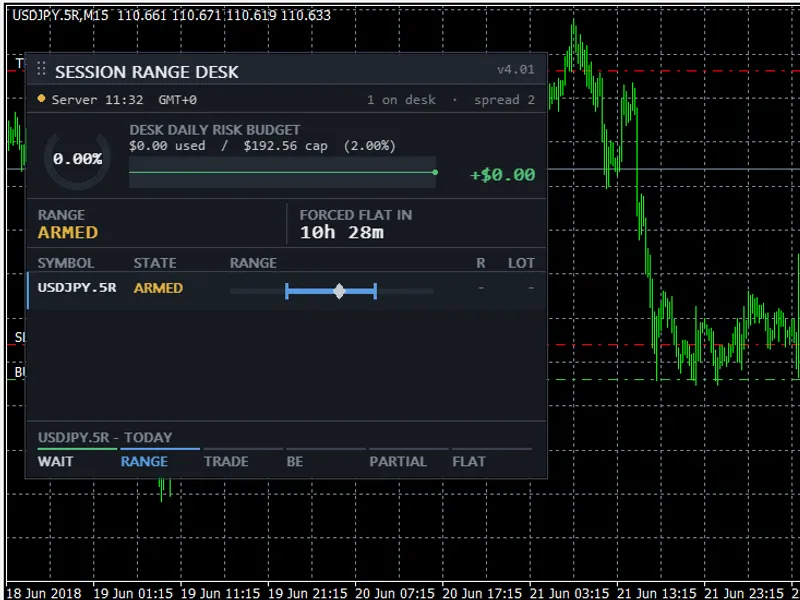
Place SessionRangeDesk.mq5 under MQL5/Experts and compile it in MetaEditor. Only the standard Trade, PositionInfo, SymbolInfo, and Canvas include files supplied with MetaTrader 5 are needed. Begin in the Strategy Tester and on a hedging demo account. The supplied screenshot illustrates the panel on a USDJPY M15 custom-symbol test; it is not a recommended production preset or proof of profitability. No optimized set files are distributed.
Important Limitations
This release is a programming example, not a certified account-protection system. The desk bus is not an atomic cross-chart risk reservation: simultaneous signals, stale heartbeats, volume rounding, and execution costs can make actual exposure differ from the threshold. It does not enforce account-wide equity or third-party prop-firm rules. Single-symbol optimization does not validate multi-chart coordination.
The day-end close is a tick-driven attempt. Version 4.01 marks the day-end action complete even if the broker rejects that close, so it must not be relied upon as a guaranteed flattening mechanism. Restart recovery does not establish a persistent once-per-day entry lock for all situations. Test these failure modes before considering unattended use. Netting partial-close behavior is not supported by this release.
Local regression tests compared trade records with graphics enabled and disabled, and the stored standalone compilation log reports zero errors and zero warnings. These checks are not live or real-tick performance validation. Earlier synthetic cost assumptions were corrected during research; no historical profit, drawdown, or speed claims are made in this publication. Broker-specific spread, commission, swap, slippage, volume steps, and stop restrictions require separate checks.
AI tools assisted code revision, research review, and preparation of this description. The source and limitations are provided for inspection and testing; no return, safety, or platform acceptance is guaranteed. This information is current as of 2026.
You may also like: EMA Cross Scalper for XAUUSD (M15) with WIB Session Filter - excellent alternative for expert users on MetaTrader 5.
Source Code
#property copyright "RobotFX"
#property link "https://robotfx.org"
#property version   "4.01"
#property description "This code is educational. Feel free to use, modify and upgrade as you wish. Visit ROBOTFX.ORG for professional trading tools"
#include <Trade\Trade.mqh>
#include <Trade\PositionInfo.mqh>
#include <Trade\SymbolInfo.mqh>
#include <Canvas\Canvas.mqh>
enum ENUM_BREAKOUT_MODE {
   BREAKOUT_TOUCH,
.......
⚠ Limitations & Risk Warning
- This tool is provided for educational and testing purposes only.
- Past performance does not guarantee future results.
- Trading involves substantial risk of loss. Use on a demo account first.
- Results may vary depending on market conditions, broker, and settings.
- We recommend thorough backtesting and forward testing before using with real funds.