
vp s trailing stop service
Info
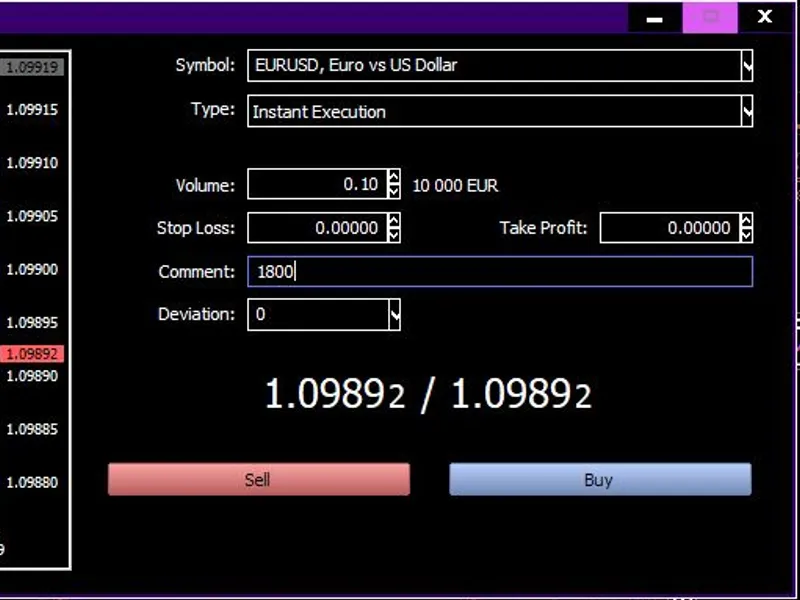
The vp s trailing stop service is a Script for MetaTrader 5 that place the file into services terminal folder. the picture above shows an example of setting up a new sell order with the corresponding comment - 1800 points.
Usage
This tool is typically used for enhancing chart analysis and decision making.
Platform
This Script works exclusively on MetaTrader 5 (both build 600+ and newer versions).
Setup
Place the downloaded file in MQL5/Scripts folder via File ? Open Data Folder in MetaTrader 5.
How to Install and Use vp s trailing stop service
1. Installation: Move your script file into the MQL/Scripts directory and restart the platform.
2. Execution: Drag the script onto a chart; it will perform a one-time action, such as closing all open orders or clearing chart objects.
3. Editing: Use MetaEditor (F4) to modify code, click "Compile," and verify no errors appear in the terminal before running.
4. Removing: Scripts stop automatically, but you can remove them manually by right-clicking the chart and choosing "Remove Script."
Frequently Asked Questions
Q: How are scripts different from EAs? A: Scripts execute a single action and then stop; EAs monitor the market and trade continuously.
Q: Can I assign a hotkey to a script? A: Yes, right-click the script in the Navigator, select "Set Hotkey," and define your preferred keyboard shortcut.
Q: Why did my script stop? A: Scripts are designed to stop immediately after finishing their programmed command; this is normal behavior.
What this tool does
place the file into services terminal folder.
Typical Use Case
This Script excels in automated trading and technical analysis on MetaTrader 5.
Compatible Platform & Setup
This Script works on MetaTrader 5. Place the file in the MQL5/Scripts folder and restart the terminal.
Description & Settings
Related: Export Symbol Specifications to CSV (Volume Step, Fill Mode, Stops Level) - another powerful script for MetaTrader 5 traders.
Also recommended: OHLC Backtesting Accuracy: Determining the Critical Stop Distance - similar script with strong performance on MetaTrader 5.
place the file into services terminal folder.the picture above shows an example of setting up a new sell order with the corresponding comment - 1800 points.
the picture above shows the result of sell order the corresponding comment - 1800 points.
the picture above shows an example of setting up a graphical object of a horizontal line - 450 points.
the picture above shows an example of the result of creating a horizontal line.
to use real sl trailing - when you open a trade order in the comment indicate the real stop loss distance in points.
to use virtual sl trailing - create horizontal line on same symbol chart then rename it to the name you used before launching the program and in the description of the object indicate the virtual stop loss distance in points.
!!! be careful !!!
when placing an object on chart use correct sl distance depending on trade direction.
to disable virtual trailing just delete created horizontal line.
to disable real trailing you have to stop this program.
this code is designed to manage only one open position per symbol.
to manage a large number of open positions for a single symbol, you need to edit the code.
You may also like: set stop loss on all open positions by target loss amount - excellent alternative for script users on MetaTrader 5.
Source Code
#property    service
#property    copyright              "Copyright 2023, Igor Gerasimov."
#property    link                   "[email protected]"
#property    version                "1.00"
input bool   S=true,                // Remove Unused Object
C=true,                // Remove Unused Symbol
W=true,                // Real Stop Loss Trail
U=true;                // Virtual Object Trail
input string V="VPS Trailing Stop"; // Trailing Object Name
input ushort B=15000;               // Sleep Time
.......
⚠ Limitations & Risk Warning
- This tool is provided for educational and testing purposes only.
- Past performance does not guarantee future results.
- Trading involves substantial risk of loss. Use on a demo account first.
- Results may vary depending on market conditions, broker, and settings.
- We recommend thorough backtesting and forward testing before using with real funds.