
Stop Distance Indicator: Bar Range and Suggested Stop Levels
Info
The Stop Distance Indicator: Bar Range and Suggested Stop Levels is a Indicator for MetaTrader 5 that stopdistance displays the range of each bar (high - low) in symbol points, its moving average, and a suggested stop distance calculated by multiplying the average by a factor. This tool helps traders determine the normal price movement within a single bar on the current timeframe, using the same units as stop loss orders.
Usage
This tool is typically used for enhancing chart analysis and decision making.
Platform
This Indicator works exclusively on MetaTrader 5 (both build 600+ and newer versions).
Setup
Place the downloaded file in MQL5/Indicators folder via File ? Open Data Folder in MetaTrader 5.
How to Install and Use Stop Distance Indicator: Bar Range and Suggested Stop Levels
1. Installation: Place your file in the MQL/Indicators folder via "Open Data Folder" and restart your terminal.
2. Loading: Find the indicator in the Navigator, drag it onto your chart, and configure the input parameters in the popup window.
3. Customization: Press Ctrl+I to open the indicator list, select your tool, and click "Properties" to change colors, levels, or visual styles.
4. Updating: Replace the old file in the Indicators folder with the new version and restart the platform to apply changes.
Frequently Asked Questions
Q: Why is my indicator not showing? A: Verify the file is in the MQL/Indicators folder, or try right-clicking the "Indicators" tree in the Navigator and clicking "Refresh."
Q: Do custom indicators slow down the platform? A: Too many complex indicators can impact performance; remove unused ones via the "Indicator List" (Ctrl+I).
Q: Can I use MT4 indicators on MT5? A: No, MQL4 and MQL5 are distinct languages; ensure the indicator is compiled specifically for your platform version.
What this tool does
StopDistance displays the range of each bar (High - Low) in symbol points, its moving average, and a suggested stop distance calculated by multiplying the average by a factor.
Typical Use Case
This Indicator excels in automated trading and technical analysis on MetaTrader 5.
Compatible Platform & Setup
This Indicator works on MetaTrader 5. Place the file in the MQL5/Indicators folder and restart the terminal.
Description & Settings
Related: Risk Lot Calculator: Calculate Lot Size Based on Risk and Stop Loss - another powerful indicator for MetaTrader 5 traders.
StopDistance displays the range of each bar (High - Low) in symbol points, its moving average, and a suggested stop distance calculated by multiplying the average by a factor. This tool helps traders determine the normal price movement within a single bar on the current timeframe, using the same units as stop loss orders.Also recommended: Risk Calculator Panel with Draggable Stop Loss and Take Profit Lines - similar indicator with strong performance on MetaTrader 5.
The primary question it addresses is: how far does a symbol typically move within one bar of the current timeframe, measured in points?
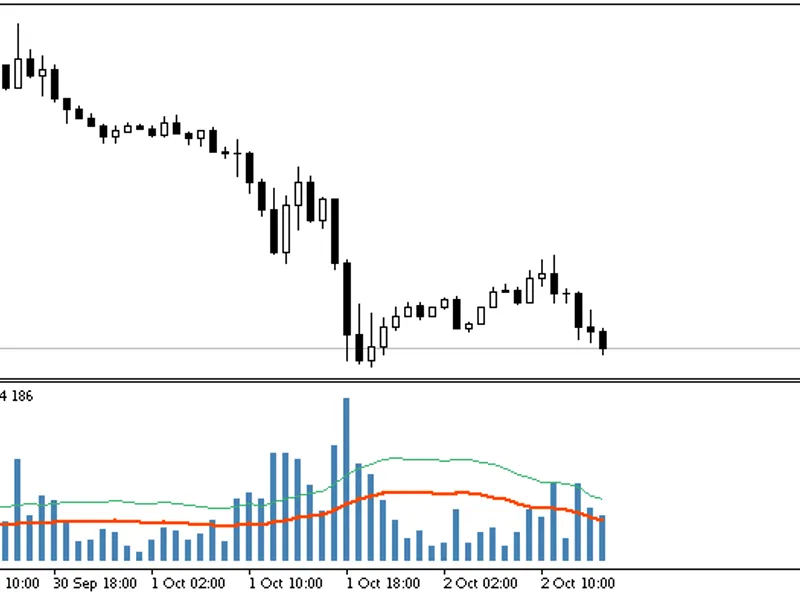
StopDistance(20, SMA, 1.50) on EURUSD H1: bar range (histogram), its average (red line), and the suggested stop (green line)
Core Concept
Placing a stop loss within the typical bar range increases the risk of being triggered by normal market fluctuations before a trade has a chance to develop. While ATR is often used to gauge volatility, it is displayed in price units. StopDistance, however, reports all values in points, directly corresponding to stop loss settings in MetaTrader platforms and Expert Advisors.
The indicator uses a straightforward calculation: bar range = (High - Low) / Point. Unlike ATR, it does not account for gaps between bars, focusing solely on intra-bar movement. StopDistance is a measurement tool and does not generate trading signals.
How to Interpret the Indicator
Blue histogram: Represents the range of each individual bar in points.
Red line: Shows the average range over the specified number of preceding bars (using SMA or EMA).
Green dashed line: Indicates the suggested stop distance, which is the calculated average range multiplied by the Stop factor.
A stop distance below the red line suggests it might be too close and could be affected by normal price volatility. The green line serves as a baseline for a minimum stop distance, not a definitive recommendation for every trade. The appropriate factor depends on the trading timeframe and the expected duration of the trade.
Input Parameters
Parameter
Default
Description
Averaging period (InpPeriod)
20
The number of bars used for calculating the average. Must be 1 or greater.
Averaging method (InpMethod)
Simple (SMA)
Specifies the averaging method: Simple Moving Average (SMA) or Exponential Moving Average (EMA). EMA is initialized using the SMA of the first 'Period' bars.
Stop factor (InpStopFactor)
1.5
A multiplier applied to the average range to determine the suggested stop distance. Must be greater than 0.
Using with Expert Advisors (EAs)
The indicator provides three data buffers accessible via iCustom and CopyBuffer functions: buffer 0 for bar range, buffer 1 for the average range, and buffer 2 for the suggested stop distance. All values are reported in points. Since the value for the currently forming bar updates with each tick, it is advisable to use data from the last closed bar (shift 1) for decision-making.
Example EA Snippet (Illustrative)
int g_handle=INVALID_HANDLE;
int OnInit()
{
g_handle=iCustom(_Symbol,_Period,"StopDistance",20,0,1.5); // period 20, SMA, stop factor 1.5
return(g_handle==INVALID_HANDLE ? INIT_FAILED : INIT_SUCCEEDED);
}
void OnTick()
{
double stop[];
if(CopyBuffer(g_handle,2,1,1,stop)==1) // Get suggested stop for the last closed bar
Print("Suggested stop, points: ",stop[0]);
}
Important Notes
All reported values are in symbol points, not pips. For example, on a 5-digit EURUSD quote, 150 points equate to 15 pips.
The indicator employs an incremental calculation method. After the initial calculation, only the currently forming bar is recomputed on each tick, ensuring efficiency even with long historical data.
The average and stop lines begin calculation from bar 'Period' - 1, which is the first bar with a complete averaging window.
This indicator is compatible with all symbols and timeframes. Invalid input parameters will be flagged with a message in the Experts log during initialization.
You may also like: ATR Trailing Stop Indicator: Pine Script to MQL5 Conversion - excellent alternative for indicator users on MetaTrader 5.
Source Code
#property copyright "RobotFX"
#property link "https://robotfx.org"
#property version   "1.10"
#property description "This code is educational. Feel free to use, modify and upgrade as you wish. Visit ROBOTFX.ORG for professional trading tools"
#property indicator_separate_window
#property indicator_buffers 3
#property indicator_plots   3
#property indicator_label1  "Range"
#property indicator_type1   DRAW_HISTOGRAM
#property indicator_color1  clrSteelBlue
.......
⚠ Limitations & Risk Warning
- This tool is provided for educational and testing purposes only.
- Past performance does not guarantee future results.
- Trading involves substantial risk of loss. Use on a demo account first.
- Results may vary depending on market conditions, broker, and settings.
- We recommend thorough backtesting and forward testing before using with real funds.