



Risk Lot Calculator: Calculate Lot Size Based on Risk and Stop Loss
Info
The Risk Lot Calculator: Calculate Lot Size Based on Risk and Stop Loss is a Indicator for MetaTrader 5 that a comprehensive class and chart panel designed to accurately calculate lot sizes for metatrader 4 and metatrader 5, addressing common issues with standard lot size formulas. Key Features and Components:RiskSizer.
Usage
This tool is typically used for enhancing chart analysis and decision making.
Platform
This Indicator works exclusively on MetaTrader 5 (both build 600+ and newer versions).
Setup
Place the downloaded file in MQL5/Indicators folder via File ? Open Data Folder in MetaTrader 5.
How to Install and Use Risk Lot Calculator: Calculate Lot Size Based on Risk and Stop Loss
1. Installation: Place your file in the MQL/Indicators folder via "Open Data Folder" and restart your terminal.
2. Loading: Find the indicator in the Navigator, drag it onto your chart, and configure the input parameters in the popup window.
3. Customization: Press Ctrl+I to open the indicator list, select your tool, and click "Properties" to change colors, levels, or visual styles.
4. Updating: Replace the old file in the Indicators folder with the new version and restart the platform to apply changes.
Frequently Asked Questions
Q: Why is my indicator not showing? A: Verify the file is in the MQL/Indicators folder, or try right-clicking the "Indicators" tree in the Navigator and clicking "Refresh."
Q: Do custom indicators slow down the platform? A: Too many complex indicators can impact performance; remove unused ones via the "Indicator List" (Ctrl+I).
Q: Can I use MT4 indicators on MT5? A: No, MQL4 and MQL5 are distinct languages; ensure the indicator is compiled specifically for your platform version.
What this tool does
A comprehensive class and chart panel designed to accurately calculate lot sizes for MetaTrader 4 and MetaTrader 5, addressing common issues with standard lot size formulas.
Typical Use Case
This Indicator excels in automated trading and technical analysis on MetaTrader 5.
Compatible Platform & Setup
This Indicator works on MetaTrader 5. Place the file in the MQL5/Indicators folder and restart the terminal.
Description & Settings
Related: Risk Lot Panel for MT5 - another powerful indicator for MetaTrader 5 traders.
A comprehensive class and chart panel designed to accurately calculate lot sizes for MetaTrader 4 and MetaTrader 5, addressing common issues with standard lot size formulas.Also recommended: Margin Call Radar: Account Risk Analysis - similar indicator with strong performance on MetaTrader 5.
Key Features and Components:
RiskSizer.mqh: A reusable class for lot size calculation. It can be placed in your MQL5\Include folder or alongside your Expert Advisor (EA).
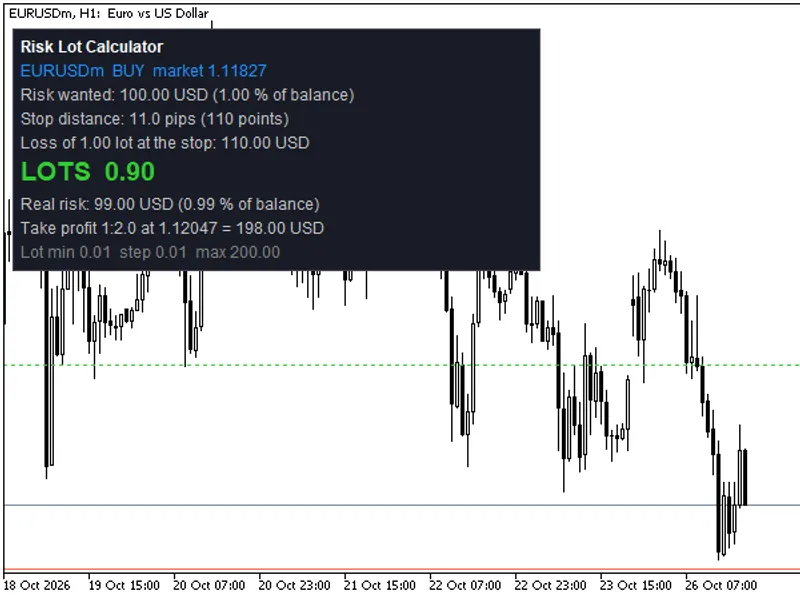
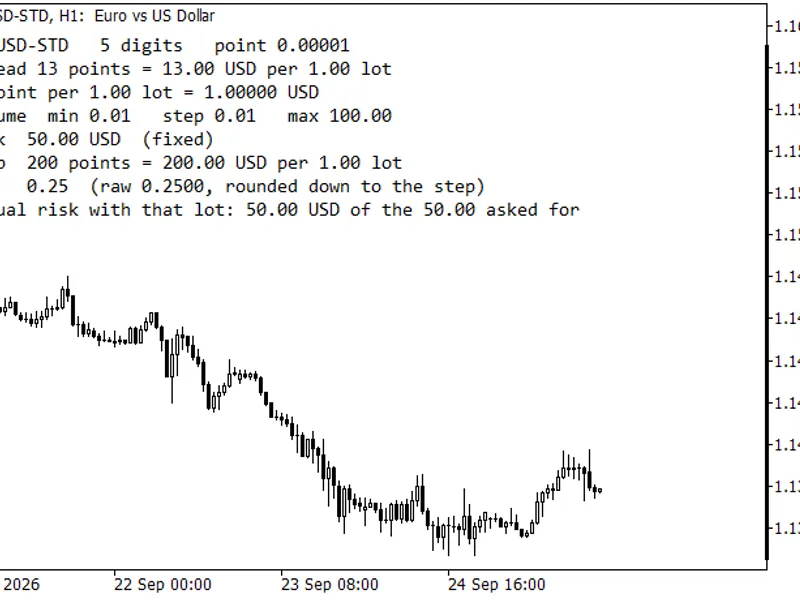
RiskLotPanel.mq5: An indicator that provides a visual trading interface. It includes a drag-and-drop stop-loss line, a take-profit line, and a panel displaying calculated results. For the indicator to compile, ensure both RiskSizer.mqh and RiskLotPanel.mq5 are in the same directory.
Panel Information:
Symbol Display: Shows the current trading symbol.
Direction: Indicates if the stop loss is below the entry price (Buy) or above (Sell).
Entry Price: Displays the market entry price or a user-defined pending order line.
Desired Risk: Allows users to specify risk as a percentage of balance, equity, or free margin, or as a fixed amount in the account currency.
Stop Distance: Shows the stop distance in points and pips (for currency pairs), and the potential loss for 1.00 lot at the specified stop.
Lot Size Calculation: Displays the calculated lot size, the actual risk after rounding (in both monetary value and percentage), and the potential profit at the take-profit level (Reward/Risk ratio).
Informative Warnings: Provides plain-text alerts for common issues such as lot size being below the minimum allowed (and the risk associated with the minimum lot), lot size being capped due to maximum volume limits or available trading volume, stop distance being too close to the broker's stop level, or the stop being placed on the incorrect side of the entry price.
Global Variables: Optionally outputs results (lot size, stop loss, take profit, order type) to global variables prefixed with RLP_
Lot Calculation Methodology:
The class calculates the loss incurred by trading one standard lot at the specified stop distance. For EAs and scripts, this is achieved using OrderCalcProfit, which takes into account the contract size, tick value, and conversion to the account currency provided by the platform. To maintain precision, especially for symbols with small tick values (like JPY pairs, some cryptos, and CFDs), the class requests a large volume (100 lots or more) and then divides the result.
For indicators, OrderCalcProfit and OrderCalcMargin are not accessible due to platform restrictions (error 4014). In such cases, the class utilizes the tick formula: Stop Distance / Tick Size * Tick Value = Loss per Lot. Margin is not calculated or checked in this scenario.
The final lot size is calculated as: Risk / (Loss Per Lot + Commission Per Lot), rounded DOWN to the nearest volume step. This ensures the actual risk never exceeds the desired risk.
Minimum Lot Handling: If the calculated lot size is below the minimum allowed by the broker, the result will indicate this and show the risk associated with the minimum lot. An input option (or SetUseMinLot(true)) allows the user to intentionally use the minimum lot.
Volume Limits: The lot size is also capped by the maximum volume allowed by the broker, the remaining available volume for the symbol (considering open and pending orders), and, for EAs and scripts, the available free margin (checked via OrderCalcMargin).
Commissions: Broker commissions per round turn lot can be incorporated into the risk calculation.
Usage in an Expert Advisor (EA):
Include the class: #include \"RiskSizer.mqh\"
Instantiate the class: CRiskSizer rs;
Initialize the class (e.g., in OnInit): rs.Init(_Symbol); (Returns false if data is not yet available; re-attempt calculation later).
Define risk: double risk = AccountInfoDouble(ACCOUNT_BALANCE) * 0.01; // Example: 1% risk
Get market price: double ask = SymbolInfoDouble(_Symbol, SYMBOL_ASK);
Calculate lots: if(rs.Calc(ORDER_TYPE_BUY, ask, stopPrice, risk, r)) { trade.Buy(r.lots, _Symbol, ask, stopPrice, takeProfit); } else { Print(rs.Describe(r)); // Log the reason for calculation failure }
The result object 'r' also contains additional useful properties such as lotsExact (lot size before rounding), riskActual (actual risk taken), lossPerLot, stopDistance, marginNeeded, freeMarginAfter, and riskOfMinLot. Helper functions like Base(), RoundDown(), LossPerLot(), MoneyAt(), MinLot(), MaxLot(), LotStep(), SetCommissionPerLot(), and SetCheckMargin() are also available.
Testing and Validation:
The class has undergone extensive testing on a demo account across 241 tradable symbols (Forex, metals, indices, crypto, stocks) in a USD account. This involved 7,663 test cases, covering various symbols, order directions (buy/sell), stop distances, and risk amounts (from 0.01 to 1,000).
Validation checks ensured that the calculated lot size was a multiple of the volume step and fell within the minimum and maximum lot limits. The actual loss at the specified stop for the calculated lot size was verified against the desired risk, accounting for potential rounding differences in the platform's OrderCalcProfit function. For the tick formula used in indicators, the calculated lot size matched the platform's calculation in most cases (7,635 out of 7,656), with minor differences of one volume step in the remainder. The loss at the calculated lot size was also confirmed to be within the acceptable risk.
Edge cases such as incorrect stop placement, zero distance, zero risk, requesting the minimum lot, and risk exceeding free margin were also handled and tested.
Manual checks were performed for specific symbols like USDJPY and Gold to confirm calculations.
The indicator was successfully loaded and tested on the Strategy Tester for EURUSD H1, XAUUSD D1, GBPUSD M30, and EURUSD M1 without errors.
Important Considerations:
Account Currency: All monetary values are displayed in the account currency. Cent accounts will show values in cents. Testing was done on a USD account, but the system correctly handles different account currencies through the symbol's tick value, which is provided by the broker in the account currency.
Broker Data Accuracy: The accuracy of the tick value and volume rules depends on the data provided by your broker. The EA version uses platform-provided data, while the indicator relies on the tick formula.
No Automated Trading: The indicator component only performs calculations and visual displays; it does not execute trades. The included class is a tool for calculation and does not provide trading advice.
Disclaimer: This tool is a calculator. The decision of where to place stops and how much risk to take remains solely the trader's responsibility.
Last updated: 2026
You may also like: Trend Buy/Sell Zones with Automated Lot Sizing and Risk Panel for MT5 - excellent alternative for indicator users on MetaTrader 5.
Source Code
#property copyright "RobotFX"
#property version   "1.00"
#property description "This code is educational. Feel free to use, modify and upgrade as you wish. Visit ROBOTFX.ORG for professional trading tools"
#property indicator_chart_window
#property indicator_buffers 1
#property indicator_plots   0
#include "RiskSizer.mqh"
enum ENUM_RISK_MODE
  {
   RISK_PERCENT = 0,
.......
⚠ Limitations & Risk Warning
- This tool is provided for educational and testing purposes only.
- Past performance does not guarantee future results.
- Trading involves substantial risk of loss. Use on a demo account first.
- Results may vary depending on market conditions, broker, and settings.
- We recommend thorough backtesting and forward testing before using with real funds.