






Margin Call Radar: Account Risk Analysis
Info
The Margin Call Radar: Account Risk Analysis is a Indicator for MetaTrader 5 that margin call radar is a read-only risk panel for metatrader 5. It provides critical information about an account's proximity to margin call and stop out levels.
Usage
This tool is typically used for enhancing chart analysis and decision making.
Platform
This Indicator works exclusively on MetaTrader 5 (both build 600+ and newer versions).
Setup
Place the downloaded file in MQL5/Indicators folder via File ? Open Data Folder in MetaTrader 5.
How to Install and Use Margin Call Radar: Account Risk Analysis
1. Installation: Place your file in the MQL/Indicators folder via "Open Data Folder" and restart your terminal.
2. Loading: Find the indicator in the Navigator, drag it onto your chart, and configure the input parameters in the popup window.
3. Customization: Press Ctrl+I to open the indicator list, select your tool, and click "Properties" to change colors, levels, or visual styles.
4. Updating: Replace the old file in the Indicators folder with the new version and restart the platform to apply changes.
Frequently Asked Questions
Q: Why is my indicator not showing? A: Verify the file is in the MQL/Indicators folder, or try right-clicking the "Indicators" tree in the Navigator and clicking "Refresh."
Q: Do custom indicators slow down the platform? A: Too many complex indicators can impact performance; remove unused ones via the "Indicator List" (Ctrl+I).
Q: Can I use MT4 indicators on MT5? A: No, MQL4 and MQL5 are distinct languages; ensure the indicator is compiled specifically for your platform version.
What this tool does
Margin Call Radar is a read-only risk panel for MetaTrader 5.
Typical Use Case
This Indicator excels in automated trading and technical analysis on MetaTrader 5.
Compatible Platform & Setup
This Indicator works on MetaTrader 5. Place the file in the MQL5/Indicators folder and restart the terminal.
Description & Settings
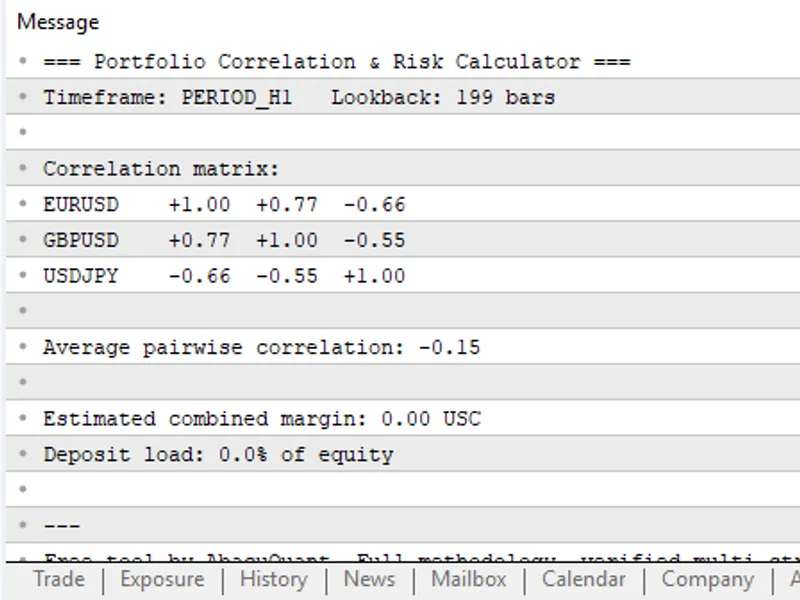
Related: Portfolio Correlation and Margin Risk Calculator - another powerful indicator for MetaTrader 5 traders.
Margin Call Radar is a read-only risk panel for MetaTrader 5. It provides critical information about an account's proximity to margin call and stop out levels.Also recommended: Xprofuter DD - similar indicator with strong performance on MetaTrader 5.
This indicator does not open, modify, or close orders, ensuring compatibility with Expert Advisors and manual trading.Key Features
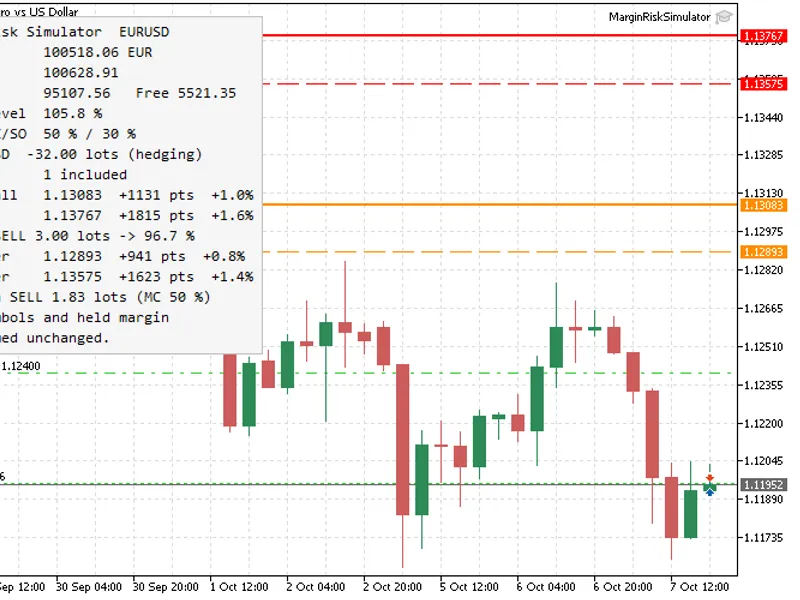
- Margin level percentage with color-coded status: Green indicates a safe level, Gold signifies proximity to margin call, and Red denotes being below stop out.
- Distance to margin call and stop out displayed in three units: account currency, percentage of equity, and points for the entire open position book.
- Shock scenarios simulation: Analyzes the margin level after an adverse price movement of 1% and 3% across all positions, and a 5% equity drop.
- Hedge-aware calculations: Exposure is netted per symbol to accurately reflect risk, even with opposing trades on the same instrument.
- Supports brokers using stop out in money (ACCOUNT_STOPOUT_MODE_MONEY) or in percentage.
- Positions table: Displays symbol, side, volume, and profit/loss including swap.
- Generates a comprehensive report in the Experts log upon startup, useful for VPS users.
- Includes a separate calculation library with a self-test indicator featuring 30 checks.
How It Works
Margin level is calculated as (Equity / Margin) * 100.
Target equity for a specific level L is (L / 100) * Margin (or directly L in money mode). The distance is calculated as Equity - Target Equity.
The point value of a position is determined by tick value, point, and tick size, scaled by volume. Since trade functions are unavailable in indicators, Margin Call Radar uses its own calculation methods.
The distance in points to a certain level is calculated by dividing the distance in money by the point value of the netted open positions. For a fully hedged book, a point move is undefined, and the panel displays 'n/a'.
The panel updates via a timer rather than on every tick, ensuring consistent updates even on quiet symbols.
Input Parameters
Panel Settings
- InpCorner: Specifies the panel's anchor corner (default: upper left).
- InpX / InpY: Offset from the anchor corner in pixels (default: 12 / 20).
- InpFontSize: Font size for the panel text (default: 9).
- InpTextColor, InpOkColor, InpWarnColor, InpDangerColor: Customizable colors for text and status indicators.
- InpShowBackground: Toggles the panel background display (default: true).
- InpBgColor, InpBorderColor: Background and border colors for the panel.
- InpRefreshSeconds: Refresh interval for the panel in seconds (default: 1).
Scenario Settings
- InpPriceMove1: Adverse price movement percentage for scenario 1 (default: 1.0).
- InpPriceMove2: Adverse price movement percentage for scenario 2 (default: 3.0).
- InpEquityShock: Equity drop percentage for scenario 3 (default: 5.0).
Positions Table Settings
- InpShowPositions: Toggles the display of the positions table (default: true).
- InpMaxPositions: Maximum number of rows to display in the positions table (default: 8).
Installation
1. Navigate to File > Open Data Folder in MetaTrader 5.
2. Create the directory MQL5/Indicators/MarginCallRadar/.
3. Copy MarginCallRadar.mq5, RadarCore.mqh, and MarginCallRadarTests.mq5 into this directory. Ensure they remain together as RadarCore.mqh is included from their own folder.
4. Open MarginCallRadar.mq5 and MarginCallRadarTests.mq5 in MetaEditor, compile them by pressing F7, and then refresh the Navigator window.
Usage
Attach the Margin Call Radar indicator to any chart. The panel will appear in the selected corner and analyze the entire account. To verify the calculations, attach the MarginCallRadarTests indicator to any chart. It will confirm its checks in the Experts log and display results in the chart comment.
Example
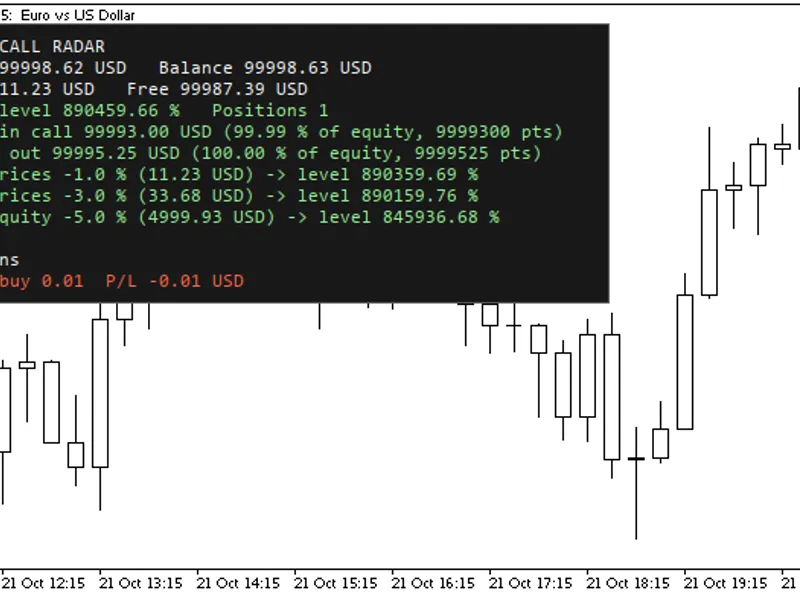
Demo account with a balance of 100,000 USD and one open EURUSD buy 0.01 position:
Margin level: 890459.66 %
To margin call: 99993.00 USD (99.99% of equity, 9999300 pts)
To stop out: 99995.25 USD (100.00% of equity, 9999525 pts)
Shock prices -1.0%: Level becomes 890359.69 % (approx. 11.23 USD impact)
Shock prices -3.0%: Level becomes 890159.76 % (approx. 33.68 USD impact)
Shock equity -5.0%: Level becomes 845936.68 % (approx. 4999.93 USD impact)
Manual check: 0.01 lot EURUSD moves approximately 0.01 USD per point. A 1% price change on 1.1230 involves about 1123 points, resulting in an approximate 11.23 USD impact.
Notes
The scenario calculations are estimates. Actual results may vary due to market gaps, swap rates, commissions, or changes in broker margin requirements.
It is strongly recommended to test this indicator on a demo account first.
Feedback and suggestions are welcome in the comments section.
You may also like: Multi RVI Trend X10 Indicator - excellent alternative for indicator users on MetaTrader 5.
Source Code
#property copyright "RobotFX"
#property link "https://robotfx.org"
#property version   "1.03"
#property description "This code is educational. Feel free to use, modify and upgrade as you wish. Visit ROBOTFX.ORG for professional trading tools"
#property indicator_chart_window
#property indicator_plots 0
#include "RadarCore.mqh"
input group "Panel"
input ENUM_BASE_CORNER InpCorner = CORNER_LEFT_UPPER;
input int    InpX              = 12;
.......
⚠ Limitations & Risk Warning
- This tool is provided for educational and testing purposes only.
- Past performance does not guarantee future results.
- Trading involves substantial risk of loss. Use on a demo account first.
- Results may vary depending on market conditions, broker, and settings.
- We recommend thorough backtesting and forward testing before using with real funds.