
Trade Permission Checker - Identify Trade Permission Issues for EAs and Copiers
Info
The Trade Permission Checker - Identify Trade Permission Issues for EAs and Copiers is a Script for MetaTrader 5 that this script provides a comprehensive report on trade permissions for expert advisors (eas) and copiers, helping you identify why they cannot trade. When dropped on a chart, it displays a concise report on the chart and in the Experts tab.
Usage
This tool is typically used for enhancing chart analysis and decision making.
Platform
This Script works exclusively on MetaTrader 5 (both build 600+ and newer versions).
Setup
Place the downloaded file in MQL5/Scripts folder via File ? Open Data Folder in MetaTrader 5.
How to Install and Use Trade Permission Checker - Identify Trade Permission Issues for EAs and Copiers
1. Installation: Move your script file into the MQL/Scripts directory and restart the platform.
2. Execution: Drag the script onto a chart; it will perform a one-time action, such as closing all open orders or clearing chart objects.
3. Editing: Use MetaEditor (F4) to modify code, click "Compile," and verify no errors appear in the terminal before running.
4. Removing: Scripts stop automatically, but you can remove them manually by right-clicking the chart and choosing "Remove Script."
Frequently Asked Questions
Q: How are scripts different from EAs? A: Scripts execute a single action and then stop; EAs monitor the market and trade continuously.
Q: Can I assign a hotkey to a script? A: Yes, right-click the script in the Navigator, select "Set Hotkey," and define your preferred keyboard shortcut.
Q: Why did my script stop? A: Scripts are designed to stop immediately after finishing their programmed command; this is normal behavior.
What this tool does
This script provides a comprehensive report on trade permissions for Expert Advisors (EAs) and copiers, helping you identify why they cannot trade.
Typical Use Case
This Script excels in automated trading and technical analysis on MetaTrader 5.
Compatible Platform & Setup
This Script works on MetaTrader 5. Place the file in the MQL5/Scripts folder and restart the terminal.
Description & Settings
Related: Risk-Based Lot Size Calculator for MetaTrader - another powerful script for MetaTrader 5 traders.
This script provides a comprehensive report on trade permissions for Expert Advisors (EAs) and copiers, helping you identify why they cannot trade.Also recommended: Creyes History CSV: Export Closed Trades and Summary - similar script with strong performance on MetaTrader 5.
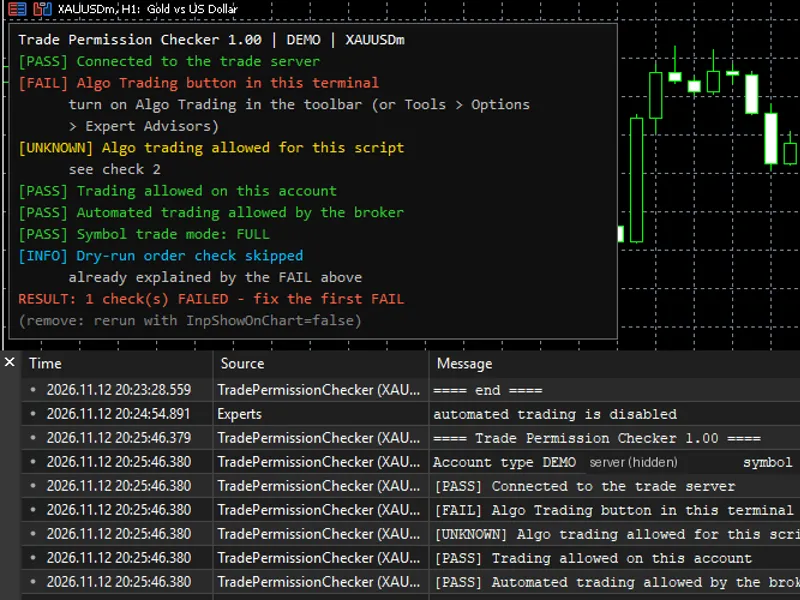
When dropped on a chart, it displays a concise report on the chart and in the Experts tab. Each line indicates PASS, FAIL, INFO, or UNKNOWN, accompanied by a clear reason and suggested next steps.
Key Checks:
- Connection to the trade server
- Algo Trading button status in the terminal
- Algo trading permission for the script (matching the EA or copier)
- Trading permission for the account (fails for investor passwords, blocked, or expired accounts)
- Automated trading allowed by the broker (fails if EAs are disabled by the broker)
- Symbol trade mode (full, long only, short only, close only, or disabled)
- Dry-run order check for the minimum lot using OrderCheck, without sending actual orders. Return codes are translated for clarity.
The script concludes with a summary of failed checks and the top priority issue to address.
Inputs:
- InpShowOnChart: Display the report on the chart (default true). Labels are named TPC_*. Re-run with false to remove.
- InpSymbol: Symbol to check. Leave empty for the chart's symbol. Inputs can be modified with F7 after script placement.
Behavior in Specific Scenarios:
- Terminal offline: Checks 4, 5, and 7 display UNKNOWN, avoiding incorrect broker blame. Reconnect and re-run.
- Market closed: Dry run shows INFO, suggesting re-running during trading hours. Closed markets are not considered permission issues.
- Single cause identification: If Algo Trading is off, the dry run is skipped to avoid duplicate failure reasons.
- Unreadable values: The line displays UNKNOWN. PASS is never shown for unchecked items.
Notes:
- Read-only operation: The script never modifies orders, ensuring safety on prop firm and live accounts.
- MetaTrader-focused: If all checks pass but issues persist, the problem lies in the copier's settings or logs.
- Testing: Successfully tested on a demo account with all checks passing and Algo Trading off. Upcoming tests include real investor password logins, broker-disabled EA accounts, and closed markets.
- Clean code: No DLL, WebRequest, or file writing. Only on-chart labels are created.
- Broker independence: Not affiliated with any broker or prop firm.
Installation:
1. Copy TradePermissionChecker.mq5 to MQL5\Scripts and compile.
2. Drag the script onto the desired symbol's chart.
3. Review the report on the chart or in the Experts tab of the Toolbox.
You may also like: Risk Drift Audit: Uncovering Hidden Trade Risks - excellent alternative for script users on MetaTrader 5.
Source Code
#property copyright "RobotFX"
#property link "https://robotfx.org"
#property version     "1.00"
#property description "This code is educational. Feel free to use, modify and upgrade as you wish. Visit ROBOTFX.ORG for professional trading tools"
input bool   InpShowOnChart = true;
input string InpSymbol = "";
int    g_fail = 0;
string g_rows[];
color  g_cols[];
void Row(const string text, const color c)
.......
⚠ Limitations & Risk Warning
- This tool is provided for educational and testing purposes only.
- Past performance does not guarantee future results.
- Trading involves substantial risk of loss. Use on a demo account first.
- Results may vary depending on market conditions, broker, and settings.
- We recommend thorough backtesting and forward testing before using with real funds.