




Creyes History CSV: Export Closed Trades and Summary
Info
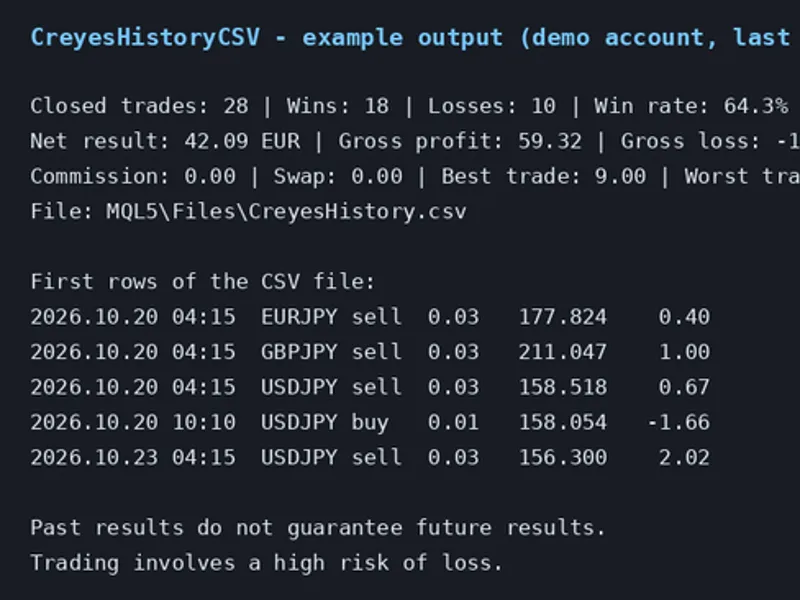
The Creyes History CSV: Export Closed Trades and Summary is a Script for MetaTrader 5 that creyeshistorycsv exports your closed trading account trades to a csv file, compatible with spreadsheet software like excel and libreoffice. It also provides a concise summary in the Experts tab.
Usage
This tool is typically used for enhancing chart analysis and decision making.
Platform
This Script works exclusively on MetaTrader 5 (both build 600+ and newer versions).
Setup
Place the downloaded file in MQL5/Scripts folder via File ? Open Data Folder in MetaTrader 5.
How to Install and Use Creyes History CSV: Export Closed Trades and Summary
1. Installation: Move your script file into the MQL/Scripts directory and restart the platform.
2. Execution: Drag the script onto a chart; it will perform a one-time action, such as closing all open orders or clearing chart objects.
3. Editing: Use MetaEditor (F4) to modify code, click "Compile," and verify no errors appear in the terminal before running.
4. Removing: Scripts stop automatically, but you can remove them manually by right-clicking the chart and choosing "Remove Script."
Frequently Asked Questions
Q: How are scripts different from EAs? A: Scripts execute a single action and then stop; EAs monitor the market and trade continuously.
Q: Can I assign a hotkey to a script? A: Yes, right-click the script in the Navigator, select "Set Hotkey," and define your preferred keyboard shortcut.
Q: Why did my script stop? A: Scripts are designed to stop immediately after finishing their programmed command; this is normal behavior.
What this tool does
CreyesHistoryCSV exports your closed trading account trades to a CSV file, compatible with spreadsheet software like Excel and LibreOffice.
Typical Use Case
This Script excels in automated trading and technical analysis on MetaTrader 5.
Compatible Platform & Setup
This Script works on MetaTrader 5. Place the file in the MQL5/Scripts folder and restart the terminal.
Description & Settings
Related: EA Auditor: Uncovering Expert Advisor Trading Behavior from Deal History - another powerful script for MetaTrader 5 traders.
CreyesHistoryCSV exports your closed trading account trades to a CSV file, compatible with spreadsheet software like Excel and LibreOffice. It also provides a concise summary in the Experts tab.Also recommended: Tick Audit: Verify Real Tick History and Backtest Quality - similar script with strong performance on MetaTrader 5.
This script operates in read-only mode, ensuring no trades are opened, modified, or closed.
Usage Instructions
1. Place the CreyesHistoryCSV.mq5 file into the MQL5/Scripts directory of your MetaTrader terminal or compile it using MetaEditor.
2. Drag the script from the Navigator window onto any chart.
3. Configure the input parameters and click OK.
4. Access the generated CSV file in the MQL5/Files directory (accessible via File - Open Data Folder).
Input Parameters
- InpDays: Specifies the number of past days (1 to 3650) for history export.
- InpSymbol: Filters trades by symbol. Leave empty to include all symbols.
- InpMagic: Filters trades by magic number. Use -1 to include all magic numbers.
- InpFileName: Sets the name for the output CSV file, saved in MQL5/Files.
- InpSeparator: Defines the column separator. Defaults to a comma; use a semicolon if required by your spreadsheet.
CSV File Columns
Time, Deal, Position, Symbol, Type, Volume, Price, Profit, Commission, Swap, Net, Magic, Comment.
Summary Details
The summary includes:
- Total closed trades
- Number of winning and losing trades
- Win rate
- Net result
- Gross profit
- Gross loss
- Profit factor
- Total commission
- Total swap
- Best trade performance
- Worst trade performance
All summary figures are displayed in your account's currency.
Important Notes
- Only trades that result in a closed position are exported. Deposits and withdrawals are excluded.
- Ensure your trading terminal has the complete account history loaded. If the history is incomplete, navigate to the History tab, right-click, and select 'All History'.
- Trading past performance does not guarantee future results. Trading involves a significant risk of loss. This tool is provided for analysis and does not constitute financial advice.
You may also like: Neural Loss-Pattern Auditor: Analyze Trade History for Behavioral Patterns - excellent alternative for script users on MetaTrader 5.
Source Code
#property copyright "RobotFX"
#property link "https://robotfx.org"
#property version     "1.00"
#property description "This code is educational. Feel free to use, modify and upgrade as you wish. Visit ROBOTFX.ORG for professional trading tools"
#property script_show_inputs
input int    InpDays       = 30;
input string InpSymbol     = "";
input long   InpMagic      = -1;
input string InpFileName   = "CreyesHistory.csv";
input string InpSeparator  = ",";
.......
⚠ Limitations & Risk Warning
- This tool is provided for educational and testing purposes only.
- Past performance does not guarantee future results.
- Trading involves substantial risk of loss. Use on a demo account first.
- Results may vary depending on market conditions, broker, and settings.
- We recommend thorough backtesting and forward testing before using with real funds.