




Tick Audit: Verify Real Tick History and Backtest Quality
Info
The Tick Audit: Verify Real Tick History and Backtest Quality is a Script for MetaTrader 5 that a common question regarding backtesting is 'why is my backtest showing 0% history quality. ' The answers often point to broker dependency and tick data limitations, but do not specify the exact range of your tick data.
Usage
This tool is typically used for enhancing chart analysis and decision making.
Platform
This Script works exclusively on MetaTrader 5 (both build 600+ and newer versions).
Setup
Place the downloaded file in MQL5/Scripts folder via File ? Open Data Folder in MetaTrader 5.
How to Install and Use Tick Audit: Verify Real Tick History and Backtest Quality
1. Installation: Move your script file into the MQL/Scripts directory and restart the platform.
2. Execution: Drag the script onto a chart; it will perform a one-time action, such as closing all open orders or clearing chart objects.
3. Editing: Use MetaEditor (F4) to modify code, click "Compile," and verify no errors appear in the terminal before running.
4. Removing: Scripts stop automatically, but you can remove them manually by right-clicking the chart and choosing "Remove Script."
Frequently Asked Questions
Q: How are scripts different from EAs? A: Scripts execute a single action and then stop; EAs monitor the market and trade continuously.
Q: Can I assign a hotkey to a script? A: Yes, right-click the script in the Navigator, select "Set Hotkey," and define your preferred keyboard shortcut.
Q: Why did my script stop? A: Scripts are designed to stop immediately after finishing their programmed command; this is normal behavior.
What this tool does
A common question regarding backtesting is 'Why is my backtest showing 0% history quality.
Typical Use Case
This Script excels in automated trading and technical analysis on MetaTrader 5.
Compatible Platform & Setup
This Script works on MetaTrader 5. Place the file in the MQL5/Scripts folder and restart the terminal.
Description & Settings
Related: Spread Audit: Analyzing Broker Spreads with M1 Historical Data - another powerful script for MetaTrader 5 traders.
A common question regarding backtesting is 'Why is my backtest showing 0% history quality?' The answers often point to broker dependency and tick data limitations, but do not specify the exact range of your tick data.Also recommended: tick value compare - similar script with strong performance on MetaTrader 5.
This script addresses that by querying the terminal month by month to determine the extent of available tick data before you begin configuring the tester.
The Problem It Solves
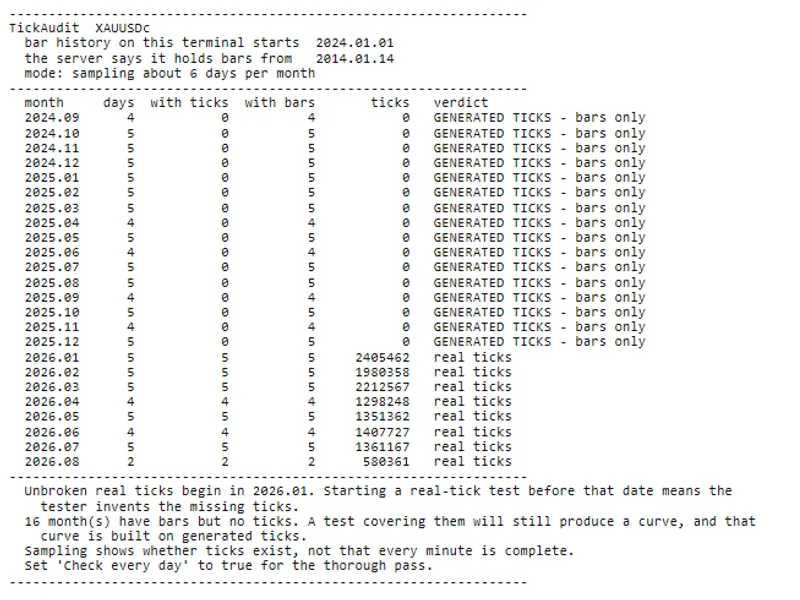
The MetaTrader tester can run on periods with no real ticks, generating ticks from M1 bars without warning. This artificial tick generation lacks spikes, gaps, and spread variations, leading to inaccurate backtest results for strategies sensitive to these conditions, such as grids, martingales, scalping, or those with tight stop-losses.
A critical issue arises when a month has bars but no real ticks. While the tester may produce a result, it is based on generated data, which can be misleading.
What It Reports
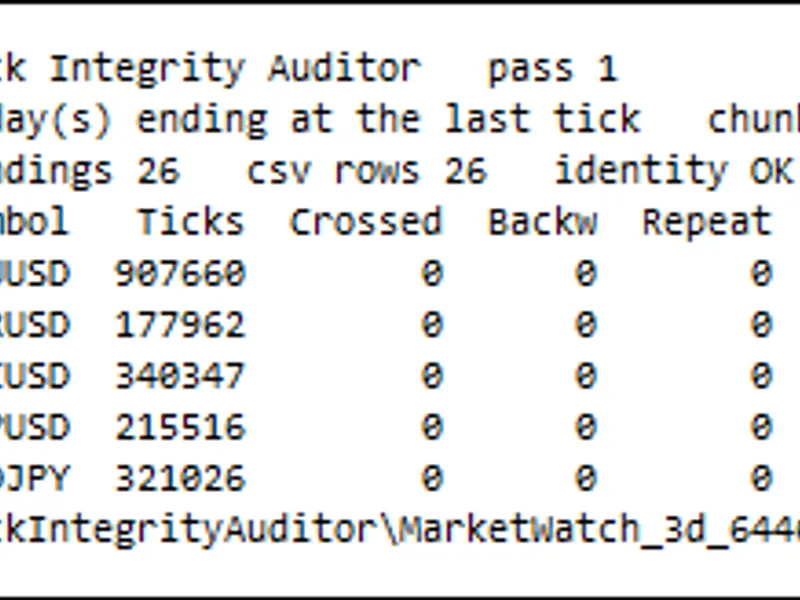
The script provides a month-by-month analysis with a verdict for each period: 'real ticks', 'partial - holes in the ticks', 'GENERATED TICKS - bars only', or 'nothing at all'. For example, a run on gold might show that every month from September 2024 to December 2025 had bars but no ticks, with real ticks only starting in January 2026.
The final outputs highlight the month when unbroken real ticks begin and the number of months within the specified range that would force the tester to generate ticks.
Inputs
Months back - Specifies the number of past months to audit.
Check every day - Enables a thorough daily scan (slower, off by default).
Sample days - Sets the number of days to sample per month for a quicker scan.
Wait seconds - The duration to wait for tick history download before starting.
Write CSV - Option to save the monthly data table to MQL5\Files.
Limitations
Sampling indicates the presence of ticks within a month but does not guarantee completeness for every minute. For a comprehensive check, enable the full daily scan. A day is counted if it contains bars or ticks, accommodating instruments trading on weekends or specific holidays.
The script automatically adds symbols to Market Watch if not present and uses server time for days. It does not place orders or alter existing settings.
How to Run It
1. Place the TickAudit.mq5 script in your terminal's MQL5\Scripts folder.
2. Open TickAudit.mq5 in MetaEditor and compile (F7). Ensure there are 0 errors and 0 warnings.
3. In MetaTrader, open the Navigator window (Ctrl+N), find TickAudit under Scripts, and drag it onto the desired chart. The chart timeframe is irrelevant.
4. Configure the input parameters in the dialog that appears. The defaults audit twenty-four months by sampling six days per month, typically taking a minute or two.
5. Review the results in the 'Experts' tab of the 'Toolbox' window.
Important: Run the audit on the specific symbol you intend to backtest. Tick history is symbol-specific.
Initial runs on symbols with extensive tick history may take several minutes as the terminal downloads data. If a month is initially marked as 'bars-only', running the script again after a short wait may confirm if the ticks were subsequently downloaded. Subsequent runs are faster due to cached data.
How to Use the Results
Identify the start date of unbroken real ticks. Set your backtest start date on or after this point and select 'Every tick based on real ticks'. If this results in insufficient history for your test, this finding itself is valuable, indicating that the desired historical data was not available.
You may also like: Candlestick Statistics Calculation Tool - excellent alternative for script users on MetaTrader 5.
Source Code
#property copyright "RobotFX"
#property link "https://robotfx.org"
#property version   "1.00"
#property script_show_inputs
input int  InpMonthsBack   = 24;
input bool InpFullScan     = false;
input int  InpSampleDays   = 6;
input int  InpWaitSeconds  = 60;
input bool InpWriteCSV     = false;
int       g_retryMisses = 0;
.......
⚠ Limitations & Risk Warning
- This tool is provided for educational and testing purposes only.
- Past performance does not guarantee future results.
- Trading involves substantial risk of loss. Use on a demo account first.
- Results may vary depending on market conditions, broker, and settings.
- We recommend thorough backtesting and forward testing before using with real funds.