









inside bar indicator: reliable candlestick pattern detection
Info
The inside bar indicator: reliable candlestick pattern detection is a Indicator for MetaTrader 4 that the inside bar indicator is a powerful tool for price action traders, offering a comprehensive solution for identifying and analyzing inside bar patterns. key features:- auto pattern detection: automatically identifies inside bars, eliminating the need for manual scanning.
Usage
This tool is typically used for enhancing chart analysis and decision making.
Platform
This Indicator works exclusively on MetaTrader 4 (both build 600+ and newer versions).
Setup
Place the downloaded file in MQL4/Indicators folder via File ? Open Data Folder in MetaTrader 4.
How to Install and Use inside bar indicator: reliable candlestick pattern detection
1. Installation: Place your file in the MQL/Indicators folder via "Open Data Folder" and restart your terminal.
2. Loading: Find the indicator in the Navigator, drag it onto your chart, and configure the input parameters in the popup window.
3. Customization: Press Ctrl+I to open the indicator list, select your tool, and click "Properties" to change colors, levels, or visual styles.
4. Updating: Replace the old file in the Indicators folder with the new version and restart the platform to apply changes.
Frequently Asked Questions
Q: Why is my indicator not showing? A: Verify the file is in the MQL/Indicators folder, or try right-clicking the "Indicators" tree in the Navigator and clicking "Refresh."
Q: Do custom indicators slow down the platform? A: Too many complex indicators can impact performance; remove unused ones via the "Indicator List" (Ctrl+I).
Q: Can I use MT4 indicators on MT5? A: No, MQL4 and MQL5 are distinct languages; ensure the indicator is compiled specifically for your platform version.
What this tool does
the inside bar indicator is a powerful tool for price action traders, offering a comprehensive solution for identifying and analyzing inside bar patterns.
Typical Use Case
This Indicator excels in automated trading and technical analysis on MetaTrader 4.
Compatible Platform & Setup
This Indicator works on MetaTrader 4. Place the file in the MQL4/Indicators folder and restart the terminal.
Description & Settings
Related: External Range Liquidity (ERL) Indicator: Advanced Market Structure and Liquidity Analysis - another powerful indicator for MetaTrader 4 traders.
the inside bar indicator is a powerful tool for price action traders, offering a comprehensive solution for identifying and analyzing inside bar patterns.Also recommended: rsar korsar indicator: a comprehensive guide - similar indicator with strong performance on MetaTrader 4.
key features:
- auto pattern detection: automatically identifies inside bars, eliminating the need for manual scanning.
- smart direction filter: determines the potential trend direction based on the small candle's open and close.
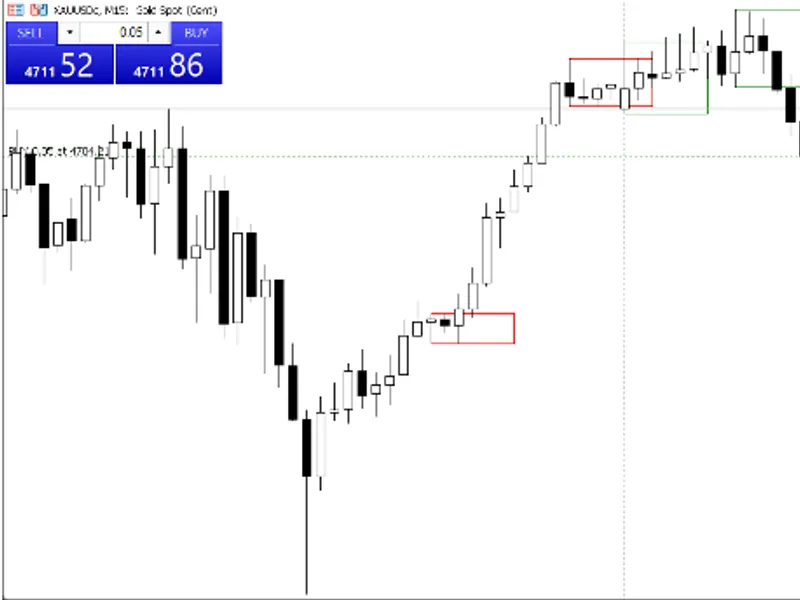
- projection rectangle: visualizes the potential breakout area by drawing a rectangle from the mother candle, customizable in length.
- multi-channel alerts: provides instant notifications via popup and sound.
- color-coded direction: uses green, red, and blue colors to indicate bullish, bearish, and neutral trends, respectively, with customizable options.
- clean chart labels: displays clear text labels next to each rectangle, indicating the pattern type.
- keep last n bars: maintains a clean chart by displaying rectangles only for the most recent bars (e.g., last 50 bars).
- symbol and timeframe flexibility: works across various symbols and timeframes, including forex, indices, stocks, crypto, and commodities.
- lightweight and fast: optimized for performance, processing only visible and recent bars.
input parameters:
- barstokeep: specify the number of past candles to retain rectangles, ensuring a clean and focused chart.
- forwardbars: define the number of bars to extend the projection rectangle to the right from the mother candle.
- rectanglefill: enable or disable the filling of the rectangle.
- autocolorbydirection: automatically adjust colors based on the trend direction.
- custom colors: set custom colors for bullish, bearish, and neutral trends when auto-color is enabled.
- rectanglefillcolor: choose the fill color when auto-color is disabled.
- enablealert: turn desktop and mobile alerts on or off.
- enablelabel: show or hide text labels on the chart.
- labelonlyonnewbar: display labels only for the most recent pattern to minimize clutter.
- filterdirection: filter out neutral patterns and focus on bullish or bearish signals.
ideal for breakout traders, price action traders, and swing/day traders seeking timely notifications and a comprehensive inside bar analysis.
You may also like: pair trading indicator: i k pair-tr - excellent alternative for indicator users on MetaTrader 4.
Source Code
#property copyright "robotfx"
#property link "https://robotfx.org"
#property version   "1.00"
#property strict
#property indicator_chart_window
input int      barstokeep           = 50;        // number of candles backward to keep rectangles
input int      forwardbars          = 5;         // rectangle extension (bars ahead from big candle)
input bool     rectanglefill        = true;      // fill rectangle with color
input bool     autocolorbydirection = true;     // auto color based on small candle direction
input color    bullishcolor         = clrgreen;  // color for bullish signal
.......
⚠ Limitations & Risk Warning
- This tool is provided for educational and testing purposes only.
- Past performance does not guarantee future results.
- Trading involves substantial risk of loss. Use on a demo account first.
- Results may vary depending on market conditions, broker, and settings.
- We recommend thorough backtesting and forward testing before using with real funds.