




Spread Audit: Analyzing Broker Spreads with M1 Historical Data
Info
The Spread Audit: Analyzing Broker Spreads with M1 Historical Data is a Script for MetaTrader 5 that before committing to a strategy based on backtest results, it is crucial to understand the actual cost per trade. The trading terminal stores the spread for each historical bar, a detail often overlooked.
Usage
This tool is typically used for enhancing chart analysis and decision making.
Platform
This Script works exclusively on MetaTrader 5 (both build 600+ and newer versions).
Setup
Place the downloaded file in MQL5/Scripts folder via File ? Open Data Folder in MetaTrader 5.
How to Install and Use Spread Audit: Analyzing Broker Spreads with M1 Historical Data
1. Installation: Move your script file into the MQL/Scripts directory and restart the platform.
2. Execution: Drag the script onto a chart; it will perform a one-time action, such as closing all open orders or clearing chart objects.
3. Editing: Use MetaEditor (F4) to modify code, click "Compile," and verify no errors appear in the terminal before running.
4. Removing: Scripts stop automatically, but you can remove them manually by right-clicking the chart and choosing "Remove Script."
Frequently Asked Questions
Q: How are scripts different from EAs? A: Scripts execute a single action and then stop; EAs monitor the market and trade continuously.
Q: Can I assign a hotkey to a script? A: Yes, right-click the script in the Navigator, select "Set Hotkey," and define your preferred keyboard shortcut.
Q: Why did my script stop? A: Scripts are designed to stop immediately after finishing their programmed command; this is normal behavior.
What this tool does
Before committing to a strategy based on backtest results, it is crucial to understand the actual cost per trade.
Typical Use Case
This Script excels in automated trading and technical analysis on MetaTrader 5.
Compatible Platform & Setup
This Script works on MetaTrader 5. Place the file in the MQL5/Scripts folder and restart the terminal.
Description & Settings
Related: Gold Hour Profile: Analyzing Trading Session Volatility and Spread Costs - another powerful script for MetaTrader 5 traders.
Before committing to a strategy based on backtest results, it is crucial to understand the actual cost per trade.Also recommended: Tick Audit: Verify Real Tick History and Backtest Quality - similar script with strong performance on MetaTrader 5.
The trading terminal stores the spread for each historical bar, a detail often overlooked. While backtesters typically display a smoothed equity curve using the 'current' spread, the reality of trading costs can be significantly different.
What the Script Does
The SpreadAudit script analyzes M1 historical data for a specified period to calculate:
- The median, 90th, and 99th percentiles of the spread, presented in both price units and pips.
- These spread values as a proportion of the Average True Range (ATR) on an H1 timeframe, enabling inter-instrument comparison.
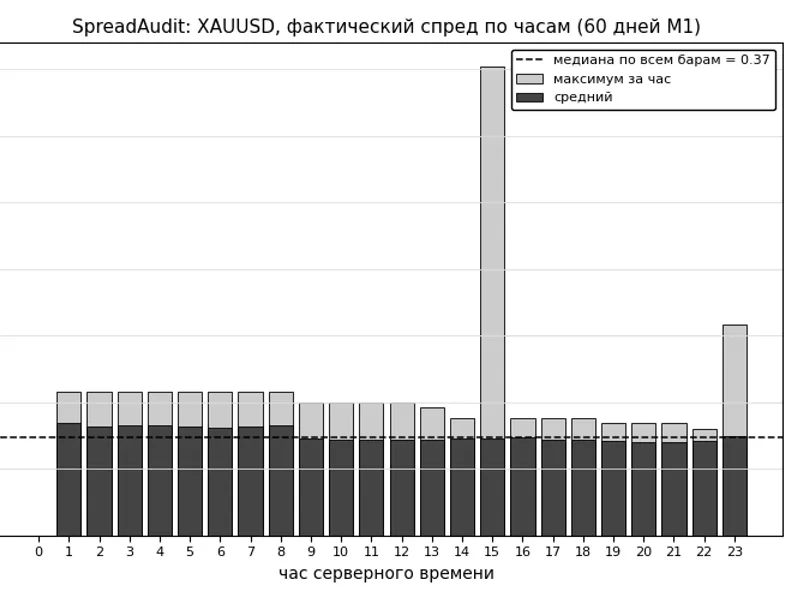
- The average and maximum spread for each hour of the day. This data is exported to a CSV file located in the MQL5\Files folder.
Input Parameters
- InpDays: Specifies the number of days of M1 historical data to analyze (range: 1–3650, default: 60).
- InpAtrPeriod: Sets the ATR period for normalization on the H1 timeframe (default: 24).
- InpSaveCSV: A boolean value to determine whether to save the hourly spread table as a CSV file.
Output Example
=== SpreadAudit: XAUUSD | actual range 30 May 2026 ... 29 July 2026 | 86,397 bars (0 excluding spread) ===
median bar spread: 0.37 (37.0 pts)
p90 bar spread: 0.42 (42.0 pts)
p99 bar spread: 0.45 (45.0 pts)
H1 ATR(24) = 6.41 -> median spread = 0.058 ATR, p90 = 0.066 ATR
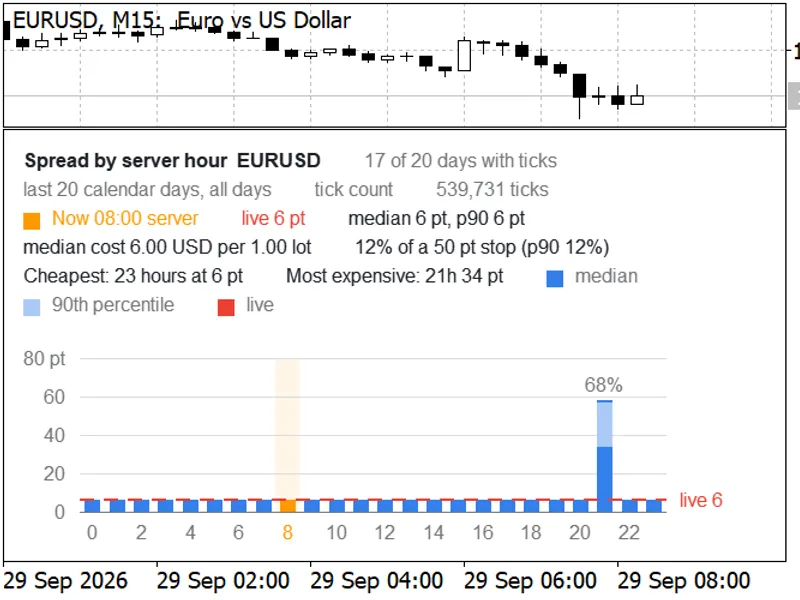
The accompanying chart illustrates the hourly price action for XAUUSD over 60 days. The average spread typically remains around 0.40. However, during the daily rollover period and shortly after trading sessions open, the maximum spread can surge to nearly 1.80, which is over four times the usual spread.
A strategy executing trades within these high-spread windows will not perform as indicated by average backtest data that excludes transaction costs.
Practical Importance
Consider a scenario where your M5 pattern strategy generates an average of 0.28 price units per trade, a statistically significant result. If the median spread for the instrument is 0.37, the strategy would operate at a loss on a live account despite appearing profitable in backtests without considering trading costs.
The distinction between a strategy being unprofitable due to costs and a strategy with a valid edge that is merely outweighed by costs is fundamental. In the first case, the strategy is abandoned; in the second, one explores alternative timeframes or trade structures where the edge is more significant than the spread.
The hourly analysis reveals specific times when the spread widens considerably. This commonly occurs during rollover and in the initial minutes following the opening of trading sessions. If your strategy frequently enters trades during these periods, implementing a spread filter is advisable. It is generally better to set this filter as a fraction of the ATR rather than a fixed point value, as an absolute threshold can become ineffective under changing volatility conditions.
Important Caveat
MetaTrader records the MINIMUM spread for each bar. Therefore, all calculated figures represent an optimistic lower bound of the actual costs incurred. The underlying principle is that if even the minimum spread is sufficient to negate the strategy's profitability, further analysis may be unwarranted.
If your broker provides empty or zero values for the spread in the M1 history, the script will accurately report this and will not proceed with calculations based on incomplete data.
You may also like: Neural Loss-Pattern Auditor: Analyze Trade History for Behavioral Patterns - excellent alternative for script users on MetaTrader 5.
Source Code
#property copyright "RobotFX"
#property link "https://robotfx.org"
#property version     "1.10"
#property description "This code is educational. Feel free to use, modify and upgrade as you wish. Visit ROBOTFX.ORG for professional trading tools"
#property script_show_inputs
input int    InpDays      = 60;
input int    InpAtrPeriod = 24;
input bool   InpSaveCSV   = true;
double PercentileSorted(const double &sorted[], const double p)
  {
.......
⚠ Limitations & Risk Warning
- This tool is provided for educational and testing purposes only.
- Past performance does not guarantee future results.
- Trading involves substantial risk of loss. Use on a demo account first.
- Results may vary depending on market conditions, broker, and settings.
- We recommend thorough backtesting and forward testing before using with real funds.