










Neural Loss-Pattern Auditor: Analyze Trade History for Behavioral Patterns
Info
The Neural Loss-Pattern Auditor: Analyze Trade History for Behavioral Patterns is a Script for MetaTrader 5 that aggregate statistics like win rate or profit factor may not reveal if the probability of a loss is influenced by recent trader actions, such as increasing position size immediately after a loss. The Neural Loss-Pattern Auditor specifically tests for these types of behavioral patterns using the trader's own historical trade data.
Usage
This tool is typically used for enhancing chart analysis and decision making.
Platform
This Script works exclusively on MetaTrader 5 (both build 600+ and newer versions).
Setup
Place the downloaded file in MQL5/Scripts folder via File ? Open Data Folder in MetaTrader 5.
How to Install and Use Neural Loss-Pattern Auditor: Analyze Trade History for Behavioral Patterns
1. Installation: Move your script file into the MQL/Scripts directory and restart the platform.
2. Execution: Drag the script onto a chart; it will perform a one-time action, such as closing all open orders or clearing chart objects.
3. Editing: Use MetaEditor (F4) to modify code, click "Compile," and verify no errors appear in the terminal before running.
4. Removing: Scripts stop automatically, but you can remove them manually by right-clicking the chart and choosing "Remove Script."
Frequently Asked Questions
Q: How are scripts different from EAs? A: Scripts execute a single action and then stop; EAs monitor the market and trade continuously.
Q: Can I assign a hotkey to a script? A: Yes, right-click the script in the Navigator, select "Set Hotkey," and define your preferred keyboard shortcut.
Q: Why did my script stop? A: Scripts are designed to stop immediately after finishing their programmed command; this is normal behavior.
What this tool does
Aggregate statistics like win rate or profit factor may not reveal if the probability of a loss is influenced by recent trader actions, such as increasing position size immediately after a loss.
Typical Use Case
This Script excels in automated trading and technical analysis on MetaTrader 5.
Compatible Platform & Setup
This Script works on MetaTrader 5. Place the file in the MQL5/Scripts folder and restart the terminal.
Description & Settings
Related: swap monitor - another powerful script for MetaTrader 5 traders.
Aggregate statistics like win rate or profit factor may not reveal if the probability of a loss is influenced by recent trader actions, such as increasing position size immediately after a loss. The Neural Loss-Pattern Auditor specifically tests for these types of behavioral patterns using the trader's own historical trade data.Also recommended: coll e c t al l indicat o r s da t a - similar script with strong performance on MetaTrader 5.
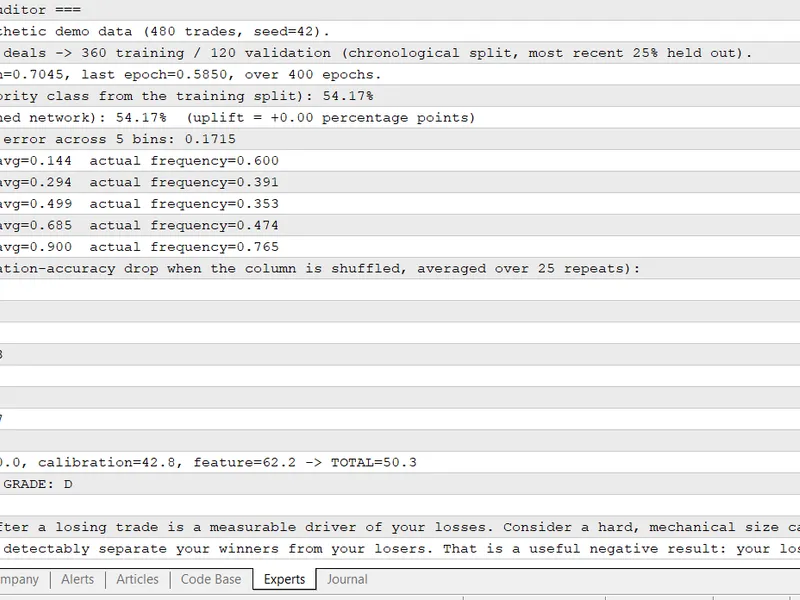
The primary script constructs an eight-feature dataset for each closed trade and generates a comprehensive diagnostic report in the Experts tab. This report includes:
Accuracy Uplift: This measures the trained neural network's validation accuracy compared to the accuracy achieved by simply guessing the majority class.
Calibration Table: This table displays the average prediction for each probability bin against the actual observed loss frequency within that bin.
Permutation Feature Importance: This indicates which of the eight features the neural network prioritizes, ranked by the decrease in accuracy when a feature's column is randomly shuffled.
A Composite Score (A to F): This score synthesizes the three diagnostic metrics and provides corresponding written recommendations.
Input Settings:
By default, with InpUseDemoData set to true, the script generates 480 synthetic closed trades with a known pattern (e.g., larger position size after a loss) for immediate analysis. To use your real closed trade history, set InpUseDemoData to false. The script will then read data via HistorySelect() and the HistoryDealGet*() functions, requiring no external files or CSVs.
Parameters:
InpMinTrades: Specifies the minimum number of closed trades required before initiating training.
InpValidationFraction: Determines the proportion of the most recent trade history reserved for validation.
InpHiddenNeurons, InpLearningRate, and InpEpochs: These parameters control the neural network's configuration.
InpCalibrationBins and InpPermutationRepeats: These control the settings for the calibration and permutation importance diagnostics, respectively.
InpWeightUplift, InpWeightCalibration, InpWeightTopFeature, along with the three Scale inputs and four Grade inputs: These parameters influence the calculation of the composite score.
This tool is developed entirely in MQL5, requiring no external libraries, Python, or third-party AI services. A detailed explanation of the methodology, the underlying mathematics for each diagnostic, and the source code can be found in the accompanying article: [ARTICLE_URL]. The analysis is based on data up to 2026.
You may also like: 3 way aroon value calculation - excellent alternative for script users on MetaTrader 5.
Source Code
#property copyright "RobotFX"
#property link "https://robotfx.org"
#property version   "1.00"
#property script_show_inputs
#include "NLPA_NeuralNet.mqh"
#define NLPA_N_FEATURES 8
input bool   InpUseDemoData       =true;
input int    InpDemoTradeCount    =480;
input int    InpMinTrades         =60;
input double InpValidationFraction=0.25;
.......
⚠ Limitations & Risk Warning
- This tool is provided for educational and testing purposes only.
- Past performance does not guarantee future results.
- Trading involves substantial risk of loss. Use on a demo account first.
- Results may vary depending on market conditions, broker, and settings.
- We recommend thorough backtesting and forward testing before using with real funds.