
Gold Hour Profile: Analyzing Trading Session Volatility and Spread Costs
Info
The Gold Hour Profile: Analyzing Trading Session Volatility and Spread Costs is a Script for MetaTrader 5 that every trader understands that certain trading hours are more profitable than others. This indicator provides a data-driven answer based on your broker's historical data, rather than relying on general assumptions.
Usage
This tool is typically used for enhancing chart analysis and decision making.
Platform
This Script works exclusively on MetaTrader 5 (both build 600+ and newer versions).
Setup
Place the downloaded file in MQL5/Scripts folder via File ? Open Data Folder in MetaTrader 5.
How to Install and Use Gold Hour Profile: Analyzing Trading Session Volatility and Spread Costs
1. Installation: Move your script file into the MQL/Scripts directory and restart the platform.
2. Execution: Drag the script onto a chart; it will perform a one-time action, such as closing all open orders or clearing chart objects.
3. Editing: Use MetaEditor (F4) to modify code, click "Compile," and verify no errors appear in the terminal before running.
4. Removing: Scripts stop automatically, but you can remove them manually by right-clicking the chart and choosing "Remove Script."
Frequently Asked Questions
Q: How are scripts different from EAs? A: Scripts execute a single action and then stop; EAs monitor the market and trade continuously.
Q: Can I assign a hotkey to a script? A: Yes, right-click the script in the Navigator, select "Set Hotkey," and define your preferred keyboard shortcut.
Q: Why did my script stop? A: Scripts are designed to stop immediately after finishing their programmed command; this is normal behavior.
What this tool does
Every trader understands that certain trading hours are more profitable than others.
Typical Use Case
This Script excels in automated trading and technical analysis on MetaTrader 5.
Compatible Platform & Setup
This Script works on MetaTrader 5. Place the file in the MQL5/Scripts folder and restart the terminal.
Description & Settings
Related: Accurate Gold Trading: Identifying Broker Symbols and Sizing Positions - another powerful script for MetaTrader 5 traders.
Every trader understands that certain trading hours are more profitable than others. This indicator provides a data-driven answer based on your broker's historical data, rather than relying on general assumptions.Also recommended: function for converting the number of seconds to years, months, days, hours, minutes, seconds - similar script with strong performance on MetaTrader 5.
For each hour of the trading day, this script calculates and displays two key metrics over a specified number of recent days:
Movement
- The average price fluctuation in points per hour, derived from the range of M1 bars.
Spread
- The average spread during that same hour, also derived from the spread data of M1 bars.
The crucial metric is the ratio of movement to spread: it quantizes how many spread units of movement are effectively gained within a given hour. An hour with substantial price movement but a wide spread can be less advantageous than a quieter hour with a narrow spread.
While the script is primarily designed for gold (XAUUSD), it can analyze a list of symbols simultaneously, presenting their performance side-by-side to contextualize gold's behavior against major currency pairs.
Indicator Inputs:
Symbols List (InpSymbols)
- A comma-separated list of trading symbols. If left empty, the indicator uses the symbol of the current chart. Example: XAUUSD,EURUSD,GBPUSD,USDJPY
Number of Days (InpDays)
- The historical period in days for calculations. Default is 90.
Hour Shift (InpHourShift)
- Adjusts the server time to your local time zone.
Write to CSV (InpWriteCSV)
- If enabled, generates a separate CSV file for each symbol in the MT4/MT5 Files directory.
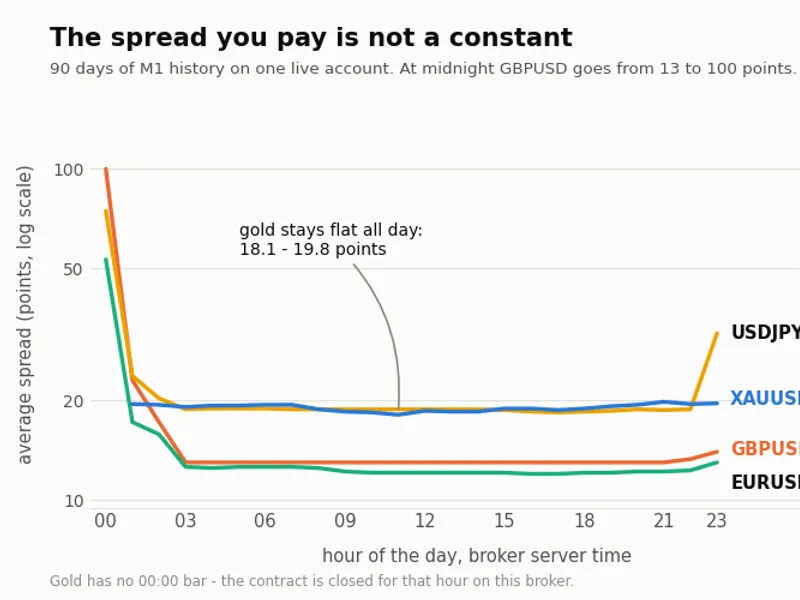
Analysis Results from One Broker (over 90 days in 2026) - Your results may vary, which underscores the value of this indicator:
XAUUSD exhibits consistent spreads throughout the day, ranging from 18.1 to 19.8 points. The most favorable hour is 16:00 with a movement-to-spread ratio of 1155.7, while the least favorable is 23:00 with 356.5, indicating a difference of only about 3.2 times.
GBPUSD shows a significant spread increase from 13.0 points to 99.9 points at midnight (00:00). The movement-to-spread ratio drops from 119.4 at 17:00 to 8.2 at 00:00, a substantial 14.6 times difference.
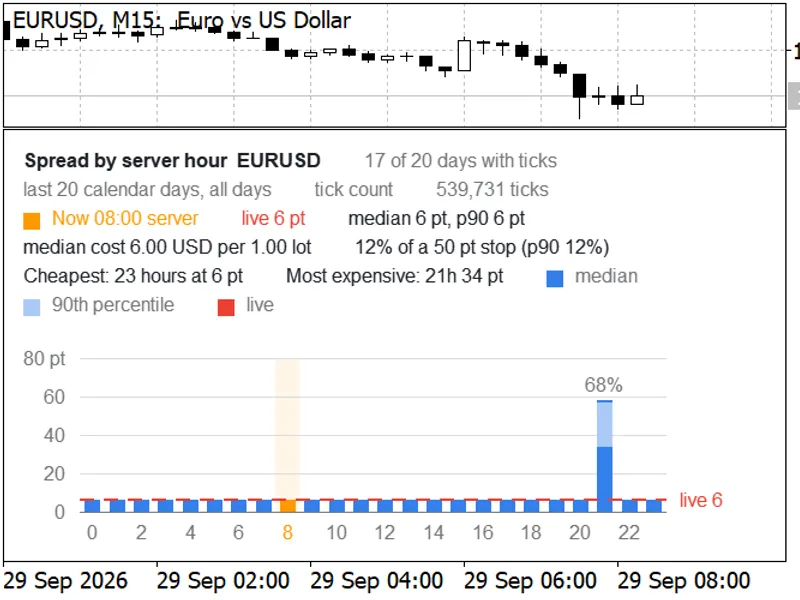
USDJPY experiences a spread change from 18.4 to 74.7 points during the same midnight hour, while EURUSD moves from 12.0 to 53.3 points.
Notably, XAUUSD has no trading data for the 00:00 hour on this specific broker, as the contract is inactive during that period.
Conclusion for this broker: Gold presents as the more stable option regarding spread costs during different trading hours, whereas major currency pairs face a costly midnight hour where spreads are several times higher than during other periods. This pattern is not readily apparent from simple chart observation.
This indicator exclusively analyzes historical data. It does not execute trades or modify any account settings. Run it on any chart; the selected timeframe is irrelevant as it consistently utilizes M1 data for its calculations.
You may also like: Overnight Cost Meter: Understand and Monitor Swap Costs - excellent alternative for script users on MetaTrader 5.
Source Code
#property copyright "RobotFX"
#property link "https://robotfx.org"
#property version   "1.10"
#property script_show_inputs
#property description "This code is educational. Feel free to use, modify and upgrade as you wish. Visit ROBOTFX.ORG for professional trading tools"
input string InpSymbols   = "";
input int    InpDays      = 90;
input int    InpHourShift = 0;
input bool   InpWriteCSV  = true;
struct HourVerdict
.......
⚠ Limitations & Risk Warning
- This tool is provided for educational and testing purposes only.
- Past performance does not guarantee future results.
- Trading involves substantial risk of loss. Use on a demo account first.
- Results may vary depending on market conditions, broker, and settings.
- We recommend thorough backtesting and forward testing before using with real funds.