

Accurate Gold Trading: Identifying Broker Symbols and Sizing Positions
Info
The Accurate Gold Trading: Identifying Broker Symbols and Sizing Positions is a Script for MetaTrader 5 that gold trading often presents unique challenges due to broker discrepancies in symbol names and contract specifications. Symbols can appear as XAUUSD, GOLD, XAUUSD.
Usage
This tool is typically used for enhancing chart analysis and decision making.
Platform
This Script works exclusively on MetaTrader 5 (both build 600+ and newer versions).
Setup
Place the downloaded file in MQL5/Scripts folder via File ? Open Data Folder in MetaTrader 5.
How to Install and Use Accurate Gold Trading: Identifying Broker Symbols and Sizing Positions
1. Installation: Move your script file into the MQL/Scripts directory and restart the platform.
2. Execution: Drag the script onto a chart; it will perform a one-time action, such as closing all open orders or clearing chart objects.
3. Editing: Use MetaEditor (F4) to modify code, click "Compile," and verify no errors appear in the terminal before running.
4. Removing: Scripts stop automatically, but you can remove them manually by right-clicking the chart and choosing "Remove Script."
Frequently Asked Questions
Q: How are scripts different from EAs? A: Scripts execute a single action and then stop; EAs monitor the market and trade continuously.
Q: Can I assign a hotkey to a script? A: Yes, right-click the script in the Navigator, select "Set Hotkey," and define your preferred keyboard shortcut.
Q: Why did my script stop? A: Scripts are designed to stop immediately after finishing their programmed command; this is normal behavior.
What this tool does
Gold trading often presents unique challenges due to broker discrepancies in symbol names and contract specifications.
Typical Use Case
This Script excels in automated trading and technical analysis on MetaTrader 5.
Compatible Platform & Setup
This Script works on MetaTrader 5. Place the file in the MQL5/Scripts folder and restart the terminal.
Description & Settings
Related: Gold Hour Profile: Analyzing Trading Session Volatility and Spread Costs - another powerful script for MetaTrader 5 traders.
Gold trading often presents unique challenges due to broker discrepancies in symbol names and contract specifications.Also recommended: transaction cost collector: a script for accurate broker cost profiling - similar script with strong performance on MetaTrader 5.
Symbols can appear as XAUUSD, GOLD, XAUUSD.m, XAUUSDpro, or GOLD#.Contract sizes vary significantly, with one contract potentially representing 100 ounces, 10 ounces, or even a single ounce.
Price quoting can also differ, using two or three decimal places.
An Expert Advisor (EA) relying on hardcoded values like "100 ounces, two digits" will not just be slightly inaccurate on a different broker; it risks account depletion due to drastically incorrect position sizing.
Symbol and Specification Detection
This utility class queries the trading terminal directly to obtain accurate information, rather than making assumptions.
The Detect() function iterates through all symbols available in the account.
It scores symbol names to identify the most likely gold symbol. For example, XAUUSD is preferred over XAUUSD.m, which is preferred over less precise matches.
Symbols for silver (XAGUSD), platinum, and palladium are intentionally excluded from the gold symbol search.
Symbols already present in the Market Watch window receive a slight preference.
If your broker uses a non-standard symbol name, you can manually specify it using Attach("YOURNAME").
Key Specifications Retrieved:
ContractSize(), Digits(), Point(), TickSize(), TickValueLoss(), MinLot(), MaxLot(), LotStep(), StopsLevel(), and FreezeLevel() are all retrieved directly from the terminal for the identified gold symbol.
Risk Management and Position Sizing
LossForDistance(lots, distance) calculates the cost of a price movement against your position in your account's currency.
LotForRisk(riskMoney, distance) performs the inverse calculation. This is crucial for accurate position sizing.
It correctly converts risk parameters through SYMBOL_TRADE_TICK_VALUE_LOSS, ensuring accuracy across different contract sizes (e.g., 10-ounce contracts) and account currencies (e.g., Euro-denominated accounts).
The function then rounds the calculated lot size down to comply with the broker's minimum lot step and ensures it falls within the minimum and maximum allowed lot sizes.
If the smallest possible trade volume would exceed the specified risk amount, the function returns zero, preventing silent minimum lot usage that most sizing code gets wrong by rounding up.
Diagnostic Reporting
The Attach() function generates warnings for potential issues:
- Contract size is not 100 ounces.
- An unusual number of digits for price quoting.
- The terminal reports a zero tick value.
- A non-zero Stops Level.
The PrintReport() function displays the complete symbol specification along with a worked example.
This report is invaluable for quickly diagnosing why a trading strategy might perform differently across various brokers.
Example Scenario:
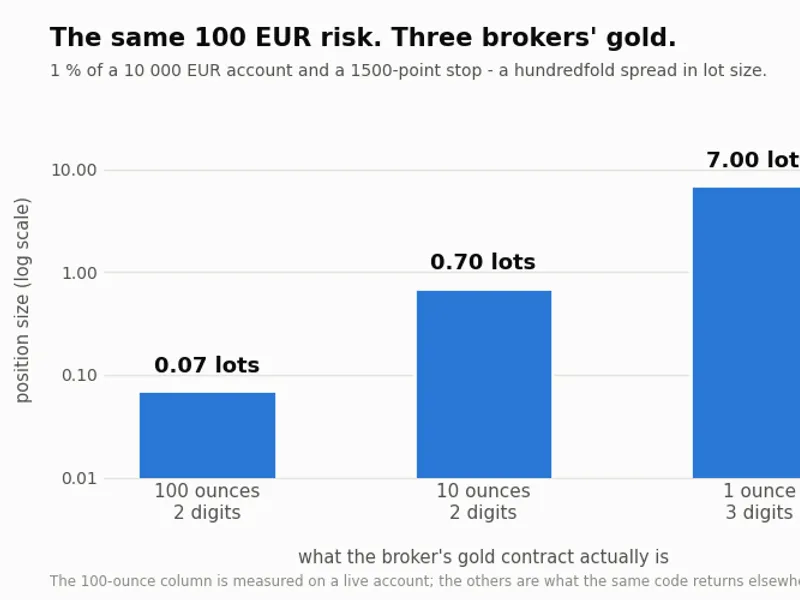
Consider a live account with a 100-ounce contract, a Euro balance, and a 1500-point stop loss.
If 1% of a 10,000 EUR balance is allocated to risk (100 EUR), the calculated lot size for a 1500-point stop would be approximately 0.07 lots, risking 90.42 EUR.
Running the same calculation on a 10-ounce contract yields 0.70 lots.
On a one-ounce contract, it results in 7.00 lots.
This demonstrates a hundredfold difference in volume for the same risk and stop distance, highlighting the critical error of using hardcoded constants.
Included Demo Script:
The package includes GoldSymbolDemo.mq5, a script designed to:
- Automatically detect the gold symbol on your broker.
- Print a detailed report of its specifications.
- Calculate lot sizes based on a percentage of the account balance for various stop loss distances.
Execute this script on any chart to understand the precise nature of your broker's gold offering.
Class Functionality:
This class is designed solely to provide information. It does not open trades or modify existing positions. It answers critical questions about your trading environment.
You may also like: Modify Stop Loss and Take Profit for Open Positions - excellent alternative for script users on MetaTrader 5.
Source Code
#property copyright "RobotFX"
#property link "https://robotfx.org"
#property version   "1.00"
#property script_show_inputs
#property description "This code is educational. Feel free to use, modify and upgrade as you wish. Visit ROBOTFX.ORG for professional trading tools"
#include "CGoldSymbol.mqh"
input string InpForceSymbol  = "";
input double InpRiskPercent  = 1.0;
input int    InpStopPoints   = 1500;
input double InpDemoBalance  = 10000.0;
.......
⚠ Limitations & Risk Warning
- This tool is provided for educational and testing purposes only.
- Past performance does not guarantee future results.
- Trading involves substantial risk of loss. Use on a demo account first.
- Results may vary depending on market conditions, broker, and settings.
- We recommend thorough backtesting and forward testing before using with real funds.