





Turtle Breakout Indicator Performance Analysis on Gold (2025-2026)
Info
The Turtle Breakout Indicator Performance Analysis on Gold (2025-2026) is a Indicator for MetaTrader 5 that breakout exit lab: donchian breakouts with three exits scored side by sidethis indicator implements turtle-style donchian channel breakouts and evaluates three distinct exit strategies simultaneously: an atr trailing stop, the turtle exit channel, and a fixed target. A panel displays the performance of each exit strategy for the selected symbol, including spread costs, measured in R (Risk).
Usage
This tool is typically used for breakout trading when price moves beyond key support/resistance levels.
Platform
This Indicator works exclusively on MetaTrader 5 (both build 600+ and newer versions).
Setup
Place the downloaded file in MQL5/Indicators folder via File ? Open Data Folder in MetaTrader 5.
How to Install and Use Turtle Breakout Indicator Performance Analysis on Gold (2025-2026)
1. Installation: Place your file in the MQL/Indicators folder via "Open Data Folder" and restart your terminal.
2. Loading: Find the indicator in the Navigator, drag it onto your chart, and configure the input parameters in the popup window.
3. Customization: Press Ctrl+I to open the indicator list, select your tool, and click "Properties" to change colors, levels, or visual styles.
4. Updating: Replace the old file in the Indicators folder with the new version and restart the platform to apply changes.
Frequently Asked Questions
Q: Why is my indicator not showing? A: Verify the file is in the MQL/Indicators folder, or try right-clicking the "Indicators" tree in the Navigator and clicking "Refresh."
Q: Do custom indicators slow down the platform? A: Too many complex indicators can impact performance; remove unused ones via the "Indicator List" (Ctrl+I).
Q: Can I use MT4 indicators on MT5? A: No, MQL4 and MQL5 are distinct languages; ensure the indicator is compiled specifically for your platform version.
What this tool does
Breakout Exit Lab: Donchian Breakouts With Three Exits Scored Side by SideThis indicator implements Turtle-style Donchian channel breakouts and evaluates three distinct exit strategies simultaneously: an ATR trailing stop, the Turtle exit channel, and a fixed target.
Typical Use Case
This Indicator excels in automated trading and technical analysis on MetaTrader 5.
Compatible Platform & Setup
This Indicator works on MetaTrader 5. Place the file in the MQL5/Indicators folder and restart the terminal.
Description & Settings
Related: Session Range Breakout: Asia, London, and New York High/Low Levels - another powerful indicator for MetaTrader 5 traders.
Breakout Exit Lab: Donchian Breakouts With Three Exits Scored Side by SideAlso recommended: Failed Breakout Detector: Identifying Trapped Traders - similar indicator with strong performance on MetaTrader 5.
This indicator implements Turtle-style Donchian channel breakouts and evaluates three distinct exit strategies simultaneously: an ATR trailing stop, the Turtle exit channel, and a fixed target. A panel displays the performance of each exit strategy for the selected symbol, including spread costs, measured in R (Risk). The indicator is non-repainting and provides buffers for integration with Expert Advisors.
Rationale for Three Exits
The effectiveness of breakout systems often hinges on the exit strategy. While entry rules are generally standardized (e.g., price closing above the highest high of the last N bars), exit methods vary significantly. This indicator allows for a direct comparison of three common exit approaches: ATR trailing stops, the Turtle's 10-bar exit channel, and a fixed R-multiple target.
Breakout Definition
The entry channel is defined by the highest high and lowest low of the preceding InpEntryBars (default 20, corresponding to Turtle System 1).
A buy signal is generated when a closed bar closes above the channel high, provided the previous bar did not. A sell signal is the inverse. Only the initial breakout beyond the channel is registered, preventing multiple signals in a strong trend.
The trade commences at the open of the subsequent bar. The initial stop-loss is set at InpStopATR (default 2.0) times the current ATR(20) value (equivalent to the Turtle's "2N").
An optional trend filter can be enabled to consider only breakouts aligned with a 200 EMA. This filter is disabled by default.
The Three Exit Strategies
A. ATR Trail: The stop-loss adjusts based on the highest price since entry, maintained at InpTrailATR (default 3.0) times the ATR value. The stop never moves backward.
B. Turtle Exit Channel: For long trades, the stop-loss follows the lowest low of the last InpExitBars (default 10, Turtle System 1). For short trades, it follows the highest high of the last InpExitBars.
C. Fixed Target: A take-profit order is set at InpTargetR (default 2.0) times the initial risk, measured from the entry price to the initial stop-loss.
Performance Measurement
Each trade's outcome is measured in R units, where 1R equals the distance between the entry price and the initial stop-loss. The cost of the spread on the signal bar is deducted. If a stop-loss is gapped through, the trade is filled at the bar's open price. In cases where both the stop-loss and take-profit fall within the range of a single bar, the stop-loss is prioritized.
Each breakout is scored independently, allowing for overlapping trades. The panel provides a comparative analysis of the three exits across the same set of entries. It is important to note that this is not a full account simulation, as it does not include position sizing.
Panel Information
The panel displays the total number of breakouts, categorized into long and short trades, and indicates the number of currently open trades.
For each exit strategy, the panel shows: the number of closed trades, win rate, profit factor, average R per trade, and the total sum in R.
The currently selected exit strategy (InpDrawExit) is displayed with separate sums for long and short trades, allowing analysis of directional performance.
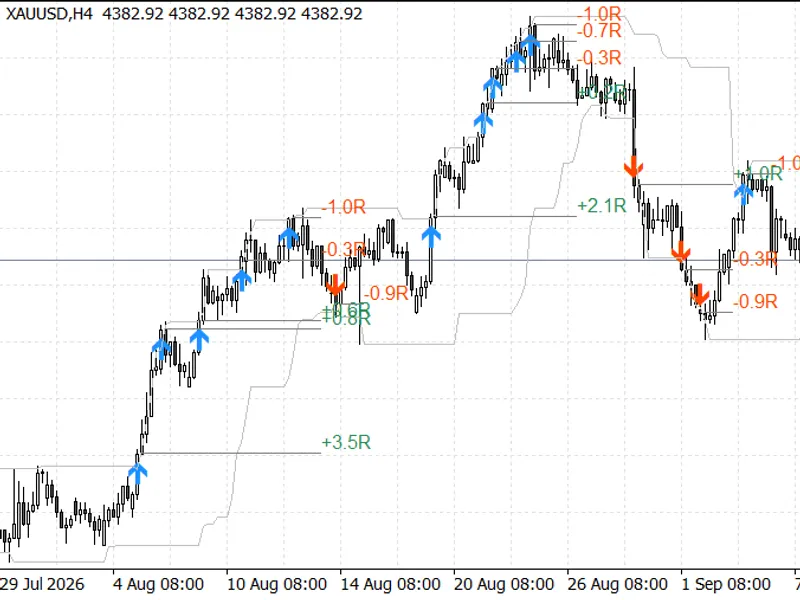
The selected exit strategy is also visualized on the chart. Each trade is marked with an entry line and its R-multiple result. The stop-loss of the latest trade is shown as a dotted line.
Performance Analysis on Gold (XAUUSD)
The following results were obtained using XAUUSD on MetaQuotes-Demo data with default inputs. The 2025 analysis covers 360 days up to December 31, 2025. The 2026 analysis covers 260 days up to September 18, 2026.
XAUUSD - H4 Timeframe
Exit Strategy | Trades | Win Rate | Profit Factor | Sum (R)
2025 - Exit A (ATR Trail) | 129 | 43.4% | 1.45 | +23.08R
2025 - Exit B (10-bar Channel) | 129 | 41.1% | 2.34 | +66.20R
2025 - Exit C (2R Target) | 129 | 45.7% | 1.68 | +47.83R
2026 - Exit A (ATR Trail) | 76 | 35.5% | 1.10 | +3.46R
2026 - Exit B (10-bar Channel) | 76 | 35.5% | 1.70 | +22.35R
2026 - Exit C (2R Target) | 75 | 38.7% | 1.26 | +11.99R
XAUUSD - H1 Timeframe
Exit Strategy | Trades | Win Rate | Profit Factor | Sum (R)
2025 - Exit A (ATR Trail) | 465 | 37.6% | 1.32 | +70.32R
2025 - Exit B (10-bar Channel) | 465 | 37.8% | 1.23 | +51.18R
2025 - Exit C (2R Target) | 465 | 37.8% | 1.21 | +60.32R
2026 - Exit A (ATR Trail) | 270 | 39.6% | 1.21 | +25.14R
2026 - Exit B (10-bar Channel) | 270 | 40.4% | 1.29 | +35.15R
2026 - Exit C (2R Target) | 269 | 38.3% | 1.23 | +39.06R
Observations on Gold Performance
All analyzed periods and strategies yielded positive results. On the H4 timeframe, the Turtle exit channel (Exit B) demonstrated superior performance in both 2025 and 2026, while the ATR trail (Exit A) was the least effective. On the H1 timeframe, performance was more varied: the ATR trail led in 2025, and the fixed target (Exit C) in 2026. This variability underscores the value of the panel, which highlights how the optimal exit strategy can differ based on timeframe and market conditions.
Analysis of Gold's Trend Influence
The strong upward trend of gold in 2025 is reflected in the results. For instance, on H4 with Exit B, long trades (99) achieved +79.4R, while short trades (30) resulted in -13.2R. In 2026, gold experienced more volatility, yet both long (42 trades, +14.9R) and short (34 trades, +7.5R) breakouts were profitable.
To assess the impact of gold's trend, a comparison was made using the same default settings on three forex pairs (EURUSD, GBPUSD, USDJPY) on the H4 timeframe during the 2026 period:
H4 2026 Forex Pairs Performance
Pair | Exit A Sum (PF) | Exit B Sum (PF) | Exit C Sum (PF)
EURUSD | -11.74R (0.68) | -3.86R (0.89) | -5.97R (0.88)
GBPUSD | -9.21R (0.77) | -3.15R (0.91) | +6.90R (1.13)
USDJPY | +1.30R (1.03) | +0.73R (1.02) | +3.03R (1.06)
These forex results were generally flat to negative, indicating that breakout strategies require trending markets. Gold exhibited a clear trend during the analyzed periods, which is a significant factor in the positive outcomes observed. The results should be interpreted as proof of concept under trending conditions, not as a guarantee of future profitability.
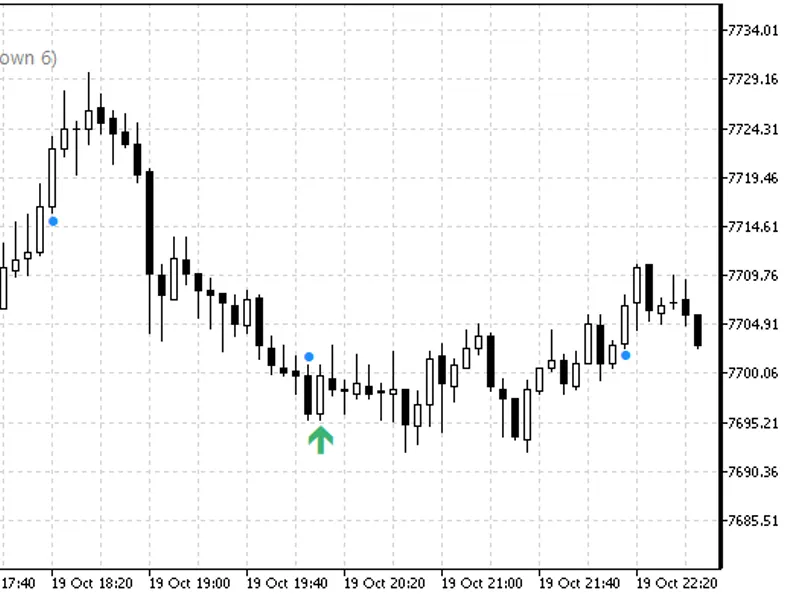
Figure 1: XAUUSD H4, late July to mid-September 2026 - breakout arrows, entry channel, and trade results under exit B.
Figure 2: Panel for XAUUSD H4 in 2025 and 2026, with exit B highlighted.
Indicator Inputs
Input | Default | Description
InpEntryBars | 20 | Length of the entry channel in bars.
InpExitBars | 10 | Length of the exit channel for exit B.
InpATRPeriod | 20 | Period for Average True Range calculation.
InpStopATR | 2.0 | Multiplier for initial stop-loss based on ATR.
InpTrailATR | 3.0 | Multiplier for ATR-based trailing stop (Exit A).
InpTargetR | 2.0 | Multiple of initial risk for fixed take-profit target (Exit C).
InpUseTrend | false | Enables or disables the trend filter based on EMA.
InpTrendEMA | 200 | Period for the trend Exponential Moving Average.
InpDrawExit | A. ATR trail | Specifies which exit strategy to draw on the chart and send to buffers 6-9.
InpDaysBack | 365 | Number of past days to include in the scorecard.
InpDrawDays | 60 | Number of days for drawing trade lines on the chart.
InpShowPanel | true | Enables or disables the display of the performance panel.
InpPanelCorner | left upper | Position of the panel on the chart.
InpAlertPopup | true | Enables popup alerts for new breakouts.
InpAlertPush | false | Enables push notifications for new breakouts.
Note: For the classic Turtle System 2, set InpEntryBars to 55 and InpExitBars to 20.
Using the Indicator with an Expert Advisor
Breakouts are registered on the bar that closes beyond the channel. An Expert Advisor (EA) can access these signals on the next bar (shift 1) after the breakout bar has closed. Signals are retained on the chart history, not limited to the analyzed window. Strategy tester verification confirmed that signals available to an EA match the buffered data precisely (473 out of 473 on H1 and 131 out of 131 on H4 for gold in 2025).
Buffer Information
Buffer Index | Content
0 | Buy breakout signal; value is the planned entry price (next bar's open), EMPTY_VALUE otherwise.
1 | Sell breakout signal; same format as buffer 0.
2, 3 | Entry channel high and low prices.
4 | Stop-loss level of the latest trade under the drawn exit strategy.
5 | Initial stop-loss level on the breakout bar.
6 to 9 | Scorecard data for the drawn exit strategy on the last closed bar: closed trades count, wins count, sum of R, sum of losing R.
Limitations
Performance results are based on historical bar data. The exact order of events within a single bar is unknown. Only spread costs are considered; commissions and slippage beyond price gaps are not included. Trades are scored individually and may overlap, meaning the summed R values do not represent an equity curve. All figures presented are derived from a single broker's data over two distinct periods where gold exhibited a strong trend.
You may also like: Compression Breakout Channels with Buy and Sell Volume Analysis - excellent alternative for indicator users on MetaTrader 5.
Source Code
#property copyright "RobotFX"
#property version     "1.00"
#property description "This code is educational. Feel free to use, modify and upgrade as you wish. Visit ROBOTFX.ORG for professional trading tools"
#property indicator_chart_window
#property indicator_buffers 10
#property indicator_plots   5
#property indicator_label1  "Breakout buy"
#property indicator_type1   DRAW_ARROW
#property indicator_color1  clrDodgerBlue
#property indicator_width1  2
.......
⚠ Limitations & Risk Warning
- This tool is provided for educational and testing purposes only.
- Past performance does not guarantee future results.
- Trading involves substantial risk of loss. Use on a demo account first.
- Results may vary depending on market conditions, broker, and settings.
- We recommend thorough backtesting and forward testing before using with real funds.