




CME Gap Tracker for Gold and Bitcoin: Analysis of Open Gaps, Fill Rates, and Fade-Trade Performance
Info
The CME Gap Tracker for Gold and Bitcoin: Analysis of Open Gaps, Fill Rates, and Fade-Trade Performance is a Indicator for MetaTrader 5 that cme gap tracker for gold and bitcoin: open gaps, fill rate and a fade-trade testthis indicator identifies weekend cme gaps on gold and 24/7 bitcoin charts. It maintains a record of all unfilled gaps on the chart until price returns to them, providing data on gap fill frequency, speed, price movement before the fill, and the profitability of fading these gaps.
Usage
This tool is typically used for enhancing chart analysis and decision making.
Platform
This Indicator works exclusively on MetaTrader 5 (both build 600+ and newer versions).
Setup
Place the downloaded file in MQL5/Indicators folder via File ? Open Data Folder in MetaTrader 5.
How to Install and Use CME Gap Tracker for Gold and Bitcoin: Analysis of Open Gaps, Fill Rates, and Fade-Trade Performance
1. Installation: Place your file in the MQL/Indicators folder via "Open Data Folder" and restart your terminal.
2. Loading: Find the indicator in the Navigator, drag it onto your chart, and configure the input parameters in the popup window.
3. Customization: Press Ctrl+I to open the indicator list, select your tool, and click "Properties" to change colors, levels, or visual styles.
4. Updating: Replace the old file in the Indicators folder with the new version and restart the platform to apply changes.
Frequently Asked Questions
Q: Why is my indicator not showing? A: Verify the file is in the MQL/Indicators folder, or try right-clicking the "Indicators" tree in the Navigator and clicking "Refresh."
Q: Do custom indicators slow down the platform? A: Too many complex indicators can impact performance; remove unused ones via the "Indicator List" (Ctrl+I).
Q: Can I use MT4 indicators on MT5? A: No, MQL4 and MQL5 are distinct languages; ensure the indicator is compiled specifically for your platform version.
What this tool does
CME Gap Tracker for Gold and Bitcoin: Open Gaps, Fill Rate and a Fade-Trade TestThis indicator identifies weekend CME gaps on gold and 24/7 Bitcoin charts.
Typical Use Case
This Indicator excels in automated trading and technical analysis on MetaTrader 5.
Compatible Platform & Setup
This Indicator works on MetaTrader 5. Place the file in the MQL5/Indicators folder and restart the terminal.
Description & Settings
Related: Opening Gap Tracker: Daily, Weekend Gaps with Fill Tracking and Alerts - another powerful indicator for MetaTrader 5 traders.
CME Gap Tracker for Gold and Bitcoin: Open Gaps, Fill Rate and a Fade-Trade TestAlso recommended: ICT Model Tracker: Sweep, MSS, and FVG Analysis with Performance Statistics - similar indicator with strong performance on MetaTrader 5.
This indicator identifies weekend CME gaps on gold and 24/7 Bitcoin charts. It maintains a record of all unfilled gaps on the chart until price returns to them, providing data on gap fill frequency, speed, price movement before the fill, and the profitability of fading these gaps. The indicator is non-repainting and includes buffers for Expert Advisor integration.
Concept
The notion that "CME gaps always fill" is frequently discussed in trading communities for both Bitcoin and gold. CME futures cease trading on Friday at 16:00 Chicago time and resume on Sunday at 17:00. Market movements during this period result in a gap on the futures chart, with the expectation that price will eventually retrace to close it.
To validate this, two key questions needed answers: How frequently do these gaps actually fill? And if they fill, is it possible to profit by trading towards the gap, or does price move adversely first, triggering stops? This indicator addresses both questions directly on your trading chart.
Functionality
The indicator converts CME Friday closing and Sunday opening times to your broker's server time, accounting for US daylight saving rules in Chicago and your server's time zone.
It captures the price from your chart at these specific moments to calculate the gap. Gaps smaller than the InpMinGapPct parameter (defaulting to 0.30%) are disregarded.
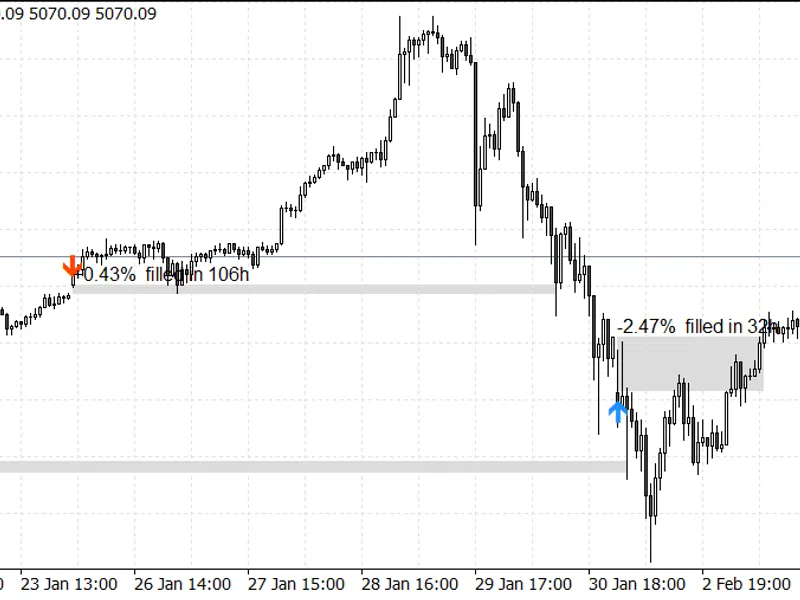
Each gap is displayed as a colored box, labeled with its size. Unfilled gaps persist on the chart, extended to the right, until a closed bar trades back to the Friday closing price. At this point, the box turns gray, and the label indicates the duration of the fill in hours.
An arrow is placed on the bar marking the CME open, pointing in the direction of the gap fill: up for a gap down, and down for a gap up.
A scorecard panel summarizes data for the last InpWeeksBack weeks (defaulting to 104).
For Bitcoin charts trading 24/7, there is no visible gap between the last bar on Friday and the first bar on Monday. A standard weekend gap tool would not detect this. The CME gap is only apparent when comparing prices at the specific CME trading moments, which is precisely what this indicator does. For gold, as the spot market also closes over the weekend, the CME gap closely mirrors the gap on the broker's weekend chart.
It is important to note that the indicator utilizes the prices from the chart it is applied to, not the direct futures prices. On a spot or CFD chart, the indicator reflects the spot market's movement over the CME weekend. The gap on the actual futures chart may differ slightly due to futures trading at a premium or discount to spot.
Scorecard Panel Details
The panel displays the total number of gaps, categorized into up and down, and the count of weekends with gaps below the minimum size threshold.
It shows the number of gaps that have filled, with percentages for those filling within 24 hours and within 7 days.
Information on the median time required to fill a gap, and the time taken by the slowest 10% of gaps.
"Heat before fill" indicates how far price moved away from the fill level before retracing, measured in multiples of the gap size. A heat of 2.0x on a 1% gap signifies that price initially moved an additional 2% in the opposite direction.
A fade-trade test simulates trades entered at the CME open towards the Friday close. The stop loss is set at InpStopGapMult times the gap size on the opposite side, and the exit occurs after InpMaxHoldDays days if neither the stop nor target is reached. The spread of the entry bar is accounted for. If both the stop and target fall within the same bar, the stop is prioritized.
The panel also shows the number of open gaps within the scored window and the nearest open fill levels above and below the current price (these consider all gaps in the loaded history).
Findings on Gold
Data analyzed: XAUUSD H1, MetaQuotes-Demo, default inputs unless specified. The two test windows slightly overlap at the end of December 2025.
Period
2026 (38 weeks to Sep 18)
2026 (38 weeks to Sep 18)
2025 (52 weeks to Dec 31)
2025 (52 weeks to Dec 31)
Minimum Gap
0.30%
0.10%
0.30%
0.10%
Gaps (Up / Down)
24 (10 / 14)
33 (13 / 20)
6 (2 / 4)
19 (9 / 10)
Filled
23 (96%)
32 (97%)
5 (83%)
18 (95%)
Filled within 24h
58%
67%
50%
68%
Filled within 7 days
83%
85%
50%
74%
Median Fill Time
7h
3h
3h
3h
Median Heat Before Fill
2.18x gap
2.31x gap
2.16x gap
1.70x gap
Fade Trades (Stop 1x Gap)
24
33
6
19
Fade Win Rate
29.2%
27.3%
16.7%
26.3%
Fade Profit Factor
0.41
0.37
0.20
0.35
Fade Total Return (R)
-10.1R
-15.1R
-4.0R
-9.1R
The observation for gold largely supports the common saying: 83% to 97% of gaps filled. However, the trading aspect reveals challenges. Among the filled gaps, the median gap initially moved approximately twice its size in the adverse direction, leading to losses in most fade trades with a one-gap-size stop.
Wider stops were tested with the 0.30% minimum gap. While a wider stop increased the win rate, the larger losses per trade resulted in a negative overall performance in both years:
Stop Size
2026 Win Rate
2026 Total Return (R)
2026 Profit Factor
2025 Win Rate
2025 Total Return (R)
2025 Profit Factor
1x Gap
29.2%
-10.1R
0.41
16.7%
-4.0R
0.20
2x Gap
45.8%
-7.0R
0.44
33.3%
-3.0R
0.25
3x Gap
66.7%
-2.0R
0.72
50.0%
-2.0R
0.33
The 2025 data with only 6 gaps of 0.30% or more should be considered a small sample size. The key takeaway is that while gold gaps serve as reliable price retracement points, fading them at the open with a fixed stop did not prove profitable in either year.
Some gaps remain unfilled for extended periods. As of September 18, 2026, a gold gap from 2025 was still open, with its fill level at 3201.00, significantly below the current price.
Figure 1. XAUUSD H1 chart, late January 2026: A +0.43% gap filled in 106 hours, and a -2.47% gap filled in 32 hours.
Figure 2. The scorecard panel illustrating the results from the four test runs detailed in the table.
Analysis on Bitcoin
Testing on Bitcoin was not feasible with the provided broker (MetaQuotes-Demo), as it offers a Bitcoin ETF trading during Nasdaq hours, not a 24/7 BTCUSD. The indicator's code path for 24/7 charts is the same used for gold, relying on Friday close and Sunday open prices. Before utilizing this indicator for BTC, it is recommended to compare the initial gaps against a CME futures chart and configure the server offset inputs according to your broker's settings.
Inputs
Parameter
Default Value
Description
InpGMTWinter
2
Server's GMT offset during winter, in hours.
InpGMTSummer
3
Server's GMT offset during summer, in hours.
InpServerDST
Europe
Server clock's daylight saving rule (fixed, Europe, or USA).
InpMinGapPct
0.30
Minimum gap size as a percentage of price.
InpWeeksBack
104
Number of weeks of history to display in the scorecard.
InpDrawWeeks
26
Number of weeks for which filled gaps are drawn (open gaps are always drawn).
InpStopGapMult
1.0
Fade test: stop loss level as a multiple of the gap size.
InpMaxHoldDays
5
Fade test: maximum number of days before exiting a trade.
InpShowPanel
true
Display the scorecard panel.
InpPanelCorner
left upper
Position of the panel on the chart.
InpOpenGapColor
light orange
Color for unfilled gaps.
InpFilledGapColor
Gainsboro
Color for filled gaps.
InpAlertNewGap
true
Generate an alert when a new gap opens.
InpAlertFill
true
Generate an alert when an open gap is filled.
InpAlertPush
false
Send push notifications in addition to alerts.
The default settings (GMT+2 in winter, GMT+3 in summer, European DST rule) are suitable for MetaQuotes-Demo and many other MetaTrader brokers. If your broker's server operates on UTC year-round, set both offsets to 0 and the rule to "fixed". Use this indicator on an H1 or lower timeframe. On H4 and higher timeframes, CME times may fall within a single bar, leading to less precise price readings.
Expert Advisor Integration
The gap information is recorded on the bar where the CME session opens, immediately as that bar forms. An EA can therefore access this data at shift 0. It relies solely on the Friday closing price and the opening price of that bar, ensuring the data remains static. Verification with a test EA confirmed that all 24 gaps identified on gold in 2026 matched the indicator's buffer data precisely.
Buffer Index
Content Description
0
Gap down entry price (for fade buy trades); EMPTY_VALUE otherwise.
1
Gap up entry price (for fade sell trades); EMPTY_VALUE otherwise.
2
Fill level (Friday close price) on the gap identification bar.
3
Fade trade stop loss level calculated on the gap bar.
4, 5
Nearest open fill levels above and below for each closed bar.
6 to 9
Scorecard data on the last closed bar: count of closed fade trades, number of wins, total risk-reward ratio, and sum of losing risk-reward amounts.
Limitations
The indicator operates on bar data and cannot determine the sequence of events within a single bar. It uses chart prices at CME trading times, not direct futures prices. US holidays that alter the CME trading week are not specifically handled. The fade trade simulation accounts for the entry bar's spread but excludes commission and slippage. Weekend opens are typically periods of highest slippage. All presented statistics reflect historical gap data from a single broker.
You may also like: Prop Firm Daily Loss Tracker: Monitor Your Risk Limits - excellent alternative for indicator users on MetaTrader 5.
Source Code
#property copyright "RobotFX"
#property version     "1.00"
#property description "This code is educational. Feel free to use, modify and upgrade as you wish. Visit ROBOTFX.ORG for professional trading tools"
#property indicator_chart_window
#property indicator_buffers 10
#property indicator_plots   2
#property indicator_label1  "Gap down (fade buy)"
#property indicator_type1   DRAW_ARROW
#property indicator_color1  clrDodgerBlue
#property indicator_width1  2
.......
⚠ Limitations & Risk Warning
- This tool is provided for educational and testing purposes only.
- Past performance does not guarantee future results.
- Trading involves substantial risk of loss. Use on a demo account first.
- Results may vary depending on market conditions, broker, and settings.
- We recommend thorough backtesting and forward testing before using with real funds.