



Gold Breakout EA for XAUUSD H4: +90% Backtest Performance (2020-2026)
Info
The Gold Breakout EA for XAUUSD H4: +90% Backtest Performance (2020-2026) is a Expert Advisor for MetaTrader 5 that gold breakout ea for xauusd h4: +90% in a 2020-2026 backtesta turtle-style breakout expert advisor designed for gold trading. It executes buy orders when an H4 bar closes above the 20-bar high during an uptrend, utilizing a stop loss set at 2 times the Average True Range (ATR) and a profit target set at 2 times the risk (2R).
Usage
This tool is typically used for breakout trading when price moves beyond key support/resistance levels.
Platform
This Expert Advisor works exclusively on MetaTrader 5 (both build 600+ and newer versions).
Setup
Place the downloaded file in MQL5/Experts folder via File ? Open Data Folder in MetaTrader 5.
How to Install and Use Gold Breakout EA for XAUUSD H4: +90% Backtest Performance (2020-2026)
1. Installation: Open the "File" menu, select "Open Data Folder," navigate to MQL/Experts, paste your file, and restart the terminal.
2. Activation: Drag the EA from the Navigator onto a chart, ensure "Allow live trading" is checked in the Common tab, and verify the AutoTrading button is green.
3. Optimization: Right-click your chart, choose "Expert List," click "Properties" to adjust inputs, and save your preferred setup as a set file for future use.
4. Maintenance: Regularly check the "Experts" tab in the terminal window to monitor trade logs and potential execution errors.
Frequently Asked Questions
Q: Why is my EA not opening trades? A: Check the "AutoTrading" button, ensure "Allow live trading" is enabled, and verify your broker allows automated trading on your account type.
Q: Can I run multiple EAs on one chart? A: No, each chart can only host one active EA; however, you can open multiple charts for different currency pairs to run several EAs.
Q: What does the "smiley face" icon mean? A: A smiley face in the top-right corner of the chart indicates the EA is successfully running; a frowny face means it is disabled.
What this tool does
Gold Breakout EA for XAUUSD H4: +90% in a 2020-2026 BacktestA Turtle-style breakout Expert Advisor designed for gold trading.
Typical Use Case
This Expert Advisor excels in automated trading and technical analysis on MetaTrader 5.
Compatible Platform & Setup
This Expert Advisor works on MetaTrader 5. Place the file in the MQL5/Experts folder and restart the terminal.
Description & Settings
Related: Fx Craft Example EA: Range Breakout with Pending Orders - another powerful expert for MetaTrader 5 traders.
Gold Breakout EA for XAUUSD H4: +90% in a 2020-2026 BacktestAlso recommended: Gold MT5 Fractal Breakout EA - similar expert with strong performance on MetaTrader 5.
A Turtle-style breakout Expert Advisor designed for gold trading. It executes buy orders when an H4 bar closes above the 20-bar high during an uptrend, utilizing a stop loss set at 2 times the Average True Range (ATR) and a profit target set at 2 times the risk (2R). The strategy was backtested on XAUUSD from January 2020 to September 2026, resulting in a net profit of +9,029.72 on an initial deposit of 10,000, with a 1% risk per trade. Key performance metrics include a profit factor of 1.77, a maximum drawdown of 11.38%, and profitability in 6 out of 7 tested years.
Development Background
This Expert Advisor is the trading implementation of the Breakout Exit Lab indicator. The indicator analyzes Donchian breakouts and evaluates them against three distinct exit strategies: an ATR trailing stop, the Turtle trading exit channel, and a fixed 2R target. Testing on gold revealed that while breakouts showed an edge, the optimal exit strategy varied annually.
An indicator's scorecard does not replicate live trading conditions. It can count overlapping trades, disregard swap costs, and does not manage position sizing. Therefore, this EA was developed and tested to simulate real trading scenarios: executing one position at a time, sizing lots based on the stop distance, including swap costs, and incorporating random execution delays.
Trading Mechanism
At the start of each new H4 bar, the EA examines the bar that just concluded. If this bar closed above the highest high of the preceding 20 bars, and the bar before that did not, it signals a breakout.
The breakout is only considered valid if the closing price is above the 200 Exponential Moving Average (EMA). Sell breakouts are disabled by default, with the reasoning explained below.
The EA initiates buy orders at the market price. The order is placed without a Stop Loss (SL) or Take Profit (TP), which are then attached to the actual fill price immediately after execution. The stop loss is set 2 x ATR(20) below the fill price, and the profit target is 2R (2 times the risk) above it.
If the stops cannot be attached, the position is closed instantly, ensuring the trade never operates without a stop loss.
The EA manages only one position at a time. It does not employ grid trading, martingale strategies, or averaging down techniques.
Lot sizes are calculated using OrderCalcProfit() based on the stop distance. This approach was adopted after a negative experience with a previous gold EA, where the SYMBOL_TRADE_TICK_VALUE for XAUUSD on MetaQuotes-Demo was 0.10, while the actual point value was 1.00. Relying on incorrect tick values could lead to risking ten times the intended amount. The EA also avoids executing a breakout trade if the spread exceeds 10% of the stop distance and refrains from entering trades within the final 15 minutes of the trading session.
Test Configuration
Configuration
Value
Symbol and Timeframe
XAUUSD H4
Period
2020.01.01 to 2026.09.20, continuous run
Server
MetaQuotes-Demo
Deposit and Leverage
10,000 USD, 1:100
Risk per Trade
1% of balance
Modelling Quality
Every tick generated from M1, with random delay
Trading Costs
Spread and swap included; no commission on this server
EA Inputs
All default settings
Performance Results
Metric
Value
Net Profit
+9,029.72 (ending balance 19,029.72)
Total Trades
198 (all long trades)
Win Rate
46.97% (93 wins, 105 losses)
Profit Factor
1.77
Expected Payoff
45.60 per trade
Average Win / Average Loss
223.51 / -111.97
Largest Loss
-174.89 (an ordinary stop loss, representing 0.9% of the balance at the time)
Maximum Equity Drawdown
11.38% (1,277.78)
Maximum Balance Drawdown
10.88% (1,215.40)
Recovery Factor
7.07
Sharpe Ratio
2.25
Maximum Consecutive Losses
9 trades (-889.86 total loss)
Total Swap Paid
-472.01
Average Holding Time
Approximately 71 hours (longest trade held for 459 hours)
Performance by Calendar Year (as a percentage of the balance at the start of each year):
Year
Trades
Net Profit
Return
2020
33
+513.69
+5.1%
2021
20
-305.26
-2.9%
2022
24
+468.04
+4.6%
2023
30
+509.20
+4.8%
2024
32
+2,683.82
+24.0%
2025
40
+3,761.85
+27.1%
2026 (up to Sep 20)
19
+1,398.38
+7.9%
The yearly figures sum up to the total net profit reported by the tester. An additional test of 2026 using real tick data (99% history quality) showed 15 trades, a net profit of +579.70, a profit factor of 2.02, and a maximum drawdown of 2.89%.
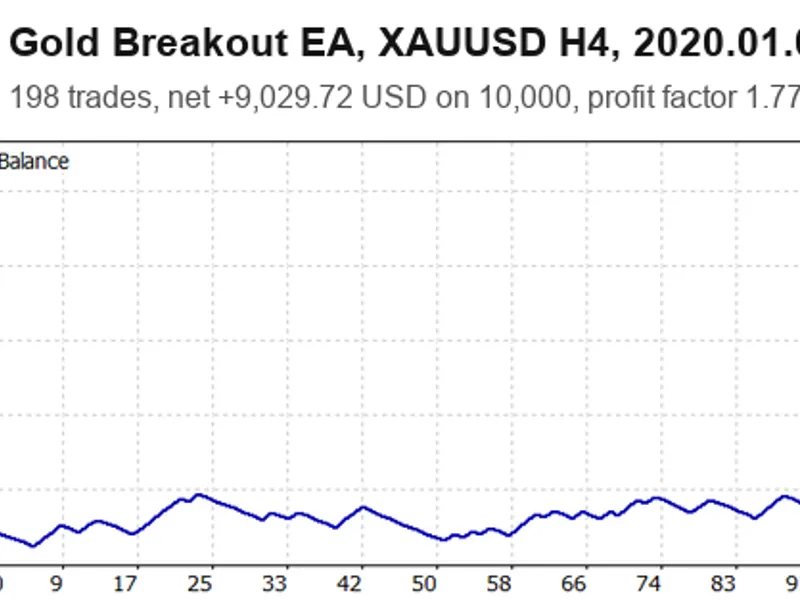
Figure 1: Equity Curve for XAUUSD H4 (January 2020 - September 2026, default inputs)
Figure 2: Calendar Year Returns from the same backtest run
Important Considerations Before Trading
The majority of the profit was generated in 2024 and 2025, periods of significant gold price increases. From 2020 to 2023, the EA achieved annual returns between -2.9% and +5.1%. This indicates that the EA performs best during trending markets and is less effective during range-bound periods.
Regarding the default buy-only setting: enabling sell trades in the same test resulted in a net profit of +5,231.80 across 310 trades, with a profit factor of 1.28 and a drawdown of 14.31%. Within this extended test, the 194 buy trades generated +7,312.19, while the 116 sell trades incurred a loss of -2,080.39. Given gold's predominantly upward trend during this period, selling breakouts proved detrimental. The buy-only strategy assumes a continuation of gold's long-term bullish trend. The 200 EMA filter moderates this assumption: when gold trades below its 200 EMA, the EA refrains from buying, thus avoiding trades against the prevailing trend. If a bearish outlook on gold is held, enabling 'InpAllowShort' may alter the performance metrics.
A sequence of nine consecutive losses occurred in mid-2021, resulting in a total loss of 889.86, approximately 8.2% of the account balance at that time. A win rate of around 47% coupled with a 2R target inherently leads to periods of flat equity. The performance from 2020 to 2023, as depicted in Figure 1, illustrates these phases.
Tested Strategies Not Used in Default Settings
All three exit strategies were evaluated on a year-by-year basis with both buy and sell trades enabled and no trend filter. Starting each year with a 10,000 balance, the cumulative results over seven years were:
Exit Strategy
Total Profit
Number of Losing Years
A. ATR Trail (3 ATR)
+2,554
2
B. Turtle 10-bar Channel
+3,393
3
C. Fixed 2R Target
+4,579
3
The fixed 2R target strategy yielded the highest profit. Applying the 200 EMA trend filter to this strategy increased the total profit to +4,777 and reduced the maximum single-year drawdown from 13.98% to 10.21%. The same filter negatively impacted exit strategy B. Therefore, exits A and B remain available as input options but are not the default setting.
The default EA settings were also tested on EURUSD H1, the pair used in MQL5's automatic checks. The EA ran without errors (164 trades, profit factor 1.03, from January 2025 to September 2026). However, the EA is optimized for gold and not intended for forex trading.
Input Parameters
Input Parameter
Default Value
Description
InpEntryBars
20
Defines the lookback period in bars for the entry channel.
InpATRPeriod
20
Sets the period for the Average True Range (ATR) calculation.
InpStopATR
2.0
Determines the stop loss distance in multiples of the ATR.
InpUseTrend
true
Enables trading only in the direction of the 200 EMA trend.
InpTrendEMA
200
Specifies the period for the trend Exponential Moving Average (EMA).
InpAllowLong
true
Allows the EA to take buy (long) breakout trades.
InpAllowShort
false
Allows the EA to take sell (short) breakout trades.
InpExitMode
C. Fixed target
Selects the exit method: A for ATR trail, B for Turtle channel, C for fixed target.
InpTargetR
2.0
Sets the take profit target for exit mode C, in multiples of the risk (R).
InpTrailATR
3.0
Sets the trailing stop distance for exit mode A, in multiples of the ATR.
InpExitBars
10
Sets the channel length for exit mode B.
InpRiskPercent
1.0
Defines the risk per trade as a percentage of the account balance.
InpMaxSpreadToRisk
0.10
The maximum acceptable spread as a fraction of the stop loss distance; trades are skipped if the spread exceeds this.
InpSlippagePoints
50
The maximum allowed slippage in points.
InpCloseFriday
false
Determines whether to close open positions before the weekend.
InpFridayHour
20
The server time hour on Friday for closing positions if InpCloseFriday is true.
InpMagic
555001
A unique magic number for the EA's trades.
Recommendations Before Deployment
Attach this EA to an XAUUSD H4 chart. It is strongly recommended to run it on a demo account for an extended period before using real funds. Thoroughly investigate your broker's spread, swap, and commission policies, as MetaQuotes-Demo has no commission, while brokers that do will impact profitability. Weekend price gaps can cause stops to be triggered at a distance from their intended levels. In this backtest, the largest loss occurred in February 2026 (-174.89), representing an ordinary stop loss of approximately 0.9% of the account balance at that time (which had grown to 18,922). It is important to note that the performance data presented is based on one broker's execution over a specific period, which largely coincided with a gold bull market.
You may also like: APEX VELOCITY: Advanced Volatility Breakout System - excellent alternative for expert users on MetaTrader 5.
Source Code
#property copyright "RobotFX"
#property version   "1.00"
#property strict
#include <Trade/Trade.mqh>
enum ENUM_EXIT_MODE
  {
   EXIT_ATR_TRAIL = 0,
   EXIT_CHANNEL   = 1,
   EXIT_FIXED     = 2
  };
.......
⚠ Limitations & Risk Warning
- This tool is provided for educational and testing purposes only.
- Past performance does not guarantee future results.
- Trading involves substantial risk of loss. Use on a demo account first.
- Results may vary depending on market conditions, broker, and settings.
- We recommend thorough backtesting and forward testing before using with real funds.