
Risk Drift Audit: Uncovering Hidden Trade Risks
Info
The Risk Drift Audit: Uncovering Hidden Trade Risks is a Script for MetaTrader 5 that understanding trade riskwhen a trading strategy is initially tested with a specific risk, such as 1% per trade, and then deployed using a fixed lot size, the actual risk per trade can diverge significantly over time. The loss incurred at the stop loss is calculated as lot size multiplied by the stop distance.
Usage
This tool is typically used for enhancing chart analysis and decision making.
Platform
This Script works exclusively on MetaTrader 5 (both build 600+ and newer versions).
Setup
Place the downloaded file in MQL5/Scripts folder via File ? Open Data Folder in MetaTrader 5.
How to Install and Use Risk Drift Audit: Uncovering Hidden Trade Risks
1. Installation: Move your script file into the MQL/Scripts directory and restart the platform.
2. Execution: Drag the script onto a chart; it will perform a one-time action, such as closing all open orders or clearing chart objects.
3. Editing: Use MetaEditor (F4) to modify code, click "Compile," and verify no errors appear in the terminal before running.
4. Removing: Scripts stop automatically, but you can remove them manually by right-clicking the chart and choosing "Remove Script."
Frequently Asked Questions
Q: How are scripts different from EAs? A: Scripts execute a single action and then stop; EAs monitor the market and trade continuously.
Q: Can I assign a hotkey to a script? A: Yes, right-click the script in the Navigator, select "Set Hotkey," and define your preferred keyboard shortcut.
Q: Why did my script stop? A: Scripts are designed to stop immediately after finishing their programmed command; this is normal behavior.
What this tool does
Understanding Trade RiskWhen a trading strategy is initially tested with a specific risk, such as 1% per trade, and then deployed using a fixed lot size, the actual risk per trade can diverge significantly over time.
Typical Use Case
This Script excels in automated trading and technical analysis on MetaTrader 5.
Compatible Platform & Setup
This Script works on MetaTrader 5. Place the file in the MQL5/Scripts folder and restart the terminal.
Description & Settings
Related: Risk-Based Lot Size Calculator for MetaTrader - another powerful script for MetaTrader 5 traders.
Understanding Trade RiskWhen a trading strategy is initially tested with a specific risk, such as 1% per trade, and then deployed using a fixed lot size, the actual risk per trade can diverge significantly over time. The loss incurred at the stop loss is calculated as lot size multiplied by the stop distance. This loss is measured against the account balance, which changes after every trade. Furthermore, if an ATR (Average True Range) stop is used, the stop distance itself fluctuates with market volatility. The trading terminal displays lot sizes rather than the effective risk, leading to a gradual drift that often goes unnoticed until a single losing trade results in a much larger loss than anticipated.
Also recommended: Expert Advisor Safety Check: Source Code Analysis for Data Leaks and Risky Practices - similar script with strong performance on MetaTrader 5.
This script analyzes the account's trade history to reconstruct the precise risk of each past trade. It calculates:
The account balance immediately preceding the trade entry. This is re-calculated by accounting for all historical deals, including deposits, profits, swaps, commissions, and fees, and then verified against the account balance at the end of the history.
The stop loss level at the time of trade entry. This is determined from the entry deal itself. If no stop loss was set at entry, the script uses the stop loss level at the time of trade closure. Trades using a closure stop are marked as 'close' because the stop loss might have been adjusted or added after the trade was opened.
The monetary loss at the determined stop loss level (using OrderCalcProfit) and its percentage relative to the account balance at the time of entry.
The script then compares the performance of each Expert Advisor (identified by magic number and symbol) against itself. It assesses the median risk of a strategy's initial trades (representing the tested risk, unless manually specified) against its later trades. It identifies the highest incurred risk, quantifies the number of trades that exceeded a specified multiple of the tested risk, flags trades executed without a stop loss, and calculates the lot size that would have maintained the tested risk level with the stop distance from the last trade, based on the current account balance.
Example Analysis: The Impact of Fixed Lots on Gold
Consider a fixed lot breakout Expert Advisor trading Gold (XAUUSD) on the H1 timeframe from 2023 to October 2026, with a 2x ATR stop and an initial balance of $10,000. Simulated in the Strategy Tester:
Year
Median Risk per Trade
Median Stop Distance
Median Balance
2023
0.18%
$8.7
$9,645
2024
0.24%
$11.4
$9,516
2025
0.45%
$20.3
$9,066
2026
0.88%
$38.6
$8,827
Although the lot size remained constant and the account balance showed minimal fluctuation, the risk per trade increased fivefold. This escalation is attributed to the widening stop distance, which correlated with gold's price and volatility. The most significant single trade risk observed was 5.77% of the account balance (31 times the initial tested risk), occurring during the high volatility period in early February 2026. A total of 453 out of 1,044 trades exceeded twice the initial tested risk.
Verification Methodology
A test Expert Advisor was used to record the account balance and the calculated risk (lots × contract size × stop distance) at each trade entry. The script's calculations closely matched these recorded values for all 1,044 trades: the pre-entry balance was exact, the calculated risk was within one cent (due to OrderCalcProfit rounding), and the source of the stop loss was correctly identified for every trade, including 104 trades that initially opened without a stop loss and had one added on the subsequent tick.
Script Outputs
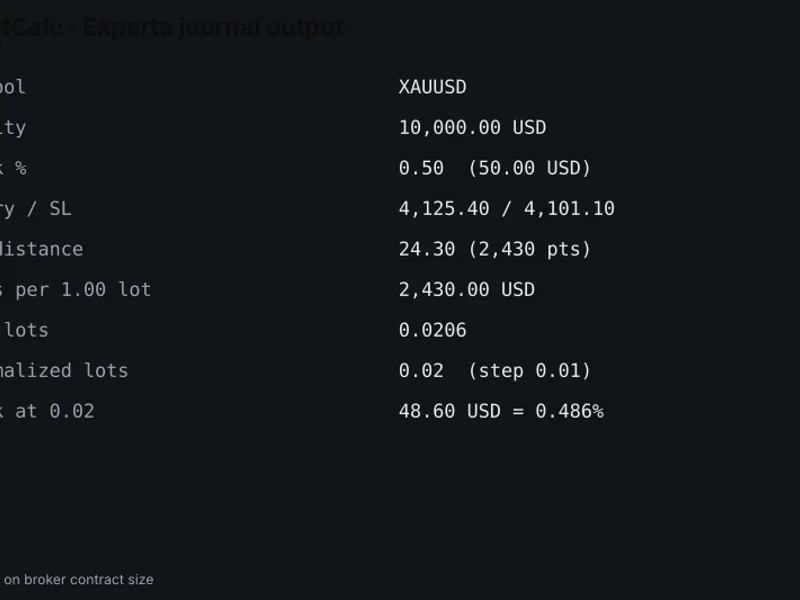
Journal: Provides a summary line for each magic number and symbol combination, followed by the five largest risks encountered.
Common\Files\RiskDrift.csv: A detailed CSV file containing one line per trade, including pre-entry balance, stop loss level, risk in monetary value and percentage, the multiple of the tested risk, trade result, and R multiple.
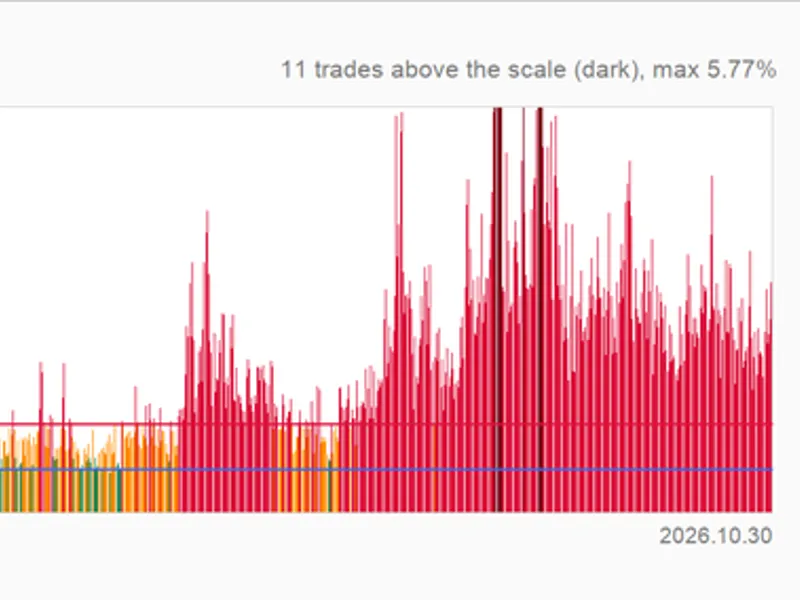
Chart Visualization: Displays the risk of recent trades as bars. Bars are color-coded: green for risks up to 1.25 times the tested risk, orange for risks up to a specified warning multiple, red for risks exceeding the warning multiple, and grey for trades executed without a stop loss. To remove the chart drawing, rerun the script with the 'Draw' input set to 'off'.
Script Inputs
Symbol: Leave blank to analyze all symbols.
Magic number: Use -1 for all magic numbers, or 0 for manual trades.
Trades opened from / until: Specify the date range for analysis.
Tested risk per trade, %: Set to 0 to automatically determine the median risk from each EA's first trades.
Number of first / last trades for medians: Default is 20.
Warning multiple: Default is 2.
Write CSV: Enable to generate the CSV file.
Draw on chart: Enable to draw visualizations.
Number of trades drawn: Specify the number of recent trades to display on the chart.
Integration with Strategy Tester
The RiskDrift.mqh include file can also be utilized directly within an Expert Advisor. This allows backtests to report on the risk drift of the strategy being tested:
#include "RiskDrift.mqh" double OnTester() { CRiskDrift rd; if(rd.Load(_Symbol, -1, 0, D'2100.01.01')) { rd.SetTested(0.0, 20); rd.Report(2.0); } return 0.0; }
Limitations
Risk is calculated based on the stop loss level at trade entry. Commissions are not included in this calculation.
For currency pairs where the profit currency differs from the account currency, exchange rates current at the time of calculation are used for conversion.
For netting accounts, volumes added to existing open positions and reversal trades are not included in the risk measurement (though they are counted in the journal output).
The risk is measured against the account balance, not equity. Floating profits or losses from other open positions are excluded from this calculation.
This script functions solely as a read-only tool; it does not place, modify, or close any orders.
You may also like: Automated Lot Size and Risk/Reward Script for MT5 - excellent alternative for script users on MetaTrader 5.
Source Code
#property copyright "RobotFX"
#property version     "1.00"
#property description "This code is educational. Feel free to use, modify and upgrade as you wish. Visit ROBOTFX.ORG for professional trading tools"
#property script_show_inputs
#include "RiskDrift.mqh"
input string   InpSymbol     = "";
input long     InpMagic      = -1;
input datetime InpFrom       = 0;
input datetime InpTo         = D'2100.01.01';
input double   InpTestedRisk = 0.0;
.......
⚠ Limitations & Risk Warning
- This tool is provided for educational and testing purposes only.
- Past performance does not guarantee future results.
- Trading involves substantial risk of loss. Use on a demo account first.
- Results may vary depending on market conditions, broker, and settings.
- We recommend thorough backtesting and forward testing before using with real funds.