

True Trading Cost: Net Risk/Reward Calculator for MT5
Info
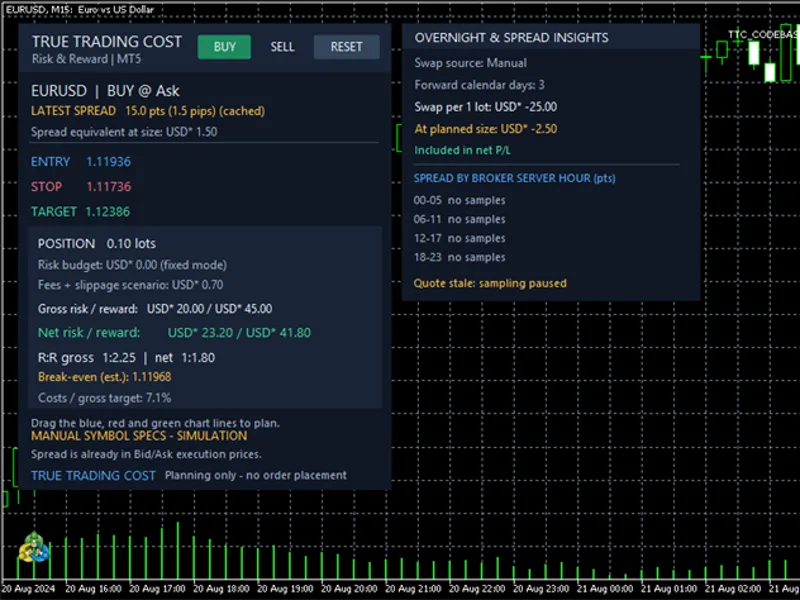
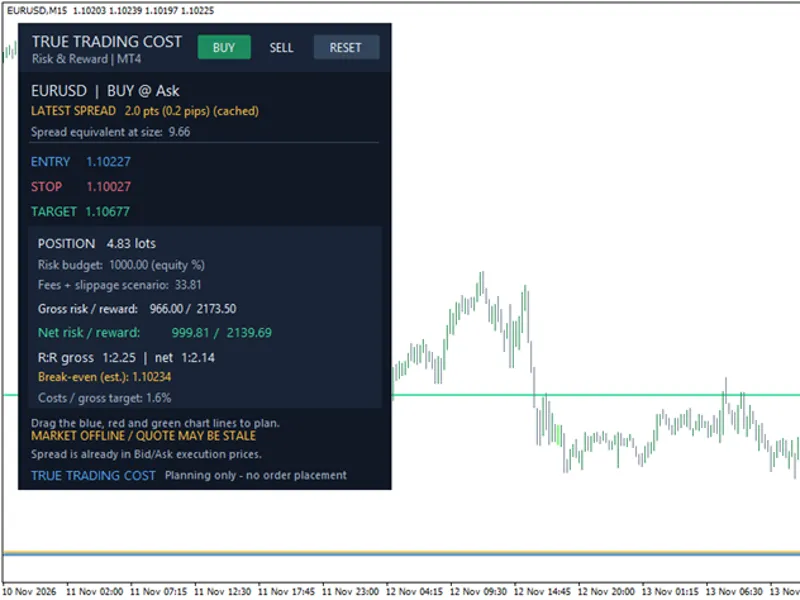
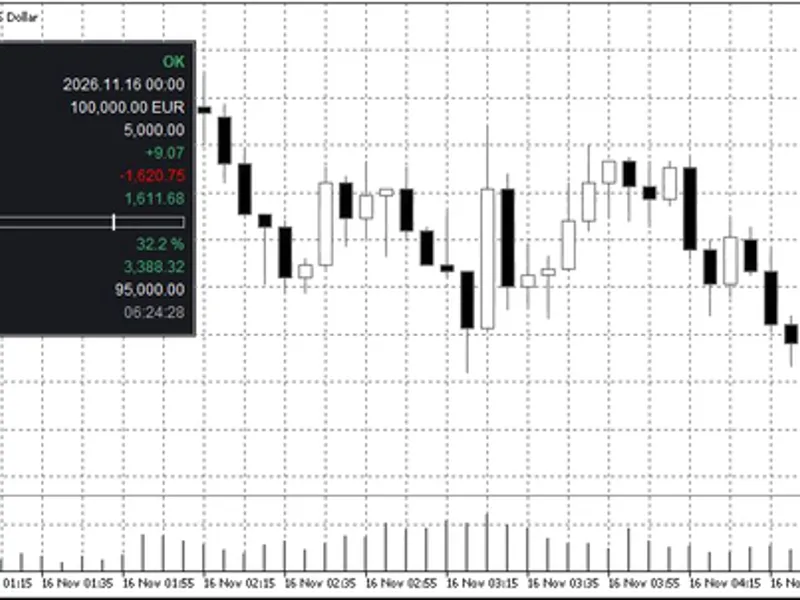
The True Trading Cost: Net Risk/Reward Calculator for MT5 is a Indicator for MetaTrader 5 that true trading cost - net risk reward calculator for mt5this free, source-included chart indicator helps discretionary traders estimate the monetary outcome of a planned forex or cfd trade before placing an order. It displays the spread, position size, round-trip costs, break-even price, and gross versus net risk/reward.
Usage
This tool is typically used for enhancing chart analysis and decision making.
Platform
This Indicator works exclusively on MetaTrader 5 (both build 600+ and newer versions).
Setup
Place the downloaded file in MQL5/Indicators folder via File ? Open Data Folder in MetaTrader 5.
How to Install and Use True Trading Cost: Net Risk/Reward Calculator for MT5
1. Installation: Place your file in the MQL/Indicators folder via "Open Data Folder" and restart your terminal.
2. Loading: Find the indicator in the Navigator, drag it onto your chart, and configure the input parameters in the popup window.
3. Customization: Press Ctrl+I to open the indicator list, select your tool, and click "Properties" to change colors, levels, or visual styles.
4. Updating: Replace the old file in the Indicators folder with the new version and restart the platform to apply changes.
Frequently Asked Questions
Q: Why is my indicator not showing? A: Verify the file is in the MQL/Indicators folder, or try right-clicking the "Indicators" tree in the Navigator and clicking "Refresh."
Q: Do custom indicators slow down the platform? A: Too many complex indicators can impact performance; remove unused ones via the "Indicator List" (Ctrl+I).
Q: Can I use MT4 indicators on MT5? A: No, MQL4 and MQL5 are distinct languages; ensure the indicator is compiled specifically for your platform version.
What this tool does
True Trading Cost - Net Risk Reward Calculator for MT5This free, source-included chart indicator helps discretionary traders estimate the monetary outcome of a planned Forex or CFD trade before placing an order.
Typical Use Case
This Indicator excels in automated trading and technical analysis on MetaTrader 5.
Compatible Platform & Setup
This Indicator works on MetaTrader 5. Place the file in the MQL5/Indicators folder and restart the terminal.
Description & Settings
Related: Daily Loss Limit Tracker for Prop Firm Trading - another powerful indicator for MetaTrader 5 traders.
True Trading Cost - Net Risk Reward Calculator for MT5Also recommended: Session Clock: Real-Time Trading Session Awareness - similar indicator with strong performance on MetaTrader 5.
This free, source-included chart indicator helps discretionary traders estimate the monetary outcome of a planned Forex or CFD trade before placing an order. It displays the spread, position size, round-trip costs, break-even price, and gross versus net risk/reward. The BUY, SELL and RESET buttons manage a hypothetical plan only; no trade is ever sent.
Planning directly on the chart
Attach the indicator to an MT5 chart. Choose BUY or SELL to initialize the Entry, Stop and Target lines.
Drag the blue Entry, red Stop and green Target lines. The dashboard recalculates the trade plan. RESET initializes the levels from the latest Bid/Ask and ATR(14) of the last closed bar.
Enter the broker's verified round-trip commission per one lot in account currency. For example, 3.50 charged at entry and another 3.50 at exit means an input of 7.00, not 3.50.
Review the net risk, net reward, net R:R, break-even exit, suggested lot size and cost/target percentage before making your own trading decision.
What the calculations include
BUY entry is modeled at Ask and exits at Bid; SELL entry at Bid and exits at Ask. Therefore the entry spread is already represented in the executable-price difference and is not charged again in the net profit/loss. The displayed spread-equivalent amount is informational.
Gross risk and reward are calculated from the entry-to-stop and entry-to-target price distances, contract tick size, and the broker-reported profit/loss tick values. Net loss adds modeled commission, additional fees and slippage, plus negative swap when expressly enabled. Net reward subtracts those fees and includes estimated swap only if the broker calendar has been verified.
Risk-based lot suggestions use a percentage of account equity, always rounded down to permitted volume increments. An insufficient budget produces no lot suggestion rather than silently increasing the risk to a minimum lot. A fixed-lot mode is also available.
Overnight swap and spread insights
The second panel offers an optional swap forecast and four six-hour blocks of observed spread, grouped by broker-server time. Samples are collected only from distinct incoming tick timestamps after the indicator starts; stale quotes are excluded. Statistics exist only in memory and reset daily or when the indicator is removed.
Swap supports OFF, AUTO or MANUAL. Automatic estimates cover supported broker models (disabled, points, deposit currency, and certain same-currency cases). Unsupported modes are clearly indicated and must be entered manually. Actual rollover charges depend on the broker, triple-swap day, cutoff time, holidays and future changes; they cannot be guaranteed by this indicator.
Inputs and configuration
Sizing:
- InpSizing, InpRiskPercent, InpFixedLots.
Commission and costs:
- InpCommissionRoundTurnPerLot, InpCommissionVerified, InpExtraFeesRoundTurnPerLot, InpSlippageRoundTurnPoints, InpWarnCostTargetPercent.
Initial chart plan:
- InpInitialStopATRMultiplier, InpInitialTargetRR, InpFallbackStopPoints.
Panel:
- InpPanelX, InpPanelY, InpShowBreakEvenLine, InpUpdateSeconds, InpShowInsightsPanel.
Swap:
- InpSwapSource, InpRolloverDays, InpManualSwapPerLotNight, InpTripleSwapWeekday, InpSwapStartWeekdayOverride, InpSwapCalendarVerified, InpIncludeSwapInNetRR.
Spread statistics:
- InpCollectSpreadStats.
Offline simulation:
- InpUseManualSymbolSpecs, InpManualTickSizePrice, InpManualTickValueProfit, InpManualTickValueLoss, InpManualMinLot, InpManualMaxLot, InpManualLotStep, InpManualAccountCurrency.
Important limitations
Commission, future slippage, overnight swap, tick-value conversion and execution prices may differ from an actual trade. The indicator does not verify free margin, broker stop-level constraints or order acceptance. If the broker does not supply valid tick values or equity, a clearly labeled manual contract-specification simulation is available for testing only, not as evidence of real broker costs.
No automated orders, EA, DLL or network requests. This is an educational calculation tool, not a trading signal, profit guarantee or substitute for validating a broker's contract specifications and transaction history. Copyright 2026.
You may also like: Trading Session Range Boxes for MT4/MT5 - excellent alternative for indicator users on MetaTrader 5.
Source Code
#property copyright "RobotFX"
#property version   "1.20"
#property description "This code is educational. Feel free to use, modify and upgrade as you wish. Visit ROBOTFX.ORG for professional trading tools"
#property indicator_chart_window
#property indicator_buffers 0
#property indicator_plots 0
enum ENUM_TTC_SIZING { TTC_RISK_PERCENT=0, TTC_FIXED_LOT=1 };
input ENUM_TTC_SIZING InpSizing             = TTC_RISK_PERCENT;
input double InpRiskPercent                = 1.00;
input double InpFixedLots                  = 0.10;
.......
⚠ Limitations & Risk Warning
- This tool is provided for educational and testing purposes only.
- Past performance does not guarantee future results.
- Trading involves substantial risk of loss. Use on a demo account first.
- Results may vary depending on market conditions, broker, and settings.
- We recommend thorough backtesting and forward testing before using with real funds.