
Expert Advisor Safety Check: Source Code Analysis for Data Leaks and Risky Practices
Info
The Expert Advisor Safety Check: Source Code Analysis for Data Leaks and Risky Practices is a Script for MetaTrader 5 that ea safety check is a script that scans the source code of an expert advisor or indicator (. mq5,.
Usage
This tool is typically used for enhancing chart analysis and decision making.
Platform
This Script works exclusively on MetaTrader 5 (both build 600+ and newer versions).
Setup
Place the downloaded file in MQL5/Scripts folder via File ? Open Data Folder in MetaTrader 5.
How to Install and Use Expert Advisor Safety Check: Source Code Analysis for Data Leaks and Risky Practices
1. Installation: Move your script file into the MQL/Scripts directory and restart the platform.
2. Execution: Drag the script onto a chart; it will perform a one-time action, such as closing all open orders or clearing chart objects.
3. Editing: Use MetaEditor (F4) to modify code, click "Compile," and verify no errors appear in the terminal before running.
4. Removing: Scripts stop automatically, but you can remove them manually by right-clicking the chart and choosing "Remove Script."
Frequently Asked Questions
Q: How are scripts different from EAs? A: Scripts execute a single action and then stop; EAs monitor the market and trade continuously.
Q: Can I assign a hotkey to a script? A: Yes, right-click the script in the Navigator, select "Set Hotkey," and define your preferred keyboard shortcut.
Q: Why did my script stop? A: Scripts are designed to stop immediately after finishing their programmed command; this is normal behavior.
What this tool does
EA Safety Check is a script that scans the source code of an Expert Advisor or indicator (.
Typical Use Case
This Script excels in automated trading and technical analysis on MetaTrader 5.
Compatible Platform & Setup
This Script works on MetaTrader 5. Place the file in the MQL5/Scripts folder and restart the terminal.
Description & Settings
Related: EA Auditor: Uncovering Expert Advisor Trading Behavior from Deal History - another powerful script for MetaTrader 5 traders.
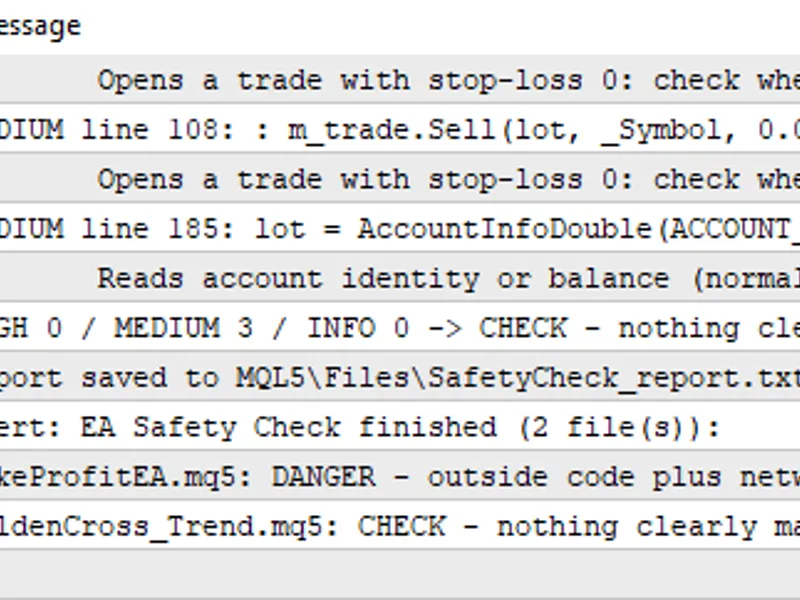
EA Safety Check is a script that scans the source code of an Expert Advisor or indicator (.mq5, .mq4, .mqh) before you run it. It reads the files as text and never executes them. The result is a short report with every risky line, why it matters, and a verdict per file. It was written for traders who download EAs from forums, chats or sellers outside the Market and want a quick first check: is this code sending my account data somewhere, starting programs on my PC, or doubling the lot after every loss? How to use Create the folder MQL5\Files\SafetyCheck\ (File > Open Data Folder > MQL5 > Files). Copy the .mq5 / .mq4 / .mqh files you want to check into it. Drag the script onto any chart. The report is printed in the Experts tab, saved to MQL5\Files\SafetyCheck_report.txt, and a summary alert shows the verdict for each file. What it checks HIGH : DLL imports, ShellExecute / WinExec / CreateProcess, Windows internet API (InternetOpen, URLDownloadToFile...), FileDelete / FolderDelete, martingale lot multiplication, and text hidden as numbers that decodes to a URL, DLL or .php/.exe file. MEDIUM : WebRequest, sockets, SendFTP / SendMail, web addresses, the shared Common folder, reading account login / name / server / balance / equity, CharArrayToString tricks, grid logic, trades opened with stop-loss 0, signals on the forming bar (shift 0). INFO (optional): fixed dates in the code (often an expiry) and account-number locks. Verdicts: DANGER (outside code or account data together with internet access), RISKY (any HIGH finding), CHECK (MEDIUM findings only) or no red flags. Example The screenshot shows the end of a run on two files. The first is a deliberately bad test file: it imports wininet.dll and shell32.dll, sends the account login and balance with WebRequest, hides a URL in a number array, multiplies the lot after each trade and deletes a file in the Common folder. It gets 8 HIGH findings and the DANGER verdict, and the hidden array is decoded so you can read the real address. The second is a normal trend-following EA: it only gets CHECK, because it opens trades without a stop-loss by design and reads the balance for position sizing. Limits Source files only. Compiled .ex5 / .ex4 files are encrypted and cannot be checked this way: ask the seller for the source. It is a static text check. A clean report is not proof that an EA is safe or profitable; it lists what needs a human look. Some findings are normal (for example reading the balance for lot sizing) and only matter in combination with network or DLL code. The script only reads files inside MQL5\Files (the MetaTrader sandbox) and writes one report file there.Also recommended: mq l unit - tiny unit tests framework for complex expert advisors - similar script with strong performance on MetaTrader 5.
You may also like: programming patterns - abstract factory - excellent alternative for script users on MetaTrader 5.
Source Code
#property copyright "RobotFX"
#property version   "1.00"
#property description "This code is educational. Feel free to use, modify and upgrade as you wish. Visit ROBOTFX.ORG for professional trading tools"
#property script_show_inputs
input string InpFolder   = "SafetyCheck";
input bool   InpShowInfo = true;
enum ELevel { LV_HIGH = 0, LV_MEDIUM = 1, LV_INFO = 2 };
struct Rule
  {
   ELevel            level;
.......
⚠ Limitations & Risk Warning
- This tool is provided for educational and testing purposes only.
- Past performance does not guarantee future results.
- Trading involves substantial risk of loss. Use on a demo account first.
- Results may vary depending on market conditions, broker, and settings.
- We recommend thorough backtesting and forward testing before using with real funds.