


Manual Trade Pad for MetaTrader 4
Info
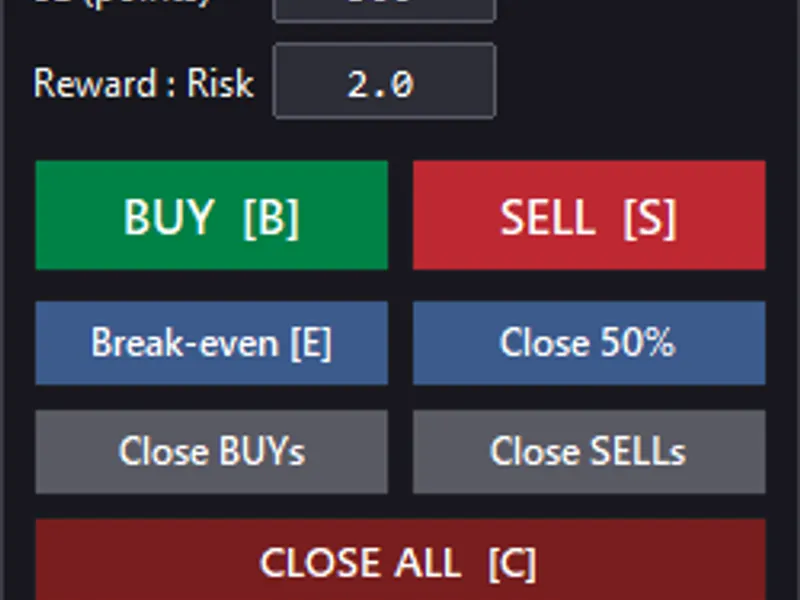
The Manual Trade Pad for MetaTrader 4 is a Expert Advisor for MetaTrader 4 that manual trade pad for mt4 is a user-friendly trading panel designed to streamline trade execution and position management directly from the metatrader 4 chart. This Expert Advisor offers a comprehensive set of trading tools in a compact interface, enabling traders to execute BUY and SELL orders, manage position sizing, and calculate Stop Loss and Take Profit levels effortlessly.
Usage
This tool is typically used for automated trading on major forex pairs and gold.
Platform
This Expert Advisor works exclusively on MetaTrader 4 (both build 600+ and newer versions).
Setup
Place the downloaded file in MQL4/Experts folder via File ? Open Data Folder in MetaTrader 4.
How to Install and Use Manual Trade Pad for MetaTrader 4
1. Installation: Open the "File" menu, select "Open Data Folder," navigate to MQL/Experts, paste your file, and restart the terminal.
2. Activation: Drag the EA from the Navigator onto a chart, ensure "Allow live trading" is checked in the Common tab, and verify the AutoTrading button is green.
3. Optimization: Right-click your chart, choose "Expert List," click "Properties" to adjust inputs, and save your preferred setup as a set file for future use.
4. Maintenance: Regularly check the "Experts" tab in the terminal window to monitor trade logs and potential execution errors.
Frequently Asked Questions
Q: Why is my EA not opening trades? A: Check the "AutoTrading" button, ensure "Allow live trading" is enabled, and verify your broker allows automated trading on your account type.
Q: Can I run multiple EAs on one chart? A: No, each chart can only host one active EA; however, you can open multiple charts for different currency pairs to run several EAs.
Q: What does the "smiley face" icon mean? A: A smiley face in the top-right corner of the chart indicates the EA is successfully running; a frowny face means it is disabled.
What this tool does
Manual Trade Pad for MT4 is a user-friendly trading panel designed to streamline trade execution and position management directly from the MetaTrader 4 chart.
Typical Use Case
This Expert Advisor excels in automated trading and technical analysis on MetaTrader 4.
Compatible Platform & Setup
This Expert Advisor works on MetaTrader 4. Place the file in the MQL4/Experts folder and restart the terminal.
Description & Settings
Related: Trade Error Classifier and Recovery for MQL4 - another powerful expert for MetaTrader 4 traders.
Manual Trade Pad for MT4 is a user-friendly trading panel designed to streamline trade execution and position management directly from the MetaTrader 4 chart.Also recommended: Trade Manager MT4: Advanced Position Management for MetaTrader 4 - similar expert with strong performance on MetaTrader 4.
This Expert Advisor offers a comprehensive set of trading tools in a compact interface, enabling traders to execute BUY and SELL orders, manage position sizing, and calculate Stop Loss and Take Profit levels effortlessly.
One of its primary objectives is to facilitate both live manual trading and historical strategy testing using a unified interface.
Main Features
1. Manual Market Order Execution
Execute market orders directly from the chart panel:
BUY
- Open a Buy position.
SELL
- Open a Sell position.
The EA calculates Stop Loss and Take Profit levels based on the selected settings and the current market price.
2. Flexible Position Sizing
Choose from two position-sizing methods:
Fixed Lot
- Manually specify the trading volume.
Example: 0.10 lots
Risk Percentage
- Set the percentage of account balance to risk on a trade.
Example: 1.0%
When using risk-based sizing, the EA estimates the lot size based on the Stop Loss distance, symbol's tick size, and tick value.
The calculated volume adheres to broker restrictions on minimum, maximum, and lot-step requirements.
Note: Actual monetary risk may vary due to execution prices, spread, commissions, slippage, and other factors.
3. Stop Loss Configuration
Set the Stop Loss distance in points before opening a trade. The EA ensures compliance with the broker's minimum permitted stop distance.
This feature ensures consistent trade parameters across different symbols and conditions.
4. Automatic Take Profit Calculation
Automatically calculate Take Profit using a configurable Risk/Reward ratio.
Example:
Stop Loss: 300 points
Risk/Reward: 2.0
Take Profit: 600 points
Set Risk/Reward to 0 to disable automatic Take Profit calculation.
5. Break-Even Management
Move managed positions to their entry price with an optional point offset.
BUY positions: Move Stop Loss to or above the entry price.
SELL positions: Move Stop Loss to or below the entry price.
The EA respects broker stop-distance requirements and preserves the existing Take Profit when possible.
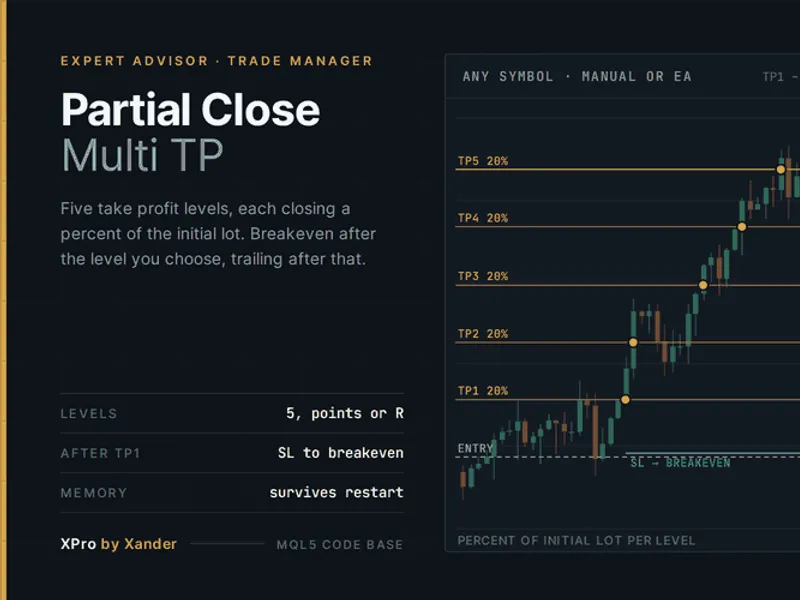
6. Partial Position Closing
Close a portion of an open position while keeping the remaining volume open. The partial-close function aims to close approximately half the selected position volume, adhering to broker restrictions.
This feature is useful for securing profits while maintaining exposure.
7. Directional and Bulk Closing
Manage multiple positions with dedicated closing operations:
- Close BUY positions.
- Close SELL positions.
- Close all positions managed by the EA.
These controls are valuable for managing trades in specific directions or quickly closing managed positions.
Manual Trading in MetaTrader 4
When attached to an MT4 chart, the panel simplifies discretionary trading:
1. Select position-sizing method (Fixed Lot or Risk Percentage).
2. Set lot size or risk percentage.
3. Configure Stop Loss distance.
4. Set Risk/Reward ratio.
5. Press BUY or SELL.
6. Manage positions using Break-Even, Partial Close, or closing controls.
Manual Trade Pad assists traders in executing trades but does not generate trading signals or analyze the market.
Strategy Tester Support
The EA is designed for manual historical testing in the MetaTrader 4 Strategy Tester.
Use the visual testing environment to practice trades and evaluate strategies:
- Manual strategy testing.
- Entry and exit evaluation.
- Discretionary trading practice.
- Risk-management experiments.
- Break-Even and partial-close testing.
- Learning and practicing trading setups.
This approach is valuable for strategies that are challenging to automate fully.
Important:
Strategy Tester functionality depends on MT4's visual testing environment. Test the panel in Visual Mode and ensure supported operations in your terminal build.
Position Identification and Trade Safety
The EA identifies managed trades using the chart symbol and Magic Number, ensuring its operations are distinct from other Expert Advisors or manual trades.
Trades outside the EA's scope are intended to remain unaffected by its management functions.
Always test the EA's behavior on your broker's account type, especially when using hedging, multiple EAs, or different Magic Numbers.
Keyboard Shortcuts
Keyboard shortcuts enhance efficiency:
Key
Action
B
Open BUY
S
Open SELL
E
Move to Break-Even
C
Close all managed positions
Shortcuts expedite manual testing and trade management.
Panel Interface
The interface is built using native MetaTrader 4 chart objects, eliminating the need for external libraries or indicators.
It integrates essential controls for:
- BUY and SELL execution.
- Position sizing.
- Stop Loss and Risk/Reward settings.
- Account and position information.
- Trade-management operations.
- Status messages.
The design aims for simplicity and practicality.
Input Parameters
Magic Number
- Identifies managed trades.
Initial Sizing Mode
- Default position-sizing method: Fixed Lot or Risk Percentage.
Default Fixed Lot
- Initial trading volume for Fixed Lot mode.
Default Risk Percentage
- Default account balance percentage for risk-based sizing.
Default Stop Loss
- Default Stop Loss distance in points.
Default Risk/Reward
- Default Risk/Reward ratio for Take Profit calculation. Set to 0 to disable.
Break-Even Offset
- Optional point offset for Break-Even.
Maximum Deviation
- Permitted price deviation for order execution and closing.
Panel X / Y
- Horizontal and vertical panel position on the chart.
Requirements
MetaTrader 4.
MT4-supported trading account.
Compatible MT4 terminal build.
No external DLLs or third-party GUI libraries.
No additional indicators required.
Important Notes
Manual Trade Pad is a trading utility, not an investment advisor. It does not guarantee profitability.
Risk-based lot sizing is an estimate and may differ from actual trading risk due to various factors.
Broker restrictions can impact trading operations.
Always test the EA in the Strategy Tester and on a demo account before using real funds.
Source Code
The source code is available for educational and customization purposes via the MQL5 Code Base.
It demonstrates how to create a lightweight manual trading interface using native MQL4 and chart objects.
Developers can adapt the code for their trading tools and workflows.
Summary
Manual Trade Pad for MT4 integrates manual trading and position-management functions into a single chart-based interface.
Key features:
- Manual BUY and SELL execution.
- Fixed-lot and risk-percentage sizing.
- Stop Loss configuration.
- Risk/Reward-based Take Profit calculation.
- Break-Even management.
- Partial position closing.
- Directional and bulk position closing.
- Keyboard shortcuts.
- Live manual trading.
- Visual Strategy Tester practice.
The goal is to enhance manual trade execution and management, offering a seamless workflow for live trading and historical testing in MetaTrader 4.
You may also like: Quantora Trade Manager MT4: Advanced Position Management for MetaTrader 4 - excellent alternative for expert users on MetaTrader 4.
Source Code
#property copyright "RobotFX"
#property link "https://robotfx.org"
#property version   "1.000"
#property description "This code is educational. Feel free to use, modify and upgrade as you wish. Visit ROBOTFX.ORG for professional trading tools"
#property strict
enum ENUM_SIZE_MODE
  {
   SIZE_FIXED_LOT    = 0,
   SIZE_RISK_PERCENT = 1
  };
.......
⚠ Limitations & Risk Warning
- This tool is provided for educational and testing purposes only.
- Past performance does not guarantee future results.
- Trading involves substantial risk of loss. Use on a demo account first.
- Results may vary depending on market conditions, broker, and settings.
- We recommend thorough backtesting and forward testing before using with real funds.